-
Search Results
-
Actually, the following should be known, since it has already been often thematized here. But headings like “white screen of death” or requests for downloads of older versions make it necessary to point this out again.
A more time consuming method but the safest way to update Enfold is to use the ftp upload.
To have a backup of the previous version for a rollback, login to your root directory via ftp.
After unpacking the downloaded zip file rename the new enfold folder to enfold-new.
Upload this folder to the themes folder.
When this is done, you can rename the still active enfold folder to enfold-old and rename the enfold-new folder to enfold. This could be done via your ftp-client program.
Ideally by that method the page should be offline only for a few seconds.Now see if your site works according to your wishes.
Individual inconsistencies can certainly be clarified here on board.If you have a page that doesn’t work anymore you can rename the Enfold folder to e.g. enfold-neweset and rename the older folder back to enfold.
Then it is possible to search for the reasons for the behaviour without sending the life site offline.
Summary:
- Update via ftp.
- Rename the downloaded newest version to enfold-new
- Upload that enfold-new folder to the themes folder
- Rename your enfold folder to f.e. enfold-old
- Rename your enfold-new folder to enfold
- Check if all your existing settings work to your full satisfaction. Yes – then stop here
- No – delete or rename back the enfold folder back to enfold-new
- rename the enfold-old folder back to enfold
Hello.. I have search the forum and cannot find anything.. Here is my problem I need to prepopulate a gravity form when a visitor choices a donation option,
After spending a very long time I have narrowed the problem to the interaction between the Enfold and Gravity forms
I have a created a test form on the site using Enfold and on (staging) with the default theme.
https://bgcbeloit.wpengine.com/test-donation?test=yes
https://bgcbeloit.staging.wpengine.com/test-donation?test=yesI am also including screenshots
http://bgcbeloit.staging.wpengine.com/wp-content/uploads/2018/10/new-site_Stateline_Boys_and_Girls_Club.jpg (hosted on WPengine)http://bgcbeloit.staging.wpengine.com/wp-content/uploads/2018/10/test_donation_–_Stateline_Boys_and_Girls_Club.jpg
Please let me know if there is anything else I can provide for you to work on this issueTopic: JQuery / Ajax problem
Hello
My client is using Enfold but he is encountering a very strange issue that I can not recall …Sliders and things like the partner/logo element don’t show up on his website … He can configure them, but on the front they don’t show up.
I tried to fix it with a plugin “jQuery Updater” and it did solve the problem, however when that plugin is active, the search and the mobile menu stop working …
Any idea what the problem could be?
Thank you.
Hi
We used the Enfold Template Construction – https://kriesi.at/themes/enfold-construction/
to create the website – https://farquharprojects.com.auHowever Enfold Theme Template Failed Google Mobile Friendly Test
– Clickable elements too close together
– Content wider than screenResults Link –
https://search.google.com/test/mobile-friendly?utm_source=mft&utm_medium=redirect&utm_campaign=mft-redirect&id=c1nCeMV6a69e_5uqnub-ZwAny ideas how to rectify this?
Thanks Dave
Hello,
I love the enfold theme! Great job! But I have a problem with the search icon. I use a transparent header, but the search icon is displayed with a white boxed background. How can I make the background of the search Icon transparent too?
I post the link to a temporary login in the privat content
Topic: RTL Problem with mobile
hello enfold team , I hope you have a good day
I have website in Both English & Arabic using WPML
I have a problems on RTL version of website
– First one is in menu on mobile
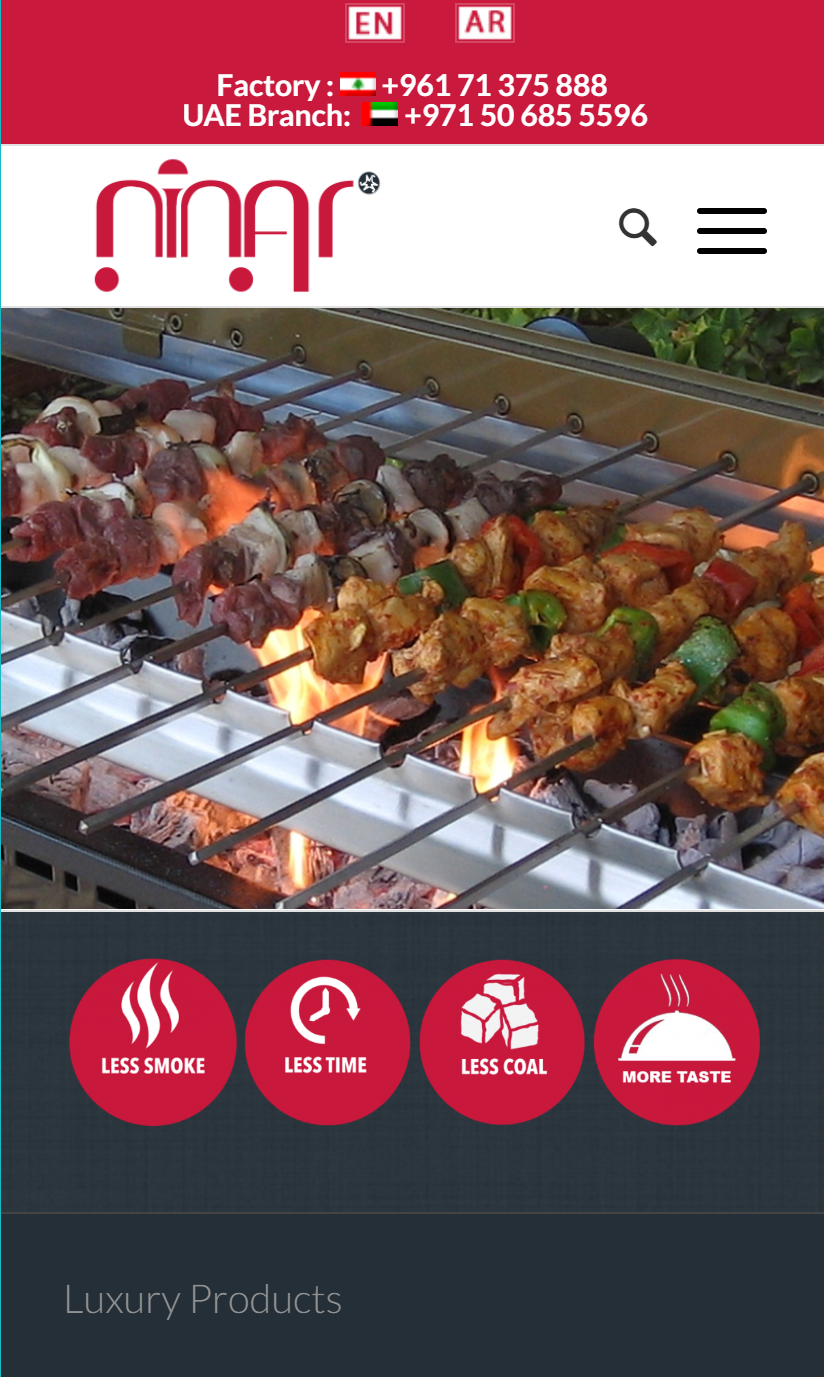
I Put The logo on the right , but the menu icon appear over the logo …
not only the menu , also the search icon appearing over the logo …
I want menu button and search icon on the left and the logo on the right ….
also I Want to disable social icons in mobile versionthis is the photo of website on mobile in English which is perfect ….
http://www.ninargrill.com/wp-content/uploads/2018/10/ninar-en.png
this is the photo of website on mobile in Arabic which is the problem
http://www.ninargrill.com/wp-content/uploads/2018/10/ninar-ar.pngthe website is : http://www.ninargrill.com
arabic version is : http://www.ninargrill.com/?lang=arHi,
I noticed the website size of zoebooth.com.au is quite large and from my research it seems that it’s because of the 3 masonry galleries that all have large full size images in them. What I thought would be a superior approach would be for the image galleries to load only the thumbnails of the images on the front page and then have the main large images only load if they are clicked (thereby saving space so the site loads faster and is a better user experience and has better SEO). I was wondering if Enfold has an element that can be inserted to achieve this or if there is any input you would have on this.
Thanks!
I have received an email from Google Search Console showing new search issues with my site that has been up for years now and not recently altered. I’m not seeing what the console is seeing at all. Any help is much appreciated.
Top new issues found, ordered by number of affected pages:
-
Content wider than screen
Clickable elements too close together
Hi,
I have a website where the client is reporting that menu is overlapping the logo and no mobile menu is being displayed.
I currently have the mobile menu to activate for smartphones and tablets, but that starts at 990px.
I searched the forums and tried adding this code, but no luck
@media only screen and (max-width: 1024px) {
.av-burger-menu-main {
     display: block!important;
}
#top .av_mobile_menu_tablet .av-main-nav .menu-item {
     display: none!important;
}}
How can we make the mobile menu display for iPad Pro?
Thanks
is it possible to put a Search in Advanced Slider with a category selector below that lower menu. Like this?
Enfold and WooCommerce with LayerSlider


Hi everyone,
i already found/checked https://kriesi.at/documentation/enfold/search/#customize-schemaorg-markup and some of the schema.org/structured data related threads here. Creating a blog post, every single aria element created via the extended layout editor (a textbox, a two-column area etc.) generates a new schema.org-item “blogPost” with content @type “BlogPosting” and text (and the already known problems with missing author etc. -Tags). With some layout elements, a single blog entry generates a handful of “BlogfPosting” elements, while it should be one, obviously.Are there plans to fix the automatic schema.org-layout, are there known best practises to customize the helper-markup.php or are any alternative plugins for schema.org-Markup known/recommended to work with Enfold/Aria Layout Elements?
best regards,
RichieHi guys.
I’ve just connected GSC and got this 2 errors:
1. /wp-content/themes/enfold/framework/ error code 403 – Access Denied
2. /wp-admin/admin-ajax.php error code 400 – OtherWent in cPanel error log:
1.[Wed Oct 10 10:47:22.455787 2018] [autoindex:error] [pid 54725] [client 37.160.102.197:45456] AH01276: Cannot serve directory /home/visitapo/public_html/wp-content/themes/enfold/framework/: No matching DirectoryIndex (index.html,Index.html,index.shtml,index.php,Index.php,index.phtml,Index.phtml,index.htm,Index.htm,default.htm,Default.htm,default.html,Default.html,home.htm,Home.htm) found, and server-generated directory index forbidden by Options directive
2. [Wed Oct 10 05:32:04.409915 2018] [:warn] [pid 49536] [client 2.236.103.95:51854] Timeout waiting for output from CGI script /home/visitapo/public_html/wp-admin/admin-ajax.php, referer: http://www.visitaportodarmi.it/wp-admin/options-general.php?page=updraftplus
Any help?
Do they affect indexing process?
Topic: Update Themes error
Dear Moderators, i have this problem when i updated my enfold theme
The update process is starting. This process may take a while on some hosts, so please be patient.
When i tried update my enfold theme. This happened, look down
Enabling Maintenance mode…
Updating Theme Enfold (1/1)Warning: preg_match() expects parameter 2 to be string, array given in /home/bellatr6/public_html/wp-admin/includes/class-wp-upgrader.php on line 258
Warning: file_exists() expects parameter 1 to be a valid path, array given in /home/bellatr6/public_html/wp-admin/includes/class-wp-upgrader.php on line 258
Warning: strip_tags() expects parameter 1 to be string, array given in /home/bellatr6/public_html/wp-admin/includes/class-bulk-upgrader-skin.php on line 61
Downloading update from …Warning: parse_url() expects parameter 1 to be string, array given in /home/bellatr6/public_html/wp-admin/includes/file.php on line 970
Warning: preg_split() expects parameter 2 to be string, array given in /home/bellatr6/public_html/wp-includes/kses.php on line 1325
Warning: strtolower() expects parameter 1 to be string, array given in /home/bellatr6/public_html/wp-includes/http.php on line 517
An error occurred while updating Enfold: Download failed. A valid URL was not provided.
When i try to open any page on website, it’s written like this in any pages
Nothing Found
Sorry, the post you are looking for is not available. Maybe you want to perform a search?
For best search results, mind the following suggestions:
Always double check your spelling.
Try similar keywords, for example: tablet instead of laptop.
Try using more than one keyword.Feel like browsing some posts instead?
Now my website is completely a mess. Please help me and repair it. Thanks
Hi
we need to rebuild an existing website with Enfold.
It has more than 3.000 posts – and the post image is not a featured image – it comes from a thumbshot-service.
The task is:
Whereever a featured image usualy is used – take a thumbshot
The thumbshots are generated by the wordpress service and the URL that is needed to generate it, comes from a custom field that already exists.
Usually i would edit the “loop.php” but since we need to use the thumbshots also for category, search and pages containing a blog-layout grid it would be better to do the replacement on a deeper place of the theme.Question: What would be the best place to replace the featured image?
kind regards Arthur
I received alerts from google search console that the sites using enfold have multiple mobile problems.
Search Console has identified that your site is affected by 4 new Mobile Usability related issues. This means that Mobile Usability may be negatively affected in Google Search results. We encourage you to fix these issues.
Top new issues found, ordered by number of affected pages:Content wider than screen
Viewport not set
Clickable elements too close together
Text too small to readWhen I did a google search for “/wp-content/themes/enfold/framework/“ to look for a fix and I am able to find all the websites using enfold show up and the folder accessible with a click. That means all website using enfold is having an issue with Google search. Why are all these pages inside this folder made to be indexable?
Is this a theme issue?
Hi Guys,
I noticed for a about 6 months or so, i couldn’t edit and save the functions.php file in the backend of my website, only if i did it via http://FTP.. I did do a post about it on here a while back but it was never resolved.
Now ive just noticed the last few days i cannot save anything in the backend now. If i try to edit a product and save it, i get a blank Nothing Found wp-admin/post.php page… And if i try to edit any setting in enfold, it says sorry it couldn’t save.
I have searched high and low on google trying to find the answers and have tried so many things including disabling all plugins, Changing to a different theme, turning on debug and checking the file, checking file permissions, changing permalinks….the list goes on… And nothing has fixed it..
Please does anyone have answers????
Hi,
I have a strange occurence where the burger menu does not appear, no menu at all, on mobile on a recent update to Enfold 4.4.1, but shows fine on an exact mirror staging site on the same server.
http://staging.theyoginiproject.org
The settings, the theme, plugins, server are all the same. I have a menu for the staging site on Chrome and Safari; none at all for the live site. The rest of my team in different parts of the world tried as well – it’s just not showing up on any phone.
Tried clearing cache innumerable times at CloudFlare, on the browser on my phone, deactivating and then reactivating W3TotalCache (checking the site when both deactivated and reactivated). Searched the threads and multiple solutions – quick css – have not worked. And it’s strange as it already works fine on the staging on identical server.
I would imagine this might be a cache issue, but again tried everything.
Suggestions? Solutions?
Thanks for the help.