Viewing 30 results - 1,741 through 1,770 (of 7,502 total)
  • Author
    Search Results
  • #1162835

    I would be interested in Enfolds recommendation as well. The Yoast SEO is indeed a power pig. And as I search for alternatives, The Seo Framework (thhttps://wordpress.org/plugins/autodescription/) is emerging as a great alternative. One reviewer mentioded that it was “lightweight and powerful” but I don’t know if it is substantially.

    I’ll be having to switch out my Yoast SEO plugins on several of my sites. I’m hoping that Seo Framework (or whichever is recommended by Enfold) will be the safe choice.

    UPDATE
    Here’s what I did that (mostly) worked:

    1. Went to Settings > Permalinks and changed the Portfolio ‘custom bases’ to “titles” and “titles-entries”
    2. In the enfold-child theme, I opened functions.php and pasted in this:<br />
      
      // portfolio args
      add_action( 'after_setup_theme', 'init_reg_portfolio' );
      function init_reg_portfolio() {
      	add_filter('avf_portfolio_cpt_args', 'avf_portfolio_cpt_args_mod', 50, 1);
      }
      
      function avf_portfolio_cpt_args_mod($args) {
      	$labels = array(
      		'name' => _x('Book Titles', 'post type general name','avia_framework'),
      		'singular_name' => _x('Title Entry', 'post type singular name','avia_framework'),
      		'add_new' => _x('Add New', 'portfolio','avia_framework'),
      		'add_new_item' => __('Add New Title','avia_framework'),
      		'edit_item' => __('Edit Title Entry','avia_framework'),
      		'new_item' => __('New Title Entry','avia_framework'),
      		'view_item' => __('View Title Entry','avia_framework'),
      		'search_items' => __('Search Title Entries','avia_framework'),
      		'not_found' =>  __('No Title Entries found','avia_framework'),
      		'not_found_in_trash' => __('No Title Entries found in Trash','avia_framework'),
      		'parent_item_colon' => ''
      	);
      
      	$args['labels'] = $labels;
      	return $args;
      }
      //END
      
    3. In wp-content > themes > enfold > includes > admin I opened register-portfolio.php and made the $labels = array code block look like this:
      $labels = array(
      		'name' => _x('Book Titles', 'post type general name','avia_framework'),
      		'singular_name' => _x('Title Entry', 'post type singular name','avia_framework'),
      		'add_new' => _x('Add New', 'portfolio','avia_framework'),
      		'add_new_item' => __('Add New Title','avia_framework'),
      		'edit_item' => __('Edit Title Entry','avia_framework'),
      		'new_item' => __('New Title Entry','avia_framework'),
      		'view_item' => __('View Title Entry','avia_framework'),
      		'search_items' => __('Search Title Entries','avia_framework'),
      		'not_found' =>  __('No Title Entries found','avia_framework'),
      		'not_found_in_trash' => __('No Title Entries found in Trash','avia_framework'),
      		'parent_item_colon' => ''
      	);
      

    [ NOTE: I’m not sure this is important, but I made the names match what I did in functions.php above ]

    I said “mostly works” above because “Portfolio Categories” is still visible in the options.
    screenshot of the last hold out

    I tried to follow what Ismael and mikeraymarketer were doing here to fix the same issue, but when I did it, I got errors so I walked it back.

    #1162716

    Hi,
    It looks like \enfold\functions-enfold.php line 348
    get_the_time( $search_messages['time_format']

    Best regards,
    Mike

    KatrienW
    Participant

    Hi team Enfold

    After searching the forum and finding several similar issues and testing their solutions, I’m still struggling with two things on a client’s website.
    I provided credentials in the private content by the way.

    – When I try to upload a zip file for Flaticons, it doesn’t work. It did with the first file, but I needed another icon so I deleted that file and uploaded the new one with the new icon included. But only two icons out of a total of 11 eleven icons showed up in the page builder. I added this code to the .htaccess file

     <FilesMatch ".(ttf|otf|woff)$">
    <IfModule mod_headers.c>
    Header set Access-Control-Allow-Origin "*"
    </IfModule>
    </FilesMatch> 

    And while that fixed the issue of rectangular boxes with the first file, it doesn’t anymore with the second. So some help here would be much appreciated.

    – Second, I’m trying to change the background image for the scroll to top button. I entered this code in custom css:

    #scroll-top-link {
        background: url(‘https://warredal.wpstagecoach.com/wp-content/uploads/2019/12/acorn-42791_640-e1575362775251.png’) center center no-repeat;
    }
    
    #scroll-top-link:before {
        display: none;
    }

    But the only thing that did was make the button completely transparent. I need it to be this acorn image that I uploaded to the media library.

    Thanks in advance!

    • This topic was modified 6 years, 4 months ago by KatrienW.
    #1162529
    LizSomerville
    Participant

    Good morning.
    I hope you can help me. I am new to Enfold and pretty new to changing CSS, I have been trying to change the navigation menu colour which I have succeeded in doing following reading the forum using the following code, however on mobile it looks wrong as the menu turns to a block of colour, is there a way to make the mobile menu the default colour?
    The search bar is also now not visible in the menu as its blended with the colour.

    #top #header .av-main-nav > li > a {
    background-color: #076872 !important;
    }
    #top #header_main_alternate {
    background-color: #076872 !important;
    }
    #top #header .av-main-nav > li > a .avia-menu-text, #top #header .av-main-nav > li > a .avia-menu-subtext {
    color: #ffff!important;
    }
    #top #header #avia-menu > li:hover > a {
    background: #dcdcdd !important;
    border: 0 !important;
    }

    #top #header #avia-menu > li:hover > a span.avia-menu-text {
    color: #076872 !important;
    border: 0 !important;
    }

    Thank you very much.

    #1162121

    Hi,


    @guenni007

    The update note from Envato is because Kriesi launched the black friday/ciber monday sale – not a real update of enfold.

    The script works because I added a more flexible logic to check for the plugin (comparing both lower case modified strings and only searching with path to our config folder) – see line 635ff the foreach loop.

    It is already merged for 4.6.4.

    Best regards,
    Günter

    #1161878

    oh…
    The problem is solved. I don’t know the exact reason, but after adding the search icon to the main menu in Enfold Child Theme Options’s main menu, I refreshed and ‘accordion’ worked fine. The reason I added the search icon is that when I tested ‘accordion’ on the test page, I tested ‘search’ together, and since then ‘accordion’ didn’t work properly.
    And ‘accordion’ works fine even if I remove the search icon from the main menu of the enfold child theme option.

    #1161851
    adplusdesign
    Participant

    Hello,
    Header cart is created from code:

    function avia_woocommerce_cart_dropdown_modified() {
    	
    	global $woocommerce, $avia_config;
    	$cart_subtotal = $woocommerce->cart->get_cart_subtotal();
    	$link = function_exists( 'wc_get_cart_url' ) ? wc_get_cart_url() : $woocommerce->cart->get_cart_url();
    	$id = "";
    	$added = wc_get_notices('success');
    	$trigger = !empty($added) ? "av-display-cart-on-load" : "";
    	
    	if(avia_get_option('cart_icon') == "always_display_menu")
    	{
    		$id = 'id="menu-item-shop"';
    	}
    
    	$output = "<ul {$id} class = 'menu-item cart_dropdown {$trigger}' data-success='".__('was added to the cart', 'avia_framework')."'>";
    	//$output .= "<li>PHP/HTML CODE TO ADD ENFOLD SEARCH ICON</li>";
    	//$output .= "<li>ADD WISHLIST ICON</li>";
    	//$output .= "<li>ADD LOGIN ICON</li>";
    	$output .= "<li class='cart_dropdown_first'>";
    	$output .= "<a class='cart_dropdown_link' href='".$link."'><span ".av_icon_string('cart')."></span><span class='av-cart-counter'>0</span><span class='avia_hidden_link_text'>".__('Shopping Cart','avia_framework')."</span></a><!--<span class='cart_subtotal'>".$cart_subtotal."</span>-->";
    	$output .= "<div class='dropdown_widget dropdown_widget_cart'><div class='avia-arrow'></div>";
    	$output .= '<div class="widget_shopping_cart_content"></div>';
    	$output .= "</div>";
    	$output .= "</li></ul>";
    	echo $output;
    }

    Now I want to add list items for search, wishlist, and login (look commented out code). While wishlist and login are simple because I can add simple links to the corresponding pages.
    But how to create the correct Enfold search icon? What code do I need?

    The final result should look: result

    #1161772
    houmwebmaster
    Participant

    hi~
    I am testing ‘accordion’ and it’s not working right while I am testing ‘search’ with.
    could you please check this page?

    wordpress version is 5.3 & enfold version is 4.6.3.1


    I have a test site that has same ground and on there ‘accordion’ working right.
    (also with ‘search’)

    SlmnB
    Participant

    Hey guys,
    Just uploaded and activated Enfold and I get this error message;
    Fatal error: Can’t use method return value in write context in /public_html/wp-content/themes/enfold/framework/php/class-grecaptcha.php on line 490
    I have no access to the website at the moment.
    I’ve done my research and checked my PHP version. It is the latest version.

    Thanks

    #1160678
    HRworks
    Participant

    Hello,

    there’s a problem with the search button in the main navigation.
    On all subpages it works fine.
    But on the startpage the search button isn’t visible. Complete <li>element is missing in code.

    In Enfold child settings -> main nav -> “add search to menu” is activated.

    Do you have any solutions?
    Thank you in advance.
    Birgit

    • This topic was modified 6 years, 4 months ago by HRworks.
    #1160649

    Hey Mike1050,

    Here is the code you can put in Enfold > General Styling > Quick Css,  if it does not work, put into themes/enfold/css/custom.css

    
     #top #header .av-main-nav > li#menu-item-1202 {
        transform: translateX(-126%); 
     }
      #top #header .av-main-nav > li#menu-item-1157 {
        transform: translateX(-106%); 
     }
       #top #header .av-main-nav > li#menu-item-2387 {
        transform: translateX(-146%); 
     }
     #top #header .av-main-nav > li#menu-item-search {
        transform: translateX(-240%);
     }
      #top #wrap_all .social_bookmarks {
       margin-left: 55px;
     }
    

    If you need further assistance please let us know.

    Best regards,
    Victoria

    #1160504

    Hi!

    Thank you for the update.

    You can move the flag’s handle in the middle of the image, but I’m not really sure how you’ll do that. You can also reverse it so that the handle is at the right side instead of left. Or use a different marker and make sure it’s symmetrical and that the bottom point is located in the middle of the image. Good example is the default marker.

    // https://www.google.com/search?q=google+map+marker&client=firefox-b-d&source=lnms&tbm=isch&sa=X&ved=2ahUKEwj59MSW_4jmAhXiy4sBHXiPD6wQ_AUoAXoECA4QAw&biw=1536&bih=750#imgrc=xM-4zGBBA-MeoM:

    If you can’t change the image, try to edit the enfold\framework\js\conditional_load\avia_google_maps_api.js file, look for this code around line 287.

    position: _self.$data.LatLng,
    

    Slightly adjust the value of the latitude data.

    position: { lat: _self.$data.LatLng.lat + 40, lng: _self.$data.LatLng.lng },
    

    This will affect where the actual marker points to the map, so it would still be better if you just change the image.

    Cheers!
    Ismael

    #1159946

    Hey doboon,

    Here is the code you can put in Enfold > General Styling > Quick Css,  if it does not work, put into themes/enfold/css/custom.css

    
    @media only screen and (max-width: 1160px) {
      nav.main_menu, #menu-item-search {
        display: block !important;
      }
      .menu-item {
        display: none;
      }
      .av-burger-menu-main.menu-item-avia-special {
        display: block;
      }
    }


    If you need further assistance please let us know.

    Best regards,
    Victoria

    #1159573

    Hi,
    Sorry for the late reply, it seems that this may be only occurring on iPhones? I only have a Android and you forms are working for me, I also see that @Rikard had the same experience.
    I researched Gravity form issues in our GitHub, and only found one issue from 2018 that was due to an old Enfold version, in wich updating solved, yet I see that you are up-to-date.
    I do notice that you are minifying the javascript with the Enfold Theme Options > Performance > JS & CSS file merging and compression, and again with WP Rocket, I have seen double minifying cause issues in the past. Please try disabling all caching and minifying as a test and clear your iPhone cache.
    If this doesn’t help try disabling your other plugins, sometimes it’s the least expected plugin that causes the conflict.
    Thank you for your patience.

    Best regards,
    Mike

    #1159564

    This is part of a demo site!

    • activate the Debug Mode in Enfold by adding this to your child-theme functions.php

    // Debug Modus Enfold
    add_action('avia_builder_mode', "builder_set_debug");
    function builder_set_debug(){
      return "debug";
    }

    • Create a new page on your enfold installation – don’t forget to name it
    Enable the Advanced Layerslider Editor ( now you can see under the layout input area another one which shows you all the enfold shortcodes generated by the ALB Elements you pull into the avia layout builder – publish that page ( this is now an empty page generated with alb )

    • now find the shortcode of that demo page
    – so all demo import options can be found at : enfold – includes – admin – demo_files
    look on the demo page to get the name of the demo and look what the page is ( in your case: knowledgebase and the page is the home page.

    open that knowledgebase.xml with a good texteditor ( f.e. : sublime text on mac (or bbedit) – notepad++ for windows )
    find : <title>Home</title>
    the enfold shortcode of that page is sourrounded by:
    <content:encoded><![CDATA[ here is the enfold shortcode ]]></content:encoded>

    i shorten it to the element you like to have with a color-section above that you can see the negative margin
    copy that code inbetween :

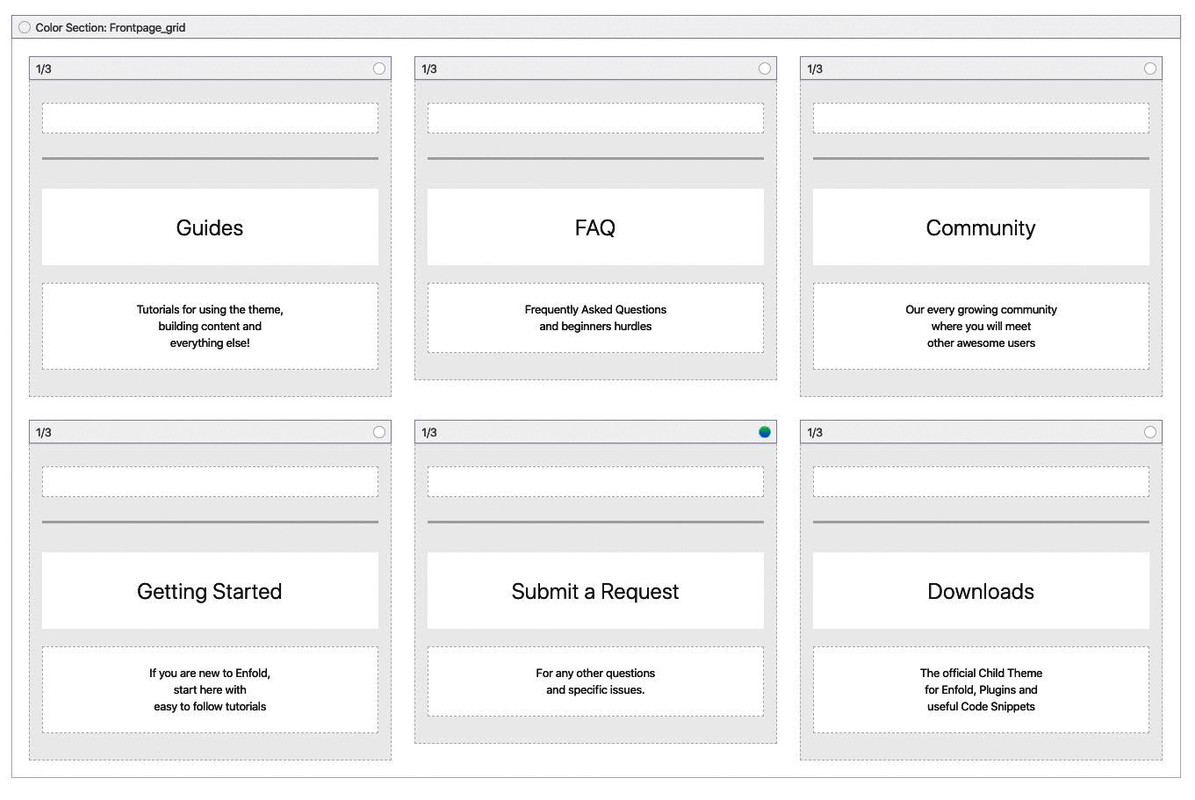
    [av_section min_height='75' min_height_pc='25' min_height_px='500px' padding='default' shadow='no-shadow' bottom_border='border-extra-diagonal' bottom_border_diagonal_color='#ffffff' bottom_border_diagonal_direction='border-extra-diagonal-inverse' bottom_border_style='' custom_margin='0px' custom_margin_sync='true' custom_arrow_bg='' color='main_color' background='bg_gradient' custom_bg='' background_gradient_color1='#009efd' background_gradient_color2='#2af598' background_gradient_direction='diagonal_bt' src='https://kriesi.at/themes/enfold-knowledgebase/wp-content/uploads/sites/80/2018/10/hero-bg.png' attachment='221' attachment_size='full' attach='scroll' position='center center' repeat='no-repeat' video='' video_ratio='16:9' overlay_opacity='0.5' overlay_color='' overlay_pattern='' overlay_custom_pattern='' id='search_section' custom_class='' aria_label='' av_element_hidden_in_editor='0' av_uid='av-jgasyq2w']
    [av_heading heading='Customer Support
    <strong>& Knowledge Base</strong>' tag='h1' link_apply='' link='manually,http://' link_target='' style='blockquote modern-quote' size='42' subheading_active='' subheading_size='14' margin='' padding='0' color='custom-color-heading' custom_font='#ffffff' custom_class='' id='' admin_preview_bg='' av-desktop-hide='' av-medium-hide='' av-small-hide='' av-mini-hide='' av-medium-font-size-title='' av-small-font-size-title='' av-mini-font-size-title='' av-medium-font-size='' av-small-font-size='' av-mini-font-size='' av_uid='av-innvjb'][/av_heading]
    [/av_section]
    
    [av_section min_height='' min_height_px='500px' padding='default' shadow='no-border-styling' bottom_border='border-extra-diagonal' bottom_border_diagonal_color='#ffffff' bottom_border_diagonal_direction='' bottom_border_style='' custom_arrow_bg='' id='frontpage_grid' color='main_color' background='bg_color' custom_bg='' background_gradient_color1='' background_gradient_color2='' background_gradient_direction='vertical' src='' attachment='' attachment_size='' attach='scroll' position='top left' repeat='no-repeat' video='' video_ratio='16:9' overlay_opacity='0.5' overlay_color='' overlay_pattern='' overlay_custom_pattern='' av_element_hidden_in_editor='0' av_uid='av-jgatvii1' custom_class='']
    [av_one_third first min_height='av-equal-height-column' vertical_alignment='av-align-top' space='no_margin' custom_margin='aviaTBcustom_margin' margin='-300px,0' row_boxshadow_color='' row_boxshadow_width='10' link='category,16' linktarget='' link_hover='opacity80' padding='80px,10px,80px,10px' highlight_size='1.1' border='1' border_color='rgba(230,234,236,0.5)' radius='0px' radius_sync='true' column_boxshadow_color='' column_boxshadow_width='10' background='bg_color' background_color='rgba(255,255,255,0.95)' background_gradient_color1='' background_gradient_color2='' background_gradient_direction='vertical' src='' attachment='' attachment_size='' background_position='top left' background_repeat='no-repeat' animation='' mobile_breaking='' mobile_display='' av_uid='av-45nqm' custom_class='']
    
    [av_font_icon icon='ue832' font='enfold-knowledgebase' style='' caption='' link='' linktarget='' size='40px' position='center' color='#79c8f8' av_uid='av-jfdzoxcx' custom_class='' admin_preview_bg=''][/av_font_icon]
    
    [av_hr class='invisible' height='10' shadow='no-shadow' position='center' custom_border='av-border-thin' custom_width='50px' custom_border_color='' custom_margin_top='30px' custom_margin_bottom='30px' icon_select='yes' custom_icon_color='' icon='ue808' font='entypo-fontello' av_uid='av-vsj2' admin_preview_bg='']
    
    [av_heading heading='Guides' tag='h3' link_apply='' link='' link_target='' style='blockquote modern-quote modern-centered' size='27' subheading_active='' subheading_size='15' margin='' padding='5' color='custom-color-heading' custom_font='#4d6877' custom_class='' admin_preview_bg='' av-desktop-hide='' av-medium-hide='' av-small-hide='' av-mini-hide='' av-medium-font-size-title='' av-small-font-size-title='' av-mini-font-size-title='' av-medium-font-size='' av-small-font-size='' av-mini-font-size='' av_uid='av-6bvdunb'][/av_heading]
    
    [av_textblock size='' font_color='' color='' av-medium-font-size='' av-small-font-size='' av-mini-font-size='' av_uid='av-jfe0fj83' custom_class='' admin_preview_bg='']
    <p style="text-align: center;">Tutorials for using the theme,
    building content and
    everything else!</p>
    [/av_textblock]
    
    [/av_one_third][av_one_third min_height='' vertical_alignment='av-align-top' space='' margin='0px' margin_sync='true' row_boxshadow_color='' row_boxshadow_width='10' link='page,647' linktarget='' link_hover='opacity80' padding='80px,10px,80px,10px' highlight_size='1.1' border='1' border_color='rgba(230,234,236,0.5)' radius='0px' radius_sync='true' column_boxshadow_color='' column_boxshadow_width='10' background='bg_color' background_color='rgba(255,255,255,0.95)' background_gradient_color1='' background_gradient_color2='' background_gradient_direction='vertical' src='' attachment='' attachment_size='' background_position='top left' background_repeat='no-repeat' animation='' mobile_breaking='' mobile_display='' av_uid='av-aage' custom_class='']
    
    [av_font_icon icon='ue825' font='enfold-knowledgebase' style='' caption='' link='' linktarget='' size='40px' position='center' color='#79c8f8' av_uid='av-jfdzoxcx' custom_class='' admin_preview_bg=''][/av_font_icon]
    
    [av_hr class='invisible' height='10' shadow='no-shadow' position='center' custom_border='av-border-thin' custom_width='50px' custom_border_color='' custom_margin_top='30px' custom_margin_bottom='30px' icon_select='yes' custom_icon_color='' icon='ue808' font='entypo-fontello' av_uid='av-vsj2' admin_preview_bg='']
    
    [av_heading heading='FAQ' tag='h3' link_apply='' link='' link_target='' style='blockquote modern-quote modern-centered' size='27' subheading_active='' subheading_size='15' margin='' padding='10' color='custom-color-heading' custom_font='#4d6877' custom_class='' admin_preview_bg='' av-desktop-hide='' av-medium-hide='' av-small-hide='' av-mini-hide='' av-medium-font-size-title='' av-small-font-size-title='' av-mini-font-size-title='' av-medium-font-size='' av-small-font-size='' av-mini-font-size='' av_uid='av-5mz86w7'][/av_heading]
    
    [av_textblock size='' font_color='' color='' av-medium-font-size='' av-small-font-size='' av-mini-font-size='' av_uid='av-jfe0gaz0' custom_class='' admin_preview_bg='']
    <p style="text-align: center;">Frequently Asked Questions
    and beginners hurdles</p>
    [/av_textblock]
    
    [/av_one_third][av_one_third min_height='' vertical_alignment='av-align-top' space='' margin='0px' margin_sync='true' row_boxshadow_color='' row_boxshadow_width='10' link='page,707' linktarget='' link_hover='opacity80' padding='80px,10px,80px,10px' highlight_size='1.1' border='1' border_color='rgba(230,234,236,0.5)' radius='0px' radius_sync='true' column_boxshadow_color='' column_boxshadow_width='10' background='bg_color' background_color='rgba(255,255,255,0.95)' background_gradient_color1='' background_gradient_color2='' background_gradient_direction='vertical' src='' attachment='' attachment_size='' background_position='top left' background_repeat='no-repeat' animation='' mobile_breaking='' mobile_display='' av_uid='av-52c6' custom_class='']
    
    [av_font_icon icon='ue82f' font='enfold-knowledgebase' style='' caption='' link='' linktarget='' size='40px' position='center' color='#79c8f8' av_uid='av-jfdzoxcx' custom_class='' admin_preview_bg=''][/av_font_icon]
    
    [av_hr class='invisible' height='10' shadow='no-shadow' position='center' custom_border='av-border-thin' custom_width='50px' custom_border_color='' custom_margin_top='30px' custom_margin_bottom='30px' icon_select='yes' custom_icon_color='' icon='ue808' font='entypo-fontello' av_uid='av-vsj2' admin_preview_bg='']
    
    [av_heading heading='Community' tag='h3' link_apply='' link='' link_target='' style='blockquote modern-quote modern-centered' size='27' subheading_active='' subheading_size='15' margin='' padding='10' color='custom-color-heading' custom_font='#4d6877' custom_class='' admin_preview_bg='' av-desktop-hide='' av-medium-hide='' av-small-hide='' av-mini-hide='' av-medium-font-size-title='' av-small-font-size-title='' av-mini-font-size-title='' av-medium-font-size='' av-small-font-size='' av-mini-font-size='' av_uid='av-5hau2x3'][/av_heading]
    
    [av_textblock size='' font_color='' color='' av-medium-font-size='' av-small-font-size='' av-mini-font-size='' av_uid='av-jfe0gsih' custom_class='' admin_preview_bg='']
    <p style="text-align: center;">Our every growing community
    where you will meet
    other awesome users</p>
    [/av_textblock]
    
    [/av_one_third][av_one_third first min_height='av-equal-height-column' vertical_alignment='av-align-top' space='no_margin' margin='0px' margin_sync='true' row_boxshadow_color='' row_boxshadow_width='10' link='category,15' linktarget='' link_hover='opacity80' padding='80px,10px,80px,10px' highlight_size='1.1' border='1' border_color='rgba(230,234,236,0.5)' radius='0px' radius_sync='true' column_boxshadow_color='' column_boxshadow_width='10' background='bg_color' background_color='rgba(255,255,255,0.95)' background_gradient_color1='' background_gradient_color2='' background_gradient_direction='vertical' src='' attachment='' attachment_size='' background_position='top left' background_repeat='no-repeat' animation='' mobile_breaking='' mobile_display='' av_uid='av-45nqm' custom_class='']
    
    [av_font_icon icon='ue820' font='enfold-knowledgebase' style='' caption='' link='' linktarget='' size='40px' position='center' color='#79c8f8' av_uid='av-jfdzoxcx' custom_class='' admin_preview_bg=''][/av_font_icon]
    
    [av_hr class='invisible' height='10' shadow='no-shadow' position='center' custom_border='av-border-thin' custom_width='50px' custom_border_color='' custom_margin_top='30px' custom_margin_bottom='30px' icon_select='yes' custom_icon_color='' icon='ue808' font='entypo-fontello' av_uid='av-vsj2' admin_preview_bg='']
    
    [av_heading heading='Getting Started' tag='h3' link_apply='' link='' link_target='' style='blockquote modern-quote modern-centered' size='27' subheading_active='' subheading_size='15' margin='' padding='10' color='custom-color-heading' custom_font='#4d6877' custom_class='' admin_preview_bg='' av-desktop-hide='' av-medium-hide='' av-small-hide='' av-mini-hide='' av-medium-font-size-title='' av-small-font-size-title='' av-mini-font-size-title='' av-medium-font-size='' av-small-font-size='' av-mini-font-size='' av_uid='av-4o861fr'][/av_heading]
    
    [av_textblock size='' font_color='' color='' av-medium-font-size='' av-small-font-size='' av-mini-font-size='' av_uid='av-jfe0ha0h' custom_class='' admin_preview_bg='']
    <p style="text-align: center;">If you are new to Enfold,
    start here with
    easy to follow tutorials</p>
    [/av_textblock]
    
    [/av_one_third][av_one_third min_height='av-equal-height-column' vertical_alignment='av-align-middle' space='no_margin' margin='0px' margin_sync='true' row_boxshadow_color='' row_boxshadow_width='10' link='page,707' linktarget='' link_hover='opacity80' padding='80px,10px,80px,10px' highlight='aviaTBhighlight' highlight_size='1.1' border='' border_color='rgba(230,234,236,0.5)' radius='0px' radius_sync='true' column_boxshadow_color='' column_boxshadow_width='10' background='bg_gradient' background_color='rgba(255,255,255,0.95)' background_gradient_color1='#2af598' background_gradient_color2='#009efd' background_gradient_direction='diagonal_tb' src='' attachment='' attachment_size='' background_position='top left' background_repeat='no-repeat' animation='' mobile_breaking='' mobile_display='' av_uid='av-45nqm' custom_class='']
    
    [av_font_icon icon='ue81c' font='enfold-knowledgebase' style='' caption='' link='' linktarget='' size='40px' position='center' color='#ffffff' av_uid='av-jfdzoxcx' custom_class='' admin_preview_bg=''][/av_font_icon]
    
    [av_hr class='invisible' height='10' shadow='no-shadow' position='center' custom_border='av-border-thin' custom_width='50px' custom_border_color='' custom_margin_top='30px' custom_margin_bottom='30px' icon_select='yes' custom_icon_color='' icon='ue808' font='entypo-fontello' av_uid='av-vsj2' admin_preview_bg='']
    
    [av_heading heading='Submit a Request' tag='h3' link_apply='' link='' link_target='' style='blockquote modern-quote modern-centered' size='27' subheading_active='' subheading_size='15' margin='' padding='10' color='custom-color-heading' custom_font='#ffffff' custom_class='' admin_preview_bg='' av-desktop-hide='' av-medium-hide='' av-small-hide='' av-mini-hide='' av-medium-font-size-title='' av-small-font-size-title='' av-mini-font-size-title='' av-medium-font-size='' av-small-font-size='' av-mini-font-size='' av_uid='av-4inadxj'][/av_heading]
    
    [av_textblock size='' font_color='custom' color='#ffffff' av-medium-font-size='' av-small-font-size='' av-mini-font-size='' av_uid='av-jfe0hwwx' custom_class='' admin_preview_bg='']
    <p style="text-align: center;">For any other questions
    and specific issues.</p>
    [/av_textblock]
    
    [/av_one_third][av_one_third min_height='av-equal-height-column' vertical_alignment='av-align-middle' space='no_margin' margin='0px' margin_sync='true' row_boxshadow_color='' row_boxshadow_width='10' link='category,14' linktarget='' link_hover='opacity80' padding='80px,10px,80px,10px' highlight_size='1.1' border='1' border_color='rgba(230,234,236,0.5)' radius='0px' radius_sync='true' column_boxshadow_color='' column_boxshadow_width='10' background='bg_color' background_color='rgba(255,255,255,0.95)' background_gradient_color1='' background_gradient_color2='' background_gradient_direction='vertical' src='' attachment='' attachment_size='' background_position='top left' background_repeat='no-repeat' animation='' mobile_breaking='' mobile_display='' av_uid='av-45nqm' custom_class='']
    
    [av_font_icon icon='ue80a' font='enfold-knowledgebase' style='' caption='' link='' linktarget='' size='40px' position='center' color='#79c8f8' av_uid='av-jfdzoxcx' custom_class='' admin_preview_bg=''][/av_font_icon]
    
    [av_hr class='invisible' height='10' shadow='no-shadow' position='center' custom_border='av-border-thin' custom_width='50px' custom_border_color='' custom_margin_top='30px' custom_margin_bottom='30px' icon_select='yes' custom_icon_color='' icon='ue808' font='entypo-fontello' av_uid='av-vsj2' admin_preview_bg='']
    
    [av_heading heading='Downloads' tag='h3' link_apply='' link='' link_target='' style='blockquote modern-quote modern-centered' size='27' subheading_active='' subheading_size='15' margin='' padding='10' color='custom-color-heading' custom_font='#4d6877' custom_class='' admin_preview_bg='' av-desktop-hide='' av-medium-hide='' av-small-hide='' av-mini-hide='' av-medium-font-size-title='' av-small-font-size-title='' av-mini-font-size-title='' av-medium-font-size='' av-small-font-size='' av-mini-font-size='' av_uid='av-445mdon'][/av_heading]
    
    [av_textblock size='' font_color='' color='' av-medium-font-size='' av-small-font-size='' av-mini-font-size='' av_uid='av-jfe0hwwx' custom_class='' admin_preview_bg='']
    <p style="text-align: center;">The official Child Theme
    for Enfold, Plugins and
    useful Code Snippets</p>
    [/av_textblock]
    
    [/av_one_third]
    [/av_section]


    that copied content you can insert into that input area below the layout builder:

    publish then (update)
    • now you see the layout builder element on top in that layout field.
    • get rid of the stuff you don’t like to have
    (• if you are familiar with the enfold shorcodes you can pick out only the parts you like to have before copying)

    by the way – this is not a flip grid element – it is a color-section with 1/3 columns in it (equal height) and no space between columns:
    the first one of them (guides) has set a negative margin of -300px

    #1159338

    In reply to: WP Night Mode

    With a WordPress theme that lives from the variety of design possibilities, however, it will always be accompanied by a large share of personal contribution.
    If you have a fixed color scheme, it is easy to define a different color scheme as “Night Mode”.
    But since everyone here in Enfold can create different color themes, it’s not as easy as it seems to be.
    So my idea would be to add more settings for a darkmode ( so to speak a second general styling tab for dark mode) similar to the already existing color settings in Enfold, and then fade in a switch on the pages if needed.

    by the way we had this discussion already : https://kriesi.at/support/topic/dark-mode-2/#post-1142042

    these Night Modes more or less uses the mix-blend -mode and that is something not supported from all Browser: Link

    See here some infos to the script : https://darkmodejs.learn.uno/

    Moondreamer21
    Participant

    I have researched this and tried many different variations of code that I got from the forums here in my functions.php. file.

    I am using LearnDash LMS and need to have the option to select no sidebars and no related content or sharaholic mentions at the bottom of all the “posts” whether they be courses, modules, or lessons.
    Natively, in LearnDash they are structured and called/considered courses – lessons – topics (but I changed the title of lessons to modules, and topics to lessons in the settings, not sure if that matters).

    Anyway, right now I have the advanced layout options available to me for creating new modules, but nothing else.
    I’ll post some varieties of code I tried. Most recent is the latest recommendation from the Enfold documentations (not working):

    function avf_alb_supported_post_types_mod( array $supported_post_types )
    {
      $supported_post_types[] = 'sfwd-courses';
      $supported_post_types[] = 'sfwd-lessons';
      $supported_post_types[] = 'sfwd-topic';
      $supported_post_types[] = 'sfwd-quiz';
      return $supported_post_types;
    }
    add_filter('avf_alb_supported_post_types', 'avf_alb_supported_post_types_mod', 10, 1);
    
    function avf_metabox_layout_post_types_mod( array $supported_post_types )
    {
      $supported_post_types[] = 'sfwd-courses';
      $supported_post_types[] = 'sfwd-lessons';
      $supported_post_types[] = 'sfwd-topic';
      $supported_post_types[] = 'sfwd-quiz';
     return $supported_post_types;
    }
    add_filter('avf_metabox_layout_post_types', 'avf_metabox_layout_post_types_mod', 10, 1);

    Here’s something else I tried:

    /*
     * Add Advanced Layout Editor to LearnDash Custom Post Types
     */
    //Add meta boxes to custom post types
    add_filter('avf_builder_boxes', 'avia_register_meta_boxes', 10, 1); 
    function avia_register_meta_boxes($boxes)
    {
      if(!empty($boxes))
      {
        foreach($boxes as $key => $box)
        {
          $boxes[$key]['page'][] = 'sfwd-courses';
          $boxes[$key]['page'][] = 'sfwd-lessons';
          $boxes[$key]['page'][] = 'sfwd-topic';
          $boxes[$key]['page'][] = 'sfwd-quiz';
        }
      }
      return $boxes;
    }

    Another one:

    add_filter('avf_builder_boxes', 'add_builder_to_posttype');
    function add_builder_to_posttype($metabox) {
    	$post_types = array('sfwd-courses', 'sfwd-lessons', 'sfwd-quiz', 'sfwd-topic', 'sfwd-certificates' );
    	foreach($metabox as &$meta) {
    		if($meta['id'] == 'avia_builder' || $meta['id'] == 'layout') {
    			foreach ($post_types as $post_type){			
    				$meta['page'][] = $post_type; 
    			}
    		}
    	}
    	return $metabox;
    }

    Another one:

    /* Adds PageBuilder to LearnDash Post Types  */
    add_filter('avf_builder_boxes', 'add_builder_to_posttype');
    function add_builder_to_posttype($metabox)
    {
    	foreach($metabox as &$meta)
    	{
    		if($meta['id'] == 'avia_builder' || $meta['id'] == 'layout')
    		{
    			$meta['page'][] = 'sfwd-courses';
    			$meta['page'][] = 'sfwd-lessons';
             $meta['page'][] = 'sfwd-topic';
    		}
    	}
    	return $metabox;
    }

    Any suggestions? I am really coming down to the wire on my deadline for things, help is so appreciated!

    kwanumzen108
    Participant

    Google search console alerts about Missing field “location” for single event page,
    How to override so i can add “venue” tag ?
    i tried adding this file and editing it, but no change.
    /wp-content/themes/enfold-child/config-events-calendar/modules/meta/venue.php

    is this correct ?

    Thanks

    #1159096

    I also asked RankMath wether they know how to get rid of the Woocommerce review date. Their answer:

    “That is not added by Rank Math. You have to use a WooCommerce specific filter to remove the date from your WooCommerce reviews. The Best person to help with this is your theme provider. Please get in touch with them and let us know if anything is needed from our end.”

    This is a product page: Product page Woocommerce with Enfold

    This is how it look in Google search results: Google search

    I would like to remove the (Woocommerce review) date from the Google search results. It doesn’t make any sense that a review date is shown in the results.

    Thank you!

    • This reply was modified 6 years, 5 months ago by e-cat.
    #1158824

    Hi Tia, amazingly enough I just began searching for exactly the same thing. From what I have read here, Enfold is a bit limited in its ability to play nice with some access/content restriction plugins so this may be a crap shoot for both of us. If you come up with something please post here. I’ll do the same.

    #1158532

    Topic: WP Night Mode

    in forum Enfold
    tekniskakari
    Participant

    Hello.

    With the plugin WP Night Mode one can add wp-night-mode class to menu button, however that is not working.
    By searching I can see that you have no official support for dark-mode but then there got to be support for plugins.

    Dark-mode is really popular today and our websites will not be state of the art if your themes does not support it.

    Help us out please. Using Enfold Child.

    Hey acelam714,

    Please try the following in Quick CSS under Enfold->General Styling:

    .search-results h2.entry-title a {
        font-size: 22px;
    }
    
    .search-results .entry-content p {
        font-size: 16px;
    }

    Best regards,
    Rikard

    acelam714
    Participant

    Hello Enfold Support,

    I was wondering if you could provide some custom CSS to change the font size of the Title and Excerpt on just the Search Results Page. At the moment, the title size is too big while the excerpt size is too small. Again, this is just for the search results page.

    I tried searching if this was previously resolved, but I was unable to find anything.

    Thank you.

    #1158325
    e-cat
    Participant

    Hello!

    I have an Enfold site with Woocommerce. Google shows all products in search very nicely, but also with a date. It seems to take the date a review of a product was made. Very strange choice I think. It also takes space, the short description space is shorter then. So, I would like to have it removed in the search results.

    Visitors don’t see this date on the site (as I have it as display no show), but it is still hidden in the source code. Google takes the info from “datePublished” of Woocommerce reviews.

    Any suggestion to take out this datePublished info so it doesn’t show in Google? Maybe with some filter snippet code in functions.php? Thanks!

    #1158265

    Topic: Help with Blog Layout

    in forum Enfold
    khickman
    Participant

    Hi Support,
    I am working on a site listed in the private comments section. I want a specific layout in the Blog/Article section that I need help with.
    There will be about 30 articles in different and crossover categories
    1) I would like the category links to display center page under the title. Default would be ALL articles but user could select to display by category
    ( about 8)
    2) I just want text links for the articles in three columns. Right now they are in boxes. Ultimately I would just like the link and the date underneath it.
    When I set this to just a link in the Enfold Blog settings, I lost the rest of the article page formatting (masthead image, title, search field).
    Thanks,
    Keith

    wholestone
    Participant

    I’ve spent hours trying to resolve this without success. Apologies if I’m repeating something already answered.

    I’m running the Enfold theme and have installed WooCommerce to setup an online store. I have created a test product with a description and I have two issues on the actual product page when it’s open that I cannot resolve and therefore need your help.

    1.) The first is the product ‘description tab’ styling and width. It is very wide and the ‘Description’ text is very small. When I add ‘Additional Information’ creating a second tab, I then get two tabs stacked one on top of the other. They’re not resizing automatically as I see elsewhere. Any suggestions?

    2.) Beneath the product images I have a vertical list of items usually found in the sidebar of a blog page that includes the – Search Box, Recent comments, Archives, Categories and META in a list form. I don’t even want these showing on the product page at all.

    I have provided a link in the private content box for you to see what I mean. I’d really value your assistance please.

    Thank you so much.
    Kind regards,
    Steve

    #1157513
    Kidbert6
    Participant

    Hello,
    I have a new problem with the ENFOLD theme (it is such a configurable theme that sometimes it is difficult to find the place to search).
    On my French site everything is fine.
    But on my Belgian site there is a problem.
    Some pages of the main menu are displayed as categories!
    ————-
    Example the “PRODUITS” page:
    I have a “PRODUITS” page and a “PRODUITS” category (The PRODUITS page is part of the PRODUITS category). Other pages also belong to the “PRODUITS” category.
    I made my main menu with the “PRODUITS” page.
    But this page is displayed with the title:
    Archive for the category: PRODUITS” (Archive pour la catégorie PRODUITS, in french).
    First, the text of the PRODUITS category is displayed and below, all pages of the same category “PRODUITS” are displayed in full.
    ————-
    Not all pages do the same thing.
    On 10 pages there are only 4 that do this.
    I looked in the theme settings but I can’t find anything.
    I changed the pages in the main menu but it didn’t change anything.
    I don’t know where else to look.
    Can you help me? Or give me some advice?
    Thank you in advance for your answer.
    Eric Bertolaso (Kidbert6).

    #1157366

    Hey charger70,

    Have you also tried to update via FTP already?
    If not, please try the following guide in order to update to Enfold.

    Update your website manually via FTP:
    1) Make a full backup of your website using a backup plugin.
    2) Safe the backup somewhere outside from the webserver of your website (e.g. on your local computer or in any cloud storage you trust).
    3) Sign out from your WordPress website.
    4) Go to your themeforest account, sign in and download the updated Enfold v4.5 to your computer. Extract it and search for the file enfold.zip. Extract this file as well to already have your folder ready to be uploaded.
    5) Sign in to FTP or SFTP using FileZilla or any other tool which is able to do that.
    6) Go to the folder ./wp-content/themes and search for “enfold”. If you want, you can download the enfold folder to your computer as well (just in case you want to restore if afterwards which is easier like that than using the whole backup).
    7) Delete the folder enfold via FTP. This may take 5-10min, depending on the server speed obviously.
    8) Wait until it is finished and the enfold folder is gone. If that is the case, upload the “new” enfold folder including v4.5 to your website in the same directory.
    9) Sign in to your WordPress website again and go to the Enfold tab (or the one from your child theme). Scroll down to the tab called Theme Update.
    10) Your current API token will not work anymore as Envato changed some stuff on their API. Therefore you need to remove your current key and generate a new private key as visible in your themeforest account under “Settings” -> “API keys”. Go to https://build.envato.com and follow the steps there. To me, https://kriesi.at/documentation/enfold/how-to-install-enfold-theme/#toggle-id-5 was also very helpful (scroll down a bit there to find out about the permissions your private API key needs in order to check for future Enfold updates). Without these permissions it will not work.
    11) Enter your generated Envato key in an incognito/private mode browser window. After revalidating your new private key within the Enfold update tab, you should see a blue rectangle saying when it could be checked for the last time.
    12) Done!

    Best regards,
    Jordan Shannon

    #1157289

    Hi kensingtoncyprus,

    Thank you.
    Here is the code you can put in Enfold > General Styling > Quick Css,  if it does not work, put into themes/enfold/css/custom.css

    
    @media only screen and (max-width: 1024px) {
        .responsive #top #wrap_all .main_menu {
            right: 125px;
        }
    }
    @media only screen and (min-width: 480px) and (max-width: 767px) {
        #text-7 {
            width: 20vw;
            top: -100px;
        }
        .responsive #top #wrap_all .main_menu {
            top: 25px;
        }
    
    }
    @media only screen and (max-width: 479px) {
        #text-7 {
            width: 33vw;
            top: -100px;
        }
        .responsive #top .logo img {
            width: 50%;
            padding-top: 32px;
        }
         .responsive #top #wrap_all .main_menu {
            top: 25px;
        }
    }
    @media only screen and (max-width: 1024px) {
      nav.main_menu, #menu-item-search {
        display: block !important;
      }
      .menu-item {
        display: none;
      }
      .av-burger-menu-main.menu-item-avia-special {
        display: block;
      }
          nav.main_menu {
            left: auto !important;
        }
    }
    

    If you need further assistance please let us know.

    Best regards,
    Victoria

Viewing 30 results - 1,741 through 1,770 (of 7,502 total)