Hey Nathan,
Refer to the following:
Best regards,
Jordan Shannon
UPDATE – Spiderfly Elements
I have updated the Spiderfly Elements to fix a couple of small bugs due to Enfold code updates with the “Edit Link Button”. The “App Card” element was updated to fix a couple of small bugs and to add both the Amazon and Windows app store badges as options. Finally, there is a new element called “App Store Badge” which will let you display the standard app store badges for directly linking to the various app stores. Choose between Apple, Google Play, Amazon, or Windows. It comes with various options like width control for both desktop and mobile layouts.
For WooCommerce updates, please send me ideas. We all use this theme and WooCommerce differently, so other perspectives would be great so I can come up with some awesome new elements. With all the WooCommerce elements I have already, you have some finite control over the layout and look of your store, but there’s always room for more.
As a reminder…I did have to break the elements up into two separate packs each sold separately. Count wise, the elements have grown to almost five times their original number and originally the price was just $15 when I first launched them. That was $15 for the Spiderfly Elements, ACF Elements, and WooCommerce Elements. With all the time and work that has gone into it over the past two years, I can’t justify that price or free re-downloading for life. Going forward, after purchase the download link will expire in 30 days and you will only be able to re-download twice. Obviously I will make exceptions in the event there are multiple bug fix updates in a row. Should that happen, just contact me direclty and I’ll hook you up with the updates by resetting your download limit. I’ll do my best to make it a point of doing so automatically for everyone who purchased the add-on pack(s) recently.
If you have any questions or concerns, please don’t hesitate to contact me.
Yeah, I was hoping it could have the exact same functionality as the open table button but keep consistent with my enfold buttons OR have it do that straight up from the navigation. When I try to add it to those things enfold/wordpress changes the code because it’s expecting a hard URL
Hi Basils,
It is weird because i’ve made a shortcode in the Enfold Child theme as told like here: https://kriesi.at/documentation/enfold/intro-to-advanced-layout-builder/#add-elements-to-alb
But sadly I still can’t see a button at the events on the home page. Perhaps there is an error in the code? I do have to say that I tried to copy the code from https://kriesi.at/support/topic/portfolio-grid-add-read-more-button/ before contacting you guys few weeks ago. Perhaps the file didn’t save properly? I use FTP at the moment to update my files because of a wordpress error I can only fix after this website goes live (I know very anoying)
Thanks in advance and kind regards,
Jasper Boetekees
I definitely would like some help with this. I have this javascript that just needs to be housed in an enfold button
<script type=’text/javascript’ src=’//www.opentable.ca/widget/reservation/loader?rid=1057615&type=standard&theme=wide&iframe=true&domain=ca&lang=en-CA&newtab=false’></script>
website is http://www.littlebirddimsum.com
Hey rene,
Thank you for using enfold – and for reporting this.
Seems to be a not very common problem – so we will provide a filter that allows you to return a value you can customize. You can hardcode a fixed value in the fiter that is returned for all sites and when you need a new popup just change the returned value in the filter.
As a quick fix:
In helper-privacy.php line 1502 you find:
$cookie_contents = md5( $cookie_contents ) . '||v1.0';
Before this line add:
$cookie_contents = apply_filters( 'avf_cookie_consent_for_md5', $cookie_contents, $message, $buttons );
And in functions.php of your child theme add:
https://github.com/KriesiMedia/enfold-library/blob/master/actions%20and%20filters/Privacy%20and%20Cookies/avf_cookie_consent_for_md5.php
The filter will become part of the next update.
Hope this helps you.
If you need assistance let us know and we can do it for you.
Best regards,
Günter
Hey FayeMcC,
Sorry for the late reply and thanks for the example link.
I believe you are looking at this one:
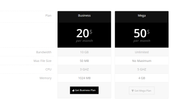
Please try Enabling the Avia Layout Builder Debugger and then pasting in this shortcode in a new page:
[av_table purpose='pricing' caption='' av_uid='av-46vmngy']
[av_row row_style='avia-heading-row' av_uid='av-45s5m2a'][av_cell col_style='avia-desc-col' av_uid='av-43cwysi']Plan[/av_cell][av_cell col_style='' av_uid='av-42aq0c2']Business[/av_cell][av_cell col_style='' av_uid='av-41352uq']Mega[/av_cell][/av_row]
[av_row row_style='avia-pricing-row' av_uid='av-3yqto5u'][av_cell col_style='avia-desc-col' av_uid='av-3xek25e'][/av_cell][av_cell col_style='' av_uid='av-3vnbtpe']20$
<small>per month</small>[/av_cell][av_cell col_style='' av_uid='av-3uktq0i']50$
<small>per month</small>[/av_cell][/av_row]
[av_row row_style='' av_uid='av-3s6wnpe'][av_cell col_style='avia-desc-col' av_uid='av-3qrslf6']Bandwidth[/av_cell][av_cell col_style='' av_uid='av-3pe4ef6']10 GB[/av_cell][av_cell col_style='' av_uid='av-3n7ojgy']Unlimited[/av_cell][/av_row]
[av_row row_style='' av_uid='av-3lmbn1u'][av_cell col_style='avia-desc-col' av_uid='av-3jw4p76']Max File Size[/av_cell][av_cell col_style='' av_uid='av-3iz8pqq']50 MB[/av_cell][av_cell col_style='' av_uid='av-3hg3bz6']No Maximum[/av_cell][/av_row]
[av_row row_style='' av_uid='av-3fo0nuq'][av_cell col_style='avia-desc-col' av_uid='av-3divj02']CPU[/av_cell][av_cell col_style='' av_uid='av-3cmw4du']3 GHZ[/av_cell][av_cell col_style='' av_uid='av-3am13de']5 GHZ[/av_cell][/av_row]
[av_row row_style='' av_uid='av-386d89e'][av_cell col_style='avia-desc-col' av_uid='av-36r53de']Memory[/av_cell][av_cell col_style='' av_uid='av-35ggx9e']1024 MB[/av_cell][av_cell col_style='' av_uid='av-33k159u']4 GB[/av_cell][/av_row]
[av_row row_style='avia-button-row' av_uid='av-32b228i'][av_cell col_style='avia-desc-col' av_uid='av-305sus2'][/av_cell][av_cell col_style='' av_uid='av-2yfxx0y'][av_button label='Get Business Plan' link='manually,http://' link_target='' color='theme-color' custom_bg='#444444' custom_font='#ffffff' size='medium' position='center' icon_select='yes' icon='29' av_uid='av-2x7x4k2']

[/av_cell][av_cell col_style='' av_uid='av-2vwhy82'][av_button label='Get Mega Plan' link='manually,http://' link_target='' color='theme-color-subtle' custom_bg='#444444' custom_font='#ffffff' size='medium' position='center' icon_select='yes' icon='44' av_uid='av-2t9lvtu']

[/av_cell][/av_row]
[/av_table]
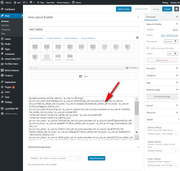
This should give you the example table which you can examine the settings or adjust to suit your needs, and then paste into your page.
Best regards,
Mike
Hey,
You can add Vero icon by referring to this post – https://kriesi.at/documentation/enfold/social-share-buttons/#how-to-add-custom-social-icons-to-enfold-options. If you would like us to do it for you, please create temporary admin logins and post them here privately :)
Best regards,
Yigit
Hi team Enfold
After searching the forum and finding several similar issues and testing their solutions, I’m still struggling with two things on a client’s website.
I provided credentials in the private content by the way.
– When I try to upload a zip file for Flaticons, it doesn’t work. It did with the first file, but I needed another icon so I deleted that file and uploaded the new one with the new icon included. But only two icons out of a total of 11 eleven icons showed up in the page builder. I added this code to the .htaccess file
 <FilesMatch ".(ttf|otf|woff)$">
<IfModule mod_headers.c>
Header set Access-Control-Allow-Origin "*"
</IfModule>
</FilesMatch>
And while that fixed the issue of rectangular boxes with the first file, it doesn’t anymore with the second. So some help here would be much appreciated.
– Second, I’m trying to change the background image for the scroll to top button. I entered this code in custom css:
#scroll-top-link {
    background: url(‘https://warredal.wpstagecoach.com/wp-content/uploads/2019/12/acorn-42791_640-e1575362775251.png’) center center no-repeat;
}

#scroll-top-link:before {
    display: none;
}
But the only thing that did was make the button completely transparent. I need it to be this acorn image that I uploaded to the media library.
Thanks in advance!
-
This topic was modified 6 years, 4 months ago by
 KatrienW.
Hello,
can you tell me where i can change the font color of the one button in the cookie banner which is automatically pink?
nicht akzeptieren
By enfold advanced styling i couldn`t find anything.
many regards
Rixi
Hi,
I upgraded my site’s theme to Enfold and used a Child theme. I set it up in a subdomain (new) where it was tested and worked fine. When I was happy with the result I moved the site to the WP subdirectory where our live site was located. I used Velvet Blues Update URL’s to change the URL’s in the site and updated permalinks. I also updated to the latest WordPress 5.3 at this point – All seemed fine until I wanted to make a change to the home page and found the changes would not save. The Avia Layout Builder gives a message that the changes were saved but the WordPress Update button just gets stuck and doesn’t save.
This is only happening on the home page. I can save changes to other pages and changes to the theme. It s only the home page affected. I know that there are some URLs for images in that page that did not change correctly but I cannot edit them. Site is https://www.northshorefc.com.au/. I also changed version of PHP to 7.1 but this did not work.
Can you please assist? Was there something I forgot to do?
Thanks
Viv
Hello Awesome Enfold team,
My client wants the title, caption, and button on a full width slider to appear at the same time as the image; is this an issue that can be adjusted? Or should I just tell them to add that information to their image and not use a caption?
Thank you in advance!
Hi there,
I fixed it!
The problem was the cookie consent bar js error (which should be fixed in the next Enfold update).
Any idea when this update becomes available?
I also want to create a blank page which opens in a popup window (when you click at the button: “Luister Live” in Mike’s screenshot).
The player should adapt to the width and height from the popup window.
Thanks again!
Hi,
Please add following code to Quick CSS in Enfold theme options > General Styling
.avia-button.avia-size-large:hover {
    background: #48b9bd!important;
}
Best regards,
Yigit
UPDATE:
I did the following:
– Enfold template removed in wordpress
– databese emptied via plugin (WP Database Reset)
– enfold reinstalled (via zip)
– no demo installed yet.
Everything worked great, also the home button !! And as I said before, the included wordpress templates also did well.
– then demo church installed.
And then it went wrong again, the home button did not work, as before.
So my conclusion is that the problem is not with the hoster or wordpress, but with the Church template from Enfold.
Enfold is my favorite and I almost always recommend it to my customers.
Always with complete satisfaction.
But this time it’s a nightmare :-)
I hope that a solution will come soon so that I can continue.
Ps, would the problem also occur with the other demos?
This reply has been marked as private.
Dear Enfold support team,
as you all know responsive design has become very important these days!
When I worked with Enfold to optimize my webpage for all possible devices, I came to the conclusion, that Enfolds responsive customizations are not at the level that they could be….
(1) Enfold Responsive Options handle only devices up to 989 screen width. iPad has 1024 px, so 989 option should be changed to 1024 to cover iPads.
(2) I saw that there is little to no room for flexibility with many Enfold elements/shortcodes above 1024px. Text-Block element only offers font-size in px.
Headings offer vw size, but not for subheading font-size. And actually users will want vw font size like 2.7vw 2.8vw and so on as a dropdown menu.
Flexible vw font-size for all elements as a selectable choice is a MUST in my opinion. Then there are elements which offer no selectable font-size at all like Button and icon/symbol-box. I know CSS customizations are possible with dev classes, but this takes a lot of time where it could be easy with shortcode options. In general many elements/shortcodes seem to miss important customization options that many users may be interested in.
So to make Enfold better I kindly and urgently want to ask to adress these issues in near future Enfold Updates.
As a summary please adress these aspects:
>Priority High<
– “vw” font-size with decimal place support as dropdown for all enfold elements where it makes sense. Especially heading + subheading/subtitle, Text block, icon/symbol box, button
– Change 989 value for responsive screen options to 1024 px or add 1024 option
>Priority Low to Medium<
-Update existing shortcodes for more customization possiblilities (like more HR style variations and with color, columns with rotate option, different colours/width for top+bottom border)
Thank you very much for understanding my concerns!
-
This topic was modified 6 years, 4 months ago by
 Flow9999.
Hey,
Thanks for contacting us!
Following fixes for 5.3 will be included in Enfold 4.6.4 which will be available within a week or so
– fixed: WP 5.3 Media Uploader not showing sizes selectbox (theme option page upload image button)
– fixed: WP 5.3 CSS theme option page selectboxes only partially clickable
If you do not mind those issues, you can update otherwise, please kindly wait for Enfold 4.6.4 :)
If you have any other questions or issues, please register to our support forum – https://kriesi.at/support/register/ and start a new thread under Enfold sub forum :)
Regards,
Yigit
Hey Terry,
Thanks for using Enfold. I think it would be better if you placed the button in a widget area instead: https://kriesi.at/documentation/enfold/header/#adding-a-header-widget-area. We can help you out with styling once you have added it to your site.
Best regards,
Rikard
Hi there,
I’m currently experiencing a bit of an issue. It seemingly started when I played around with the Enfold footer settings and tried to active the default theme footer – which had previously been disabled.
When I click update, the button changes to show that something is happening/updating but it never stops. I’ve also tried rolling back, but that doesn’t seem to do anything either.
Many thanks in advance!
Some other info for you:
All of my plugins have been turned off
Enfold and wordpress are updated to their latest versions
All of my plugins are up-to-date.
Thank you for your response.
The settings in the WP_config are done automatically by the hoster. I have done nothing manually about this, just like in the htacces.
I only placed the template on the server myself. I understand your statement regarding non-editing WP_HOME and WP_SITEURL.
But still the question remains, how is it possible that when I switch to another template, like Twenty Twenty, the home button works as normal? Do you have an explanation for that?
Would you please try it yourself. You can log in on the site (see private login), type http://maastrichtvooriedereen.nl.transurl.nl/home. (don’t forget /home), choose another template and see that they all work. Haven’t done anything with the Enfold template yet, so don’t mind if something goes wrong :-). Perhaps I have to reinstall the template?
————————————–
The old site (www.maastrichtvooriedereen.nl) now refers to another hoster and is therefore still online. The new site is being developed on a separate domain by a new hoster, therefore .transurl.nl after the name.
I also send the content of the htaccess along.
What do I have to adjust?
————————————–
# START WordPress
# The guidelines (lines) between BEGIN WordPress andEND WordPress become
# dynamically created and should only be adjusted via WordPress filters.
# Any change to these guidelines between these markers will be overwritten.
<IfModule mod_rewrite.c>
RewriteEngine On
RewriteBase /
RewriteRule ^ index \ .php $ – [L]
RewriteCond% {REQUEST_FILENAME}! -F
RewriteCond% {REQUEST_FILENAME}! -D
RewriteRule. /index.php [L]
</IfModule>
# END WordPress
————————————–
Hope you can help, would like to start the site.
Greeting Tom
-
This reply was modified 6 years, 4 months ago by
 tom.
tom.
Hi there,
A few queries with a website (prasidium.com) created quite a while ago using Enfold:
– Homepage is blank (but can click on all other pages in menu)
– I can no longer add links to forms (or anything) to any buttons (is greyed out in options)
– Having issues getting content to show up/using the avia builder as it now appears that classic option is integrated into wordpress as default (I have added some code into the functions.php to just enable avia vs classic, which doesn’t seem to fix entire issue)
**Have checked for updates and am running on WordPress 5.3 and Enfold 3.8.4 and have tried downgrading to php 7.0 (going on what threads I have read so far)**
I am a bit of a novice when it comes to this, so am a bit lost with what is not working with what in the above versions or updates… I have read through lots of threads and tried to integrate as much as I can to problem solve, but have come to a dead end.
Would love some advice as I feel like I have broken it!
Cheers, Kristin
Enfold causes problems with the WooCommerce shopping cart
As soon as a product is to be placed in the shopping cart, for example https://ammerseebavaria.de/produkt/ammersee-hoodie-unisex-abshoody0801_unia_na_skygreen/ , the shopping cart button immediately redirects it to another product.
We do not get an answer from Krisi.
does anyone know this problem? Because the shop ran smoothly before version 4.6.3.1. And now we can not continue our relaunch for 4 days …
Dringende Hilfe erbeten
Liebes Krisi-Team,
seit Dienstag morgen funktioniert unser Shop nicht mehr. Tests von uns, von WooCommerce-Support und von WordPress-Support zeigen immer das gleiche Ergebnis:
-> Schalten wir ENFOLD ab, funktioniert der Shop
-> Schalten wir ENFOLD an, funktioniert der Shop nicht
Hier kommt die spannende Frage:
NEUE PRODUKTE
1. Egal welches Produkt in den Warenkorb soll, nach Klick auf den Warenkorb Button erfolgt immer eine Weiterleitung an den Hoodie in Pink. Hier…
A) Standard-Produkt: https://ammerseebavaria.de/produkt/ammersee-hoodie-unisex-abshoody0801_unia_na_skygreen/
B) Umleitung auf: https://ammerseebavaria.de/produkt/ammersee-hoodie-unisex-abshoody1001_unia_na_pinkwhite/
(dieser lässt sich auch als einziger in den Warenkorb legen)
ALTE PRODUKTE
2. Drei alte Produkte, die wir seit dem Relaunch nicht verändert haben, lassen sich problemlos in den Warenkorb legen. Sie werden auch nicht umgeleitet.
UNSERE PRÜFUNG
Wir haben alle Shop-Seiten-Einstellungen verglichen und überprüft.
Es gibt keine Unterschiede in den Einstellungen
VERMUTUNG
 Holtmann
Guest
Urgent help requested
Dear Krisi Team,
since Tuesday morning, our shop does not work anymore. Tests from us, WooCommerce support and WordPress support always show the same result:
-> Turn off ENFOLD, the shop works
-> If we turn on ENFOLD, the shop will not work
Here comes the exciting question:
NEW PRODUCTS
1. No matter which product is in the shopping cart, after clicking on the cart button, there is always a redirect to the hoodie in pink. Here…
A) Standard product: https://ammerseebavaria.de/produkt/ammersee-hoodie-unisex-abshoody0801_unia_na_skygreen/
B) redirect to: https://ammerseebavaria.de/produkt/ammersee-hoodie-unisex-abshoody1001_unia_na_pinkwhite/
(this can also be the only one in the shopping cart)
OLD PRODUCTS
2. Three old products, which we have not changed since the relaunch, can easily be added to the shopping cart. You will not be redirected either.
OUR TEST
We have compared and reviewed all shop page settings.
There are no differences in the settings
GUESS
There seems to be a problem with ENFOLD and the WOOCOMMERCE CATEGORIES
Urgent help requested
Dear Krisi Team,
since Tuesday morning, our shop does not work anymore. Tests from us, WooCommerce support and WordPress support always show the same result:
-> Turn off ENFOLD, the shop works
-> If we turn on ENFOLD, the shop will not work
Here comes the exciting question:
NEW PRODUCTS
1. No matter which product is in the shopping cart, after clicking on the cart button, there is always a redirect to the hoodie in pink. Here…
A) Standard product: https://ammerseebavaria.de/produkt/ammersee-hoodie-unisex-abshoody0801_unia_na_skygreen/
B) redirect to: https://ammerseebavaria.de/produkt/ammersee-hoodie-unisex-abshoody1001_unia_na_pinkwhite/
(this can also be the only one in the shopping cart)
OLD PRODUCTS
2. Three old products, which we have not changed since the relaunch, can easily be added to the shopping cart. You will not be redirected either.
OUR TEST
We have compared and reviewed all shop page settings.
There are no differences in the settings
GUESS
There seems to be a problem with ENFOLD and the WOOCOMMERCE CATEGORIES
Dringende Hilfe erbeten
Liebes Krisi-Team,
seit Dienstag morgen funktioniert unser Shop nicht mehr. Tests von uns, von WooCommerce-Support und von WordPress-Support zeigen immer das gleiche Ergebnis:
-> Schalten wir ENFOLD ab, funktioniert der Shop
-> Schalten wir ENFOLD an, funktioniert der Shop nicht
Hier kommt die spannende Frage:
NEUE PRODUKTE
1. Egal welches Produkt in den Warenkorb soll, nach Klick auf den Warenkorb Button erfolgt immer eine Weiterleitung an den Hoodie in Pink. Hier…
A) Standard-Produkt: https://ammerseebavaria.de/produkt/ammersee-hoodie-unisex-abshoody0801_unia_na_skygreen/
B) Umleitung auf: https://ammerseebavaria.de/produkt/ammersee-hoodie-unisex-abshoody1001_unia_na_pinkwhite/
(dieser lässt sich auch als einziger in den Warenkorb legen)
ALTE PRODUKTE
2. Drei alte Produkte, die wir seit dem Relaunch nicht verändert haben, lassen sich problemlos in den Warenkorb legen. Sie werden auch nicht umgeleitet.
UNSERE PRÜFUNG
Wir haben alle Shop-Seiten-Einstellungen verglichen und überprüft.
Es gibt keine Unterschiede in den Einstellungen
VERMUTUNG
Es scheint ein Problem zu existieren mit ENFOLD und den WOOCOMMERCE KATEGORIEN
 gb
gbParticipant
Hi,
I have built a WooCommerce store page in my Enfold site and am having trouble setting it up like shown in the Enfold default store example:
https://kriesi.at/themes/enfold-shop/shop/
My Shop:
How do I create the product filter options like seen in the right sidebar default example: COLOR, SIZE, BRAND?
Part 2 of problem is I created my own shop page by using the Enfold Product Grid however if someone is in the cart and clicks the “return to shop” button, it goes to the WooCommerce created store page which is not editable.
I Could use that page if needed since I am not doing too much in terms of custimization, is there an advantage to using the Woo shop page?
Thanks in advance for any insights into this :-)
GB
When you take this site as an example on your mobile: https://www.operaballet.nl/nl you will see when you scroll down that there is an arrow with which you can scroll up or down. When you scroll down to the end you can find the menu again. Is it possible to achieve this (the arrow and the menu) within Enfold?



