Hey Misantaller,
Are you referring on the images with instagram icon when hovered below ‘BE PART OF OUR JOURNEY’?
It can be done through some css, try to do the following:
– In the Color Section, go to Developer (tab) and on Custom CSS Class, put my-section.
– In Enfold > General Styling > Quick CSS, add this CSS code:
.my-section .avia-button-wrap {
    position: absolute;
    top: 50%;
    left: 0;
    margin-top: -19px;
    text-align: center;
    width: 100%;
}

.my-section .avia-button {
    display: inline-block;
}
Hope it helps.
Best regards,
Nikko
Hey patrickpriest81,
On the Google font webpage, after you click the select the font button, open the popup at the bottom of the screen and download it.
Then import it into Enfold Theme Options > Import/Export > Custom Font Manager
This will add it to the theme.
Best regards,
Mike
Hi Kriesi Team,
i know, there are some other threads with nearly the same problem, but i cant find for me a good solution.
So if upload a picture, the following type of images where generated:
WP
Vorschaubilder Thumbnail 80×80
Mittelgroß medium large 300×300
Groß big 1030×1030
Enfold
Bildgröße „medium_large“ 768×0
Bildgröße „1536×1536“ 1536×1536
Bildgröße „2048×2048“ 2048×2048
Bildgröße „widget“ 36×36
Bildgröße „square“ 180×180
Bildgröße „featured“ 1500×430
Bildgröße „featured_large“ 1500×630
Bildgröße „extra_large“ 1500×1500
Bildgröße „portfolio“ 495×400
Bildgröße „portfolio_small“ 265×185
Bildgröße „gallery“ 845×684
Bildgröße „magazine“ 710×375
Bildgröße „masonry“ 705×705
Bildgröße „entry_with_sidebar“ 845×321
Bildgröße „entry_without_sidebar“1210×423
Bildgröße „ab-block-post-grid-landscape“600×400
Bildgröße „ab-block-post-grid-square“ 600×600
Ok, thats a lot of images and so a lot of storage space too. For me, a little too much. So therefore some questions:
1. It is unlikely, that i use all this sizes. How can i find out, which one i use?
2. I upload pictures that i have “optimized” so good as i can, size around 1040x76x or 76x x 1040, size 100-200kbite.Do i need then the sizes with 1500 ? Stretch Enfold my pictures of that size or stay they max at the uploaded size and these 1500 size options are useless for me?
3.Plugin Simple Image Size – after all sizes there are the possibility to push a delete button. What will this button do? Delete the enfold option to create the specific size ? Delete the images of this size?
4.If Enfold will show a picture in a size, that is not before createt, say like 100×100. What will happen? Use a smaller created and stretch or will it be created if needed?
It would help me a lot, that i can delete some big sizes that i dont need, because they have the most storage size. It would be very nice, if anyone can help or have some tips for me. Thanks in advance
Bert
-
This topic was modified 6 years, 2 months ago by
 Bert.
Bert.
Hi,
Please refer to this post – https://kriesi.at/documentation/enfold/header/#adding-a-header-widget-area and add widget area to your header to display your button.
Then you can add following code to Quick CSS in Enfold theme options > General Styling to display it only on screens below 1300px
@media only screen and (min-width: 1300px) {
#header .widget { display: none !important; }}
Cheers!
Yigit
hi enfold team,
I’d like to add a button to the header area that only showa below 1300 px width.
my first idea was to do it as a floating button with the following css code but that doesn’t work.
this doesn’t include the media query
.button-float {
position: fixed;
right: 10%;
top:200px;
z-index: 999999 !important;
}
do you have a better idea?
thank you
Hi!
A client of us showed me the problem first: the “social share buttons” have no social media icons any more. I don’t know if it is related to a WordPress update or if it’s Enfold itself but after checking the documentation (https://kriesi.at/documentation/enfold/social-share-buttons/) it seems it is broken everywhere!
Best regards
Hi edendesign,
Thanks for providing admin access.
The play button was inside the video iframe, to fix it, please use a child theme, here’s a link where you can find the child theme and how to use it: https://kriesi.at/documentation/enfold/child-theme/
Then add this code in functions.php:
add_filter('avf_vimeo_video_url', 'avf_vimeo_hide_controls');

function avf_vimeo_hide_controls($video_url) {
	$video_url = esc_url( add_query_arg( array( 'controls' => 0 ), $video_url ) );
	return $video_url;
}
Best regards,
Nikko
-
This reply was modified 6 years, 2 months ago by
 Nikko.
Managed to use this. It’s not exactly what I want but its quite good. It shows all posts from same category rather than excluding just one. Let me know if anyone has any other thoughts.
D
/* make previous-next buttons stay within the relevant portfolio category (multiple portfolios) */
add_filter( 'avia_post_nav_entries', 'enfold_customization_postnav', 10, 2);
function enfold_customization_postnav($entries, $settings)
{
if($settings['type'] == 'portfolio')
{
$settings['same_category'] = true;
$entries['prev'] = get_next_post($settings['same_category'], $settings['excluded_terms'], $settings['taxonomy']);
$entries['next'] = get_previous_post($settings['same_category'], $settings['excluded_terms'], $settings['taxonomy']);
}
return $entries;
}
Hi,
I have a website on air, but like to make a landingspage in this website ( so https://……/ladingspagename ) with a different layout and CTA button
The most easy way for me seems to use one of your demo’s like https://kriesi.at/themes/enfold-landing-page/
But when I import this demo into my existing Enfold Child theme (like I did with another demo when I created my current website) does this landingspage-demo not overwrite the layout of my existing website??
Or should I better create a new landingspage from scratch myself?
Hello,
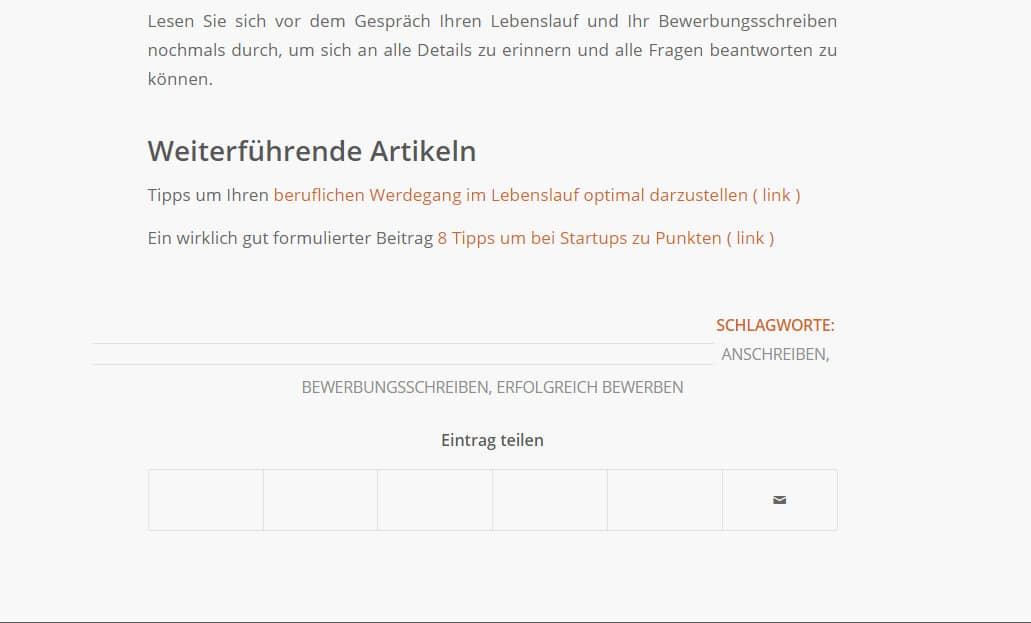
I´ve chanced my blog layout resently from right sidebar to no sidebar.
At the bottom of every post we show “keywords” and “share buttons”.
The allinement of the keyword is wrong – it is allinged right, and the share buttons lost the icons (except mail).
Please have a look:
Hi,
Please add following code to Quick CSS in Enfold theme options > General Styling tab
#top .av-menu-button > a .avia-menu-text {
    border-width: 1px;
}
Best regards,
Yigit
Hello
Based on the av_blog shortcode and the loop-index.php i created a custom shortcode which shows meta-data, a forward button and a masonry gallery for each element of a chosen taxonomy. The masonry gallery is created with the av_masonry_gallery shortcode, where the ids of the images are dynamically adjusted according to the element.
Before christmas the customer updated the system (WP 5.3.2 and Enfold 4.6.3.1) and now the galleries are no longer displayed correctly. This means that the gallery of the first entry is displayed correctly, the remaining galleries are located outside the wrap_all container and therefore cover the whole screen width.
I would be glad if you could help me to solve this problem. With wordpress 5.2 and Enfold 4.6 everything worked fine.
The link to the website as well as the source code of my customizations can be found in the private data of the post.
Many thanks in advance
Hey Kevin,
The WhatsApp was added to replace the Google+ when it shut down, I guess at the time it seemed to be more requested.
Have you seen our documentation on adding social icons?
Do you want help with implementing this?
Best regards,
Mike
Hello Rikard,
I had the problem with the social icons and hev it fixed with another advice I read from you.
Only the whats app button does not work yet.
I used this CSS script in the quick fix
/* enfold social media icons fix */
.social_bookmarks_twitter a::before, .av-social-link-twitter a::before {
font-family: ‘entypo-fontello’;
content: ‘’;
}
.social_bookmarks_facebook a::before, .av-social-link-facebook a::before {
font-family: ‘entypo-fontello’;
content: ‘’;
}
.social_bookmarks_linkedin a::before, .av-social-link-linkedin a::before {
font-family: ‘entypo-fontello’;
content: ‘’;
}
.social_bookmarks_pinterest a::before, .av-social-link-pinterest a::before {
font-family: ‘entypo-fontello’;
content: ‘’;
}
.social_bookmarks_tumblr a::before, .av-social-link-tumblr a::before {
font-family: ‘entypo-fontello’;
content: ‘’;
}
.social_bookmarks_reddit a::before, .av-social-link-reddit a::before {
font-family: ‘entypo-fontello’;
content: ‘’;
}
.social_bookmarks_vk a::before, .av-social-link-vk a::before {
font-family: ‘entypo-fontello’;
content: ‘’;
}
.social_bookmarks_gplus a::before, .av-social-link-gplus a::before {
font-family: ‘entypo-fontello’;
content: ‘’;
}
.social_bookmarks_mail a::before {
font-family: ‘entypo-fontello’;
content: ‘’;
}
.social_bookmarks_dribble a::before {
font-family: ‘entypo-fontello’;
content: ‘’;
}
.social_bookmarks_youtube a::before {
font-family: ‘entypo-fontello’;
content: ‘’;
}
.social_bookmarks_instagram a::before {
font-family: ‘entypo-fontello’;
content: ‘’;
}
.social_bookmarks_vimeo a::before {
font-family: ‘entypo-fontello’;
content: ‘’;
}
Thank you instead,
Lianne
Hi,
I’ve tried this (https://kriesi.at/documentation/enfold/button/#toggle-id-22) and a couple other posts I’ve seen, but nothing is working for me – I’m sure it’s user error. I’m trying to get a background image for the button in the center widget in the footer on this site (https://friendsoftheorlandova.org/) – it should be just below the Donate button. I’m using the custom color attribute – I tried leaving that blank, using the default, etc. – nothing worked. I have the custom class set and in my CSS – any ideas?
Thanks!
Hi Team,
after updating several sites to the new beta successfully I still have a problem on one site. I am using these shortcodes in a text widget but the social icons still don’t display as they should:
[av_social_share style='minimal' buttons='custom' share_facebook='aviaTBshare_facebook' share_twitter='aviaTBshare_twitter' share_linkedin='aviaTBshare_linkedin' share_mail='aviaTBshare_mail' custom_class='' admin_preview_bg='' av_uid='av-670mc8']
What can I do to fix this?
Best
Thorsten
Hi, I’m encounteringan issue in browser Safari (it works fine in other browsers):
I work with the “Team Booking” plugin (https://codecanyon.net/item/team-booking-wordpress-booking-system/9211794). When I want to make a reservation, the “create reservation” button (Dutch: “Reserveer nu”) is not shown in Safari.
URL in private
I contacted Team-Booing support. They say it could be related to Enfold- post-1148975
Thanks for your help.
Gert
Hi,
Thank you for the login, so I see that you are using the mobile menu for all screen sizes, I believe in this case adding a custom header widget area would work best, please see this in our documentation.
This function in your functions.php will add the widget area after the logo and before the menu:
add_action( 'ava_before_bottom_main_menu', 'enfold_customization_header_widget_area' );
function enfold_customization_header_widget_area() {
dynamic_sidebar( 'header' );
}
then you can add your button shortcode or html link to the widget and use css to position it next to the search icon, and make it show on the one page only.
Your WordPress > Appearance > Editor was not showing on your site so I couldn’t add the function for you, perhaps you will need to add via ftp, or unhide the editor. Once you have added the widget area and link we can help with the css.
Best regards,
Mike
Hey Ettore,
https://share.getcloudapp.com/WnuE0OQJ You need to go to this link
https://kriesi.at/support/forum/enfold/ and press the big button, it will take you to the bottom of the page where you can post a thread.

Best regards,
Victoria
I’m looking for a solution like this one:
Example Demo Shop
When you click on “Add to cart”, the item is immediately added to the shopping cart.
If i click the button on my page, i will be directed to the single product view and the item is not in the cart as in the demoshop.
-
This reply was modified 6 years, 3 months ago by
 LFK.
LFK.
Hi,
1. The logo in the header looks fine, I believe you are talking about the logo in the post which looks blur and oversized? Please remove the featured image in the post or update it with a different image.
2. Please adjust the header height in Enfold theme options to fixe the gap :)
3. To update the social icon color, please add the below CSS in Enfold > General Styling > Quick CSS
#wrap_all .social_bookmarks a:before {
    color: #FFF !important;
}
You may not see the changes until the cached files are cleared in your browser.
Please perform the below steps to clear the browser cache:
1. Disable “merging and compression” for CSS and JS files from Enfold > Performance.
2. If a caching plugin is installed check the plugin settings and clear the cache and deactivate the plugins for testing purpose.
3. Hard refresh by pressing Ctrl + Shift + F5 on your browser or press the F12 key to open chrome dev tools and right click on the refresh button and select “Empty Cache and Hard Reload”.

Best regards,
Vinay
Hey talltini,
Thanks for the link to your site, In your css “font-color” is not valid, please use “color” like this:
.avia-cookiemessage-bottom { background: #a1c2a2 !important; color: #f5f5dc !important;}
.avia-cookie-consent-button { background-color: #f5f5dc !important;}
Did you add this css to the Enfold Theme Options > General Styling > Quick CSS field:
or did you fill in the fields in the Enfold Theme Options > Advanced Styling > Cookie Consent Message Bar:

If you used the Enfold Theme Options > Advanced Styling > Cookie Consent Message Bar and included the !important; please remove this. If you used Enfold Theme Options > General Styling > Quick CSS then perhaps there is a missing bracket earlier in your css braking your code, please try copying all of your css and add it to WordPress > Customize > Additional CSS as it will check your code for errors and give you hints to repair.
If this doesn’t help, please include an admin login in the private content area so we can be of more assistance.
To change the font color of the message below the contact form, Please try this code in the General Styling > Quick CSS field:
p.av_form_privacy_check.av_contact_privacy_check {
	color: red !important;
}
Please adjust the color to suit.
I see that you have html code showing on your page:

is this something you are working on?
I also note that you are using Enfold v4.4.1 with WordPress v5.3.2, you can expect errors with these as Enfold v4.4.1 was not WordPress v5 ready. Please update Enfold, but unfortunately, due to a change at Theme Forest around that version you will need to update via FTP.
The easiest and safest way to update is to download the newest version from Theme Forest and rename your current theme folder to “enfold-old” via ftp then upload the new “enfold” folder and check that your site is working correctly.
Once you are happy you can delete the “enfold-old” folder via ftp, (not the WP theme page)
Should for some reason you wish to roll-back to the old version, it’s easy to do, simply rename the new “enfold” folder to “enfold-new” via ftp and then rename “enfold-old” to “enfold” then refresh your page.
Please don’t try to overwrite the theme folder, as this will leave old files behind and cause errors.
If you are not comfortable with this then also include ftp access in the Private Content area and we can assist.
Best regards,
Mike
Hello from Germany,
first of all: big compliment for this forum – it already helped my a lot reading various topics.
I have two questions concerning the Enfold theme:
1. Cookie message box
I tried to change the color of the Cookie message box and icons using the following CSS code in Advanced Styling but it is not reflecting the changes on my site http://urlaubskoerbchen.vom-hankenuell.de:
.avia-cookiemessage-bottom { background: #a1c2a2 !important; font-color: #f5f5dc !important;}
.avia-cookie-consent-button { background-color: #f5f5dc !important;}
2. Message below contact form
I would like to change the font color of the message below the contact form but don’t know how I shall do this.
Can you perhaps help me?
Thanks in advance!
Bettina
Hi Good day!,
i would like to ask a support from your side, i already installed my enfold theme on hosting services and i am working already on my web pages, every time i tried to edit my page, the page layout screwed up, i don’t even press the save and publish button. what do you think is the problem of this them?
kindly check the url of the theme : pccilp.org. at first you will see it nice and perfect, but if you try to update the content it will mess you up.
Hey solomita,
Thank you for contacting us.
You can edit the font size for the submenu items from
Enfold options > Advanced styling > Main menu sublevel links > Font Size
You may not see the changes until the cached files are cleared in your browser.
Please perform the below steps to clear the browser cache:
1. Disable “merging and compression” for CSS and JS files from Enfold > Performance.
2. If a caching plugin is installed check the plugin settings and clear the cache and deactivate the plugins for testing purpose.
3. Hard refresh by pressing Ctrl + Shift + F5 on your browser or press the F12 key to open chrome dev tools and right click on the refresh button and select “Empty Cache and Hard Reload”.
Let us know if you have any questions.
Best regards,
Vinay
Hey Kieran,
Thank you for writing to us.
I checked your site and noticed that there is not enough space for the pagination info to be displayed on the mobile device. The best you can do to avoid it looking messy is to hide this info on mobile device.
Please try adding this code to the Quick CSS section under Enfold > General Styling or to your child theme’s style.css file:
@media(max-width:580px) {
span.pagination-meta {
    display: none;
}
You may not see the changes until the cached files are cleared in your browser.
Please perform the below steps to clear the browser cache:
1. Disable “merging and compression” for CSS and JS files from Enfold > Performance.
2. If a caching plugin is installed check the plugin settings and clear the cache and deactivate the plugins for testing purpose.
3. Hard refresh by pressing Ctrl + Shift + F5 on your browser or press the F12 key to open chrome dev tools and right click on the refresh button and select “Empty Cache and Hard Reload”.
Best regards,
Vinay
Hi,
I added Enfold’s version of magnific pop up as I would like there to be a lightbox that appears with a form when the “Request a Quote” button is clicked.
However, while it appears that I have added the necessary code and set up, I cannot get it to work. It references the correct link but there’s no action.
This is the video I followed to add this feature to enfold: https://www.youtube.com/watch?v=ezR27jB7zL8
Thank you!
Hello support team,
I use the Enfold theme and have integrated Google Maps on my homepage so that the user should first click to load GM.
However, the English message always appears on the page: “Maps were disabled by the visitor on this site. Click to open the map in a new window.” If I set the dropdown list to “Open Google Maps only in a new window” in the settings for Google Maps under “Conditional loading”, the message appears in German. Clicking the button will always open Google maps in a new window. What do I have to set so that Google Maps is loaded on my homepage instead of the hint button?
Thanks in advance.
Jörg
Hi,
Sorry for the late reply, I tested your Bookings plugin with Enfold for the product in the Private Content area and it seems to work for me, please see the screenshot in Private Content area.
I used the calendar to find dates that were available to book, the next available date was March 7 2020
then I choose a time, the next available time was 13:00
then I clicked the “Book Now” button and was taken to the order page to pay.
I couldn’t see the screenshots you posted above so I’m not sure what they are pointing out.
Please try these steps and confirm that this also worked for you.
Best regards,
Mike



