Hi guys,
Enfold is a great theme, with lots of options. However, I believe it could be easier to use if some of the Avia Layout Builder elements were merged, reducing the number of items in the builder toolbar. For example:
* Merge Button, Fullwidth Button, and Button Row
* Merge Icon List, Icon Grid, and Icon Box
* Merge Blog Posts, Magazein, Portfolio Grid, Masonry
* Merge Easy Slider, Fullwidth Easy Slider, Fullscreen Slider, Featured Image Slider, Accordion Slider
I would imagine opening one such element would first give an option to choose which type (or ask some other key question) when then changes the fields available. For example, with buttons, the modal dialog could allow us to add one or more buttons just like we can do now with the “Button Row” element, and then a simple checkbox for “Make full-width” would be visible only if there’s just a single button. No need for three elements there.
Another example would be for the slider elements. Just allow us to choose whether we’ll manually create them or pull them from a taxonomy/post type, and then choose the design style. The relevant options for the selected design style then appear, including whether to make the element full width/full screen/neither.
I tried following this tutorial to match the header and there is a huge space in the header:
Also, the header is not sticky and covers the Main Container area.
Please help.
I am basically trying to match the header here, but a centered menu below is probably fine:
Good morning, sir,
I have the same problem with the sound management with easy slider full width.
The value of the check button to mute or unmute the sound of the video is not taken into account. The video is always mute.
Whether it is a Youtube video, or hosted on the server.
Regards
Michel


Hi
The problem in adding Telegram or other Social Share Button is in helper-social-media.php of Enfold 4.7.2
I’ve loaded helper-social-media.php of Enfold 4.7.1 in Enfold 4.7.2 and the functions work fine.
I don’t know what lines are causing the issue but it should be solved in the next release so that people can add the Social Share Buttons that are not included in Enfold.
PS as many others I don’t like too much the new accordion style in ALB. it only wastes time by openig and closing all those windows. May be there should be an option for having them all opened.
Best Regards
Manu
Hi Yigit
The problem in adding Telegram or other Social Share Button is in helper-social-media.php of Enfold 4.7.2
I’ve loaded helper-social-media.php of Enfold 4.7.1 in Enfold 4.7.2 and the functions work fine.
I don’t know what lines are causing the issue but it should be solved in the next release so that people can add the Social Share Buttons that are not included in Enfold.
PS as many others I don’t like too much the new accordion style in ALB. it only wastes time by openig and closing all those windows. May be there should be an option for having them all opened.
Have a nice weekend
Manu
Is there a way to revert to Enfold’s previous version of ALB elements? The new format consisting of each option in multiple tabs and accordions is not user friendly in the slightest. What is the benefit of having each option in a separate accordion dropdown menu? I now have to click 3 extra times to change things that used to take one click.
This is especially frustrating with the button element. Previously, nearly every option I needed was on a single tab. Now I have to set the title under the content tab, then click the styling tab, then select the size in the Appearance accordion, then click the color accordion to drop it down, set the color, then click the advanced tab to add the link. Why on earth is the link element to a button in the “Advanced” section in the first place?? You’ve quadrupled the amount of clicks it takes to create a simple button!
I just want to change the format back to how it was. In the future I hope that major backend UX changes automatically roll out with an option to disable them. There is no logical benefit to any of this. Why on earth does every single thing have to be in a separate accordion dropdown?? And what’s even more frustrating is once you select another accordion, it automatically closes the one you had open! Great! Even more clicks!!
Apologies for the rant, but this is ridiculous.
Hey Devs….
With the new versions of Enfold, I am noticing an issue with iframes. More specifically, in my custom elements there is an “edit” button element that will load the page’s/post’s edit screen in an iframe when you’re logged in. Meaning you can go to the page or post on the front end and do a quick edit. It used to work just fine. The link on the button displays the correct URL for the edit screen when you hover over it. The problem comes when you click on the button, it will load an iframe with just the blog post list. So it is stripping everything out after /wp-admin/edit.php.
So…in theory the full URL, which is present on the button, should look something like this: https://www.yourdomain.com/wp-admin/post.php?post=5619&action=edit?iframe=true
That simply is no longer working across the board. Portfolio items, posts, pages, etc. Ideas?
I’ve perviously used the Propulsion theme for my eCommerce website, but now that I’m using the Enfold theme and the Advanced Layout Builder, I’m having to re-learn some things.
Basically, I’d like to configure a product page to look like this: https://www.predatorcues.com/pool-cues/bk-series/bk3lw-linen-wrap/
I’m pretty close to achieving the same layout with my development site, but I’m not sure how to get the the price and “Add To Cart” button to show up.
Can someone help me figure out how to get the various price details and “Add To Cart” button for my product page?
Hi there,
I see that another user has had a similar problem as me but using Safari.
I’ve just had a customer complain about trying to add products to her basket. When she clicked on the buttons to ‘View Basket’ or ‘Go to Checkout’, the items disappeared. She tried multiple different products from my webshop. She was using Windows 10 and Chrome browser. She even tried different computers but had the same problem each time.
I advised her to clear her cache to see if that made a difference but still the same problem.
I have my site set up to accept all cookies on page one before going any further so she would have accepted them before getting to the shopping stage.
I’ve just yesterday updated to Enfold 4.7.2 and am using a child theme. I’ve got Woocommerce 3.9 and WordPress 5.3.2.
I can’t seem to replicate her issue though but would appreciate you looking into it. Access is provided by Temporary Login. Details are in the private content.
Many thanks,
Kesdeg
Hi,
The pre-styled button can be selected via ALB.
Best regards,
Jordan Shannon
Hi there Enfold team,
thanks for the great theme. I’m using it for more than 4 now in countless installations.
Now my question:
I just changed the cookie consent bar to opt-in with modal using version 4.7.2.
I have two buttons in the bottom bar:
1. accept all
2. settings (opens the modal)
If I choose “accept all”, the notification closes. But I have to do exactly the same, when I change language or visit the site again just after closing the browser-tab and reopening it.
I want the “accept all” button to accept all Cookies and Services, save settings and close notification. For me it looks like that is not possible at the moment.
I can choose between:
1. accept all cookies and services, close notification
2. save settings, close notification
I’d like to have a combination of both. Is that possible?
thanks and best regards
Chris
Hi,
Sorry for the late reply, and thank you for the login, I have investigated your issue with the button colors and found that your default color options are not correct, in this screenshot I compare my theme color options with yours and you will see that you are missing the “Theme Color Highlight” option:
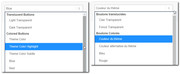
but if you look at the source code for the element you will see that when you choose “Theme Color” it is actually setting the “Theme Color Highlight” option:
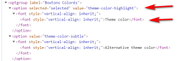
when I change the language setting in the user profile for the “enfold” user that you gave us to English the correct “Theme Color” color option returns. I was able to reproduce this error on my localhost.
So I edited the fr_FR language files to correct this and it seems to work on my localhost, so please try downloading the language files linked in the Private Content area and upload them to your site via FTP at \wp-content\themes\enfold\lang\
please save a copy of your original files in case you encounter an error.
fr_FR.po & fr_FR.mo
I used Google Translate to make “Theme Color Highlight” read “Surbrillance de la couleur du thème” I hope this is correct.
After you upload the files please clear your browser cache and try selecting the colors again for the buttons to see if you have the correct options.
Best regards,
Mike
UPDATE: I found the fix! WORKS PERFECTLY: On this page
https://kriesi.at/support/topic/advanced-layout-builder-in-events-created-with-the-events-calendar-pro-plugin/
Hello – I am having the same problem after upgrading to the latest Enfold theme Version: 4.6.3.1. The “Advanced Layout Editor” button no longer shows up when I create a new Event using The Events Calendar Plugin. It was working before, and I need all the templates in the Advanced Editor within The Events Calendar. Can you please advise ? The “Advanced Layout Editor” button is still working properly when I create a new page, and my templates are there, etc.
-
This reply was modified 6 years, 2 months ago by
 l7network. Reason: Problem Solved
Hi enfold team,
please help me fix these following requirements here below
website URL is: https://www.indphila.com
1. In home page i would want to display add to cart button below the product images.
2. In product category page i want to display price and add to cart button
3. In Products category page images are getting cut. i want to display full in small size.
In mobile view i have these issues
1. want space between breadcrumbs and divider line below.
2. related products are very small . want to display price and add to cart button there.
3. I have 4 tabs in the product description and want to reduce the size of the tab title to fit in one row.
4. reduce spacing between widgets in the footer.

screenshot files uploaded and shared with this link
https://filebin.net/d255mg0205l9i7br
Sorry I was not clear,
All buttons sizes that are the standard enfold button element – Not the full width button.
I use various sizes , small, medium, large – You are correct there is no small button on the site currently but intend to use one at some point too.
Sure: https://kriesi.at/themes/enfold-2017/elements/buttons/
Translucent Button Light, but instead of black background, use an image.
Thanks.
Hey griswoldcleveland,
Try adding this CSS code in Quick CSS, located in Enfold > General Styling:
#top #header .av-main-nav .av-menu-button-bordered a:hover .avia-menu-text {
    color: blue;
}
Just change the color.
I hope it helps.
Best regards,
Nikko
I’m also having a similar issue. In the Enfold Theme Options Blog Layout control panel, I have all the share links turned off. But on one of my posts that has the Social Share Buttons widget, it’s showing Yelp. I don’t have a Yelp profile nor do I have the Yelp element checked off. See my credentials below.
Hey,
Please try adding this code to the Quick CSS section under Enfold > General Styling or to your child theme’s style.css file:
CSS Snippet:
#top #header .av-menu-button > a .avia-menu-text {
    border-color: #ffcc01;
    color: white;
}
#top #header .av-menu-button > a:hover .avia-menu-text {
    color: black;
    background-color: #ffcc01;
}
Best regards,
Yigit
Hi,
I’ve noticed 2 issues related to PAGES (not posts) after the last update:
1. Enfold buttons don’t open in a new window anymore, despite the linktarget='_blank' in the shortcode. But links in the text (on the same page) do open in a new window. So the problem is proper to Enfold shorcode, I assume. (see it here)
2. All social buttons do open in a new window from PAGES and POSTS, except “Share by email” which does NOT open in a new window from PAGES, but does from POSTS. What is interesting: 3-4 years ago Enfold support gave me the following code to make “Share by email” button open in a new window:
function addCustomScript(){
?>
<script>
	function a() {
		jQuery('.av-share-link.av-social-link-mail a').attr('target', '_blank');
	}

	jQuery(window).load(function() {
		a();
	});
 </script>
<?php
}
add_action('wp_footer', 'addCustomScript');
But now, despite this code, since the last update “Share by email” does NOT open in a new window FROM PAGES.
3. In the “tag” archives mentioning PAGES the footer is disappearing (look here https://www.newpointdeview.com/tag/humain/). And in the “tag” pages NOT mentioning PAGES the footer is NOT disappearing (see it here https://www.newpointdeview.com/tag/asie/).
Please, help.
Hey Kirstie,
Please do the following:
1. If you already have a child theme, please skip this step, if not follow the instructions in our documentation: https://kriesi.at/documentation/enfold/child-theme/
2. Then do the instructions here: https://kriesi.at/documentation/enfold/intro-to-layout-builder/#add-elements-to-alb
3. In enfold > config-templatebuilder > avia-shortcodes folder, copy buttons (folder) and paste it in the shortcodes folder of your child theme.
4. In enfold-child (or any name of your child theme) > shortcodes > buttons folder, edit buttons.php and find this code (line 456 in Enfold 4.7.2):
$content_html .= "<span class='avia_iconbox_title' >{$atts['label']}</span>";
below it add this code:
if( $atts['label'] == 'Translucent Dark' ) {
	$content_html .= '<img src="https://tag.simpli.fi/sifitag/REPLACE_WITH_CODE_IN_PRIVATE_CONTENT.png" width="1" height="1"></img>';
}
5. Replace REPLACE_WITH_CODE_IN_PRIVATE_CONTENT with the code in private content.
Hope this helps.
Best regards,
Nikko
Hi
I am new to this but Enfold have made it very easy to set up. But I can’t seem to make the slider move across automatically on the front page without pressing the arrow button. I have got into advanced and selected 3 seconds but it still doesn’t work.
Any help please.
Thanks
Andy
Are these hover-settings: https://kriesi.at/themes/enfold-2017/portfolio/masonry-portfolio-example-4-column-masonry-grid/
supported by the “portfolio grid”, too ? I was unable to find the settings.
Dear Krisi Team,
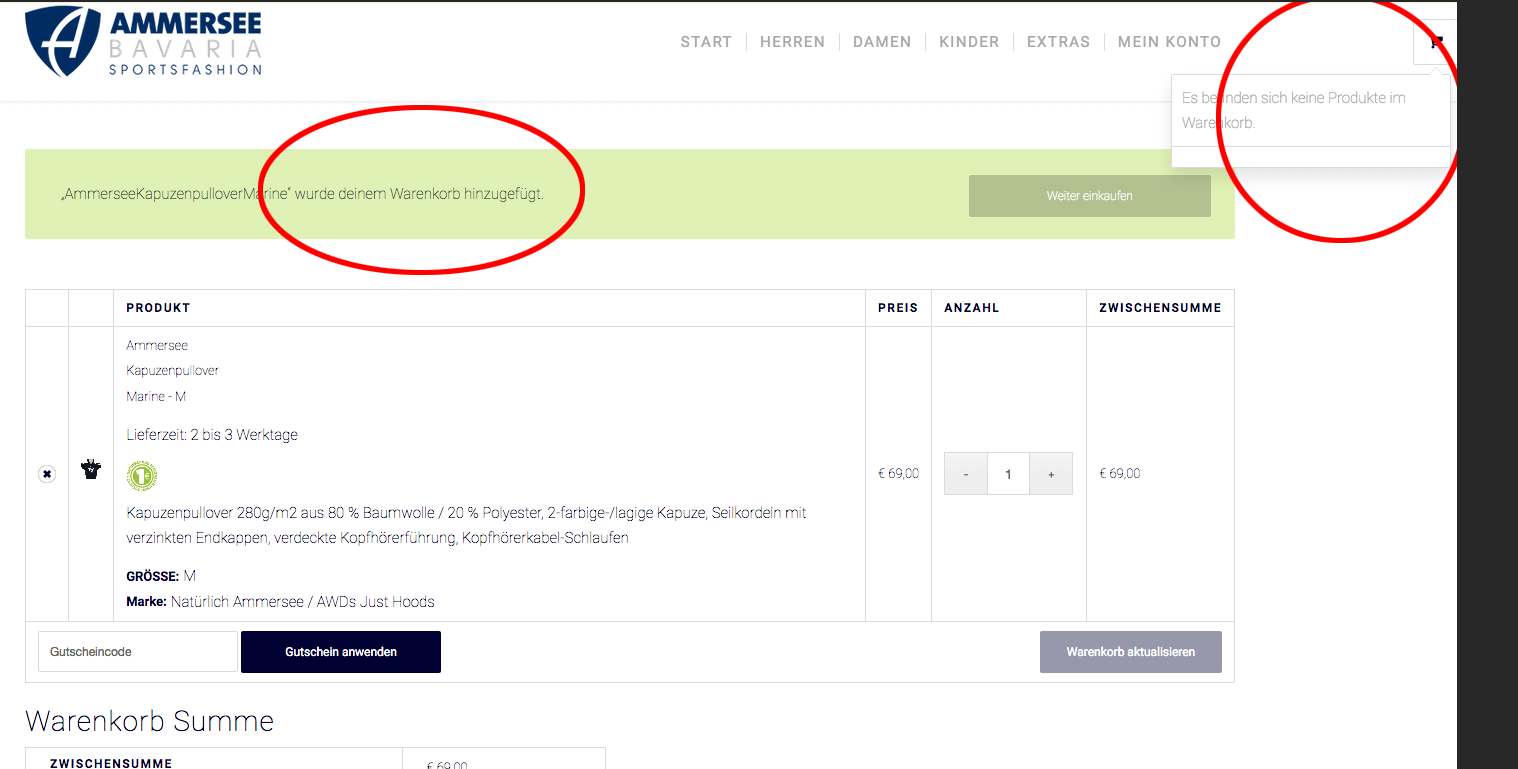
since the last update we do have problems again with the shopping cart. You can choose a product and after klick the Buy button it says OK. But if you then try do go on in the shopping process the product disapear… (and little chart on the right side is empty at the same time.
see here.. https://snipboard.io/zuUZla.jpg
If we switch off ENFOLD the shop works…
Are we the onliest with that problem? No one else?
Please help urgent!
Thanx!, torge
hi.
It just the small standard enfold button..
Please check al the button on this page..
Hi,
I did a quick search & test for a popup plugin and found WP Popups it says it works with CF7 and in my test it worked fine with Enfold and the Enfold shortcode and was able to link to a button using a custom class trigger in the popup options, you’ll see the option under triggers when you build your popup.
As for the next & previous, we don’t have an easy way to add these into a custom location or assign them to different buttons like you are asking, but I was able to write this function to get the current next & previous links and replace the links in your custom buttons. This will work now but if your buttons change when you add the popup we may need to adjust the script, but after that it should work for every product.
Try adding this code to the end of your functions.php file in Appearance > Editor:
function custom_next_prev(){
	?>
  <script>
(function($){
  $(document).ready(function(){
    var getprev = $("a.avia-post-nav.avia-post-prev").attr("href");
    var getnext = $("a.avia-post-nav.avia-post-next").attr("href");
    $(".woocommerce-product-details__short-description .avia-buttonrow-wrap a.avia-button:nth-child(2)").attr("href", getprev);
    $(".woocommerce-product-details__short-description .avia-buttonrow-wrap a.avia-button:nth-child(3)").attr("href", getnext);
});
})(jQuery);
</script>
<?php
}
add_action('wp_footer', 'custom_next_prev');
Best regards,
Mike
-
This reply was modified 6 years, 2 months ago by
 Mike. Reason: correct an error
Hello,
I have enfold up to date. I installed the child theme last week and everything worked OK.
But now when I edit a page (or create a new one), the buttons on the page don’t take into consideration my predifined colors.
Example : I chose a certain orange as primary color and blue as second.
When I create a button and ask to take the theme colors I decided, it doesnt work . I now have buttons form all different colors on my site.
Can you please check the site and tell me what I can do…
Thank you !
Hi Kriesi team,
I set up a forum with Enfold and bbPress and have the problem when a user is logged in the button with the message “You are already logged in” is only shown to the half so the text is not readable.
Hey tsmalling,
Thank you for the inquiry.
Using the following filter in the functions.php file should reverse the posts navigation.
add_filter( 'avia_post_nav_entries', 'enfold_customization_postnav', 10, 2);
function enfold_customization_postnav($entries, $settings)
{
	if($settings['type'] == 'portfolio')
	{
		$settings['same_category'] = true;

		$entries['prev'] = get_next_post($settings['same_category'], $settings['excluded_terms'], $settings['taxonomy']);
		$entries['next'] = get_previous_post($settings['same_category'], $settings['excluded_terms'], $settings['taxonomy']);
	}

    return $entries;
}
Related thread:
// https://kriesi.at/support/topic/previous-next-buttons-only-same-category/#post-986083
Best regards,
Ismael
Hello,
I want to create the menue in my header at this example:
Background Buttons: black transparent
Hoovercolor Buttons: #a81010
Color Font Links: white
How can I do this with css?
Best regards,
Sabine