Viewing 30 results - 2,641 through 2,670 (of 11,206 total)
  • Author
    Search Results
  • #1190404
    Cdfb
    Participant

    Hi guys.
    I’ve been having problems with the responsive version of Enfold.
    1. The Social Media buttons are non existent on the responsive version.
    2. There is a beige bar between the navigation and the first picture. I don’t know why and I would love to get rid of it.
    3. When opening the navigation it is pink. I would like to change the color and can’t find where to do it.

    #1190271
    frasche
    Participant

    II am a web designer and have already installed many Enfold Themes for my customers. With the latest installation (4.7.3) I can no longer find buttons for animations in the AV-Page Builder. In version (4.5.7) “Edit column” there is a tab with “Animation”. Version 4.7.3 is no longer available or is it hidden so that I cannot find it?

    #1190231

    Hi schwabino,

    Here is the code you can put in Enfold > General Styling > Quick Css,  if it does not work, put into themes/enfold/css/custom.css

    
    .avia-cookie-consent .avia-cookie-consent-button.av-extra-cookie-btn, 
    .avia-popup .avia-cookie-consent-button.av-extra-cookie-btn {
        color: #fff;
        background-color: #2d80f7;
        border-color: #fff;
    }
    

    If you need further assistance please let us know.

    Best regards,
    Victoria

    #1190104

    Well today I logged into the admin and the update alert appeared at Enfold Child > Theme Update. However, when I click the Updated Now button the following is returned:

    Errors occured checking on 2020/03/04 13:31:
    Download Package URL: Errorcode 404 returned by Envato: Not Found:
    – description: The purchase you have requested is not downloadable at this time.:
    – Possible cause: your download limit might be exceeded – please try again later.
    Download Package URL: A problem occured accessing your download link. Unable to perform update.
    Following Envato package errors occured:
    Enfold – Request for Download URL failed.

    I don’t know what the “download limit” is, but I do not this is the first time I’ve attempted to update the theme, so I shouldn’t be anywhere near hitting any limit. Any suggestions on how to proceed to get the latest theme?

    #1190061

    Hi,
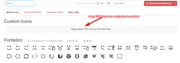
    Thanks for the feedback, please try adding two new social icon profiles by following these steps then go to Fontello and upload SVG icon versions of your flags to be converted into the icon font:
    2020-03-04-065932
    Then these will be next to your other social icons and you will be able to add links in the social profiles in the theme options.

    Best regards,
    Mike

    #1190035

    Hi,

    sorry but it doesn’t work again I leave only for short time the site online the link at below…
    The first button is an image, but I must customize the second the third etc… not as image but with button element enfold.

    Please help me

    asap

    Best Regards

    #1190032

    Hey,

    Please edit your button element and give it a custom CSS class (“your-custom-class” in example below) in Advanced > Developer Settings tab and then add following code to Quick CSS in Enfold theme options > General Styling tab

    .your-custom-class {
        border-top-left-radius: 100px!important;
        border-bottom-left-radius: 100px!important;
    }

    Cheers!
    Yigit

    #1189775
    Bernd
    Participant

    Hallo zusammen,
    Leider werden mir einige Optionen bei den Cookie-Einstellungen nicht angezeigt.
    Mir fehlen zwei komplette Reiter (oben habe ich nur den Reiter Datenschutz, sonst gibt es hier auch eine CookieRubrik).
    Einige Cookieeinstellungen stehen nun unterhalbder DSGVO Reiter, jedoch unvollständig und ich kann keine neuen Buttons eröffnen, um meine Cookie-Einstellungen zu individualisieren. Enfold ist auf aktuellster Version (4.7.3) PHP 7.3 und WordPress 5.3.2 ebenso aktuell.
    Bei einer andere Seite funktioniert alles super und alle Einstellungen sind vorhanden.

    Habt ihr eine Idee?

    Vielen Dank im Voraus.
    ———————————
    Hello, everybody,
    Unfortunately, some options in the cookie settings are not shown to me.
    I am missing two complete tabs (at the top I only have the Privacy tab) and I cannot open new buttons to customize my cookie settings. Enfold is up to date with the latest version (4.7.3) of PHP and WordPress.
    On another site everything works great and all settings are present.

    Thanks a lot!

    #1189528

    Due to IP restriction, I am not able to login to your dashboard.

    Q: what is you IP location and IP address.

    Note: I asked in a prior ticket are you able to access the dashboard and your tech replied yes after white listing certain counties.

    Re. 1- Please add following code to Quick CSS in Enfold theme options > General Styling tab
    NOTE: this reducing the growth of the image size HOWEVER I am not trying increasing the physical size of my images. I never did. Prior to the upgrade my images had a zoom in hover effect but the physical size of the image never increased. So for example an 800×600 image did not increase to say 900×1200 pixel on hover , it remained an 800×600 image.

    Q: how do I retain the image size and add back the zoom in effect universally for all images set this way to zoom in prior to the upgrade?

    2- Please go to /enfold/includes/admin/ in Appearance > Editor and replace the content of register-backend-advanced-styles.php file with this one – https://raw.githubusercontent.com/KriesiMedia/enfold-library/master/temp_fixes/Enfold_4_7_3/register-backend-advanced-styles.php

    Is this in reference to the nav bar button going from circular to square?

    Note the button for Free Consultation has this style applied which used to make the button round: Button Style (Colored) (where is this configured?)

    Note: I have this Quick CSS (Adopted from prior designer)

    Q: is this code being ignored in 4.7.3 and is this being applied to the nav bar button?

    /* Square buttons */
    #top #wrap_all .my-custom-button,
    #top #wrap_all .my-custom-button a.avia-button {
      padding: 0;
      min-width: 100px;  
      border-radius: 2px;
      line-height: 100px;
    }

    2020-03-02_1301

    Please advise on all 3 issues above.

    • This reply was modified 6 years ago by kurson.
    #1189352

    Thank you for the link. I have downloaded and installed it for future use.

    Q: are there automatic updates to the child theme?

    As to the Update process. I did manually update the site. In doing so the site has incurred front end issues.

    Page example: https://blgenvironmental.com/about/

    1. Before the update the nav bar Free Consultation button was circular. After the Update the button is rectangular.

    Screenshot: https://www.screencast.com/t/VdjDKiLs1

    2. Before the update the update the image hover effect for an image was contained to the image. After the update the image itself increases in size and bleeds out to the next container. It’s terrible.

    Screenshot: https://www.screencast.com/t/Sa7dpJEsC

    . Please advise on how I can restore my layout to look as it did before for Enfold v 4.7.3, manually upgraded from v4.2.

    #1189115

    In reply to: Tiktok in social media

    Hey bitterlemmer,
    Do you mean that you would like a Tiktok social icon in the header or footer next to the others, or do you mean a Tiktok social share button in the box after the posts?
    The social share box button will require a request because of the linking involved, but a social icon can easily be added.
    You can add more social profiles by following the steps outlined here in our documentation.
    Then you can upload your new icon to the Enfold Theme Options > Import/Export > Iconfont Manager from http://fontello.com/
    I didn’t find your Tiktok icon on fontello so you will need to find a SVG of it to drag into fontello to create the icon font:
    2020-02-29-161400
    The icon font will be black and white which css will color, so you don’t need to find a colored SVG, it won’t work. But if you find a png with a transparent background then you can convert it here.
    Please give this a try and let us know if you need a hand with it.

    Best regards,
    Mike

    #1189114

    Hey mary301187,
    You can add more social profiles by following the steps outlined here in our documentation.
    Then you can upload your new icon to the Enfold Theme Options > Import/Export > Iconfont Manager from http://fontello.com/
    I didn’t find your Beatport icon on fontello so you will need to find a SVG of it to drag into fontello to create the icon font:
    2020-02-29-161400
    The icon font will be black and white which css will color, so you don’t need to find a colored SVG, it won’t work. But if you want to use the png you linked to because it has a transparent background then you can convert it here.
    Please give this a try and let us know if you need a hand with it.

    Best regards,
    Mike

    #1189021

    Topic: Few help needed

    in forum Enfold
    Romovick
    Participant

    I recently purchased enfold theme and i need help on

    1) the price shows in product page is really ugly looking, can i give it a style and visible in center?
    2) In product grid, can i show some product description instead of price?
    3) Can we customise height of product displayed on product grid?
    4) Can we show Customer image little bigger on left side and add a read more button?

    waiting for reply

    • This topic was modified 6 years ago by Romovick.
    #1189014

    Hey frankic,
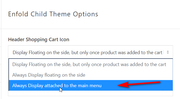
    Sorry for the late reply, to show the shopping cart button please go to Enfold > Shop Options then set the Header Shopping Cart Icon to the third option, attached to the main menu.
    2020-02-29-054509
    Expected results:
    2020-02-29-054739
    If this doesn’t help, please include an admin login in the private content area so we can be of more assistance.

    Best regards,
    Mike

    #1188970

    Topic: No carga bien el tema

    in forum Enfold
    chili72
    Participant

    Failed to load plugin url: http://www.huanchuyadm.com/wp/wp-content/themes/enfold/config-templatebuilder/avia-template-builder/assets/js/avia-tinymce-buttons-4.js

    Me siento timado, veo que a muchos les sucede este problema con este tema y demoran demasiado para dar una solución

    #1188853
    Hannes
    Participant

    Hi Enfold Team,

    I need a dynamic element, I want the user to select one radio button option. Depending on the selection the content displayed should change. Is there a solution from enfold?

    Thanks a lot!

    PressWizards.com
    Participant

    Background Summary: I’ve used Enfold for many clients for many years, always use latest version of WP and Theme. Congrats on building something that works well, has been very reliable, and is always updated.

    Issue Research: Making changes to a page in the Advanced Layout Builder (ALB) and clicking the Update button saves the changes to the database posts table successfully (and shows in Revisions), but NOT to the postmeta ‘_aviaLayoutBuilderCleanData’ field, and then the theme seems to be pulling from that field to display the page, which displays an old version of the page, not from the posts post_content field like normal. I’ve verified using Chrome Dev Tools that the POST submission has all the posts and postmeta fields with correct values containing the updates made, and gets a 200 success response, but the postmeta CleanData field is not updated for some reason.

    Multiple Updates are made, and if using the Block Editor, clicking Update says it works, but displays the old version, and reloading the Editor page causes all those changes to be LOST. We’ve lost hours of work due to this issue. Changing the page status from Draft to Published seems to help for some reason. Cloning the page does not help.

    I have tried multiple servers, migrating a site from one to another, same issue. Disabled all plugins, disabled all caching, same issue. It does not happen on all pages, but even removing sections of the page don’t seem to help, once it’s not working, it stops updating.

    Interestingly, if I delete the ‘_aviaLayoutBuilderCleanData’ field value in the database, then the page updates ok, and the page displays ok. It doesn’t seem to recreate it right away either… a few updates work ok, then once it recreates it, it doesn’t display any updates made again, and the issue is back.

    I searched and found many posts with similar issues, but most seem to be either certain text or sections or characters cause it to break, such as the special character replacement noted in the docs, and that’s a shame, the text should be escaped or something. If it’s parser related, it’s only affecting the CleanData field value, which is the problem. Upon failing to update, it should delete that field then, so it falls back to displaying from the posts post_content field like a normal site would

    I have created a workaround that seems to solve the issue completely, and this code can be placed in the functions.php of a child theme, or as I prefer, use the Code Snippets plugin and have it fire only in the Admin:

    function fix_for_enfold_page_builder( $post_ID, $post ) {
      $page_builder_active = get_post_meta( $post_ID, '_aviaLayoutBuilder_active', true );
      $page_builder_shortcode_tree = get_post_meta( $post_ID, '_avia_builder_shortcode_tree', true );
     
      if ( $page_builder_active && $page_builder_shortcode_tree ) {
        update_post_meta( $post_ID, '_aviaLayoutBuilderCleanData', $post->post_content );
      }
    }
    add_action( 'wp_insert_post', 'fix_for_enfold_page_builder', 10, 2 );

    I would suggest Enfold stop using ‘_aviaLayoutBuilderCleanData’ completely, as it’s very concerning when updates show in Revisions and in the Editor, but are not actually used for the display of the content, that’s a major bug and no matter the cause, storing two versions of a page is bound to have issues and cause problems, not to mention take up twice as much space in the database.

    #1188610

    Hey beachcitiescryo,

    Here is the code you can put in Enfold > General Styling > Quick Css,  if it does not work, put into themes/enfold/css/custom.css

    
    @media only screen and (max-width: 767px) {
        .html_header_transparency #top .avia-builder-el-0 .slideshow_caption {
            padding-top: 20px;
        }
        #top .avia-slideshow-button {
            margin-top: 0px;
        }
    }
    

    If you need further assistance please let us know.

    Best regards,
    Victoria

    #1188574
    Luis Manuel Lévano Arévalo
    Guest
    #1188365

    Hey Dzimnikov,

    Please try the following in Quick CSS under Enfold->General Styling:

    .page-id-19 #av_section_2 .avia-button-row td {
      padding: 0; 
    }

    Best regards,
    Rikard

    #1188174

    In reply to: Full width easy button

    Hey beachcitiescryo,

    Here is the code you can put in Enfold > General Styling > Quick Css,  if it does not work, put into themes/enfold/css/custom.css

    
    #top .avia-slideshow-button {
        padding: 15px 50px;
    }
    

    If you need further assistance please let us know.

    Best regards,
    Victoria

    #1188119

    In reply to: Vertical align button

    Hey ashrigby,

    Here is the code you can put in Enfold > General Styling > Quick Css,  if it does not work, put into themes/enfold/css/custom.css

    
    @media only screen and (min-width:768px){
        #av_section_1 .avia-button-wrap.avia-button-right {
            margin-top: 30px;
        }
    }
    

    If you need further assistance please let us know.

    Best regards,
    Victoria

    #1188047

    Hi,

    Sorry for the confusion. I thought you were using button or button with border menu styles on your desktop menu and their styling was not applying on burger menu. We have fixed this and will include in upcoming version.

    I edited “Menu Links in overlay/slide out” in Enfold theme options > Advanced Styling tab. Styling defined for desktop and mobile menu items are separate. Please review your website :)

    Best regards,
    Yigit

    #1187924

    In reply to: Support Link Hidden

    Hey milano24ore,

    Sorry for the confusion. To open a new thread or ticket, please visit the https://kriesi.at/support page, then go to the Enfold forum. At the very top of the page, you should see a huge button that when clicked will lead you to the very bottom of the page and directly to the form where you can post your inquiry. You can also bookmark this link https://kriesi.at/support/forum/enfold/#new-post.

    Thank you for your patience.

    Best regards,
    Ismael

    #1187810
    agreatescape
    Participant

    Is this possible in Enfold? Or do you know if there’s a solution for this for WordPress in general?

    Here’s an example of what I’m talking about: https://www.securegive.com/world-changers-demo/
    Hover over the “Select A Campus To Give” button.

    Thanks in advance!

    #1187734
    nautrino
    Participant

    Hi,

    since Enfold 4.7.3, masonry item for showing the posts (blog) with showing the sort option:

    A) clicking on a category give me 2 posts as a result. But there are 25 to show and the setting is: show 16 posts per page. So the masonry gives the button “load more”. After clicking I get 6 more. (that are still not 16 but 8, so the user has to click again “show more”… and so on)
    -> why is the first result not showing 16, then showing 9 more (=25)?
    -> in other categories it’s quite the same (instead of 16 posts 4 or 5 are shown even if there are over 200 posts)

    B) I have a shaky masonry blog overview, when clicking on the “load more” button. A second scrollbar is showing up for some seconds on the right side and the post images are flaring up for 1-2 seconds.

    Thanks for help.
    Nautrino

    • This topic was modified 6 years ago by nautrino.
    #1187684

    Hi,

    Thanks for the login details, I see the same problem on my end. It doesn’t work using the button, but manually navigating to that page is fine. First off, could you try updating the theme to the latest version (4.7.3) to see if that helps please? https://kriesi.at/documentation/enfold/how-to-install-enfold-theme/#theme-update

    Best regards,
    Rikard

    #1187504

    Topic: Adding red more button

    in forum Enfold
    dweddell
    Participant

    Hi

    I m trying to add a read more button script to asn enfold site.

    script take from this site:

    https://codepen.io/chun-wong/pen/gKyero

    I’ve enqued the script in child theme functions.php, but just cant get it to work. Are you able shed any light?

    kind regards

    Duncan

    #1187326

    In reply to: Lightbox

    Hi,
    Glad to hear this is working for you, the trigger to open the popup is a link with the URL #test-popup that also has the class open-popup-link so to add this to a masonry gallery image, add this jQuery to a code block on your page:

    
    <script>
    (function($){
      $(document).ready(function(){
        $("a#av-masonry-1-item-1960").attr("href", "#test-popup").addClass('open-popup-link');
    });
    })(jQuery);
    </script>
    

    You will need to adjust the masonry ID you yours, and clone this code for every link, if you need help finding it please link to your page so we can inspect.
    You can add image and button shortcodes from the shortcode wand to the popup and it will work, here is an example:
    2020-02-24-060959
    Best regards,
    Mike

    #1187175

    Hi,

    Thank you for following up.

    Looks like this is the default behavior of html5 videos as described in the following thread.

    // https://kriesi.at/support/topic/enfold-fullwidth-easy-slider-mute-video-player-option/#post-1179100

    The volume control or button is hidden, so you can’t use it but you can press the up / down arrows to increase to decrease the volume.

    As for the videos where you can’t change the volume slider, this HTML5 video player is the WordPress built-in “mejs-mediaelement” and the text for the volume control is hidden, but it says this:
    Utilisez les flèches haut/bas pour augmenter ou diminuer le volume.
    Use the up / down arrows to increase or decrease the volume.
    which is not much help if you can’t see it.

    Best regards,
    Ismael

Viewing 30 results - 2,641 through 2,670 (of 11,206 total)