
-
Search Results
-
Hello support,
today I updated 3 sites (all WP 5.4 and Enfold 4.7.4) and on two of those sites, the Cookies & Privacy settings look different and even do not work correctly.
The one site that works fine shows 3 Tabs at the top
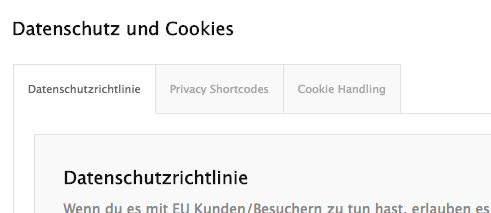
the other two sites do not have these tabs:

and on the 2 sites with no tabs, it is not possible to add more buttons to the Cookie Consent Message Bar or Modal Popup Window. Clicking on the [+] sign does not do anything.As I said, all sites run the latest WP and Enfold version.
Hi, I’ve got a nav using enfold theme, whichever page I set as the most right button, the drop-down does not work. when hovering over it doesn’t drop down like the others, to show subpages. When I swap around it’s always the far right menu.
Any ideas?
Hello,
I hope all is well during this COVID-19 outbreak.
I have a question, this provided website in private content is using Enfold and my question is:
they have been using some sort of effects for their white transparent buttons… Can anyone kindly assist me, which option Enfold or what CSS can do the job?
There are two effects, for light and dark transparent buttons.Thank you very much.
Topic: Dropdown button
Hello, how can I create a drop-down button in the Enfold theme? I do not want a menu, I want a button that once clicked shows a list of drop-down links which users can access (example on this page https://about.google/products/ – the “Get started” button). Please help.
Thank you in advance!Hallo!
Ich weiß jetzt nicht ob es an WP selbst liegt oder am Enfold Theme (alles aktuellste Versionen), es fehlt dort eine primäre “mast häf” Funktion, habe zumindest keinerlei Möglichkeit gefunden.Vorgang:
1) jede Menge Untermenues angelegt für Kategorien, um eine finale Vorschauübersicht der Menuegröße zu haben
2) jetzt soll jedoch nicht jede Kategorie = Untermenue sichtbar sein, weil noch nichts hinterlegt ist und erst mit Zeit folgt.
3) daher wird mehr als die Löschfunktion in der Menuestruktur benötigt, da diese null Sinn macht in dem Fall. (da ja ansonsten wieder alles angelegt werden müsste = überflüssige Arbeitszeit verschwendet)
4) daher wäre es schön wenn ein einfacher Button, Kästchen oder Linkwort dort mit integriert wäre ( neben dem Wort entfernen = deaktivieren + aktivieren)Falls am Theme liegend: wann wird es ein Update geben wo das dann enthalten ist?
Oder gibt es ein funktionsfähiges Plugin was diese dann ermöglicht, wer hätte einen Tipp?Grüße
A.B.Hi, I know this question has been asked very often already.
I have updated to the latest WordPress version, and updated Enfold.
Since then the Enfold Layout editor does no longer work.
It shows all Enfold Avia Layout editor Shortcodes in one big shortcode block.
The edit in Avia Layout Editor button is somehow hidden behind the default editor button. See screenrecording in private content.I tried de-activating plugins (I haven’t changed any plugins recently and Enfold worked fine with the plugins installed).
Can you take a look at the site?
Topic: Warning After Theme Update
Hello,
I received this error warning this morning after updating a client’s website. Below are the steps that occurred along with the message:
Steps
1. Updated plugins
2. Updated Enfold to version 4.7.4 via “Updates” tab in Dashboard
3. After updating, clicked “Visit Site” in Dashboard drop down menu
4. Home page appeared with warning message above the header with content appearing below
5. Clicked into an interior page and message disappeared
6. Viewed website in Incognito window and message did not appear
7. Website seems to be functioning normallyEntire Message
Warning: file_get_contents(/wordpress/wp-content/themes/enfold/css/grid.css): failed to open stream: No such file or directory in /www/wp-content/themes/enfold/config-templatebuilder/avia-template-builder/php/asset-manager.class.php on line 448 Warning: file_get_contents(/wordpress/wp-content/themes/enfold/css/base.css): failed to open stream: No such file or directory in /www/wp-content/themes/enfold/config-templatebuilder/avia-template-builder/php/asset-manager.class.php on line 448 Warning: file_get_contents(/wordpress/wp-content/themes/enfold/css/layout.css): failed to open stream: No such file or directory in /www/wp-content/themes/enfold/config-templatebuilder/avia-template-builder/php/asset-manager.class.php on line 448 Warning: file_get_contents(/wordpress/wp-content/themes/enfold/config-templatebuilder/avia-shortcodes/buttons/buttons.css): failed to open stream: No such file or directory in /www/wp-content/themes/enfold/config-templatebuilder/avia-template-builder/php/asset-manager.class.php on line 448 Warning: file_get_contents(/wordpress/wp-content/themes/enfold/config-templatebuilder/avia-shortcodes/buttonrow/buttonrow.css): failed to open stream: No such file or directory in /www/wp-content/themes/enfold/config-templatebuilder/avia-template-builder/php/asset-manager.class.php on line 448 Warning: file_get_contents(/wordpress/wp-content/themes/enfold/config-templatebuilder/avia-shortcodes/contact/contact.css): failed to open stream: No such file or directory in /www/wp-content/themes/enfold/config-templatebuilder/avia-template-builder/php/asset-manager.class.php on line 448 Warning: file_get_contents(/wordpress/wp-content/themes/enfold/config-templatebuilder/avia-shortcodes/gallery/gallery.css): failed to open stream: No such file or directory in /www/wp-content/themes/enfold/config-templatebuilder/avia-template-builder/php/asset-manager.class.php on line 448 Warning: file_get_contents(/wordpress/wp-content/themes/enfold/config-templatebuilder/avia-shortcodes/google_maps/google_maps.css): failed to open stream: No such file or directory in /www/wp-content/themes/enfold/config-templatebuilder/avia-template-builder/php/asset-manager.class.php on line 448 Warning: file_get_contents(/wordpress/wp-content/themes/enfold/config-templatebuilder/avia-shortcodes/grid_row/grid_row.css): failed to open stream: No such file or directory in /www/wp-content/themes/enfold/config-templatebuilder/avia-template-builder/php/asset-manager.class.php on line 448 Warning: file_get_contents(/wordpress/wp-content/themes/enfold/config-templatebuilder/avia-shortcodes/heading/heading.css): failed to open stream: No such file or directory in /www/wp-content/themes/enfold/config-templatebuilder/avia-template-builder/php/asset-manager.class.php on line 448 Warning: file_get_contents(/wordpress/wp-content/themes/enfold/config-templatebuilder/avia-shortcodes/hr/hr.css): failed to open stream: No such file or directory in /www/wp-content/themes/enfold/config-templatebuilder/avia-template-builder/php/asset-manager.class.php on line 448 Warning: file_get_contents(/wordpress/wp-content/themes/enfold/config-templatebuilder/avia-shortcodes/icon/icon.css): failed to open stream: No such file or directory in /www/wp-content/themes/enfold/config-templatebuilder/avia-template-builder/php/asset-manager.class.php on line 448 Warning: file_get_contents(/wordpress/wp-content/themes/enfold/config-templatebuilder/avia-shortcodes/iconbox/iconbox.css): failed to open stream: No such file or directory in /www/wp-content/themes/enfold/config-templatebuilder/avia-template-builder/php/asset-manager.class.php on line 448 Warning: file_get_contents(/wordpress/wp-content/themes/enfold/config-templatebuilder/avia-shortcodes/iconlist/iconlist.css): failed to open stream: No such file or directory in /www/wp-content/themes/enfold/config-templatebuilder/avia-template-builder/php/asset-manager.class.php on line 448 Warning: file_get_contents(/wordpress/wp-content/themes/enfold/config-templatebuilder/avia-shortcodes/image/image.css): failed to open stream: No such file or directory in /www/wp-content/themes/enfold/config-templatebuilder/avia-template-builder/php/asset-manager.class.php on line 448 Warning: file_get_contents(/wordpress/wp-content/themes/enfold/config-templatebuilder/avia-shortcodes/masonry_entries/masonry_entries.css): failed to open stream: No such file or directory in /www/wp-content/themes/enfold/config-templatebuilder/avia-template-builder/php/asset-manager.class.php on line 448 Warning: file_get_contents(/wordpress/wp-content/themes/enfold/css/avia-snippet-site-preloader.css): failed to open stream: No such file or directory in /www/wp-content/themes/enfold/config-templatebuilder/avia-template-builder/php/asset-manager.class.php on line 448 Warning: file_get_contents(/wordpress/wp-content/themes/enfold/config-templatebuilder/avia-shortcodes/menu/menu.css): failed to open stream: No such file or directory in /www/wp-content/themes/enfold/config-templatebuilder/avia-template-builder/php/asset-manager.class.php on line 448 Warning: file_get_contents(/wordpress/wp-content/themes/enfold/config-templatebuilder/avia-shortcodes/notification/notification.css): failed to open stream: No such file or directory in /www/wp-content/themes/enfold/config-templatebuilder/avia-template-builder/php/asset-manager.class.php on line 448 Warning: file_get_contents(/wordpress/wp-content/themes/enfold/config-templatebuilder/avia-shortcodes/numbers/numbers.css): failed to open stream: No such file or directory in /www/wp-content/themes/enfold/config-templatebuilder/avia-template-builder/php/asset-manager.class.php on line 448 Warning: file_get_contents(/wordpress/wp-content/themes/enfold/config-templatebuilder/avia-shortcodes/promobox/promobox.css): failed to open stream: No such file or directory in /www/wp-content/themes/enfold/config-templatebuilder/avia-template-builder/php/asset-manager.class.php on line 448 Warning: file_get_contents(/wordpress/wp-content/themes/enfold/config-templatebuilder/avia-shortcodes/slideshow/slideshow.css): failed to open stream: No such file or directory in /www/wp-content/themes/enfold/config-templatebuilder/avia-template-builder/php/asset-manager.class.php on line 448 Warning: file_get_contents(/wordpress/wp-content/themes/enfold/config-templatebuilder/avia-shortcodes/slideshow_fullsize/slideshow_fullsize.css): failed to open stream: No such file or directory in /www/wp-content/themes/enfold/config-templatebuilder/avia-template-builder/php/asset-manager.class.php on line 448 Warning: file_get_contents(/wordpress/wp-content/themes/enfold/config-templatebuilder/avia-shortcodes/slideshow_fullscreen/slideshow_fullscreen.css): failed to open stream: No such file or directory in /www/wp-content/themes/enfold/config-templatebuilder/avia-template-builder/php/asset-manager.class.php on line 448 Warning: file_get_contents(/wordpress/wp-content/themes/enfold/config-templatebuilder/avia-shortcodes/social_share/social_share.css): failed to open stream: No such file or directory in /www/wp-content/themes/enfold/config-templatebuilder/avia-template-builder/php/asset-manager.class.php on line 448 Warning: file_get_contents(/wordpress/wp-content/themes/enfold/config-templatebuilder/avia-shortcodes/table/table.css): failed to open stream: No such file or directory in /www/wp-content/themes/enfold/config-templatebuilder/avia-template-builder/php/asset-manager.class.php on line 448 Warning: file_get_contents(/wordpress/wp-content/themes/enfold/config-templatebuilder/avia-shortcodes/tabs/tabs.css): failed to open stream: No such file or directory in /www/wp-content/themes/enfold/config-templatebuilder/avia-template-builder/php/asset-manager.class.php on line 448 Warning: file_get_contents(/wordpress/wp-content/themes/enfold/config-templatebuilder/avia-shortcodes/team/team.css): failed to open stream: No such file or directory in /www/wp-content/themes/enfold/config-templatebuilder/avia-template-builder/php/asset-manager.class.php on line 448 Warning: file_get_contents(/wordpress/wp-content/themes/enfold/config-templatebuilder/avia-shortcodes/video/video.css): failed to open stream: No such file or directory in /www/wp-content/themes/enfold/config-templatebuilder/avia-template-builder/php/asset-manager.class.php on line 448 Warning: file_get_contents(/wordpress/wp-content/themes/enfold/css/shortcodes.css): failed to open stream: No such file or directory in /www/wp-content/themes/enfold/config-templatebuilder/avia-template-builder/php/asset-manager.class.php on line 448 Warning: file_get_contents(/wordpress/wp-content/themes/enfold/js/aviapopup/magnific-popup.css): failed to open stream: No such file or directory in /www/wp-content/themes/enfold/config-templatebuilder/avia-template-builder/php/asset-manager.class.php on line 448 Warning: file_get_contents(/wordpress/wp-content/themes/enfold/css/avia-snippet-lightbox.css): failed to open stream: No such file or directory in /www/wp-content/themes/enfold/config-templatebuilder/avia-template-builder/php/asset-manager.class.php on line 448 Warning: file_get_contents(/wordpress/wp-content/themes/enfold/css/avia-snippet-widget.css): failed to open stream: No such file or directory in /www/wp-content/themes/enfold/config-templatebuilder/avia-template-builder/php/asset-manager.class.php on line 448 Warning: file_get_contents(/wordpress/wp-content/uploads/dynamic_avia/colorado_basin_roundtable.css): failed to open stream: No such file or directory in /www/wp-content/themes/enfold/config-templatebuilder/avia-template-builder/php/asset-manager.class.php on line 448 Warning: file_get_contents(/wordpress/wp-content/themes/enfold/css/custom.css): failed to open stream: No such file or directory in /www/wp-content/themes/enfold/config-templatebuilder/avia-template-builder/php/asset-manager.class.php on line 448 Warning: file_get_contents(/wordpress/wp-content/themes/enfold-child/style.css): failed to open stream: No such file or directory in /www/wp-content/themes/enfold/config-templatebuilder/avia-template-builder/php/asset-manager.class.php on line 448 Warning: file_get_contents(/wordpress/wp-content/themes/enfold/config-events-calendar/event-mod.css): failed to open stream: No such file or directory in /www/wp-content/themes/enfold/config-templatebuilder/avia-template-builder/php/asset-manager.class.php on line 448 Warning: file_get_contents(/wordpress/wp-content/themes/enfold/js/avia-compat.js): failed to open stream: No such file or directory in /www/wp-content/themes/enfold/config-templatebuilder/avia-template-builder/php/asset-manager.class.php on line 448Thank you for your time and I included logins to the site just in case you need access.
Topic: Cookie questions
I need more info on how Enfold’s cookie consent functionality works.
First of all, did I understand it correctly from https://kriesi.at/support/topic/facebook-pixel-google-analytics-tracking-codes/#post-1201062 that in order to use Facebook Pixel in accordance with the DSGVO I need to put the the Script for Google Analytics and Facebook Pixel together into the field Tracking Code für Google Analytics like this:
<!-- Global site tag (gtag.js) - Google Analytics -->
<script async src="https://www.googletagmanager.com/gtag/js?id=UA-XXXXXXX"></script>
<script>
  window.dataLayer = window.dataLayer || [];
  function gtag(){dataLayer.push(arguments);}
  gtag('js', new Date());

  gtag('config', 'UA-XXXXXXX');
</script>

<!-- Facebook Pixel Code -->
<script>
  !function(f,b,e,v,n,t,s)
  {if(f.fbq)return;n=f.fbq=function(){n.callMethod?
  n.callMethod.apply(n,arguments):n.queue.push(arguments)};
  if(!f._fbq)f._fbq=n;n.push=n;n.loaded=!0;n.version='2.0';
  n.queue=[];t=b.createElement(e);t.async=!0;
  t.src=v;s=b.getElementsByTagName(e)[0];
  s.parentNode.insertBefore(t,s)}(window, document,'script',
  'https://connect.facebook.net/en_US/fbevents.js');
  fbq('init', 'XXXXXXX');
  fbq('track', 'PageView');
</script>
<!-- End Facebook Pixel Code -->
Is this correct?
When I look at the Essential Cookies tab https://ibb.co/X5htVWP there is a sentence “We provide you with a list of stored cookies…” – is this just a sample text or do I really see a list of all cookies placed from my domain somewhere? Or does this refer to the other tabs of that modal window?
To be honest I am confused about the rest of this text too. First of all, essential cookies are essential cookies for a reason – why even provide an option to disable this? I have only looked at a few other consent tools, but none of them suggests disabling essential cookies.
And please, can we get rid of these awful switch buttons? They never match the text next to it, no matter how you try to phrase it, unless you introduce separate texts for “Setting is NOW on” and “Setting is NOW off”. If like in this sample it says “Aktivieren”, does it mean that it is not activated yet? “It just makes no sense, it’s a dumb control to use” – sorry, that’s my dad’s opinion who I asked to have a look as a neutral test person :)Next, when I want to enable or disable the cookies for Google Analytics and Facebook Pixel, the switch is locked and I see the text “Bitte aktiviere diese Funktion in Ihren Browsereinstellungen und lade die Seite neu” – https://ibb.co/9pHRQrV
Why is it disabled and what exactly should I enable in my Browser Settings? I’ll not write what my dad said here, but it was funny to hear. Also it should be “in deinen Browsereinstellungen” for consistent grammar – where can I fix that?Finally, a minor issue is the inconsistency of translations in the settings part, for example:
– German and English are pretty mixed up, not just texts but dropdown values too.
Dear,
We took over a website created with enfold, bought a license and did a full update of WP, enfold and used plugins.
After the update we are noticing that the hamburger menu on mobile is not activating
Please see: https://zencare.beAlso: We enable the button style menu item on the “webshop” menu item
After styling the item trough ¨the enfold settings it doesn’t show it.I’m trying to change the color of the previous/next buttons on the Layerslider. I tried the code you suggested below:
#top .avia-layerslider .ls-nav-prev, #top .avia-layerslider .ls-nav-next {
background: rgb(255, 215, 0);but that didn’t seem to work.
I took your suggestion:After adding custom CSS code, please make sure to disable CSS file merging in Enfold theme options > Performance and clear cache.
I disabled CSS file merging, but I’m using W3 Total Cache, and I was not sure which part of that to “purge.” They have 6 different “save and purge” buttons.
Any help you can give me would be appreciated!BTW, code for changing all the Navigation controls would be nice to have, in case I want to do that later.
Topic: Buttons stopped working
Hello,
The buttons do not work anymore. I can not edit them after enfold and WP update.
https://www.bilder-upload.eu/bild-ff825e-1586078033.png.html
Hi there,
I am managing a site which I left a bit behid. Today I noticed on the homepage http://samolis.family/en/samolis-family/towards the end of the page I used to have 3 big social buttons which used to have 3 big circles with social links but now, there are oval buttons but you cannot see the buttons in the middle. See attached image.
Could you assist?
Also should safely upgrade WordPress Enfold 5.4 and Enfold 4.7.4?Thank you!
Topic: Page Layout Not Full Width
I’m using CartFlows to create landing page funnels on my website. Their Elementor page builder makes the Enfold Avia Layout Builder and all the page controls disappear. I need the page design to stretch full width across the page and I want to eliminate the header and footer. Can you please tell me how to do this for just this page?
Update: It appears that when you work in Elementor and save your work, then come back out to the flow page and click the Update button, that’s when the page width shrinks and the header and footer appear. Once you click Update, you can’t get the page to go back to the way it was. No revisions or history changes work. Any suggestions here?
Is there a way I can insert code into the pre-established BUTTON element in Enfold? I’d like to use the preloaded buttons instead of using those I have created and then putting into Code Block. (they look much nicer!).
ON this page
you can tell the difference between code blocks with code that includes media of various buttons (DAILY LIVESTREAM CLASSES) vs the light blue buttons that are above the multi-colored ones mid-page.
Thank you!
(see code sample & log-in below)
Hello,
quick brief, so ive cloned our original wordpress website to a new managed wordpress hosting by godaddy so that we can try and resolve many problems with our current website
the old website was running WordPress 4.5.20 with enfold 3.6.1 with child theme enabled
any attempts in the past to update enfold, or wordpress failed miserably thats why we cloned the website to figure out the problem
now initially after everything was copied we updated to wordpress 5.3.2 and enfold parent theme updated to 4.7.4, and woocommerce to 4.0.1
the home page doesnt seem to be working normally, and at a certain point on the backend we received either of those two errors
Failed to initialize plugin: avia_builder_button
Failed to load plugin url: /wp-content/plugins/LayerSlider/assets/static/admin/js/ls-admin-tinymce.jsi cannot replicate the error any longer
thank you in advance for your help


