Hi,
Thanks for contacting us!
1- Please go to the Enfold theme options from your WordPress dashboard and from the Theme Options panel look for the Logo section: Enfold Options > Logo – https://imgur.com/a/r6sXIJs
If you choose to have a transparent header another logo for the transparent header can be added from Enfold > Header > Transparency options > Transparency Logo
2- Please go to Enfold theme options > General Styling > Fonts to change heading and body fonts.
3- Fullscreen slider supports up to 2 buttons out of the box. If you do not need to display a slider, you could add Color Section element to your page and set the height to 100% and add your image as background image. Then insert Button Row element inside your Color Section element to add more buttons :)
4- Could you please post a screenshot and show the changes you would like to make? You can upload your screenshots on imgur.com and post them here.
Regards,
Yigit
Hello,
I am using the enfold photography portfolio on my website.
There is no option for me to upload my logo in customization. How do I upload my logo onto the page?
The theme doesn’t allow me to change the font. How can I change the text fonts, ie google fonts? do I need a plugin?
On the home page, I need more than two buttons on the screen (view portfolio, get in touch, etc). Please, how do I add more buttons to the front page?
Lastly, I want to use the portfolio for a UX Product design portfolio. Please, how do add words (paragraphs) in between images on a portfolio page describing the processes I took? while the user scrolls down the page
-
This topic was modified 5 years ago by
 qkel94.
Hi,
1. Okay your code works to center the logo on a desktop, with the hamburger icon on the right. However, the header area is not then responsive and the logo gets cut off on a mobile phone. I have temporarily placed my left button widget in a Widget Area called “Header Widget Holding Area”, until I can make the header responsive.
2. I have a transparent header, is there a way to make the background of the menu area black upon scroll instead of remaining transparent? It’s set to black in General Styling and typically I believe Enfold does that, not sure why it isn’t working on this site.
3. The Menu overlay slide-out is not taking on the styling that I’ve given it in Enfold Child > Advanced Styling . I’ve added a red background to the menu itmes upon hover, but it doesn’t appear, which brings me to #5, the theme is outdated, could that be why?
4. This is an older Enfold site that someone gave me, I didn’t build it, but I told them to buy Enfold and update the theme, which I’ve tried to do for them, manually (renamed named original version _old and kept it, and the new _new) but it breaks the site every time. I now have “Enfold_new” and I reverted back to their older version because I can’t make it work. Might you have any thoughts on this. The old version that works is 4.6.2 and that’s what they are running now.
I am so sorry for so much
Hi Maarten,
You can try this font: https://www.fontsquirrel.com/fonts/berkshire-swash
Then click Webfont Kit and make sure to check WOFF, TTF, EOT and SVG then click DOWNLOAD @FONT-FACE KIT button.
Extract the downloaded zip file and find the berkshireswash_regular_macroman folder (inside web fonts folder) and zip it.
Go to Enfold > Import/Export > Custom Font Manager and upload berkshireswash_regular_macroman.zip
Go to Enfold > General Styling > Fonts (tab) > Heading Font > set this to berkshireswash regular macroman (400) it should be located at the bottom of the dropdown.
Best regards,
Nikko
Hello —
I saw your other post re Calendly (https://kriesi.at/support/topic/use-java-script-in-button/), but even with enqueuing the scripts properly, I’m facing a similar problem: the Calendly CSS is breaking that of Enfold.
You can see how the transparent & glossy header, which typically turns white on scroll, stays transparent.
Any suggestions for how to force Enfolds styles to trump any others?
Thank you!
erstmal mache das mit dem Header Widget Area rückgängig!
Also auch aus der funkions.php den entsprechenden Eintrag entfernen, und bei Widgets das Widget-Area löschen.
Dann ist es wohl für dein Menü günstiger den Responsiven Fall bei 990px eintreten zu lassen:
Enfold (Child) – Hauptmenü – “Menüelemente für Mobilgeräte” dort für mobil und tablets wählen.
__________
zunächst musst Du wissen, wie man einzelnen Menupunkten eine benutzerdefinierte Klasse gibt:
im Dashboard – Design – Menüs
gibt es ganz oben im Fenster diesen Tab : “Ansicht anpassen” ( fly out button)
nachdem du das gedrückt hast, siehst du( alle bilder kannst du durch klicken vergrößern)
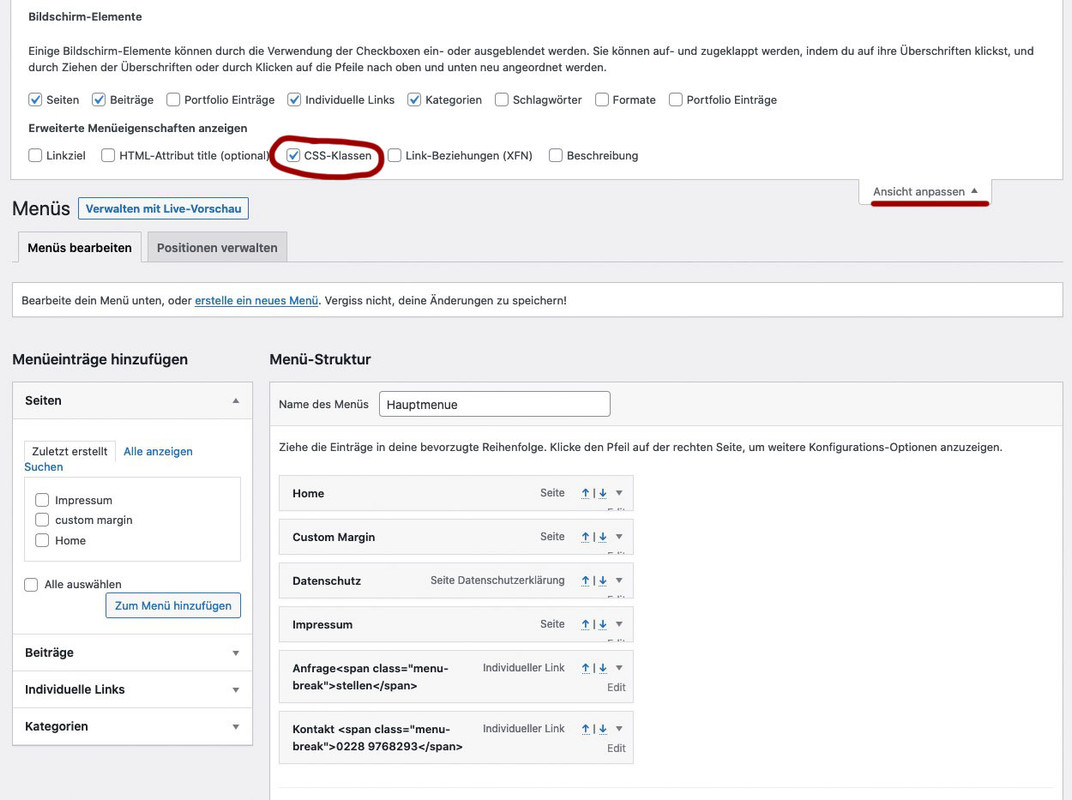
mach den Haken bei CSS-Klassen.
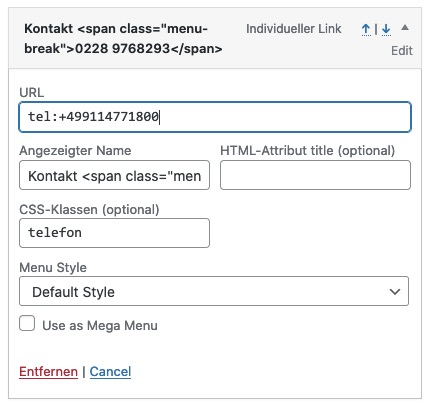
Jetzt kannst du neben jedem Menupunkt den Edit Button Klicken und du hast dann die Möglichkeit diesem eine Klasse zuzuordnen.
also z.B: rechstbuendig besser ist für nachher aber hier auch schon zu unterscheiden also Klassen anfrage und telefon
Bei “Angezeigter Name” ( engl: Label ) gibst du in einem “Individuellem Link” ein
a)
Anfrage<span class="menu-break">stellen</span>
b)
Kontakt <span class="menu-break">0911-4771800</span>
bei b) gibst du als Link an:
tel:+499114771800
gleich geht es weiter: …
Hi Ismael,
Thank you for the update, but it’s not working as expected.
Premise: no cache plugins, browser cache always empty, enfold minifications all disabled.
Added “a” to your code:
jQuery(‘open-popup-link-button a, .open-popup-link’).addClass(‘no-scroll’);
jQuery(‘open-popup-link-button a, .open-popup-link’).magnificPopup({
The strange thing is that the code works every now and then. Let’s say once every 15/20 attempts. In another installation I have it never works.
My code now is:
function popup_inline() { ?>
<script type="text/javascript">
jQuery(window).load(function(){
	jQuery('.open-popup-link-button a, .open-popup-link').magnificPopup({
	  type:'inline',
	  midClick: true // Allow opening popup on middle mouse click. Always set it to true if you don't provide alternative source in href.
	});
});
</script>
<?php }

add_action('wp_head', 'popup_inline');

function no_background_scroll_on_lightbox_open(){ ?>
<script type="text/javascript">
(function($) {
    jQuery(window).load(function(){
	jQuery('open-popup-link-button a, .open-popup-link').addClass('no-scroll');
	jQuery('open-popup-link-button a, .open-popup-link').magnificPopup({
		type:'inline',
		midClick: true,
		callbacks: {
			beforeOpen: function () {
				jQuery('body').css("overflow-y", "hidden");
			},
			close: function() {
				jQuery('body').css("overflow-y", "auto");
			},
		},
	});
   });
})(jQuery);
</script>
<?php
}
add_action('wp_footer', 'no_background_scroll_on_lightbox_open');
If you want to take a look, in private content you will find the credentials to enter the website.
Best Regards
Manu
read carefully: https://kriesi.at/support/topic/changing-avia-iconbox-title-to-h2/#post-1261597
the child-theme usage of edited enfold alb elements – works if you insert to your child-theme functions.php :
function avia_include_shortcode_template($paths){
  $template_url = get_stylesheet_directory();
      array_unshift($paths, $template_url.'/shortcodes/');
  return $paths;
}
add_filter('avia_load_shortcodes', 'avia_include_shortcode_template', 15, 1);
The trick is to have a copy of the alb element ( in your case: buttons_fullwidth.php ) in a subfolder of your child-theme folder: shortcodes and to edit this copy.
Because this child-theme folder is untouched on an update of the parent theme – entries and edited alb elements are not influenced.
But if there are major changes on the parent file – you had to synchronize these edited elements again by new edited files.
But that is something which did not change the layout – it can cause that this alb element didn’t have the new features of the parent element.
Hey fcp,
Thanks for contacting us!
I disabled JS merging in Autoptimize plugin and noticed Side Cart WooCommerce plugin in console. De-activated the plugin, went to Enfold theme options > Privacy and Cookies > Cookie Handling and saved theme options then I cleared cache in your plugins and they showed up. After that, I activated Side Cart WooCommerce plugin and enabled JS merging in Autoptimize, cleared cache and buttons are still there :)
Please review your website.
Best regards,
Yigit
Hi guys,
I started the following topic. https://kriesi.at/support/topic/changing-avia-iconbox-title-to-h2/
I did some changes in the buttons_fullwidth.php section. In particular I mean the following change:
– Go to /enfold/config-templatebuilder/avia-shortcodes/buttons_fullwidth and copy buttons_fullwidth.php file to your child theme inside /shortcodes/ folder
– Open buttons_fullwidth.php file on your child theme and find following line
$content_html .= “<span class=’avia_iconbox_title’ >{$atts[‘label’]}</span>”;
and change it to following
$content_html .= “<h2 class=’avia_iconbox_title’ >{$atts[‘label’]}</h2>”;
After updating Enfold all changes are lost.
I am now tired of making the changes again after each update. Is there a solution to this that the changes are retained?
Thanks for your help.
Hi,
Thanks for coming back.
You may need to ask the “Memberships” author if the plugin is using the mce_buttons or the mce_buttons_2 filters to adjust the items in the tinymce toolbar.
Or try to temporarily edit the enfold/config-templatebuilder/avia-template-builder/php/template-builder.class.php, and comment out line 1610..
new avia_tinyMCE_button( $tiny_lb );
.. and line 1629.
new avia_tinyMCE_button( $tiny );
See if it changes anything or it makes the kitchen sink icon display back again. Please note that this will remove the insert shortcode button in the text editor.
Best regards,
Ismael
Hey comprompt,
Please follow the steps below:
Make a backup:
– Site Backup: https://kriesi.at/documentation/enfold/backup-wordpress-site/
– Theme Settings Backup: https://kriesi.at/documentation/enfold/backup-theme-settings/
Option 1: Use Envato Market to update your site
– link: https://envato.com/market-plugin/
Option 2: Update manually
1. Login to ThemeForest and download the Enfold theme, right-click over the downloaded zip file and extract/unzip it.
2. It should generate a new folder, open it and look for the enfold folder
3. Right-click the enfold folder then zip it, here’s a tutorial on how to create a zip file in windows: https://www.howtogeek.com/668409/how-to-zip-and-unzip-files-on-windows-10/ (this should create enfold.zip
4. Log in to WordPress as and Admin.
5. Install and activate a maintenance plugin and put your site in Maintenance mode.
6. Go to Appearance > Themes, switch to a default WordPress theme like TwentyTwenty then delete Enfold.
7. Click on the ADD NEW button.
8. Click on the UPLOAD THEME button.
9. Click BROWSE and choose enfold.zip file
10. Click the INSTALL NOW button and switch to Enfold or your child theme.
11. Remove the maintenance mode then deactivate and remove the maintenance plugin.
Register the theme by following the instructions in https://kriesi.at/documentation/enfold/theme-registration/
Once this is done, the next time you update, you’ll only need to go to Enfold > Theme Updates and click on the Update button.
Best regards,
Nikko
Hi
I noticed a new behaviour for the cookie consent message pop-up, with a refreshed cache or visiting the website the first time the cookie consent message pop up and stays till a button is pressed. This step is like expected. But when choosing another page via the menu, at the new page cookie message jumps in and immediately out.
Before the current Enfold version 4.8, I never recognised this jumping in and out. Another recognised point is slower page load by 30% since the new version measured by pingdom.com.
Any idea would be greatly anticipated.
Andreas
Hi,
Thanks for the clarification. I think I missed it last time since I had the browser inspector up, and that was blocking it. Please try the following in Quick CSS under Enfold->General Styling:
@media only screen and (max-width: 767px) {
.postid-5000 button.single_add_to_cart_button {
    position: fixed;
    bottom: 0;
    left: 0;
}
}
Best regards,
Rikard
Hi there,
I’d like to change customize few texts ,links on my Enfold child theme related to woocommerce products. Probably not a big change on the functions.php file, but I need some help, if possible. Maybe someone already had the same problem.
1) Basically, we have installed a plugin to select a product with variables on quick view mode, and stay on the same page. So instead of “Scegli” under each “add to cart” product, we’d like to change to “Dettagli” or another phrase. Using the inspection tool, it’s easy to localize the text. But how to implement it on the website?
2) Same on the cart page, when this is empty. There is a button link that redirects you to the default shop page. As we created an alternative shop page, how is it possible to change the “href” in this button? And also here we’d like to change the “Ritorno al negozio” text into something else.
I’ve had a look at your guide here: https://kriesi.at/documentation/enfold/woocommerce-shop/ Custom WooCommerce Shop Overview, but even following point 1, on the empty cart this redirect default button option stays . As the layout editor is disabled on the default shop page.
3) Are you aware of a way to display a minimum advertised price for each product instead of the minimum – maximum range price on variable products?
Many thanks for your help!
Regards
UPDATE: I found it! Advanced > Link settings. No response needed :)
Hi, I’m using the Enfold Gym demo (import) which I LOVE – thank you. On the home page, in the demo, there is the button “give it a try now” and I can’t see where in the editor to find/change this button. Thanks so much in advance!
-
This reply was modified 5 years ago by
 CorrinaGB.
Hi bauchope,
Try adding this CSS code in Enfold > General Styling > Quick CSS:
#top #header #avia-menu .av-menu-button .avia-menu-text {
    color: black;
}
just change the color from black to anything that you’d like.
Best regards,
Nikko
Hi bobfurgo,
Please follow the steps below to update.
Make a backup:
– Site Backup: https://kriesi.at/documentation/enfold/backup-wordpress-site/
– Theme Settings Backup: https://kriesi.at/documentation/enfold/backup-theme-settings/
Option 1: Use Envato Market to update your site
– link: https://envato.com/market-plugin/
Option 2: Update manually
1. Login to ThemeForest and download the Enfold theme, right-click over the downloaded zip file and extract/unzip it.
2. It should generate a new folder, open it and look for the enfold folder
3. Right-click the enfold folder then zip it, here’s a tutorial on how to create a zip file in windows: https://www.howtogeek.com/668409/how-to-zip-and-unzip-files-on-windows-10/ (this should create enfold.zip
4. Log in to WordPress as and Admin.
5. Install and activate a maintenance plugin and put your site in Maintenance mode.
6. Go to Appearance > Themes, switch to a default WordPress theme like TwentyTwenty then delete Enfold.
7. Click on the ADD NEW button.
8. Click on the UPLOAD THEME button.
9. Click BROWSE and choose enfold.zip file
10. Click the INSTALL NOW button and switch to Enfold or your child theme.
11. Remove the maintenance mode then deactivate and remove the maintenance plugin.
Register the theme by following the instructions in https://kriesi.at/documentation/enfold/theme-registration/
Once this is done, the next time you update, you’ll only need to go to Enfold > Theme Updates and click on the Update button.
If you still want us to do the updates, then please backup your site and give us FTP access.
Best regards,
Nikko
when you open that drop down list to choose the telegram option – it is not placed in alphabetical order – it is at the bottom of that list.
btw: https://kriesi.at/documentation/enfold/social-share-buttons/#how-to-add-custom-social-icons-to-enfold-options
scroll a little to “Using images or non-Fontello icons” if you like to use an image on that – and not a font-icon
Hi Markus,
Can you try adding this CSS code in Enfold > General Styling > Quick CSS:
@media only screen and (max-width:767px) {
  .responsive .avia_responsive_table .avia-data-table .avia-button-row {
    display: block !important;
  }
}
Best regards,
Nikko
Hi wealthyone,
We apologize for the delayed response.
If no changes happen, please disable CSS file merging and compression in Enfold > Performance (clear out caching and minification cache if you have one).
As for having certain length, just add min-width property.
So the code should be like:
#top .special-button .avia-button {
    border: 2px solid white;
    min-width: 200px;
}
If there’s still no changes then please give us a temporary admin access.
Best regards,
Nikko
If you find your bottom placed Mash Share buttons get thrown off (mine end up in the sidebar somehow), just make sure you enter a HTML space which is this code: either at the bottom of the HTML editor, or as a code block at the very bottom if using the visual editor. I fought with this for days, with support being slow these days, I didn’t want to ask. Almost gave in before I accidentally stumbled on this.
I am referring to this free add-on. I selected it because it is super light weight, it doesn’t slow my site down at all.
-
This topic was modified 5 years ago by
 Synthea79.
Hey Antiquaritaly,
Thank you for your patience and the link to your site, do you want buttons that links to facebook and instagram in a footer widget, if so then add this shortcode to a custom html widget:
[av_buttonrow alignment='center' button_spacing='5' button_spacing_unit='px' alb_description='' id='' custom_class='' template_class='' av_uid='av-kn3eudx6' sc_version='1.0' admin_preview_bg='']
[av_buttonrow_item label='Facebook' icon_select='yes' icon='ue8f5' font='entypo-fontello' link='manually,http://' link_target='' size='small' label_display='' title_attr='' color_options='' color='theme-color' custom_bg='#444444' custom_font='#ffffff' btn_color_bg='theme-color' btn_custom_bg='#444444' btn_color_bg_hover='theme-color-highlight' btn_custom_bg_hover='#444444' btn_color_font='theme-color' btn_custom_font='#ffffff' av_uid='av-kn3etr2k' sc_version='1.0']
[av_buttonrow_item label='Instagram' icon_select='yes' icon='ue909' font='entypo-fontello' link='manually,http://' link_target='' size='small' label_display='' title_attr='' color_options='' color='theme-color' custom_bg='#444444' custom_font='#ffffff' btn_color_bg='theme-color' btn_custom_bg='#444444' btn_color_bg_hover='theme-color-highlight' btn_custom_bg_hover='#444444' btn_color_font='theme-color' btn_custom_font='#ffffff' av_uid='av-kn3eu7yf' sc_version='1.0']
[/av_buttonrow]
You can create and customize your own buttons using the Magic wand tool using the instructions in the theme documentation.
If you want to add the Social Share Buttons to a footer widget, you could add this shortcode to a custom html widget:
[av_social_share title='Share this entry' buttons='' share_facebook='aviaTBshare_facebook' yelp_link='https://www.yelp.com' style='' alb_description='' id='' custom_class='' template_class='' av_uid='av-1a8ccp' sc_version='1.0' admin_preview_bg='rgb(255, 255, 255)']
But adding this to the footer will lead to incorect back links when users use these because it is in the global footer and not in a specific post, and instagram is not an option in the Social Share Buttons.
Best regards,
Mike
Hey eggmedia-salient,
Thank you for your patience and for the link to the site, I believe I recognize this as the Enfold Theme Options > Performance > JS & CSS file merging and compression showing an older css cached version.
Please try turning this option off and at the bottom of the same option page look for Enfold Theme Options > Performance > Delete old CSS and JS files and enable this, and then save the theme settings via the big blue button, the clear your browser cache and check again.
The current css causing this is in the merged css file targeting .footer_color a so you could use this to override it in the quick css if you wished:
#footer.footer_color a { color: #fff; }
but I believe clearing the merged files will solve.
Best regards,
Mike
Hi,
Thank you for your patience, I was not able to log into your test site, but I was able to log into your live site and I reviewed your page /marketing/social-media-materiaal/ and both of these buttons opened the download prompt for me:

but I recognize from experience that this doesn’t always occur for every browser and device, typically this is corrected by editing the .htaccess file as explained in this article. There are also some that suggest using the “download” attribute but I have not experienced a need for this in the past. I have heard elsewhere, not specifically from Enfold, that on some iPhones users will experience this issue, but this is how iPhone handles certain types of links to prevent security issues with forced rouge files. I’m not sure if this has anything to do with your issue, but I thought I would share the info, I don’t have an iPhone to test with, but as I pointed out above, both of your links opened the download prompt for me.
Best regards,
Mike
I guess I found the way to solve this. First, I apologize for not being so clear, because I’m using Spanish version of Enfold and have to be translating to English for your understanding, what causes sometimes I use wrong terms.
By default, when you open Advanced Styling section, no elements to customize are present for edition (what makes sense, of course). You must select which element you want to change from “Select an element go customize” list, then choose “Edit element”.
So, if I want to use different attributes for active state menu item and default state (the rest of not active items) separately, I had to select “Main menu links” from the list and click on “Edit element” button TWICE in order to have two Main menu links editing areas. After that, I stablished default state color into the first area, then stablish active state color into second area checking, this time, “Apply only to active state” box.
Best regards,
Eduardo
Hi Saru82,
Please follow the steps below to update.
Make a backup:
– Site Backup: https://kriesi.at/documentation/enfold/backup-wordpress-site/
– Theme Settings Backup: https://kriesi.at/documentation/enfold/backup-theme-settings/
Option 1: Use Envato Market to update your site
– link: https://envato.com/market-plugin/
Option 2: Update manually
1. Login to ThemeForest and download the Enfold theme, right-click over the downloaded zip file and extract/unzip it.
2. It should generate a new folder, open it and look for the enfold folder
3. Right-click the enfold folder then zip it, here’s a tutorial on how to create a zip file in windows: https://www.howtogeek.com/668409/how-to-zip-and-unzip-files-on-windows-10/ (this should create enfold.zip
4. Log in to WordPress as and Admin.
5. Install and activate a maintenance plugin and put your site in Maintenance mode.
6. Go to Appearance > Themes, switch to a default WordPress theme like TwentyTwenty then delete Enfold.
7. Click on the ADD NEW button.
8. Click on the UPLOAD THEME button.
9. Click BROWSE and choose enfold.zip file
10. Click the INSTALL NOW button and switch to Enfold or your child theme.
11. Remove the maintenance mode then deactivate and remove the maintenance plugin.
Register the theme by following the instructions in https://kriesi.at/documentation/enfold/theme-registration/
Once this is done, the next time you update, you’ll only need to go to Enfold > Theme Updates and click on the Update button.
Best regards,
Nikko
Hi wealthyone,
Please try to do the following steps (edit the button):
1. Go to Content (tab) > Show Button Icon set to Display icon to the right and select the icon.
2. Go to Styling (tab) > Button Color set to Custom Color then change the Custom Background Color to any color you like.
3. Go to Advanced (tab) > Developer Settings > Custom CSS Class put: special-button
4. Go to Enfold > General Styling > Quick CSS, add this code:
#top .special-button .avia-button {
    border: 2px solid white;
}
Hope this helps.
Best regards,
Nikko
Hi kfranck,
1. Would you like this to apply on all Blog Posts? or only on specific pages?
Can you try to go to Enfold > Advanced Styling > (Select an item to customize) then choose Widget Links then click Edit Element button.
It should open up a box which contains font size.
2. Are you referring on the ‘Also on Your SOURCE’ box?
3. I have checked the order of posts and the Blog Post and it seems to be in correct order based on date in descending order.
And lastly, try adding this CSS code in Enfold > General Styling:
#top .avia-builder-widget-area .widget li a {
    font-style: normal;
    font-family: Arial, Helvetica, sans-serif;
}
Best regards,
Nikko
To clarify:
an autostart of a video is only possible on desktop and muted videos!
on mobile devices the browsers do not autostart even on this setting options.
due to that – Enfold does not offer on color-section the interaction with the video at all.
On the video alb element – there are options – and the possibility to have audio. – But on mobile you had to start the video yourself.
On your first topic – you said that it has to be not full-width – now you got the fullwidth version ?
What now – is your setting ?
If it is possible – your png is not the first choice – because the starting video play button is at that position wher your chess-figure (king) is in front over the film. To have influence in a iframe only to that play-button to have partially a higher z-index – will not be possible.
see again : https://webers-testseite.de/video-behind-a-hole/



