Hey,
Thanks for contacting us!
Please refer to this post – https://kriesi.at/documentation/enfold/social-share-buttons/#how-to-add-custom-social-icons-to-enfold-options.
If you need assistance with it, please let us know :)
Best regards,
Yigit
Hi,
I changed your password and logged in using your account, and I’m able to open a new thread. Please use open a new thread link, or click this button in the Enfold sub forum: https://imgur.com/a/AnoSPNb
Best regards,
Rikard
Hey guys
maybe someone knows a Workaround or when this bugs are going to be patched:
1. When adding a manual link to a button element and having a link with multiple parameters like:
/request/?subject=beratung¶m=this-wont-work
Enfold first saves it correctly, but after reloading the Editor in backend, the &p… got converted into some weird special-char.
2. If someone uses the Social icons – element in a page and uses that page as a footer, the share-link uses the footer-url.
3. When adding a Video with the Videoplayer element, the video starts muted (even if not selected) –
and if someone clicks on unmute, you additionally have to increase the volume.
Hey!
Thank you for waiting.
To fix the issue with the product shortcode, please edit the enfold/config-templatebuilder/avia-shortcodes/product_snippets/product_snippet_button.php file, add update it using this code ( https://pastebin.com/cEDU5HQ4 ). Then edit the enfold/config-woocommerce/config.php file and update the avia_woocommerce_add_body_classes function around line 103 using this code.
function avia_woocommerce_add_body_classes( $classes, $class )
	{
		global $product;

		if( avia_woocommerce_version_check( '3.0' ) )
		{
			$classes[] = 'avia-woocommerce-30';
		}

		/**
		 * Adds the product class name to the body tag when ALB is activem, required by WC scripts such as add-to-cart-variation.js
                 *
		 * https://kriesi.at/support/topic/sku-on-product-page-disappeared-with-theme-update/
                */
		if( is_product() && Avia_Builder()->get_alb_builder_status( $product->get_id() ) == 'active' ) {
			$classes[] = 'product';
		}

		return $classes;
	}
Please make sure to purge the cache after doing the steps above or before testing the page.
Best regards,
Ismael
Hi Mike
Thank you for sharing. I just tired, but my first experience is that the style and fonts look so different from my Enfold style plus everything seems in English …
Is there an easy way to make the Embedded form look like the rest of my page (e.g. fonts, button style)?
The way you described the Embedded form, can I jave two of them with different tags?
Finally, maybe there is a fallback solution to the Enfold Mailchimp API: Since this is a relatively new feature, Enfold asks for feedback to implement future requirements. Could you specify the requiredment of having a pulldown menue with the available tags within the selected list? This might me value added not just for me. Or do you think it would make sense for me to get the StackOverflow solution programmed by a e.g. Fiver programmer?
Just looking for the easiest way to get this done.
Thank you for sharing your thoughst on this!
Best regards
Philipp
Hi There,
I am using ENFOLD theme there is an issue in theme builder in the button module setting the button link option is disabled. Please help its urgent.

Thank You
Dear support team.
My website home page and WooCommerce single product page shows error. could you please help me fix the error?
your prompt reply will be much appreciated:
Fatal error: Uncaught TypeError: call_user_func_array(): Argument #1 ($callback) must be a valid callback, function “woocommerce_single_product_summary_button” not found or invalid function name in /home4/shinydec/public_html/wp-includes/class-wp-hook.php:307 Stack trace: #0 /home4/shinydec/public_html/wp-includes/class-wp-hook.php(331): WP_Hook->apply_filters(NULL, Array) #1 /home4/shinydec/public_html/wp-includes/plugin.php(474): WP_Hook->do_action(Array) #2 /home4/shinydec/public_html/wp-content/plugins/woocommerce/templates/content-single-product.php(60): do_action(‘woocommerce_sin…’) #3 /home4/shinydec/public_html/wp-includes/template.php(772): require(‘/home4/shinydec…’) #4 /home4/shinydec/public_html/wp-content/plugins/woocommerce/includes/wc-core-functions.php(284): load_template(‘/home4/shinydec…’, false) #5 /home4/shinydec/public_html/wp-content/themes/Enfold-child-theme/woocommerce/single-product.php(37): wc_get_template_part(‘content’, ‘single-product’) #6 /home4/shinydec/public_html/wp-includes/template-loader.php(106): include(‘/home4/shinydec…’) #7 /home4/shinydec/public_html/wp-blog-header.php(19): require_once(‘/home4/shinydec…’) #8 /home4/shinydec/public_html/index.php(17): require(‘/home4/shinydec…’) #9 {main} thrown in /home4/shinydec/public_html/wp-includes/class-wp-hook.php on line 307
Hey,
Thanks for contacting us!
Please add following code to Quick CSS field in Enfold theme options > General Styling tab
.av_promobox .avia-button-right {
  float: none;
}
.av_promobox .avia-button {
  float: none;
  position: unset;
  margin-top: 0 !important;
  width: 150px; /* Adjust width as needed */
  margin: auto;
}
Best regards,
Yigit
Hey sitibus,
I assume that you have read our documentation about Adding your own Fontello or Flaticon Icons, you can create your own icons in SVG format single color only (black) and upload them to fontello which will convert them to a icon font which then can be imported to the Iconfont Manager.
Your other option would be to create an image icon and use css to replace the current icon font in the button, like this:
#top.page-id-1152 .avia_button_icon_left:before {
  content: url(https://img.icons8.com/fluency/30/000000/idea.png)!important;
}
#top.page-id-1152 .avia_iconbox_title {
	top: -8px;
}

Best regards,
Mike
No probably it is not clear the bug. Sorry for my english.
I’ve ever use contact form on my website and I never had problems.
From last update all my contact form (Enfold and Contact form7) has issue.
Try please to fill contact form called FREE in this page:
You can write request. But you have not confirmation about ok send and also you will not recive any answer automatic mail. The circle continue to run without says nothing. But I have set an answear authomatic mail.
My clients in contact form of hotel reservation for example send request but the mail set they would recive doesn’t start. They continue to push button send 10 times. I receve 10 request from the same guest and he doesn’t recive nothing.
Also in this page for axample I have set 2 mails in contact form:
1 mail arrive to me and it advices me that one guest requests free guide.
1 mail has to arrive to my guest in automatic and he recives the guide attached. This mail doesn’t start. So from some time they are reciving nothing.
Please try this form to understand:
All contact forms has the same issue: Mail 2 doen’s work and contact form circle continue to run when push SEND.
Hi again
If you click on “Kontakt oss” menu, you see that the “Like” and “Share” buttons are shown in english (not in Norwegian “Lik” and “Del”. The same goes for the Messenger Chat, which also is shown in english.
I accidently resetted the enfold Theme to defaults, and then both those buttons and the Messenger chat was shown in Norwegian. But when I restored a backup, it is only showing english again. I tried resetting to defaults once more (after making note of all settings), but then it only shows english again.
I am working on the site at
https://ineedhelp-nr.com.au
front end pw = helpme
to assist flood victims here in Australia
the directory listings I am using have a Title field – this is showing up on the Map Listing but it is not showing once you click the link to view the Full Listing page
Looking at the support forums this is often caused by the theme – I cant see any relevant settings in Enfold bit wondered if you have an info on this?
the docs for the site say this string can be added to the template (copied to the child theme)
<?php Sabai::_h($entity->getTitle())?>
I have added it (line 23) but it is still no showing up
here is the template file code
<?php if (!$IS_EMBED) $this->Action('directory_before_single_listing', array($bundle->addon, $entity));?>
<?php $has_photos = $entity->directory_photos && ($photos = $this->Entity_RenderField($entity, 'directory_photos'));?>
<div id="<?php echo $id;?>" class="<?php echo $class;?> sabai-clearfix<?php if (!$has_photos):?> sabai-directory-no-image<?php endif;?>" itemscope itemtype="http://schema.org/gLocalBusiness">
    <meta itemprop="name" content="<?php Sabai::_h($entity->getTitle());?>" />
    <link itemprop="url" href="<?php echo $this->Entity_Url($entity);?>" />
<?php if ($labels = $this->Entity_RenderLabels($entity)):?>
    <div class="sabai-directory-labels"><?php echo $labels;?></div>
<?php endif;?>
    <div class="sabai-row">
<?php if ($has_photos):?>
        <div class="sabai-col-sm-4 sabai-directory-images">
            <?php echo $photos;?>
        </div>
<?php else:?>
        <link itemprop="image" href="<?php echo $this->NoImageUrl();?>" />
<?php endif;?>
        <div class="<?php if ($has_photos):?>sabai-col-sm-8<?php else:?>sabai-col-sm-12<?php endif;?> sabai-directory-main">
<?php if (!empty($entity->voting_rating['']['count'])):?>
            <div class="sabai-directory-rating" itemprop="aggregateRating" itemscope itemtype="http://schema.org/AggregateRating">
                <?php echo $this->Entity_RenderField($entity, 'voting_rating', array('link' => $this->Entity_Url($entity, '/reviews'), 'count_formats' => array(sprintf(__('%s review', 'sabai-directory'), '<span itemprop="reviewCount">%d</span>'), sprintf(__('%s reviews', 'sabai-directory'), '<span itemprop="reviewCount">%d</span>')), 'summary_url' => $this->Entity_Url($entity, '/ratings')));?>
            </div>
<?php endif;?>
<?php Sabai::_h($entity->getTitle());?>
<?php if ($entity->directory_category && ($categories = $this->Entity_RenderField($entity, 'directory_category'))):?>
            <div class="sabai-directory-category">
                <?php echo $categories;?>
            </div>
<?php endif;?>
            <div class="sabai-directory-info sabai-clearfix">
<?php if ($entity->directory_location):?>
                <div class="sabai-directory-location">
                    <?php echo $this->Entity_RenderField($entity, 'directory_location');?>
                </div>
<?php   if ($entity->directory_location[0]['street']):?>
                <div itemprop="address" itemscope itemtype="http://schema.org/PostalAddress" class="sabai-directory-address sabai-hidden">
                    <span itemprop="streetAddress"><?php Sabai::_h($entity->directory_location[0]['street']);?></span>
<?php     if ($entity->directory_location[0]['city']):?>
                    <span itemprop="addressLocality"><?php Sabai::_h($entity->directory_location[0]['city']);?></span>
<?php     endif;?>
<?php     if ($entity->directory_location[0]['state']):?>
                    <span itemprop="addressRegion"><?php Sabai::_h($entity->directory_location[0]['state']);?></span>
<?php     endif;?>
<?php     if ($entity->directory_location[0]['zip']):?>
                    <span itemprop="postalCode"><?php Sabai::_h($entity->directory_location[0]['zip']);?></span>
<?php     endif;?>
<?php     if ($entity->directory_location[0]['country']):?>
                    <span itemprop="addressCountry"><?php Sabai::_h($entity->directory_location[0]['country']);?></span>
<?php     endif;?>
                </div>
<?php   endif;?>
<?php endif;?>
                <div class="sabai-directory-contact">
                    <?php echo $this->Entity_RenderField($entity, 'directory_contact');?>
                </div>
                <div class="sabai-directory-social">
                    <?php echo $this->Entity_RenderField($entity, 'directory_social');?>
                </div>
            </div>
<?php if ($listing_body = $this->Entity_RenderField($entity, 'content_body')):?>
            <div class="sabai-directory-body" itemprop="description">
                <?php echo $listing_body;?>
            </div>
<?php endif;?>
            <div class="sabai-directory-custom-fields">
                <?php $this->displayTemplate('directory_custom_fields', array('entity' => $entity));?>
            </div>
        </div>
    </div>
<?php if (!empty($buttons)):?>
    <div class="sabai-navigation sabai-navigation-bottom sabai-entity-buttons">
        <?php echo $this->ButtonToolbar($buttons);?>
    </div>
<?php endif;?>
<?php if (!empty($links)):?>
    <div class="sabai-entity-links">
        <?php echo $this->ButtonLinks($links);?>
    </div>
<?php endif;?>
</div>
<?php if (!$IS_EMBED) $this->Action('directory_after_single_listing', array($bundle->addon, $entity));?>
Good Morning Nikko,
thank you for the quick reply. Maybe I did express this the wrong way.
On every page of this website the menu is hidden because I had to build my own menu within the layerslider. There will be a second Layerslider containing just a (self built) Burgermenu-Button. I need a way to trigger the (enfold)-mobile menu with this button if this is possible at all. If you want to take a look I‘ll provide you with the website-data.
I also put a (temporary) big Burger-Button in the Layerslider…
best regards,
Wolfram
Hallo,
I have two problems.
First one belongs to youtube videos. On my video-page only the first video is working normally.
1) Borlabs is working fine
2) and I can start the video with the play button.
The second video below isn’t working fine: no Borlabs cover on the video and no play button, just a link on top of the video.
Why?
Second: Then I realized that because of the special enfold form on every page the reCaptcha code runs, not just on the contact page. How can I disable this?
Thanks
Hey Jak,
Please add this CSS code in Enfold > General Styling > Quick CSS:
#top .mejs-overlay-button {
    background: url(mejs-controls.svg) no-repeat;
    background-position: center center;
    height: 80px;
    width: 80px;
}
replace mejs-controls.svg with the URL of the image you would like to use then change also the height and width value.
Hope this helps.
Best regards,
Nikko
Hi,
Thanks for your patience, perhaps it would be easier to go back to the step were we used a shortcode to add the button to the topbar, so to add a phone number to the left side and the button to the right we assume you are using the setting Enfold Theme Options ▸ Header ▸ Extra Elements ▸ Header Phone Number/Extra Info ▸ Display in top bar at the left and your phone number is in the Phone Number or small info text field.
Now we will add your button wrapped in a span with the class top-right link this:

Now we will use this css
#header_meta .phone-info,#header_meta .phone-info > div {
	width: 100%;
}
#header_meta .phone-info .top-right {
	float: right;
}
and the result should be like this

Best regards,
Mike
Hi
I have installed the Facebook Chat Plugin – Live Chat Plugin for WordPress (Messenger), but it is only shown in english in Enfold.
The same goes for the embedded Enfold Like and share box. The buttons are only shown as “Like” and “Share”, event though my site is in norwegian.
Could you please help?
Best regards
Jo
Hi Tim,
Please try the following in Quick CSS under Enfold->General Styling:
.avia_cart_buttons {
    opacity: 1;
}
Best regards,
Rikard
Hi,
Thank you for the update.
You can try this css code to adjust the font size of the sort buttons.
#top .sort_by_cat a .inner_sort_button span {
    font-size: 100px;
}
Please toggle or temporarily disable the Enfold > Performance > File Compression settings after adding the css.
Best regards,
Ismael
1. Before migrating to Enfold, the buttons were styled fine, but now they are above the addon option – is there a quick CSS way to align these left, in line with the text?
You can see the issue I am having here under “Model-Options”: https://wenningbranding.com/product/advance-premium-retractable-banner-stand/
2. Also, when adding these addon options, it doesn’t affect the total. When going to check out, the customer isn’t charged correctly for the addons. This was working before installing enfold, so I am confused about what the issue is with Enfold and Woocommerce.
Thanks!
on fontello you can upload svg files ( they have to meet a few conditions there, but then you can also make an iconfont out of any monochrome svg).
you can upload to fontello svg’s by drag&drop into that custom icons field.
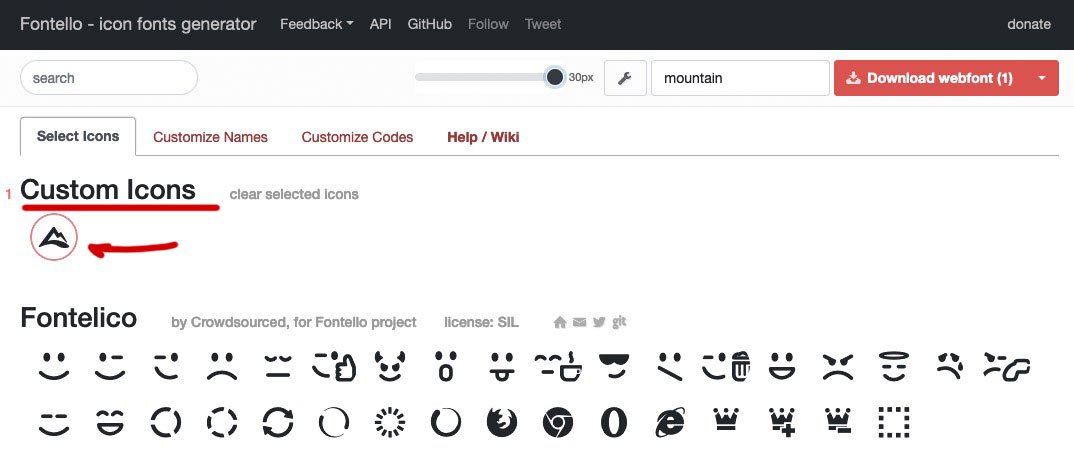
after adding all your wanted svg files – mark them on fontello and give a name to the new icon-font.
Upload that icon-font to enfold ( import/export – Icon font manager )

after that – go and read on the docu how to get for an existing icon a different one.
Hi,
Thanks for that. I created a test page and I removed the less than characters in the table, and it's rendering as it should after that. Please see private. I wanted to install this plugin: https://kriesi.at/documentation/enfold/intro-to-layout-builder/#troubleshoot, but the choose file button is not reacting when I try it on your installation. Could you try from your end, or upload it via FTP please? After that, then you can replace the less than characters with this code instead:
###gt###
Best regards,
Rikard
-
This reply was modified 4 years ago by
 Rikard.
Hi,
Did you check the documentation that @Guenni007 provided above? This is the link again.
// https://kriesi.at/documentation/enfold/social-share-buttons/#how-to-add-custom-social-icons-to-enfold-options
You can convert the svg file to an actual icon font on fontello.com and upload it to the theme using the Enfold > Import/Export > Iconfont Manager.
Best regards,
Ismael
you can replace these enfold predefined icons by quick css
Then you can even use multicolor images
f.e. a different telegram icon: see docu
scroll to: “In case of using an image”
#top #wrap_all .av-social-link-telegram a:before{
    content: "";
    width: 20px;
    height: 20px;
    display: inline-block;
    vertical-align: middle;
    background: url(/wp-content/uploads/custom-telegram.png) no-repeat center center;
    background-size: contain;
}

#top #wrap_all .av-social-link-telegram:hover a {
  /*** if needed ***/
}
Hi,
There are two ways to do this, the first is outlined in our documentation here: How to add Custom Social Icons to Enfold options
Or if you are going to use an image you caan replace the rss-feed-icon with this css in your Quick CSS:
.social_bookmarks_rss a:before{
    content: "";
    width: 20px;
    height: 20px;
    display: inline-block;
    vertical-align: middle;
    background: url(https://kriesi.at/wp-content/themes/kriesi/images/logo.png) no-repeat center center;
    background-size: contain;
}
just adjust the image to suit and clear your browser cache.
Best regards,
Mike
Hey terishka1,
Please try the following in Quick CSS under Enfold->General Styling:
.sort_width_container .inner_sort_button span {
  font-size: 18px;
  color: red;
}

.sort_width_container .inner_sort_button span:hover {
  color: blue;
}

div.sort_by_cat {
  background: #262626;
}
Best regards,
Rikard
I created a secondary menu and have it located at the top right, next to social media icons. I made the two links “button styles colored”, but they will not change. Is there a different location where Enfold is over-riding this styling?
Hi,
You can add a widget inside the header containing the button shortcode instead of using the phone number field. Please check this documentation for more info.
// https://kriesi.at/documentation/enfold/header/#adding-a-header-widget-area
You may need to replace the action hook with avia_meta_header.
Example:
add_action("avia_meta_header", function() {
    dynamic_sidebar("header");
}, 10);
The code above will render a widget area called “header” inside the top bar.
Best regards,
Ismael
Hey Eleina_Shinn,
The bypass link is not working, I’m only seeing a coming soon page. The problem might be that the button is pushing the header down though, did you try to adjust the size of your header under Enfold->Header?
Best regards,
Rikard
Hey,
Thanks for contacting us!
I tested cart icon on my test site running Enfold 4.9 and WooCommerce 6.2.1 using Safari on my iphone but it works fine for me. View Cart and Checkout buttons work as well. I attached a screenshot in private content field below.
Could you please post a link of your page so we can look into it? :)
Regards,
Yigit



