
-
Search Results
-
Topic: Fonts import doesn’t work
Hi,
I have some fonts which I have download from google fonts. I did it as you describe in documentation – so I used the webfont generator and then I imported the fonts as a zip into enfold. When I tired to insert the zip file (button) only one strange named font were imported, called specimen files ().
I also think, that the font isn’t shown although I set it. I also tried to deacitvate the google font blocker plugin, but that is not the reason for this problem.
Can you please help me here again?
Thanks a lot.
Best regards,
EveHi Enfold Team,
I am having an issue with the full-width easy slider. I cannot add text, overlays, or buttons to the section. It seems like those functions are missing from the module. I have created them before so not sure why it’s not working this time.
Thanks,
MoniqueHello,
I was given responsibility of a website using the Enfold template. I had to transferred hosting companies and after doing so I noticed the template keeps referencing back to an old CSS file. Currently, I can’t make any changes to the template because of this error.I am providing you credentials so you can log in to the server and test this yourself. Before you do, please take a look at the website’s footer then change any text on the copyright field and you will notice how the entire footer will change. It will become another color and different font type. In fact, many other elements across the site will also change like buttons, font types, colors. etc. However, I can make any changes to page text or forms but none that is related to the template.
Thanks in advance for your help
Hello,
1/ Since a while I have 2 light grey lines below the main menu, there should be juste one !
I updated Enfold to the latest version and WP as well ! How can I change this ?2/ How can I change the color of the second button “Kontakt” in the main menu (it is yellow)?
3/ Top menu, we can’t change the menu points to another color – look at ReFo – I changed it in the menu to a colored button, but it does not change!
Thank you in advance,
ABTopic: UPdating Enfold Broke Site
Hi:
I updated Enfold today on one of my sites and it broke the site; many of the images no longer appeared. So, I restored a backup, database and files on this website and then I received this Fatal Error, related to the enfold theme:
Fatal error: Access level to avia_sc_chart::shortcode_insert_button() must be public (as in class aviaShortcodeTemplate) in /home/customer/www/surfshackbuilders.com/public_html/wp-content/themes/enfold/config-templatebuilder/avia-shortcodes/chart/chart.php on line 49
There has been a critical error on this website. Please check your site admin email inbox for instructions.I tried adding an older version of the theme back in, manually, in file manager, but that did not help. Site is here: https://surfshackbuilders.com/
—:Update: I had to restore a backup because the client’s site was down. So, I’ve done that and now My Theme Options > Theme Update shows that I have Version 5.0 of Enfold installed, and that it should be updated to Version 5.4.1, but now I’m afraid to, because that’s what caused the site to go down last time. Any suggestions?
Topic: Enfold / Toggle buttons
Hello, I have a problem with toggle/switch buttons in Enfold (the ones used for cookies settings for example or in WP backend to activate Enfold options), It seems that Enfold do not use the convention right/on and left/off but the opposite, why this choice ? it’s a bit disturbing…
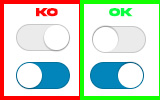
EDIT : I’ve found a way to change that with quick css for those who are interested :#top .av-toggle-switch .toggle-track:before { right: 27px; } #top .av-toggle-switch input[type="checkbox"]:checked + .toggle-track:before { right: 0; }Topic: Adding image
Hello, I’m using enfold photography demo. How can I add a image under the social media buttons?
Thanks in advance
Topic: Recaptcha button not showing
Hi, just set the Recaptcha V2 and V3 on a couple of my sites with Enfold. But not showing the Recaptcha button on the right bottom side. Tried several keys from different accounts. But not showing.
When using the Imagify plugin with Enfold, the list view of the media library breaks. I’ve also reported this to Imagify, but switching to a different theme fixes the issue, so it does seem to be a conflict with Enfold. The issue occurs even if Imagify is the only active plugin, so there’s not another plugin interfering to cause this. I’ve tested with Enfold 5.2.1 and Enfold 5.4, using Imagify 2.1.1, and the issue occurs with both versions of Enfold.
Imagify adds a column to the wp-admin media library list view for its “Optimize” button. Using the list view appears to be required in order to use Imagify to manually optimize images.
It’s supposed to look like this (this is when the Twenty Twenty-Three theme is active):

When Enfold is active, it looks like this:

Hi,
Google Maps worked correctly but now it shows “For development purposes only”.
I’ve checked this troubleshooting list of enfold but I don’t find the bug.:
1. Check if you typed the key correctly.
2. If you use the restriction setting on Google try to remove that, wait a few minutes for google to apply your changes and then check again if the key works here. If it does, you probably have a syntax error in your referrer url
3. If none of this helps: deactivate all plugins and then check if the API works by using the button above. If thats the case then one of your plugins is interfering.Could you help me?
Thanks in advance,
Jordi
Hi, i noticed that in many many many WP websites using enfold, yesterday has suddenly appeared a message in contact forms using enfold’s recaptcha v2 to validate submissions. all these forms are now disabled (the submit button won’t show), and the message is (translated from italian) “this contact form is deactivated because the user has refused to accept the google recaptcha service, which is necessary to validate messages sent from the form.”. i tried in one of my websites, and i cna confirm is a theme problem: i deactivated all pluigns, i have WP 6.1.1, and the latest 5.4 enfold release. i also checked my recaptcha setup ion google, and they are ok. just check the error message in google and you’ll find plenty of websites, ALL of them are using enfold (i checked 10) https://www.google.com/search?q=errore+questo+modulo+di+contatto+%C3%A8+disattivato+perch%C3%A9+l%E2%80%99utente+ha+rifiutato+di+accettare+il+servizio+google+recaptcha%2C+necessario+per+convalidare+i+messaggi+inviati+dal+modulo.&oq=&aqs=chrome.4.69i59i450l8.103074j0j1&sourceid=chrome&ie=UTF-8
Topic: Header: Bar
Hey Enfold support
The bar above the main navigation is now blue, but should be transparent.
Where in the settings should this be done?
In the header (general styling) the header style is set to transparent.
Please see print here
https://imgur.com/MBOC9Qm
Further I need to slider button to be:
Font color: black
Frame: Black
Background: TransparentHow can I get the frame and font to be black?
Thx
&
Best regards
LeneHi,
I’m just finished updating or migating from Enfold 4.7 to 5.4. The problem is that everytime I hit the Plugins > Add New button the following error message comes up.
['all-in-one-wp-migration' => class stdClass { public $id = 'w.org/plugins/all-in-one-wp-migration'; public $slug = 'all-in-one-wp-migration'; public $plugin = 'all-in-one-wp-migration/all-in-one-wp-migration.php'; public $new_version = '7.70'; public $url = 'https://wordpress.org/plugins/all-in-one-wp-migration/'; public $package = 'https://downloads.wordpress.org/plugin/all-in-one-wp-migration.7.70.zip'; public $icons = [...]; public $banners = [...]; public $banners_rtl = [...]; public $requires = '3.3'; public $upgrade = FALSE }, 'better-search-replace' => class stdClass { public $id = 'w.org/plugins/better-search-replace'; public $slug = 'better-search-replace'; public $plugin = 'better-search-replace/better-search-replace.php'; public $new_version = '1.4.2'; public $url = 'https://wordpress.org/plugins/better-search-replace/'; public $package = 'https://downloads.wordpress.org/plugin/better-search-replace.1.4.2.zip'; public $icons = [...]; public $banners = [...]; public $banners_rtl = [...]; public $requires = '3.0.1'; public $upgrade = FALSE }, 'iwp-client' => class stdClass { public $id = 'w.org/plugins/iwp-client'; public $slug = 'iwp-client'; public $plugin = 'iwp-client/init.php'; public $new_version = '1.11.0'; public $url = 'https://wordpress.org/plugins/iwp-client/'; public $package = 'https://downloads.wordpress.org/plugin/iwp-client.zip'; public $icons = [...]; public $banners = [...]; public $banners_rtl = [...]; public $requires = '3.1'; public $upgrade = FALSE }, 'popup-maker' => class stdClass { public $id = 'w.org/plugins/popup-maker'; public $slug = 'popup-maker'; public $plugin = 'popup-maker/popup-maker.php'; public $new_version = '1.17.1'; public $url = 'https://wordpress.org/plugins/popup-maker/'; public $package = 'https://downloads.wordpress.org/plugin/popup-maker.1.17.1.zip'; public $icons = [...]; public $banners = [...]; public $banners_rtl = [...]; public $requires = '4.9'; public $upgrade = FALSE }, 'post-duplicator' => class stdClass { public $id = 'w.org/plugins/post-duplicator'; public $slug = 'post-duplicator'; public $plugin = 'post-duplicator/m4c-postduplicator.php'; public $new_version = '2.28'; public $url = 'https://wordpress.org/plugins/post-duplicator/'; public $package = 'https://downloads.wordpress.org/plugin/post-duplicator.2.28.zip'; public $icons = [...]; public $banners = [...]; public $banners_rtl = [...]; public $requires = '4.0'; public $upgrade = FALSE }, 'simple-301-redirects' => class stdClass { public $id = 'w.org/plugins/simple-301-redirects'; public $slug = 'simple-301-redirects'; public $plugin = 'simple-301-redirects/wp-simple-301-redirects.php'; public $new_version = '2.0.7'; public $url = 'https://wordpress.org/plugins/simple-301-redirects/'; public $package = 'https://downloads.wordpress.org/plugin/simple-301-redirects.2.0.7.zip'; public $icons = [...]; public $banners = [...]; public $banners_rtl = [...]; public $requires = '5.0'; public $upgrade = FALSE }, 'wp-mail-smtp' => class stdClass { public $id = 'w.org/plugins/wp-mail-smtp'; public $slug = 'wp-mail-smtp'; public $plugin = 'wp-mail-smtp/wp_mail_smtp.php'; public $new_version = '3.7.0'; public $url = 'https://wordpress.org/plugins/wp-mail-smtp/'; public $package = 'https://downloads.wordpress.org/plugin/wp-mail-smtp.3.7.0.zip'; public $icons = [...]; public $banners = [...]; public $banners_rtl = [...]; public $requires = '5.2'; public $upgrade = FALSE }, 'wordpress-seo' => class stdClass { public $id = 'w.org/plugins/wordpress-seo'; public $slug = 'wordpress-seo'; public $plugin = 'wordpress-seo/wp-seo.php'; public $new_version = '20.1'; public $url = 'https://wordpress.org/plugins/wordpress-seo/'; public $package = 'https://downloads.wordpress.org/plugin/wordpress-seo.20.1.zip'; public $icons = [...]; public $banners = [...]; public $banners_rtl = [...]; public $requires = '6.0'; public $upgrade = FALSE }, 'custom-facebook-feed' => class stdClass { public $new_version = '4.3.4'; public $stable_version = '4.3.4'; public $package = 'https://smashballoon.com/edd-sl/package_download/NTI3NTc...='; public $download_link = 'https://smashballoon.com/edd-sl/package_download/NTI3NTc...='; public $slug = 'custom-facebook-feed'; public $name = 'Custom Facebook Feed WordPress Plugin Developer'; public $url = 'https://smashballoon.com'; public $homepage = 'https://smashballoon.com'; public $last_update = '2022-12-14 11:07:30'; public $id = 300; public $requires = ''; public $requires_php = ''; public $tested = '5.9.3'; public $sections = class stdClass { ... }; public $description = [...]; public $changelog = [...]; public $upgrade = TRUE }]Other than the theme there are nothing else (no plugins) activated. This is the environment used
Wordpress: v6.1.1 (single-site)
Enfold: v5.4
Child Theme activeLocal dev environment using Local (by Flywheel)
Server: Nginx
PHP: 8.0.22
MySQL: 8.0.16Please advice.
//Seb
Topic: ENFOLD THEME
Hello and thanks for the quick reply about WPress 6.1 compatibility
I also wanted to know if ENFOLD has the chance to add link to its slideshow and found a post in the forum where you were saying it is possibel to add 1/2 buttons that activate a link but the other guy wanted to link directly from the caption text. Is it right to say that this is possible simply adding a tag like
Thanks !
Topic: Fatal error
My site crashed earlier and now I can’t access wp-admin. I can see the site but I can’t get into the dashboard. I get this message:
Fatal error: Access level to avia_sc_chart::shortcode_insert_button() must be public (as in class aviaShortcodeTemplate) in /var/www/wp-content/themes/enfold/config-templatebuilder/avia-shortcodes/chart/chart.php on line 49
There has been a critical error on this website. Please check your site admin email inbox for instructions.Can you help me with this? We’ve used Enfold on this site for years and this is the first issue we’ve ever had.
Thanks,
ErinHello,
I have a problem with an Enfold theme installation. I have the error Failed to initialize plugin: avia_builder_button on every post/page I try to edit. Furthermore, on theme options -: general styling I can not choose a color scheme (they are all greyed out).
The error in console is refering to tynymce
(Failed to initialize plugin: avia_builder_button TypeError: Cannot read properties of undefined (reading ‘openInstance’)
at t.<computed>.t.<computed>.createMenuValues (avia-tinymce-buttons-4.js?wp-mce-49110-20201110:40:32)
at t.<computed>.t.<computed>.init (avia-tinymce-buttons-4.js?wp-mce-49110-20201110:25:26)…..)
I tried disabling all the plugins, reenabling. Install reinstall wp and theme and many many other and same result. Can you help me with that?


