Günter,
Great to see your post and thank you! After 7 years using Enfold I had never used the custom element and have been using templates instead… wow, this is great! I will start using them for buttons, etc. Wonderful!
However in the case of the custom element for post metadata, it appears when customizing on the content tab then gonig to the “edit metadata element” and the first box “Metadata” which says “Select the metadata you want to display, if empty or not available your selection will be skipped. On the regular (non customized element) this opens a dropdown with “add/edit metadata” and a “+” so you can stack the metadata elements like “author” and “publishing date”.
However with the custom element for post metadata, this same field is just a dropdown without the “+” so it lets you select only one element such as “Last Modified Date” but there is no way to string them together (that I can see) like there is on the original non-custom element.
Am I doing something wrong?
Thanks,
Rob
Hi Lion,
I’m sorry for the delayed response.
Please add the following code to the Quick CSS in Enfold theme options > General Styling:
/* To fix the background images on tablet */
@media only screen and (max-width: 1024px) {
    .touch-device #top .avia-section.avia-bg-style-fixed {
        background-attachment: scroll;
    }
}

/* To fix the Social Share icons on mobile */
@media only screen and (max-width: 480px) {
    .av-social-sharing-box:not(.av-social-sharing-box-rounded, .av-social-sharing-box-buttons, .av-social-sharing-box-default, .av-social-sharing-box-minimal) .av-share-box ul li {
        display: inline-block;
    }
	.av-social-sharing-box-circle .av-share-box ul li, .av-social-sharing-box-icon .av-share-box ul li {
    	margin-bottom: 2px;
    }
}
After adding the code, please make sure to clear any server-side, plugin-based, and browser caches.
Best regards,
Yigit
-
This reply was modified 2 years, 2 months ago by
 Yigit.
Hi,
on my website the wrong colors for frames and buttons are displayed – only when I am logged out and when WP Fastest Cache is active. I have already deleted the cache of the plugin and deactivated Delete old CSS and JS files under Enfold/Performance.
Thank you very much for your help!
kind regards,
ebenanders
Hi,
I believe you are referring to changing the content of the pages after they have been created by some other way instead of editing the pages themselves, such as though the database with an import file such as, xml, csv, or json. Such as your opening post.
I don’t know of any plugins that can do this.
We do have a Custom Element Templates option, and these elements have a group level ability, such as changing the text of a custom button, or the color and size this might work for you if all of your galleries and content was the same on every page.
Best regards,
Mike
We recently built a new form on our website running Enfold. For some reason, the Gravity Forms do not appear in the editor any longer. Additionally, when you access the Text Editor in a block or section, the Gravity Form button is there, but it is not active.
I have turned off all plugins. THE ONLY THING that seems to work is to turn off Enfold, both our Child Theme. The Enfold primary theme also results in the same problem. Gravity Forms does not appear to work with the publishing tools in Enfold.
In addition to the above checks, Google Chrome, Firefox and Safari all result in the same issue as well.
Can you provide any assistance to why this may happened?
Hey Laura,
The code you have on your website is a Personal Token. To register to our support forum, you’d need to enter your Purchase Code.
You can go to the Downloads page ( https://themeforest.net/downloads ), click the Download button, and select the License Certificate option to find your Purchase Code:

After registering to our support forum ( https://kriesi.at/support/register/ ), you can start new threads under Enfold sub forum ( https://kriesi.at/support/forum/enfold#new-post ).
Best regards,
Yigit
The code shows in textblock in enfold layout builder and on site. It looks like this.
theme, php and wp is up to date.
[et_pb_section bb_built=”1″ fullwidth=”on” _builder_version=”3.0.51″][et_pb_fullwidth_slider admin_label=”Tillbehör bild” auto=”on” auto_speed=”5000″ _builder_version=”3.0.51″ header_font=”Nunito||||” header_font_size=”46px” header_font_size_last_edited=”on|desktop” header_letter_spacing_last_edited=”on|desktop” header_line_height=”1.2em” body_line_height=”1.4em” show_arrows=”on” show_pagination=”on” parallax=”off” parallax_method=”off” remove_inner_shadow=”off” custom_button=”off” button_letter_spacing=”0″ button_icon_placement=”right” button_letter_spacing_hover=”0″ auto_ignore_hover=”off” hide_content_on_mobile=”off” hide_cta_on_mobile=”off” show_image_video_mobile=”off” disabled=”off” disabled_on=”on||” show_inner_shadow=”on” show_content_on_mobile=”on”
-
This topic was modified 2 years, 2 months ago by
 sifix.
Hi Tom,
Do you have access to the ThemeForest account that was used when purchasing the license? If so, you can go to the Downloads page ( https://themeforest.net/downloads ), click the Download button, and select the License Certificate option to find your Purchase Code:
Then, you can go to the Register page ( https://kriesi.at/support/register/ ), register to our forums using your purchase, and start new threads under Enfold sub forum ( https://kriesi.at/support/forum/enfold#new-post ).
Best regards,
Yigit
Our current website consists of all straight columns. I have been able to make the buttons round, but how can I make the columns rounder? At the moment, everything is so rectangular, and it does not look pleasant.
Hi,
I’m sorry for the confusion, this feature has been added in Enfold 5.6.9. If this button isn’t available on your site, you’re probably using an older version of the theme. Updating the theme should add the option: https://kriesi.at/documentation/enfold/theme-update/.
Regards,
Yigit
Thanks Mike – you are my hero again!
One more thing for the header section. My client would like for the logo to be bigger – any attempts to change the size in header editor doesn’t change the logo size, it only creates a larger gap below the image and menu.
I am using this header layout to have the 3 buttons
Is it possible to make the logo a little larger?
Hi Vanwynsberghe Bart,
You cannot update the theme anymore using API key with Enfold 4.0.7, you’ll need to use a personal token for that, in order to generate it, please follow the instructions in our documentation: https://kriesi.at/documentation/enfold/theme-registration/#how-to-generate-a-envato-personal-token
Please do the following process:
First make a backup:
– Site Backup: https://kriesi.at/documentation/enfold/backup-wordpress-site/
– Theme Settings Backup: https://kriesi.at/documentation/enfold/backup-theme-settings/
Option 1: Use Envato Market to update your site
– link: https://envato.com/market-plugin/
Option 2: Update manually
1. Login to ThemeForest and download the Enfold theme, right-click over the downloaded zip file and extract/unzip it.
2. It should generate a new folder, open it and look for the enfold folder
3. Right-click the enfold folder then zip it, here’s a tutorial on how to create a zip file in windows: https://www.howtogeek.com/668409/how-to-zip-and-unzip-files-on-windows-10/ (this should create enfold.zip
4. Log in to WordPress as and Admin.
5. Install and activate a maintenance plugin and put your site in Maintenance mode.
6. Go to Appearance > Themes, switch to a default WordPress theme like TwentyTwenty then delete Enfold.
7. Click on the ADD NEW button.
8. Click on the UPLOAD THEME button.
9. Click BROWSE and choose enfold.zip file
10. Click the INSTALL NOW button and switch to Enfold or your child theme.
11. Remove the maintenance mode then deactivate and remove the maintenance plugin.
Then register the theme by following the instructions in https://kriesi.at/documentation/enfold/theme-registration/
Once this is done, the next time you update, you’ll only need to go to Enfold > Theme Updates and click on the Update button.
Once the latest version of Enfold is installed and activated, update your PHP version from 7.4 to 8.2.
Hope it helps.
Best regards,
Nikko
Hey Sebastian,
I tested with a medium sized button and this css:
.my-custom-button,
.my-custom-button a.avia-button {
padding: 0;
width: 100px;
height: 100px;
border-radius: 100px;
line-height: 108px;
}

.my-custom-button .avia_iconbox_title {
width: 72px;
display: inline-block;
line-height: 16px;
}
This was the result:

Please give this a try.
Best regards,
Mike
Resolve a conflict between Enfold and WooCommerce
I use Enfold to create prettier product sheets than with the native Woocommerce editor.
As soon as I add the purchase button and update the product sheet I get an error message from WP which crashes.
How to resolve this conflict?
THANKS
Hey macika,
Thank you for the inquiry.
Have you assigned one of the menus as the Enfold Main Menu in the Appearance > Menus panel? Please go to the Appearance > Menus panel, select your main menu, and assign it as the Enfold Main Menu in the Menu Settings > Display location section.
If you want to create a button-like menu item, edit one of the menu items in the Appearance > Menus panel, and then adjust the Menu Style settings.
Best regards,
Ismael
Hi,
On my test page I added two more buttons with the URLs #open-popup3 and #open-popup2

and adjusted the code blocks to match:

and they work correctly:

try checking your code again.
Best regards,
Mike
Hi,
To enable a button to open the popup, add a button to your page and set the link URL to #open-popup:

then go to Advanced ▸ Developer Settings and add the custom class open-popup-button:

then update the popup script in your child theme functions.php to this:
function magnific_popup_with_no_scroll_and_button() { ?>
  <script>
(function($) {
  $(window).on('load', function(){
	$('.open-popup-button a').addClass('open-popup-link');
    $('.open-popup-link').addClass('no-scroll');
    $('.open-popup-link').magnificPopup({
      type:'inline',
      midClick: true,
      callbacks: {
        beforeOpen: function () {
          $('body').css("overflow-y", "hidden");
        },
        close: function() {
          $('body').css("overflow-y", "auto");
        },
      },
    });
  });
  })(jQuery);
</script>
  <?php
}
add_action( 'wp_footer', 'magnific_popup_with_no_scroll_and_button', 99 );
then you can use both text links and buttons for your popup like in the example:


Best regards,
Mike
Hi Rikard,
From what that “InvalidKeyMapError” says is that the valid API key couldn’t be found. Then when I click the “get started” button, it brings me to the Google Quick Start page where it can walk me through the process of creating a new API key. (I’ve become quite familiar with this page for a few days now.) But if the key I’m using (it’s within Enfold Google services) wasn’t correct, then why does Enfold Google Maps work and not the Events map? (Or does one thing not have to do with the other?)
So, do you recommend that I start from the beginning and create a fresh API key?
Thanks Rikard!
Hi there,
I’m trying to update my pages into my ENFOLD theme, but for some reason I can’t go through.
I can do changes on my page in the backend, but as soon as I click the update button, they disappear and the page goes back to its original state.
I’ve got this issue on some modules, not on all of them. One of the modules I am struggling with is the Easy Slider module.
I recorded a video so you can understand my problem. I will put the link in te Moderators only Private Content.
Could you please help ?
Thanks & Kind Regards,
Emmanuel
Hello, we are having an issue lately with the full width easy slider. It just shows up as white with no images displayed and the navigation buttons don’t work. I put a link to the website below as well as login credentials. We also temporarily have the easy slider hidden on all screen sizes because this is an active site. You have our permission to un-hide the easy slider to test. Here’s everything we have tried:
– Updating all plugins and WordPress (was already done previous to this issue)
– Disabling ALL plugins
– Reinstalling the Enfold theme
– Reinstalling a fresh copy of the wp-admin folder as well as the wp-includes folder
– Increasing the allotment of RAM
– Removing and Replacing the Easy Slider with just 1 image.
– Swapping to a newer version of PHP (php 8.0)
You also have our permission to disable plugins if needed.
Thanks,
Chris
Dear support,
I’m using Woocommerce with Enfold for my site, when I click the ‘add to cart’ button on my products page, it reloads the page, and add the item to cart, but never shows a pop-up with the message ‘added to cart’ or ‘product added to cart’, but it should appear.
Can you help me with this issue?
Thanks
Andrea
Hey MikeTandySwag,
Thanks for the mockup, I recommend using the Masonry Element with the Display Title and Excerpt and Display as centered overlay (overlays the image) selected:

then under styling choose a Large Gap and Perfect Grid:

Then under the Advanced tab ▸ Developer Settigs add the custom class custom-masonry-with-button, note that you do not add the class dot:

For my example I choose to use two columns and only show four posts.
Then add this CSS in your Enfold Theme Options ▸ General Styling ▸ Quick CSS field:
.custom-masonry-with-button .av-masonry-date {
	display: none;
}
#top .custom-masonry-with-button.av-caption-style-overlay .av-masonry-item-with-image .av-inner-masonry-content-pos {
    vertical-align: bottom;
}
Then add this code to the end of your child theme functions.php file in Appearance ▸ Editor:
add_filter('avf_masonry_loop_prepare','avia_change_default_link', 10, 2);
function avia_change_default_link($loop, $entries)
{
	foreach($entries->posts as $key => $entry)
    {
        if($entry->post_type == "post")
        {
            $more 	 		 =  "<br /><span class='custom-masonry-more-button avia-button avia-size-x-large avia-position-center avia-color-light'>".__('Read more','avia_framework')."</span>";
			$loop['content'] =   avia_backend_truncate($entry->post_content, apply_filters( 'avf_masonry_excerpt_length' , 0) , apply_filters( 'avf_masonry_excerpt_delimiter' , ""), "", true, '') . $more;
        }
    }

    return $loop;
}
If you are not using a child theme I recommend the WPcode plugin this plugin supports PHP code snippets, JavaScript code snippets, & CSS code snippets, for this code you would choose the PHP snippet:

This is the expected results:

Please give this a try.
Best regards,
Mike
Hi,
Please note in our documentation Custom Elements Advanced Options about the opton: Custom Elements For Subitems which by default is set to All sub-items use the same custom element template for button rows you will want to change this to Individually select subitem custom element templates
Please scroll down to this part of the documentation for Button Rows and review.
I have done this for you on your test page:
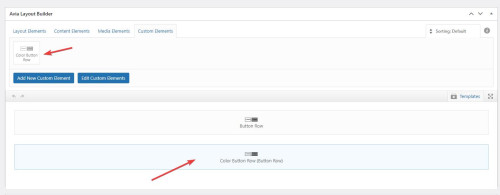

Best regards,
Mike
HI,
I tried this as stated in de documentation
*—————————————-
// CSS – Contact form submit button
//————————————–*/
#top .avia_ajax_form input[type=’submit’] {
border: none;
background: #eb5424;
color: #f6f6f5;
}
#top .avia_ajax_form input[type=’submit’]:hover {
background: #000000;
}
but it did not change, even after clearing the cache.
I changed submit to the Dutch ‘Verzenden’ for the button, so I tried that wording in the CSS as well, but without success
Maybe ‘submit’ has to be something else,since I use the Dutch version of WordPress/Enfold?
Hey Monique,
Thank you for the inquiry.
Please temporarily edit the enfold/config-templatebuilder/avia-template-builder/php/class-element-templates.php and remove this code around line 672.
			$duplicate  = '<a href="' . $notify_url . '" aria-label="' . esc_attr__( 'Make a duplicate from this element template', 'avia_framework' ) . '" rel="permalink">';
			$duplicate .=		esc_html__( 'Duplicate', 'avia_framework' );
			$duplicate .= '</a>';

			$actions['duplicate'] = $duplicate;
Let us know if this removes the Duplicate button.
Best regards,
Ismael
Hello,
Since the latest Enfold update was installed, I noticed I am getting a “duplicate” post link when I roll over an order link in WooCommerce. I spoke to Woo Support and they said it is from the parent theme since the CSS on the button says Avia Framework. Is there a simple solution to fix this?
Thanks,
Monique
 Håkan
HåkanGuest
Hello, is it possible to add a video.like this one (see link) with Enfold? Will I need a plugin?
It should be intregrated to the website, not with a play-button or frames.
Hi,
Typically when you add a new social profile following the documentation this is the correct code snippet that you should add to your child theme functions.php:
// Register new icon as a theme icon
function avia_add_custom_icon($icons) {
$icons['line'] = array( 'font' =>'icomoon', 'icon' => 'ue900');
return $icons;
}
add_filter('avf_default_icons','avia_add_custom_icon', 10, 1);

// Add new icon as an option for social icons
function avia_add_custom_social_icon($icons) {
$icons['Line'] = 'line';
return $icons;
}
add_filter('avf_social_icons_options','avia_add_custom_social_icon', 10, 1);
// Add new icon to sharebox
add_filter('avia_social_share_link_arguments', 'avia_add_social_share_link_arguments', 10, 1);
function avia_add_social_share_link_arguments($args){
    $tiktok = array('line' => array("encode"=>true, "encode_urls"=>false, "pattern" => "https://line.me/", 'label' => __("Share on Line",'avia_framework')));
    $args = array_merge($line, $args);
    return $args;
}
and then you would choose the new social profile from the options”

and then it will show on the front end:

I have done this for you.
Best regards,
Mike
Thank you. I suspected that was (at least part of) the problem. I just purchased a new version of ENFOLD and when I try to install it on this site, I still get an error message (below). Can you help me? JACKIE GAMBILL
Installing theme from uploaded file: themeforest-tLyxAgOg-enfold-responsive-multipurpose-theme.zip
You are in recovery mode. This means there may be an error with a theme or plugin. To exit recovery mode, log out or use the Exit button. Exit Recovery Mode
Unpacking the package…
Installing the theme…
The package could not be installed. The theme is missing the style.css stylesheet.
Theme installation failed.



