Viewing 30 results - 4,171 through 4,200 (of 11,211 total)
  • Author
    Search Results
  • #1022977

    Aha, ok, sorry here comes the functions.php file
    <?php

    /**
    * Add your own functions here. You can also copy some of the theme functions into this file.
    * WordPress will use those functions instead of the original functions then.
    *
    * Remove the comments before or around the sample functions and code to use theme.
    * @link http://kriesi.at/documentation/enfold/using-a-child-theme/
    */

    /**
    * Add filter to add or replace Enfold ALB shortcodes with new folder contents
    *
    * Note that the shortcodes must be in the same format as those in
    * enfold/config-templatebuilder/avia-shortcodes
    *
    * @link http://kriesi.at/documentation/enfold/add-new-or-replace-advanced-layout-builder-elements-from-child-theme/
    */

    add_filter(‘avia_load_shortcodes’, ‘avia_include_shortcode_template’, 15, 1);
    function avia_include_shortcode_template($paths)
    {
    $template_url = get_stylesheet_directory();
    array_unshift($paths, $template_url.’/shortcodes/’);

    return $paths;
    }

    /**
    * Turn on Custom CSS Class field for all Avia Layout Builder elements
    * @link http://kriesi.at/documentation/enfold/turn-on-custom-css-field-for-all-alb-elements/
    */
    //add_theme_support(‘avia_template_builder_custom_css’);

    /**
    * Remove the Import dummy data button from theme options
    * @link http://kriesi.at/documentation/enfold/remove-the-import-dummy-data-button/
    */
    //add_theme_support(‘avia_disable_dummy_import’);

    /**
    * Enable Avia Layout Builder Debug
    * @link http://kriesi.at/documentation/enfold/enable-advanced-layout-builder-debug/
    */
    add_action(‘avia_builder_mode’, “builder_set_debug”);
    function builder_set_debug() {
    return “debug”;
    }

    add_filter( ‘avf_google_heading_font’, ‘avia_add_heading_font’);
    function avia_add_heading_font($fonts)
    {
    $fonts[‘Prata’] = ‘Prata:400’;
    $fonts[‘Francois One’] = ‘Francois One:400’;
    $fonts[‘Open Sans’] = ‘Open Sans:300,400,600,700’;
    $fonts[‘Alegreya’] = ‘Alegreya:400,700’;
    return $fonts;
    }

    add_filter( ‘avf_google_content_font’, ‘avia_add_content_font’);
    function avia_add_content_font($fonts)
    {
    $fonts[‘Prata’] = ‘Prata:400’;
    $fonts[‘Francois One’] = ‘Francois One:400’;
    $fonts[‘Open Sans’] = ‘Open Sans:300,400,600,700’;
    $fonts[‘Alegreya’] = ‘Alegreya:400,700’;
    return $fonts;
    }

    add_filter(“kriesi_backlink”,”new_nolink”);
    function new_nolink(){
    $kriesi_at_backlink = “”;
    return $kriesi_at_backlink;
    }

    add_filter( ‘avf_modify_thumb_size’, ‘enfold_customization_modify_thumb_size’, 10, 1 );
    function enfold_customization_modify_thumb_size( $size ) {
    $size[‘masonry’] = array(‘width’=>1500, ‘height’=>250);
    $size[‘entry_without_sidebar’] = array(‘width’=>1210, ‘height’=>1210 , ‘crop’ => false);
    return $size;
    }

    function av_title_sc( ){
    $output = “<h1 class=’page-title’>”. get_the_title() .”</h1>”;
    return $output;
    }
    add_shortcode( ‘av_page_title’, ‘av_title_sc’ );

    function av_author_sc(){
    $current_user = wp_get_current_user();
    $output = “<h6 class=’ra-author’>AN ARTICLE BY ” . $current_user->user_firstname . “</h6>”;
    return $output;
    }
    add_shortcode(‘av_author’,’av_author_sc’);

    function av_excerpt( ){
    $excerpt = get_the_excerpt( $post );
    $output = “<span class=’related-excerpt’>”.$excerpt.”</span>”;
    return $output;
    }
    add_shortcode( ‘av_post_exc’, ‘av_excerpt’ );

    function avia_post_created(){
    $output = “<span class=’post-date’>”. get_the_date( $format, $post_id ) .”</span>”;
    return $output;
    }
    add_shortcode( ‘avia_created’, ‘avia_post_created’ );

    add_action( ‘after_setup_theme’, ‘ava_enfold_builder_layout_mod’ );
    function ava_enfold_builder_layout_mod(){
    add_filter(‘avf_builder_elements’, ‘avf_enfold_builder_layout_settings_mod’);
    }

    function avf_enfold_builder_layout_settings_mod($elements)
    {
    $counter = 0;
    foreach($elements as $element)
    {

    // Layout > Header visibility and transparency
    if($element[‘id’] == ‘header_transparency’) {
    /**
    *
    * Available Options
    * No transparency =
    * Transparent Header = ‘header_transparent’
    * Transparent Header with border = ‘header_transparent header_with_border’
    * Transparent & Glassy Header = ‘header_transparent header_glassy ‘
    * Header is invisible and appears once the users scrolls down = ‘header_transparent header_scrolldown ‘
    * Hide Header on this page = ‘header_transparent header_hidden ‘
    * MOD: Set the Layout > Header visibility and transparency settings to “Hide both”Header is invisible and appears once the users scrolls down”
    *
    **/
    $elements[$counter][‘std’] = ‘header_transparent’;
    }

    $counter++;
    }
    return $elements;
    }

    function av_single_fo(){
    ?>
    <script>
    var header = jQuery(“.single-post #main .avia-section .content”);
    jQuery(window).scroll(function() {
    var scroll = jQuery(window).scrollTop();

    if (scroll >= 250) {
    header.addClass(“single-header”);
    } else {
    header.removeClass(“single-header”);
    }
    });
    </script>
    <?php
    }
    add_action(‘wp_footer’, ‘av_single_fo’);

    add_filter( ‘style_loader_src’, ‘t5_remove_version’ );
    add_filter( ‘script_loader_src’, ‘t5_remove_version’ );

    function t5_remove_version( $url )
    {
    return remove_query_arg( ‘ver’, $url );
    }

    function raboff_custom_checkbox(){
    ?>
    <script>

    jQuery(window).load(function(){
    jQuery(‘h2.avia-caption-title’).after(‘<p class=”close-caption”> </p>’);
    jQuery( “.close-caption”).click(function() {
    var closeTheCap = jQuery(this).closest(“.slideshow_align_caption”);
    closeTheCap.hide(“slow”);
    });
    });

    jQuery(window).scroll(function(){
    var numberNotChecked = jQuery(‘fieldset.alacarte-form input:checkbox:not(“:checked”)’).length;
    console.log(numberNotChecked, “Hello, world!”);

    if (numberNotChecked >= 16) {
    jQuery(“.one-day”).addClass(“p-highlight”);
    }
    else {
    jQuery(“.one-day”).removeClass(“p-highlight”);
    }

    if (numberNotChecked <= 15 && numberNotChecked >= 8 ) {
    jQuery(“.two-day”).addClass(“p-highlight”);
    }
    else {
    jQuery(“.two-day”).removeClass(“p-highlight”);
    }

    if (numberNotChecked <= 7 ) {
    jQuery(“.three-day”).addClass(“p-highlight”);
    }
    else {
    jQuery(“.three-day”).removeClass(“p-highlight”);
    }

    });
    </script>
    <?php
    }
    add_action(‘wp_footer’, ‘raboff_custom_checkbox’);

    function avia_add_custom_social_icon($icons) {
    $icons[‘Turning Torso’] = ‘turning_torso’;
    return $icons;
    }
    add_filter(‘avf_social_icons_options’,’avia_add_custom_social_icon’, 10, 1);

    #1022594

    Hi mIke,
    Yes, I did. I have updated 5 websites (Enfold theme with valide envato API keys – I have 5 licences) yesterday morning from 4.4.1 to 5.
    I’ve created 5 new token. Only one worked (FYI with full access, not only the 6 permissions you recommend).
    For the others, the “save all button” is still spinning with the message below :
    “Last time we checked the token we were not able to connected to Envato:
    Purchases could not be accessed
    Username could not be accessed (needed for your information only)
    E-Mail could not be accessed (needed for your information only)”

    For one of my website, I have succeed to install the envato market plugin with a valid token. Then I tried to add an other token for the Enfold on the Enfold dashboard without success. The “save all button” spins and spins…

    This morning, I’m going to re-instal Enfold and try to add token… I will let you know…
    Best
    Lex
    And I forgot to say that when I try to remove token, the “all save button” spins and spins as well…

    • This reply was modified 7 years, 5 months ago by Lexa_Dryke.
    #1022211

    Thanks Mike for the link, but I’ve already read it and checked permissions.
    I have succeed to install envato market plugin with a token, but the token for enfold is not working.
    The all saves button is still spinning and spinning…

    • This reply was modified 7 years, 5 months ago by Lexa_Dryke.
    ilkbaharkunduzu
    Participant

    Hi,

    I did the update via FTP. No problem so far except the Fullwidth Sub Menu. It does not work. How is that? The menu is still there, the current menu item is highlighted but other texts with the links are not clickable. Just the appearance not the function.

    I click another page ( button) and the page I go has the same sub menu ( fullwidth). Then the menu is working. I click another page. On the page it is not working again. Then ( this part is weird) I go back to the page once worked but now it is not working. Kidding me….

    The problem seems not stable but is more and more in favor of the disabled links.

    I just wanted to inform you.

    Thanks

    #1021676

    Hey dondela,

    Here are the links for you to consider:

    If you need further assistance please let us know.
    Best regards,
    Victoria

    Hi Yigit – I’ve done two things:
    1) generated a new token, just in case there was an issue with the old one
    2) added the define statement to the wp-config
    Still no joy, I’m afraid. I enter the token and click the “check the private token” button and the top right green “save all changes” button starts to whir but doesn’t complete the action – left for about 2 mins before refreshing the page.
    For info, I’m using Litespeed Cache and have tried clearing these…

    EDIT – also, because I’m unsure what other impacts the define option might have, I have commented it out for now…
    EDIT 2 – I have tried on one of my other Enfold sites, worked fine and this is same server/cache setup – a further site has the same issue. All sites running PHP7.2 and a child theme

    • This reply was modified 7 years, 5 months ago by sdturnbull.
    #1021644
    sensiblekaren
    Participant

    Hello

    I am starting to create a site with the tribe event calendar and Enfold.

    1. On a single event it is showing in two columns but in my settings I have selected to display event info and tickets below the description?

    2. Also the button for the event plus tickets is not inheriting the style of other buttons on the site – how can I style this?

    3. How can I add a right side bar with widgets to a single event?

    4. How can I add a sidge bar with widgets to the calendar page?

    Hi,

    I have 6 Enfold licenses and 6 Enfold sites. Do I need (or is it good practice) to add difference API token to each site, or is it fine to use one “master” token for all my Enfold site?

    I have just updated to the latest version manually (via cPanel) and version 4.5 works fine, but it doesn’t allow me to verify my new token, the circle in the update button just whirls… Is this expected while we wait for a further release?

    Thanks
    Steve

    #1021413

    Hi,

    The Social icons are center aligned by default. however, it scales the entire width of the parent container.

    If you like to set a custom width to the social icons and center align the elements please use the below CSS

    /* Remove icon border */
    #top .av-social-sharing-box .av-share-box ul li {    
        border-left-style: none;    
        display: inline-block;
        vertical-align: middle!important;
    }
    
    /* Icon style */
    #top .av-social-sharing-box .av-share-link a {
       margin: 0 10px 0 0; 
       width: 50px!important;
       height: 50px!important;
       border-radius: 30px!important;
    }

    For more code snippets and styles please check https://kriesi.at/documentation/enfold/social-share-buttons/

    Best regards,
    Vinay

    Hey Pointbreakd,

    Please try the following in Quick CSS under Enfold->General Styling:

    .gform_footer #gform_submit_button_1 {
        padding: 15px 30px;
        border-radius: 3px;
        color: #ffffff;
        border-color: #36486a;
        background-color: #36486a;
    }

    Best regards,
    Rikard

    #1021405

    Hi,

    Thank you for using Enfold.

    Are you referring to the category sort button? It can be enabled in the “Sortierung?” settings. If you want to display the items’ categories inside the grid, you have to modify the config-templatebuilder > aviashortcodes > portfolio > portfolio.php file.

    Best regards,
    Ismael

    #1021369

    Hi,

    You can open a new thread here: https://kriesi.at/support/forum/enfold/#new-post

    There is a big blue button on the top of every sub forum reading Can’t find a solution to your problem? Open a new thread, you can try clicking that if you don’t want to use the link I posted.

    Best regards,
    Rikard

    #1021358

    Hi,

    The site looks good on my end. You may not see the changes until the cached files are cleared in your browser.

    Please perform the below steps to clear the browser cache:

    1. Disable “merging and compression” for CSS and JS files from Enfold > Performance.
    2. If a caching plugin is installed check the plugin settings and clear the cache and deactivate the plugins for testing purpose.
    3. Hard refresh by pressing Ctrl + Shift + F5 on your browser or press the F12 key to open chrome dev tools and right click on the refresh button and select “Empty Cache and Hard Reload”.

    Best regards,
    Vinay

    #1021352

    Hey Papergena,

    Please check the documentation https://kriesi.at/documentation/enfold/menu/

    1. Main menu > Main menu sub-text
    2. Please set the icon size and copy the shortcode to the menu label https://kriesi.at/documentation/enfold/menu/#add-icons-to-menu-item
    3. Please elaborate with a link to the page which element color are you trying to change?
    4. To center the logo in mobile please add the below CSS

    @media only screen and (max-width: 767px) {
    .responsive .logo a {
    display: inline-block;
    vertical-align: middle;
    }
    
    .responsive .logo {
    position: relative;
    display: block;
    width: 100%;
    text-align: center;
    }
    }

    After you add the code to view changes please clear the browser cache:

    1. Disable “merging and compression” for CSS and JS files from Enfold > Performance.
    2. If a caching plugin is installed check the plugin settings and clear the cache and deactivate the plugins for testing purpose.
    3. Hard refresh by pressing Ctrl + Shift + F5 on your browser or press the F12 key to open chrome dev tools and right click on the refresh button and select “Empty Cache and Hard Reload”.

    Best regards,
    Vinay

    Pointbreakd
    Participant

    Any way to do this?

    #1021281
    timchurchman
    Participant

    Hi, I am trying to create rollovers for my main menu like this demo: https://kriesi.at/themes/enfold-law/
    My site is: http://huntpr.co.za

    if i go to advanced styling change color there and click on “Apply only to mouse hover state” nothing happens.
    I would like the color to change to ddae87 and the line appear in this color?

    Already this code sitting in Quick CSS so not sure if anything blocking:
    #top #header.header-scrolled .container.av-logo-container {
    background: #88bbc8;
    }

    #scroll-top-link:hover {
    opacity:1 !important;
    color:cce4e7 !important;
    }

    .page-id-734 #contact input[type=’submit’]:hover {
    background-color: green !important;
    }

    /*hide auto sidebar from magazine*/
    .page-id-2967 .sidebar .widget_nav_hide_child {
    display: none;
    }

    /*2.8 firefox problem*/
    .avia-image-container-inner, .avia_image {
    max-width: 100%;
    }

    #socket .avia-bullet, #socket .avia-menu-fx {
    display: none;
    }

    .container {
    padding: 0px 95px;
    }

    .avia-button.avia-color-grey, .avia-button.avia-color-grey {
    color:#faf400!important;
    border: 1px solid #faf400!important;
    }

    h1, h2, h3 {
    text-transform: none !important;
    }

    h1, h2, h3, h4, h5, h6 {
    font-weight: normal!important;
    }

    #top * {
    border-radius:0 !important;
    }

    .avia-button {
    border: 1px solid !important;
    }

    #avia-menu #menu-item-3252 .avia-menu-text {
    border-color:#ddae87 !important;
    }

    /* Color section container width */
    #team .container {
    width: 100% !important;
    min-width: 100%;
    padding: 0;
    margin: 0;
    }

    #top .avia_ajax_form .button {
    width: 100%;
    }

    #top .social_bookmarks li a {
    color: #ddae87;
    }

    @media only screen and (max-width: 1200px) {
    .responsive #top .av_mobile_menu_tablet .av-main-nav .menu-item-avia-special {
    display: block !important;
    }
    .responsive #top .av_mobile_menu_tablet .av-main-nav .menu-item {
    display: none;
    }
    .responsive #top .av_mobile_menu_tablet .av-main-nav .menu-item-avia-special a { border: none !important; }
    }

    .avia-button:hover {
    background-color: #ffffff !important;
    color: #231f20 !important;
    }

    #scroll-top-link {
    color: white !important;
    border: 1px solid #ddae87 !important;
    background-color: #ddae87 !important;
    }

    .home #av_section_1 a.avia-color-custom {
    border:1px solid #ddae87 !important;
    }

    .avia-team-member .team-social {
    background: rgba(17,20,71,0.8);
    }

    .team-social a {
    background: #ddae87;
    }

    .team-social a::before {
    color: #ffffff;
    }

    .av_menu_icon_beside {
    border-right:none;
    }

    .home #av_section_1 a.avia-color-custom:hover {
    border:1px solid white !important;
    }

    .home #av_section_1 a.avia-color-light:hover {
    border:rgba(255, 255, 255, 0.5) !important;
    }

    .avia-menu {
    border-right:none !important;
    }

    .page-id-734 #contact input[type=’submit’]:hover {
    background-color: #ddae87 !important;
    border-color: #ddae87 !important;
    color: #ffffff !important;
    }

    .avia-menu-text{
    letter-spacing: 2px!important;
    }

    #1021254

    Hey ddandreo,
    Sorry I had not heard of this term before so I read about it here from what I understand, you are looking to add a button that links to the main content, since the main content can begin with different Enfold elements depending if you are using a column or a color section, or if it’s a standard post using a text block, each page or post would or could be different.
    But you could add a uniform ID to the content area for each page and the ID could be added manually to each page. The buttons could be created using shortcodes and added to each page.
    Am I on the right track?
    Do you know where you would want your button on each page, and what it would look like?
    Would you like us to show you how to add these ID’s to your pages & posts?

    Best regards,
    Mike

    Hi,

    Please perform the below steps :

    1. Disable “merging and compression” for CSS and JS files from Enfold > Performance.
    2. If a caching plugin is installed check the plugin settings and clear the cache and deactivate the plugins for testing purpose.
    3. Hard refresh by pressing Ctrl + Shift + F5 on your browser or press the F12 key to open chrome dev tools and right click on the refresh button and select “Empty Cache and Hard Reload”.

    Then try the steps mentioned in this link https://kriesi.at/documentation/enfold/icon/#icons-are-showing-as-rectangular-boxes-

    Best regards,
    Vinay

    #1021228
    ddandreo
    Participant

    Hi,
    I am working on a website with strict accessibility requirements and I believe there is no skip navigation button with the Enfold Theme? Can you confirm if there is an easy way to add this into the theme?
    Thanks!
    Garrett

    #1021193

    Hi,

    The top bar font is already at the max bold supported by the font family.

    You can try the below CSS to make it darker.

    /* Top Bar phone info */
    #top #header_meta .phone-info {
    	font-weight: bolder;
    	color: #000;
    }

    Please perform the below steps to clear the browser cache and view the changes:

    1. Disable “merging and compression” for CSS and JS files from Enfold > Performance.
    2. If a caching plugin is installed check the plugin settings and clear the cache and deactivate the plugins for testing purpose.
    3. Hard refresh by pressing Ctrl + Shift + F5 on your browser or press the F12 key to open chrome dev tools and right click on the refresh button and select “Empty Cache and Hard Reload”.

    I checked your company page and the separators appear in the same line. If you have any issue please open a new ticket for different issues.

    Best regards,
    Vinay

    #1021183

    Hey opvab,

    Add your shortcode to a page and hide the header and footer from the page options.

    Link the page to the image with “?iframe=true” at the end of the page URL to open it in a lightbox

    For more info please check https://kriesi.at/documentation/enfold/button/#button-usage (Works the same for an image).

    Best regards,
    Vinay

    #1021065

    Hi,
    im Enfold-Template werde ich eine Website erstellen, die sehr lange Einzelseiten hat. Wie kann ich ein seitlich mitlaufendes Button-Menü erstellen, um nicht immer wieder nach oben scrollen zu müssen. So dass man jederzeit innerhalb der Einzelseite zwischen den Themen wecheln kann? Schon mal Danke für eine Antwort.
    Viele Grüße,
    Gabi

    #1021042
    kasem-online
    Participant

    hello enfold team , I hope you have a good day

    I have website in Both English & Arabic using WPML
    I have a problems on RTL version of website
    – First one is in menu on mobile
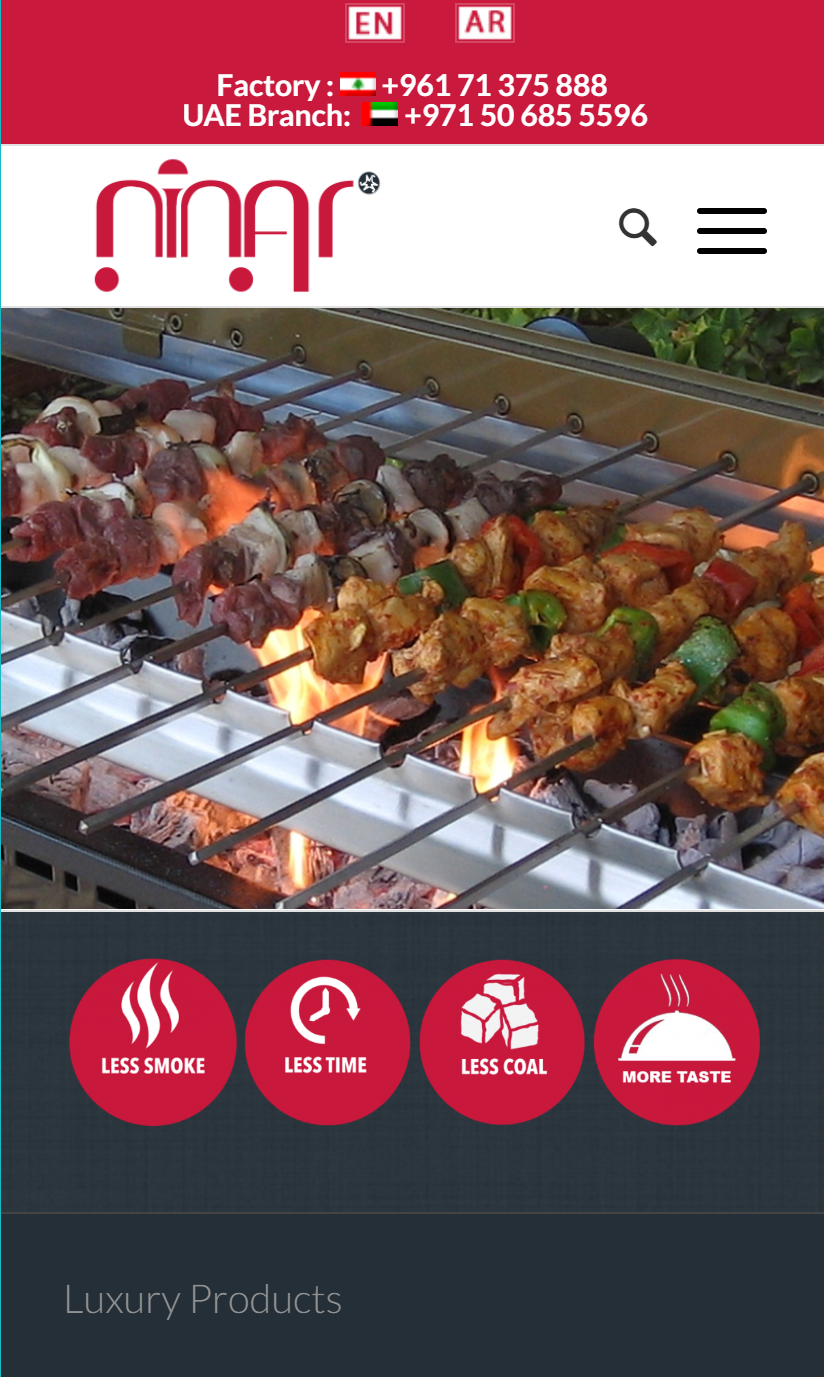
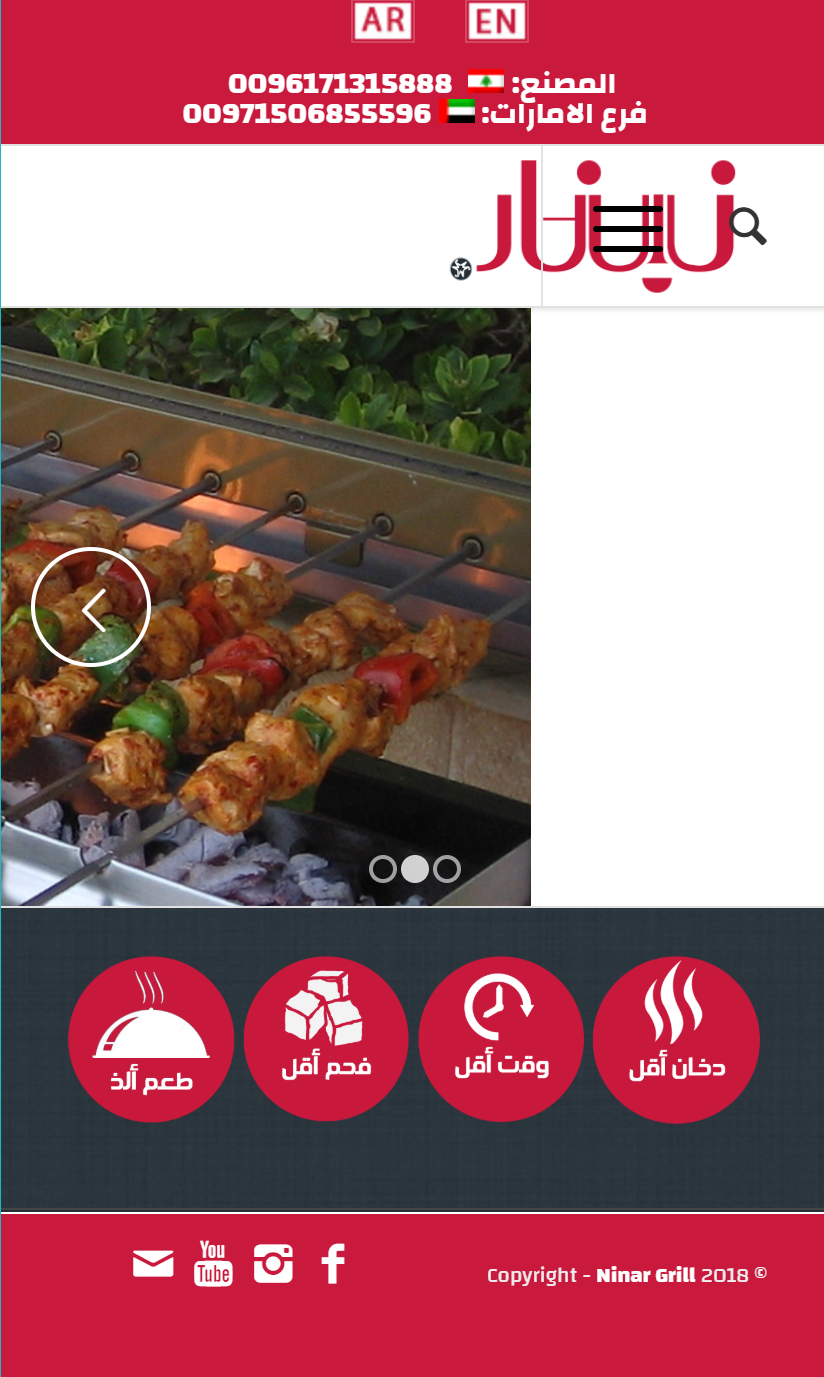
    I Put The logo on the right , but the menu icon appear over the logo …
    not only the menu , also the search icon appearing over the logo …
    I want menu button and search icon on the left and the logo on the right ….
    also I Want to disable social icons in mobile version

    this is the photo of website on mobile in English which is perfect ….
    http://www.ninargrill.com/wp-content/uploads/2018/10/ninar-en.png
    this is the photo of website on mobile in Arabic which is the problem
    http://www.ninargrill.com/wp-content/uploads/2018/10/ninar-ar.png

    the website is : http://www.ninargrill.com
    arabic version is : http://www.ninargrill.com/?lang=ar

    #1020770
    RafaRojo
    Participant

    Hello community!
    My website is based on Enfold and I need some help to change my menu in the header.
    I would like to change the colors of a single item in the main menu, I set it as “Button style (colored)” but it appears with the default colors.
    So I would like to change the background of the item with orange (# ff8d42), the text in white (#ffffff), when hovered the background in red (# bf1329) and the text always white (#ffffff).
    I suppose can be enough a quick css in the general style under enfold menu, right?

    Thanks to anyone who can help me create the css code for my needs!
    RafaRojo

    • This topic was modified 7 years, 5 months ago by RafaRojo.
    jscarlett
    Participant

    Hi

    I have been trying to re-create an existing website for a client but using WordPress and Enfold.

    For the header I added this to the Quick CSS in order to change the position of the buttons in the main menu:

    .main_menu ul:first-child > li a {
    height: 35px !important;
    line-height: 35px !important;
    }

    The positions and heights look fine now but something strange happens now when you hover on the main menu drop-down menu and text appears underneath the drop-down items.

    Please can you tell me what I should use to stop this happening?

    Thank you

    #1020690

    Hi Ismael,

    Thank you for your recent mail. I have added the URLs to the key restrictions list and waited for Google to process this, however, I still get the same error message in Enfolds Google Services Panel.

    Could not connect to Google Maps with this API Key.
    Troubleshooting:
    Check if you typed the key correctly.
    If you use the restriction setting on Google try to remove that, wait a few minutes for Google to apply your changes and then check again if the key works here. If it does, you probably have a syntax error in your referrer URL
    If none of this helps: deactivate all plugins and then check if the API works by using the button above. If that’s the case then one of your plugins is interfering.

    After checking the API Key that was saved it seems to disappear when the page is loaded again…
    I wonder if you any further ideas here?

    Thanks
    Nick

    #1020361

    In reply to: New Enfold site

    OK got it no theme specific.. that is good..

    I just clicked the install button on our hosting site. and it asked what folder I wanted to put it in.. should I have said “root” and not put a folder??

    Sorry, I am still kind of new at this.. I got my other site installed correctly, but I cannot tell you how I did it, it has been so long and sine I do not do this all the time and not really my job, I just go with the flow. Please tell me the correct way. I can blow this one away and start over, no problem there..

    I really appreciate any help you can give to a novice in web building.. We are looking to use the Enfold theme with this site, the other one came out perfect..

    Gene

    #1020306
    marit6114491
    Participant

    We have recently updated the Enfold theme and are struggling with a page that includes a Magazine content element.
    The element does not display as expected, and the clicking on the sort buttons has no effect.

    I saw that the js and css files included in the theme under enfold/config-templatebuilder/avia-shortcodes/magazine/ were not loaded when displaying the page. I tried deactivating all the new performance options, but it had no effect.
    I also noticed that in the Theme settings under Performance > Disabling of template builder elements, if i select “Manually manage loaded elements”, the magazine does not appear.
    Could it be that this content element was missed somewhere when moving to the new performance settings?

    #1020079
    saquasar
    Participant

    Hi,
    In mobile version it is not appearing the quantity buttons and the total but only the update cart button.

    #1019849

    Hi Andreas,

    Please try the following in Quick CSS under Enfold->General Styling:

    .wcppec-checkout-buttons {
        margin-top: 40px;
    }

    Best regards,
    Rikard

Viewing 30 results - 4,171 through 4,200 (of 11,211 total)