Hi team,
I’ve installed your theme few days ago and updated last time today. I’m encountering lots issues in the way blog posts are shown as listed:
– If I add a video in a post, in the main blog page this post is shown without any part of text but just the “read more” button after featured image. At the same time if I click the post the title is gone.
– Many posts featured images disapperar when listed in any category page.
– In category pages posts are listed with their entire text, that’s annoying because some of them are quite long. Is there a way to cut them after a while and add the “read more” button to point to the post itself?
– In WP dashboard it indicate as I have 1 plugin to update, but there isn’t. Same even if I deactivate all plugins.
Website url is http://www.lucaveronesi.it
Help please…
Best regards,
Luca
hello
i try to set enfold full-width button tabs and images on it.
now it looks:

http://s6.ifotos.pl/img/Screen-Sh_qwxrxsn.png
I would :

http://s5.ifotos.pl/img/Screen-Sh_qwxrxse.png
thx for help
-
This topic was modified 7 years, 4 months ago by
 osukaru.
Hey hbourdillon,
Please try the following in Quick CSS under Enfold->General Styling:
.avia_ajax_form .button {
    min-width: 100%;
}
Best regards,
Rikard
Hi,
The /wp-content/uploads/dynamic_avia/avia-merged-styles[..].css is used if you are using the option at Enfold Theme Options > Performance > JS & CSS file merging and compression
Often if someone adds css into their child theme style.css via WordPress > Appearance > Editor > Child Theme > Stylesheet and then checks their site it seems that the css is not working, this is because adding the css this way doesn’t rebuild the merged files to add the new css.
One way to resolve this is to disable the Performance > JS & CSS file merging and compression option until they are done developing the site, in the same way that it is not recommend in using a caching plugin until they are done developing the site, clearing cached css can be a pain sometimes.
Another option is to rebuild the merged files after adding css to the child theme styles file, this is done by clicking the blue “save all changes” button in the theme options, if this button is not clickable, then go the Enfold Theme Options > General Styling > Quick CSS field and add a blank space, this will activate the button so you can click it.
Then please clear your browser cache for the changes to take effect.
Best regards,
Mike
I’d set up a basic wordpress install with enfold, imported the “gym” demo, and made sure “minify and concatenate” css and js were both enabled, however, I’m not seeing any minification or concatenation of any theme files and there’s quite a significant number of them:
base.css,
layout.css,
buttons_fullwidth.css?ver=4.9.8
gallery.css?ver=4.9.8
google_maps.css?ver=4.9.8
grid_row.css?ver=4.9.8
heading.css?ver=4.9.8
hr.css?ver=4.9.8
icon.css?ver=4.9.8
iconlist.css?ver=4.9.8
image.css?ver=4.9.8
numbers.css?ver=4.9.8
slideshow.css?ver=4.9.8 slideshow_fullsize.css?ver=4.9.8
and the list goes on and on…which is good in the sense that it’s modular…but I need a working solution for minifying and concatenating these files — and also ideally only serving up the files that are used on the page instead of everything;
“Load only used elements” also isn’t working.
Any ideas?
Thank you
Hi everyone,
I am using Enfold’s share buttons and have following problem:
When I am using the facebook share button it shows me the facebook title and the word “WordPress” next to it.
I am sure there will be plugins to avoid this but I would prefer to avoid any plugin. As I have it still under construction I will post a temporary login in the private area.
Thank you,
Vasilis
Urgent
Dear Sir / Madam,
I have bought your enfold theme and I am using it for a while. The theme has been upgraded to the most recent version 4.5.1.
Lately, I changed the settings in the privacy section of theme options enabling them all. However, after that in the WordPress login form, the Connect button does not appear, so I locked out of my admin panel and cannot connect.
Is there any solution to this?
I would be very grateful if you could help me.
Thank you in advance.
Hello
I made a Portfolio with Enfold. When you enter a item of the portfolio, you can move to the next one or to the back one with the two buttons that appear on the left or on the right of the screen. I attach an image to explain it better.
http://www.mediafire.com/view/4i0si5ekxntxzfo/Unbenannt.png/file
Why the button of the left go forward and the button on the right go backward? In my opinion it should be the opposite. How can I fix it?
Best Regards.
-
This topic was modified 7 years, 4 months ago by
 lordgara3.
Hi Gian
Plus, the Advanced Layout Editor button doesn’t work.
Do you have the classic editor plugin enabled by any chance? If yes, please disable/remove it. This solved the issue for me and made the Enfold editor working side by side with Gutenberg, so you can choose which one you would like to use.
Best,
Michael
Hi,
@angeleliq I have taken a look at your site and see that you are using Enfold v3.5.2.
We can assist, but since you say that you have tried to update via ftp, and it’s not showing, I would like to take a look at your directory with ftp to see what is going on.
Please open a new thread so we can assist, and include your admin login in the Private Content area, but as this is not your thread your login info will not be private if posted here.
To open a new thread please go here and click the big blue button at the top of the page.
Best regards,
Mike
Hi,
I’ve just updated Enfold to 4.5.1 and WP to 5.0 and now I can’t add new content to posts or pages or portfolio items.
The editor is set to Text version and can’t switch to Visual version.
Plus, the Advanced Layout Editor button doesn’t work.
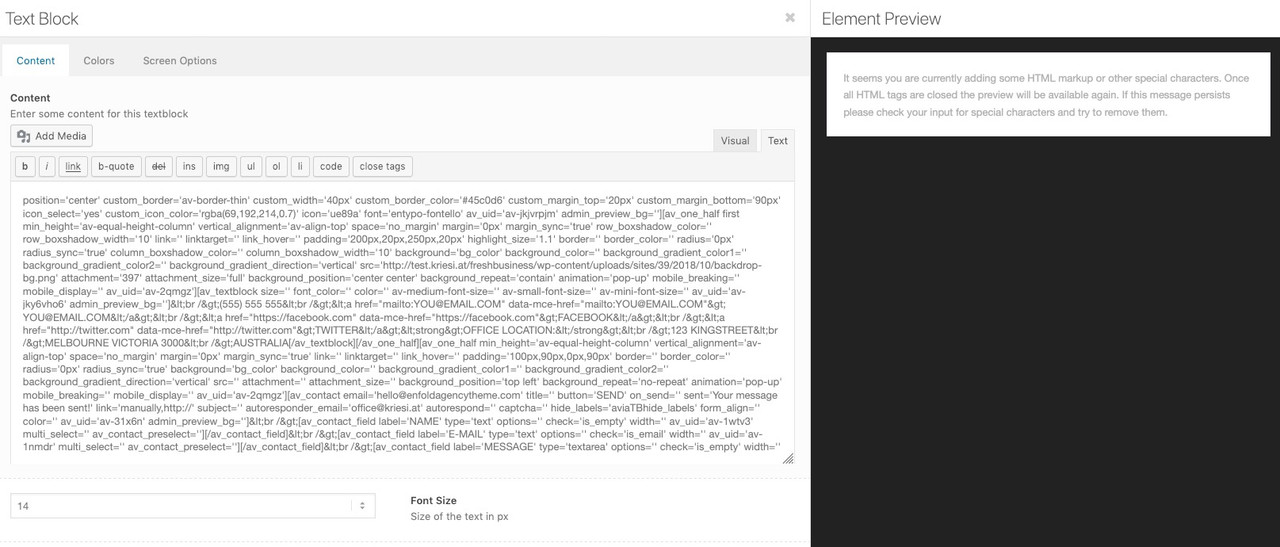
Yes – it seems that the whole Enfold Shortcode Stuff is in the textfield. If you goto text view you see this:
_____________
Edit: if you first – when you open an existing Enfold ALB Page goto “Save” : “Update” Button on the right top side – then the page will be as it should be – and the image of text-block element would not be this way above:
Seems the code you have on this page for the Enfold Mailchimp Newsletter Widget customization is no longer working with the new theme update. https://kriesi.at/documentation/enfold/mailchimp-signup/
If I add the code below the fields and submit button will no longer work. I have already tried turning off all the plugin and I still see the issue.
/*Mailchimp Footer Newsletter Formatting*/
#top .avia_ajax_form.avia-mailchimp-form input[type=’submit’] {
background: #3d8ee1;
color: #ffffff;
border: none;
}
#top .avia_ajax_form.avia-mailchimp-form input[type=’text’] {
background: #383838;
color: #00334e;
}
I managed to change the formatting on my own but felt that the information on the page should be updated.
Okay, so I’ve read through all the comments about the theme not uploading, like I’m experiencing, but I’m frustrated that I am reading about people having problems. I have downloaded the latest theme from Themeforest. I have installed the “Update Theme and Plugins from Zip File” plugin, but I’m not certain what to do next. Will going to Appearance/Add New and then picking the enfold.zip file do it? I don’t want to overwrite my old theme files.
I really wish this was more intuitive. I REALLY wish the update button in the theme worked!
Please reassure me, and please give me exact instructions for how to proceed.
I hope I don’t sound too grumpy, but we’ve got other issues that came up for our business, and I don’t have the energy today to be trying to correct this! Sorry for any bad vibes.
Thank you for your help!!
-
This topic was modified 7 years, 4 months ago by
 rasa.
rasa.
Hi Nikko – that’s not my support problem… The problem is that it will not save. The save all changes button just keeps spinning – I left it for 1 hour and it still did not save… It doesn’t work in this area… I can save all changes in other areas of the Enfold theme but not the token field and google maps api field. Please log into my account to try/test. Thank you
Little bug report on this:
I have WP 5.0 With Gutenberg Enfold 4.5.1
I noticed when I edit an icon block in the Enfold pagebuilder the editor shows up, but all text is white and code is shown, when you click on the code button, you can see the text correct.
When I install and activate the classic editor it works perfect. Hope this helps.
Hello! I saw the threads about how to update enfold manually to 4.5 but for some reason (and I have no idea how) my enfold updated from within wordpress by just clicking the update button on the theme page. I had tried just doing the update button a few weeks ago and no luck so I went to the threads and saw how to update manually. I was going to do so today when it somehow worked without doing anything…so appeared like a success.
After that, I was prompted to update to a personal token to remove the old api key which I did and it was also successful.
I thought everything was fine but now I’m trying to edit content on a few pages and when I hit ‘update’ the page just spins and then eventually the page is white and an error message 404/405. The site is working fine, but no updates are allowed and I can’t perform a backup from within Bluehost as well.
Any thoughts? Perhaps I missed a step….? Thank you guys! You’re always so helpful.
@sd142ppr as for now (dec, 6th, 2018) you have to enable the classic editor plugin if you want to use the enfold layout editor. If you activate gutenberg you wont see the advanced layout editor at all. If your site is mission critical I advice to wait with an update to wp5 until january 2019. While writing this lines there are already 163 known issues tagged with wordpress 5.0.1. I won’t be surprised to see the first update (5.0.1) before x-mas.
Regards
Michael
P.S.
5 Min after writing this I got an update notice for enfold 4.5.1. With 4.5.1 you con’t need the classic editor plugin. The advaced layout editor button now shows up on the edit screen as usual even with gutenberg enabled.
-
This reply was modified 7 years, 4 months ago by
 mensmaximus.
When I last updated theme and uploaded new version of Enfold template, it removed the debug mode? I tried to do same process you mentioned but now it doesn’t work like it did before? Please advise.
When I tried to add, this is the response I got after I clicked update file button: “Unable to communicate back with site to check for fatal errors, so the PHP change was reverted. You will need to upload your PHP file change by some other means, such as by using SFTP.”
Hey philippmosqueira,
Please try the following in Quick CSS under Enfold->General Styling:
#top .avia-button {
    border-width: 0;
}
Make sure to clear your cache before you check the results.
Best regards,
Rikard
I have update with ftp, I cancelled the directory enfold in wp-content/themes and uploaded the new version
Now all work correctly
I have a problem with the token
I created it and copied in update theme section but I have this message:
The right button (revalidate or remove the token)
Last time we checked the token we were not able to connected to Envato:
Purchases could not be accessed
Username could not be accessed (needed for your information only)
E-Mail could not be accessed (needed for your information only)
How can I resolve this problem?
Beste regards
Adriano
Hi victoriahepburn,
Thank you very much :)
Here is the code you can put in Enfold > General Styling > Quick Css, if it does not work, put into themes/enfold/css/custom.css
#top .av-menu-button > a .avia-menu-text {
    border-radius: 100px;
}
Can you please share the icons file with us?
If you need further assistance please let us know.
Best regards,
Victoria
Dear Enfold Team,
the blue buttons on my page somehow have a 3D effect or a shade that I would like to remove.
If you look at them, you can see the normal button but below the button is a darker blue that creates this “3D effect”. How can I make this disappear or at least make this a bit smaller? I would like to have normal buttons such as for example the “subscribe” button on the right sidebar of this page where you can sign-up for your newsletter.
Thanks a lot for the help.
Greetings Philipp
I was looking and couldn’ t find it.
I am sure that other share buttons would ok, but I would try to use Enfold’s share buttons.
I want to add a 3D look to the buttons. Is there any code I can paste into the quick css section? :)
Hi Ismael,
Thanks a lot for your reply and your work !
We just installed Enfold Recaptcha plugin, then activated and configurated it on Google Services Panel on Enfold options.
It works on our contact form : https://tech-my.biz/contact-agence-transformation-digitale/
But there are two problems :
1) Validation button disappear. Even though we validate reCAPTCHA.
2) This message “You have to pass reCAPTCHA before you can send the form.” is at the end of the contact form. Can you delete it please ?
Could you fix these two points please ?
Many thanks in advance,
Best regards,
Jérôme
 Barry Strauss
Guest
Hi,
I’d like to use the live demo site of the Enfold Law, which is at this URL: https://preview.themeforest.net/item/enfold-responsive-multipurpose-theme/full_screen_preview/4519990?_ga=2.116078726.1033554149.1542584775-1204939734.1542476857
It’s probably obvious, but I can’t find the download button to retrieve it so that I can upload it to our server.
Can you help?
Barry Strauss
Hey Roger,
Please try the following in Quick CSS under Enfold->General Styling:
.woocommerce-page .button {
  background:yellow !important;
}
Best regards,
Rikard
Hi,
Please try adding this at the very end of your themes/child theme’s functions.php file:
You can change the button class name and button url in the below code.
// Button after add to cart

// Button after add to cart
function button_after_add_to_cart(){
?>
<script>
jQuery(window).load(function(){
	jQuery(function($) {
  	jQuery('.single_add_to_cart_button.button').after('<a class="avia-button   avia-icon_select-yes-left-icon avia-color-blue avia-size-large avia-position-left "  style="margin-right: 10px;margin-left: 10px;"   href="http://www.your-site.com/store/">Back to store</a>');
	});
});
</script>
<?php
}
add_action('wp_footer', 'button_after_add_to_cart');


// End function
For more information about adding custom script please check this link.
Best regards,
Vinay
Hey wjwebdesign,
Thank you for writing to us.
I checked your site and it appears you have managed to fix both the issue?
Please see the attached screenshot. I did not find any issue trying to access submenus or viewing the mega menu.


You may not see the changes until the cached files are cleared in your browser.
Please perform the below steps to clear the browser cache:
1. Disable “merging and compression” for CSS and JS files from Enfold > Performance.
2. If a caching plugin is installed check the plugin settings and clear the cache and deactivate the plugins for testing purpose.
3. Hard refresh by pressing Ctrl + Shift + F5 on your browser or press the F12 key to open chrome dev tools and right click on the refresh button and select “Empty Cache and Hard Reload”.

Best regards,
Vinay



