Hello: following problem:
1) I downloaded new copy from envato
2) unzipped and uploaded via ftp to my server. Version according to style.css: Version: 4.5.2
3) I uppdated Child style.css via FTP
4) generated new token and inputted it under “theme update” in my child theme
->Webseite works fine.
5) I checked the updater of child theme. It is saying: “A new Version (4.5.2) of your Parent Theme (Enfold) is available! You are using Version 4.4.1.
See what’s new in change log. Do you want to update?” (i.e.: somehow it still thinks we are on 4.4.1)
6) Updating over the button creates the following error message: “Beim Aktualisieren von Enfold ist ein Fehler aufgetreten: Download fehlgeschlagen. Es wurde keine gültige URL übermittelt.” (=Failure due to invalid URL)
Not the biggest issue however updating should work once 4.5.2 is installed, shouldnt it?
Hi,
You need to download the whole snippet library and copy the plugin folder manually.
// https://github.com/KriesiMedia/enfold-library
Click the green “Clone or download” > “Download ZIP” button.
Best regards,
Ismael
The submit button is not working on mobile and the wording is too low.
I have the enfold contact form that is only visible for mobile and tablet and the button is not working. how can I fix this?
Also is there any way to make the background picture bigger on mobile, or make the slider show more of the background picture.
I am trying to change the shape of the button on the following page:
What I want is for the button towards the bottom of the page (under the report image) to be the same shape as the button in the layer slider. I have changed the color, but the other commands are not taking. I have tried the following CSS code:
.avia-button { border-radius: 100px; !important; }
.avia-button.avia-size-xlarge { font-size: 28px; } /* for large buttons */
.avia-button.avia-size-large { font-size: 24px; } /* for large buttons */
.avia-button.avia-size-medium { font-size: 24px; } /* for medium buttons */
.avia-button.avia-size-small { font-size: 24px; } /* for small buttons */
I have also tried to edit the border radius in Enfold –> Advanced Styling
Nothing seems to be changing this shape!
Thank you!
Hi,
@jbub561 Please forget about this thread and refer to this post – https://kriesi.at/documentation/enfold/social-share-buttons/#how-to-add-custom-social-icons-to-enfold-options. If that does not help, please start a new thread under Enfold sub forum :)
Best regards,
Yigit
Good evening folks,
new question: how can I change the size of the social media profile icons?
And also the space between the icons. Please take a look on the screenshots,
than you know what I mean.
I’ve still read the enfold documentation but I only find content about “social
share buttons“, but this is not what I’m looking for. ;)
I’m looking forward to your new answer.
Best regads
Carsten
Themes I used
DIvi theme
Twenty Eighteen
Twenty Nineteen
Urban Square
Play School
It really doesn’t matter the theme ..I have tried other themes as well, I can pick any one and the Quiz portion will work
Only Enfold does not render the theme
New Password below
Here are images of themes used to to test teh rendering of the quiz
View post on imgur.com
View post on imgur.com
View post on imgur.com
Also to add
View post on imgur.com
This link does not fire off – It tells me that Enfold and H5P quiz are not working well.
No errors in console
*in the image blow – I noticed that Enfold converted a link to a button, am I seeing this correct?
View post on imgur.com
I am running Enfold version 4.5.2.
The “Enabled” button/slider to enable layer transitions is not functioning. I can disable transitions but when I click to enable nothing happens.
To recreate :
– Create a slide
– Create a layer
– Click Transitions
– Try and enable “Loop or Middle transition” – this just fails for me.
– I have tried in multiple browsers . and multiple machines.
Any ideas?
Thanks,
Elliot.
Hello, I am running into an issue where the developer of the plugin mentioned it was a conflict with Enfold.
I have WooCommerce Print Products installed which is supposed to generate a PDF of the product for print. An example would be to go to this page and click “Print Product” https://redefinedhomeboutique.com/product/anderson-nightstand/
Does anyone know how to resolve this?
Here is the error log I get from my server
[Wed Jan 09 12:49:06.749150 2019] [:error] [pid 27546] [client 155.186.205.13:62679] PHP Fatal error: Call to a member function get_price_html() on string in /nas/content/live/redefinedhome/wp-content/themes/enfold/config-templatebuilder/avia-shortcodes/product_snippets/product_snippet_button.php on line 110, referer: https://redefinedhomeboutique.com/product/anderson-nightstand/
Thanks in advance for any help!
*Hi,
The site looks good on my end. You may not see the changes until the cached files are cleared in your browser.
Please perform the below steps to clear the browser cache:
1. Disable “merging and compression” for CSS and JS files from Enfold > Performance.
2. If a caching plugin is installed check the plugin settings and clear the cache and deactivate the plugins for testing purpose.
3. Hard refresh by pressing Ctrl + Shift + F5 on your browser or press the F12 key to open chrome dev tools and right click on the refresh button and select “Empty Cache and Hard Reload”.

Best regards,
Vinay+-
Hello Nikko,
thank you for your reply. I have removed both lines from the file. Cleared Cache and actualized browser but it is still in see here for example:
https://xn--schlafstrungen-2pb.com/category/radiaesthesie/erdstrahlen/erdstrahlen-abschirmen-entstoeren/
This link-line should be removed from Code if there is no Read More Button on Page anymore:
<div class=”read-more-link”>Weiterlesen<span class=”more-link-arrow”></span></div>
It would be good to get this out via the Enfold Child theme otherwise I need to change it again at all updates if it works.
Shall I put the 2 lines in again?
Best regards
Dietmar
-
This reply was modified 7 years, 3 months ago by
 pumpmakers.
Hi,
Typically this occurs when the Enfold Theme Options > Performance > JS & CSS file merging and compression is enabled, for the merged files to be updated (rebuilt) the theme options needs to be saved, this is the big blue button “Save all changes”, which also happens to be the same button to save the Quick CSS.
Glad that you have discovered this, but I wanted to explain why this is for you.
Unless there is anything else we can assist with on this issue, shall we close this then?
Best regards,
Mike
Hi,
Please go here: https://kriesi.at/support/forum/enfold/
Then click the big blue button at the top of the page:
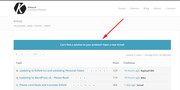
It will point you to the support form:
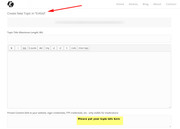
Best regards,
Mike
Hi, I have an enfold contact form which I would like styled like the enfold contact form. How do I achieve this? I tired this code but the submit button is not the same size…
/*----------------------------------------
// CSS - Styling contact form 7
//--------------------------------------*/

/* Textarea email and input fields */
#top .wpcf7-form input[type='text'],
#top .wpcf7-form input[type='email'],
#top .wpcf7-form .wpcf7-textarea {
/*border-color: #d0d2d3;*/
/*background: #dbebfa;*/
/*color: #00334e;*/
font-family: "HelveticaNeue", "Helvetica Neue", Helvetica, Arial, sans-serif;
font-size: 17px;
line-height: 1em;
padding: 13px!important;
border-radius: 2px;
}

/* Submit button */
#top .wpcf7-form .wpcf7-submit {
padding: 15px 30px;
border-radius: 2px;
}
Is there a way to hide the Hide Form Labels like in the enfold as well?
-
This topic was modified 7 years, 3 months ago by
 flightdeck.
Enfold gurus: I need to do a very simple rollover effect for a whole lot of boats. I can’t find anything in the theme which will allow me to do this. I tried some basic code I found online, to no avail.
An example of the images are below (note, I need to do this rollover for at least 50 boat images):
http://just4funpowersportslhc.com/wp-content/uploads/suncatcher-V324SE-overhead1.jpg
http://just4funpowersportslhc.com/wp-content/uploads/suncatcher-V324SE-overhead2.jpg
The test page is here: http://just4funpowersportslhc.com/portfolio-item/test/
And the code I found (that isn’t working) is from this webpage (note, I don’t want any linkage – just a rollover effect showing seats and seats with storage): https://wpfaq.org/site/rollover-buttons-and-images/
Can you give me some guidance, pretty please? All I need is a very basic rollover, closed/open seats.
Hello
the problem I have only with the Enfold Theme. If I change the theme, the button is in the frame.
Regards Carlo
Hi guys!
I was able to decorate the hyperlinks as I wanted them but I need help so the CSS only applies to the hyperlinks and not the image links (hover on the image and then move towards the text – an underline will appear), and/or Enfold buttons (with the theme color get overridden and replaced with the new colors) and/or any other type of link that may appear on the body. Basically, I want this CSS to be applied only on blog posts plain text hyperlinks.
I had to emphasize the hover behavior as it would get overridden by the underline one.
What am I missing?
/*underline links body*/
.entry-content a {
color: #000 !important;
border-bottom: 2px solid #e06;
}
.entry-content a:hover {
color: #6e9e9a !important;
text-decoration: none !important;
border-bottom: none !important;
}
Here’s one page where you can see it in action: https://argen-travel.com/argentina-pizza/
Thank you!!!
Havi
Hi,
Please try adding this code to the Quick CSS section under Enfold > General Styling or to your child theme’s style.css file:
CSS Snippet:
/* CSS - */

#top #header .av-menu-button a {
	top: -6px !important;
	transition: all 40ms linear !important;
	position: relative;
}

#top #header .av-menu-button a:active {
	margin-top: 2px !important;
}


#top #header .av-menu-button a .avia-menu-text{
	box-shadow:  0 0 0 1px gold inset,
	0 0 0 2px rgba(255, 255, 255, 0.15) inset,
	0 8px 0 0 gold, /* 3d bottom border */
	0 8px 8px 1px rgba(0, 0, 0, 0.25); /* shadow */
}

#top #header .av-menu-button a:active .avia-menu-text {
	box-shadow:  0 0 0 1px gold inset,
	0 0 0 1px rgba(255, 255, 255, 0.15) inset,
	0 1px 3px 1px rgba(0, 0, 0, 0.35);
}
Please play around with the CSS values and change the gold color in the code to suit your design.
Best regards,
Vinay
Hi,
Please try adding this code to the Quick CSS section under Enfold > General Styling or to your child theme’s style.css file:
CSS Snippet:
/* CSS - */

#top .avia_ajax_form .select option { color: #333; }
You may not see the changes until the cached files are cleared in your browser.
Please perform the below steps to clear the browser cache:
1. Disable “merging and compression” for CSS and JS files from Enfold > Performance.
2. If a caching plugin is installed check the plugin settings and clear the cache and deactivate the plugins for testing purpose.
3. Hard refresh by pressing Ctrl + Shift + F5 on your browser or press the F12 key to open chrome dev tools and right click on the refresh button and select “Empty Cache and Hard Reload”.
Best regards,
Vinay
Hi,
There is a huge blue button on the top of each sub forum for that, or you can use this link to open a new thread.
Best regards,
Rikard
Hey Hudavi,
Please try adding this code to the Quick CSS section under Enfold > General Styling or to your child theme’s style.css file:
CSS Snippet:
/* CSS - Footer widgets */

#top #footer #text-4.widget {
    margin-bottom: 0px;
}

#top #footer #nav_menu-2.widget {
    margin-top: 0px;
}
After adding the CSS please perform the below steps to clear the browser cache:
1. Disable “merging and compression” for CSS and JS files from Enfold > Performance.
2. If a caching plugin is installed check the plugin settings and clear the cache and deactivate the plugins for testing purpose.
3. Hard refresh by pressing Ctrl + Shift + F5 on your browser or press the F12 key to open chrome dev tools and right click on the refresh button and select “Empty Cache and Hard Reload”.
Best regards,
Vinay
Hey Dee007,
Thank you for using Enfold.
1.) That button is hidden by default. You can use this css code to re-display it:
@media only screen and (max-width: 767px) {
.responsive #scroll-top-link {
    display: none;
}
}
2.) Set the table’s Table Options > “Responsive Styling” to the second option (“scrollable”).
Best regards,
Ismael
hi,
we changed the theme of our site to enfold and we imported a demo. after that there were many (about 90) new pages created that simply have f.e. all buttons on them or other elements. what are those pages good for? can we simply delete them?
some examples of the page names are:
— Buttons
— Catalogue
— Code Block
— Color Section
…
Hey GeoCreo,
If you are using Enfold v4.0.5 with WordPress v5 then you may not see the ALB button.
Please update Enfold to v4.5.2
or your can downgrade WordPress to v4.9.9 with the WP Downgrade plugin.
If you want you update Enfold, Theme Forest has changed their API for Token keys so you will need to update manually.
There is a free plugin that will allow you to manually update via the WordPress Theme panel by uploading the enfold.zip file.
Otherwise you can update via FTP, please remember, if you update manually you will need to delete the current enfold folder and then upload the new one. Please don’t try to overwrite the theme folder, as this will leave old files behind and cause errors.
My recommendation is to go to your Theme Forest account and download the updated Enfold v4.5.2 and manually update it, then going forward it will use the new Token keys. All users will need to generate a new token for updates. Please see this post
Please let us know if you would like some help updating.
Best regards,
Mike
Hi there,
I haven’t edited my client’s website since a much older version of enfold where the avia layout button was right at the top. On trying to create a new page I saw the new setup and must admit that I’m quite lost. Please may you help me locate the Avia Layout in version 4.0.5.
Kind regards,
George
Hi,
Adding the css to the style.css above is a good place and should work good, but I believe your css/js file merging is on in your performance settings, so your merged css needs to be re-built. Please try going to Enfold Theme Options > General Styling > Quick CSS field and add a blank space in the field, then save your theme settings by clicking the big blue button “Save all changes”, then clear or purge any cache plugin, then clear your browser cache.
If this doesn’t help, please include a admin login in the private content area so we can be of more assistance.
Best regards,
Mike
I’m looking to emulate the functionality of this website with the Enfold theme. It would be a one page side with just an accordion, but the limited styling choices on the existing accordion shortcode won’t quite accomplish what I’m trying to do. If I were able to use buttons as the title bar for accordion content, the styling would be flexible enough to accomplish what I’m trying to do.
Is there a way to use buttons (or full width buttons) to as the title bar that opens/closes an accordion section so that I can emulate that functionality?
-
This topic was modified 7 years, 3 months ago by
 fhcadvance.
Thanks Ismael. Unfortunately it looks like we are going backwards here. The button doesn’t work (It actually seems to be obscuring the play button embedded in the video) and when I finally get the video to play once again there is no sound. My client needed this video live weeks ago, and we seem no closer to a fix. I am desperate for a fix here.
On the demo page you will see first the full-width video that is not working, but the smaller video below is actually not bad. Could you please help me get it formatted to span the full-width of the page? Or can we get the full-width video working as expected? I’ve had nothing but positive experiences with you, your team and Enfold until this video issue – please help!
Hello,last week I bought Enfold and I’m now building on our website on a local server, so I can’t check or the pages are responsive.
Therefore I went to your website and checked some demo versions of Enfold.
I see that several demo sites are not responsive. They show only blank screens. I checked this on my iPhone X and my iPad.
How is this possible? Does it mean that I’m putting a lot of work on creating the pages and discover in a few weeks that our site is also not responsive?
Second question: how can I remove the social media buttons on the top right side of the menu in Enfold?
Best regards,
Henk
(Email address hidden if logged out)



