

Forum Replies Created
-
AuthorPosts
-
Hey Petra,
I adjusted your code in Functions.php file. Please review your website :)
Cheers!
YigitHi!
Please use the code as following instead
.page-id-2025 .slide-meta {
    display: none;
}
Cheers!
YigitDecember 5, 2017 at 11:03 am in reply to: Menu is overlapping the logo when resizing the screen #884966Hi Florian,
I added following code to bottom of Style.css file of your child theme in Appearance > Editor
@media only screen and (max-width: 989px) and (min-width: 768px) {
.responsive .main_menu ul > li > a {
    font-size: 18px;
}}
Please review your website :)
Best regards,
YigitHi Mike,
I enabled debugging mode – https://kriesi.at/documentation/enfold/enable-advanced-layout-builder-debug/ and copied your pages shortcodes to my local installation but i cannot reproduce the issue there.
Removing PDF links helps however copying them gives “unavailable for legal reasons” error. Could you please contact your hosting provider and ask if they have any insights on this? I will ask my teammates as well.
Best regards,
YigitHi,
You are welcome! :)
For your information, you can take a look at Enfold documentation here – http://kriesi.at/documentation/enfold/
And if there are features that you wish Enfold had, you can request them and vote the requested ones here – https://kriesi.at/support/enfold-feature-requests/
For any other questions or issues, feel free to start new threads under Enfold sub forum and we will gladly try to help you :)Best regards,
YigitHey!
Code is not being applied. Please try flushing cache in cache plugin you are using and refresh your page a few times. If that too does not help, please create a temporary admin login and post it here privately.
Cheers!
YigitHey,
Please add following code to Quick CSS in Enfold theme options under General Styling tab
@media only screen and (max-width: 767px) {
.single-product .sidebar { display: none !important; }
}
If that does not help, please post a link to your website.
Regards,
YigitHi Emilio,
Thanks for contacting us!
Please see private content field below :)
Best regards,
YigitDecember 4, 2017 at 8:35 pm in reply to: Menu is overlapping the logo when resizing the screen #884773Hey Florian,
I simply went to Enfold theme options > Main Menu and choose to switch to mobile menu on tablets
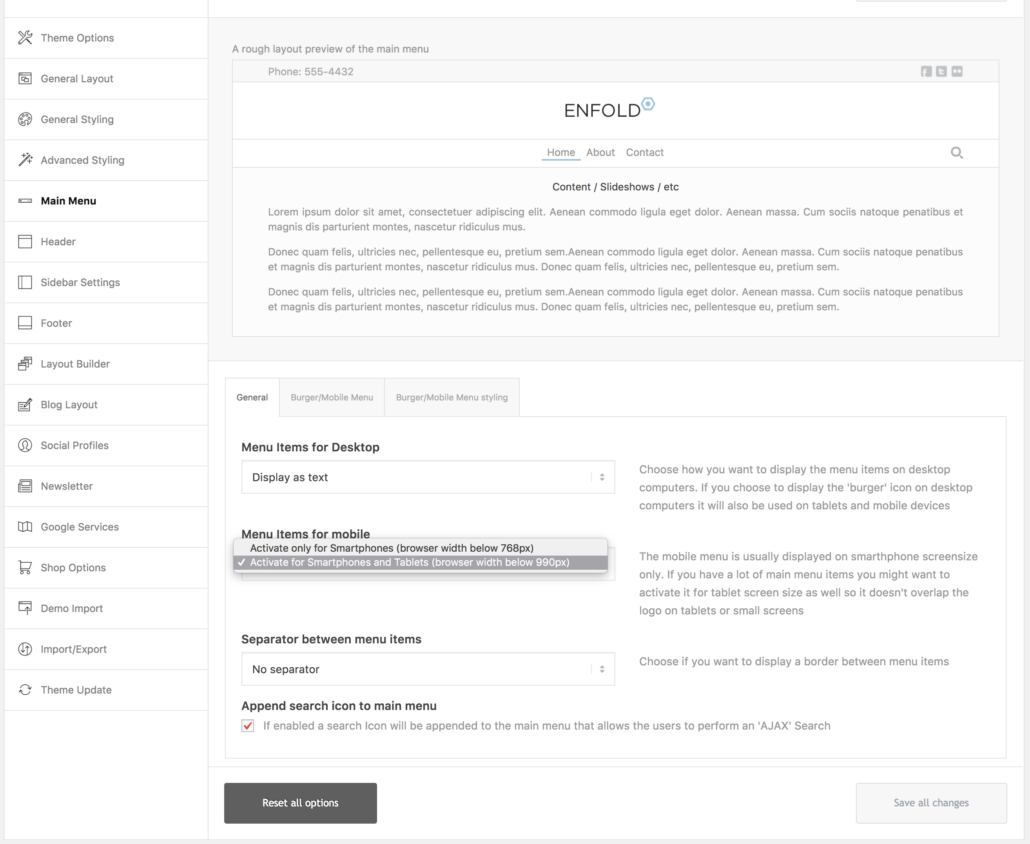
Please review your website :)Best regards,
YigitDecember 4, 2017 at 8:25 pm in reply to: Enfold 4.2.1. coming? Or Should I update and fix issues with temporary fixes? #884771Hi Rob,
I am well too, thanks :)
Thanks for your patience and understanding!
Best regards,
YigitDecember 4, 2017 at 8:19 pm in reply to: Remove time (but not date) from the Enfold Latest News Widget #884767Hi!
You are welcome! Let us know if you have any other questions or issues! :)
Cheers!
YigitHello Katie,
We understand your frustration and we are sorry for the inconvenience.
Kriesi has been making changes in company’s structure and as of today, he has started reviewing tasks that needs his attention. Since Kriesi is the only one who can initiate a refund, we could not help you with this case.
We have reminded him about your request once again. Hopefully, he will review it soon and do what is necessary.
Thanks for your patience and understanding!
Best regards,
YigitHi Guy,
I searched all 5 of these emails and none of them can be found in our database. Maybe you have never registered to our support forum.
The easiest way to register/reset your account would be by providing your purchase code and i am afraid you can only retrieve it by having an access to ThemeForest account that was used to purchase the theme.Best regards,
YigitDecember 4, 2017 at 6:11 pm in reply to: Enfold 4.2.1. coming? Or Should I update and fix issues with temporary fixes? #884738Hi Rob,
Hope you are doing well :)
Our dev team has made so many changes since Enfold 4.2 was released. They are going to be reviewed by Kriesi and hopefully we will release a minor update before new year.
Best regards,
YigitDecember 4, 2017 at 5:54 pm in reply to: Remove time (but not date) from the Enfold Latest News Widget #884735Hi,
Sorry Florian! Please change the code to following one
add_filter('avia_widget_time', 'change_avia_date_format', 10, 2);
function change_avia_date_format($date, $time_format) {
  $time_format = get_option('date_format');
  return $time_format;
}
Best regards,
YigitHi,
Glad you figured it out and thanks for sharing! :)
For your information, you can take a look at Enfold documentation here – http://kriesi.at/documentation/enfold/
And if there are features that you wish Enfold had, you can request them and vote the requested ones here – https://kriesi.at/support/enfold-feature-requests/
For any other questions or issues, feel free to start new threads under Enfold sub forum and we will gladly try to help you :)Best regards,
YigitHey George,
Thanks for contacting us! :)
1- All Enfold demos are included in Enfold theme and you can simply go to Enfold theme options > Demo Import and import any demo (in your case, Creative Studio demo :) ) with a single click within a few minutes. You can use all features you see on other demos in Creative Studio demo as well :)
2- You can create your portfolio using Masonry element instead of Masonry Gallery element and then you could enable sorting. Please see an example here – https://kriesi.at/themes/enfold-2017/portfolio/masonry-portfolio-example-4-column-masonry-grid/
3- If you would like to enable sorting, you could use Masonry element just as i suggested above and then edit your element and choose to display certain category on your page. That way you could create as many portfolio page as you would like.
4- Enfold is fully compatible with WooCommerce. You can simply install it and start creating your products :)
5- Out of the box, none. You can install it, activate it and start using it. You can use WooCommerce for selling products online, WPML to turn your site into a multilingual one, bbPress to have a forum on your site and the list goes on :)
I hope that helps! Let us know if you have any other questions!
Best regards,
YigitHey!
@atelierdouceur Please contact your hosting provider and ask them to upgrade PHP version to minimum 5.6. Enfold is compatible up PHP 7.1. If that does not help, please start a new thread under Enfold sub forum and attach FTP and WP logins in private content field so we can look into it.It is not coming from the theme. If you have not added it, it might be from a plugin you are using. If de-activating all active plugins do not help, debugging mode (shows your shortcodes below Advanced Layout Builder) is still enabled so you can remove it manually from there.
Regards,
YigitHi,
Please contact your hosting provider and ask them to upgrade PHP version to minimum 5.6. Enfold is compatible up to PHP 7.1.
That should help. If it does not, please post FTP and WP admin logins here privately so we can look into it :)Best regards,
YigitHey Guy,
Thanks for contacting us!
I have searched email you provided in our database however there is no user registered with that email. If you might have used another email to register, please post it as well so we can try to find it to reset your forum account.
If you have not registered, you can simply refer to this screenshot and find your purchase code and register to our support forum

Cheers!
YigitHi,
I enabled debugging mode – https://kriesi.at/documentation/enfold/enable-advanced-layout-builder-debug/ and corrected your page layout. Following is inserted in your page in multiple sections and they are wrongly wrapped in Text Block shortcode
<div id="sconnect-is-installed" style="display: none;">2.5.0.0</div>Please review your website.
Best regards,
YigitHi,
I believe the issue is either related to a plugin or to your customizations however i could not find the cause yet. Could you please create temporary admin logins and post them here privately so we can take a closer look?
Best regards,
YigitHi,
You are welcome! :)
For your information, you can take a look at Enfold documentation here – http://kriesi.at/documentation/enfold/
And if there are features that you wish Enfold had, you can request them and vote the requested ones here – https://kriesi.at/support/enfold-feature-requests/
For any other questions or issues, feel free to start new threads under Enfold sub forum and we will gladly try to help you :)Best regards,
YigitHi,
Please post us your login credentials (in the “private data” field), so we can take a look at your backend.
- Install and activate ” Temporary Login Without Password “.
- Go to ” Users > Temporary Logins ” on the left-side menu.
- Click ” Create New “.
- Add the email address for the account ( you can use (Email address hidden if logged out) ), as well as the ” Role ” making that the highest possible and the expiry about four days
( do be sure that we have enough time to debug ). - Click ” Submit “.
- You’ll now have a temporary account. Please provide us here in the private section the URL, so we can login and help you out.
When your issue is fixed, you can always remove the plugin!
If you prefer to not use the plugin, you can manually create a admin user and post the login credentials in the “private data” field.Best regards,
YigitHi,
Please add following code to Functions.php file in Appearance > Editor
add_filter( 'woocommerce_product_tabs', 'av_remove_product_tabs', 98 );
function av_remove_product_tabs( $tabs ) {
    unset( $tabs['additional_information'] );
    return $tabs;
}
Best regards,
YigitHallo,
Wunderbar! Bitte schön :)
For your information, you can take a look at Enfold documentation here – http://kriesi.at/documentation/enfold/
And if there are features that you wish Enfold had, you can request them and vote the requested ones here – https://kriesi.at/support/enfold-feature-requests/
For any other questions or issues, feel free to start new threads under Enfold sub forum and we will gladly try to help you :)Best regards,
YigitHey!
You are welcome! Let us know if you have any other questions or issues :)
Regards,
YigitHey!
Please try re-updating the theme via FTP and overwrite all files – kriesi.at/documentation/enfold/updating-your-theme-files/
Also, please make sure that PHP version you are using is minimum 5.6. Enfold is compatible up to PHP 7.1. You can contact your hosting provider and ask them to upgrade PHP version.Let us know if what i suggested above does not help :)
Regards,
Yigit -
AuthorPosts
