

Forum Replies Created
-
AuthorPosts
-
Hey,
Thanks for the information. Could you please post a link to your website as well? :)
Cheers!
YigitHi!
As you can see in this screenshot – https://i.imgur.com/FmCs0nT.png, comment inputs inherit “main_color” class. I added “comment-entry” class (slightly highlighted on the left side) and since it makes selector more specific, it overrides inheriting “main_color”.
You are welcome! Let us know if you have any other questions or issues.
Best regards,
YigitHi,
Thanks for contacting us!
1- Please go to Appearance > Menus and adjust your menu items – https://codex.wordpress.org/Navigation_Menus
2- Default logo will be removed once you upload your own logo.
3- Those are default widgets. If you would not like to display them, please add your own widgets or place an empty text widget element to your “displayed everywhere” widget area :)If any of the above do not help, please create a temporary admin login so we can look into it.
Regards,
YigitHey,
You are welcome! If you have any other questions or issues, please register to our support forum – https://kriesi.at/support/register/ and start a new thread under Enfold sub forum :)
Best regards,
YigitHey,
Please use following code
#top .main_color .comment-entry .input-text, #top .main_color .comment-entry input[type='text'], #top .main_color .comment-entry input[type='input'], #top .main_color .comment-entry input[type='password'], #top .main_color .comment-entry input[type='email'], #top .main_color .comment-entry input[type='number'], #top .main_color .comment-entry input[type='url'], #top .main_color .comment-entry input[type='tel'], #top .main_color .comment-entry input[type='search'], #top .main_color .comment-entry textarea, #top .main_color .comment-entry select {
    border-color: #e2e2e2;
}
Cheers!
YigitHi,
Please try adding this code to the Quick CSS section under Enfold > General Styling or to your child theme’s style.css file:
.side-container-comment-inner {
    display: none;
}
Best regards,
YigitHi Alejandro,
Thanks for contacting us!
Please see private content field below for more information (please click the link in your email otherwise you will not be able to see private content)
Regards,
YigitHi,
You are welcome!
For your information, you can take a look at Enfold documentation here – http://kriesi.at/documentation/enfold/
And if there are features that you wish Enfold had, you can request them and vote the requested ones here – https://kriesi.at/support/enfold-feature-requests/
For any other questions or issues, feel free to start new threads under Enfold sub forum and we will gladly try to help you :)Best regards,
YigitHey!
Please use this plugin to translate untranslated strings – https://wordpress.org/plugins/loco-translate/ :)
Cheers!
YigitHey!
Please contact your hosting provider and ask them to upgrade PHP version to minimum 5.6. Enfold is compatible up to PHP 7.1. That should solve the issue, if it does not, please let us know :)
Regards,
YigitHey Michael,
Thanks for contacting us!
Due to agreement with Envato/ThemeForest, we are not allowed to sell/distribute themes directly even if it is for testing purposes. However, you can check out this tutorial video to see how Enfold works – https://www.youtube.com/watch?v=NB2JKqRL_bY
That website is sharing Enfold illegally. Those illegal versions are usually modified therefore we do not recommend you to use them. Our theme comes with 6 months of support and you will receive free updates. If you purchase the theme, you can insert your username and API key in Enfold theme options (we already have instructions so to set it up and to use the theme, you do not need to be a developer) and you would receive auto updates from WordPress dashboard and update the theme with a single click :)
I hope that was helpful! if you have any other questions, please let us know!
Regards,
YigitBonjour François,
Please go to LayerSlider WP in WP admin panel and edit your slider there.
If you have any other questions or issues, please register to our support forum – https://kriesi.at/support/register/ and start a new thread under Enfold sub forum.
Regards,
YigitHey,
Would you like to remove the box shadow that is displayed on focus? If so, please use following code instead
#top textarea:focus {
    box-shadow: none;
}
Otherwise, i am not seeing any borders in your comment section.
Cheers!
YigitHallo,
Bitte schoen! Let us know if you have any other questions or issues :)
Best regards,
YigitJanuary 8, 2018 at 10:19 pm in reply to: Styles work in Quick CSS but not in Child Theme Style.css #894939Hi,
I disabled CSS minifying W3 Total Cache settings and that helped. You can enable custom CSS code to your Style.css while CSS minification is disabled and then enable it. Please review your website.
Regards,
YigitHi,
You are welcome!
For your information, you can take a look at Enfold documentation here – http://kriesi.at/documentation/enfold/
And if there are features that you wish Enfold had, you can request them and vote the requested ones here – https://kriesi.at/support/enfold-feature-requests/
For any other questions or issues, feel free to start new threads under Enfold sub forum and we will gladly try to help you :)Best regards,
YigitHey,
Please use the code as following
.responsive .logo, .logo { display: none !important; }Best regards,
YigitHi,
You are welcome!
For your information, you can take a look at Enfold documentation here – http://kriesi.at/documentation/enfold/
And if there are features that you wish Enfold had, you can request them and vote the requested ones here – https://kriesi.at/support/enfold-feature-requests/
For any other questions or issues, feel free to start new threads under Enfold sub forum and we will gladly try to help you :)Best regards,
YigitHey!
No, you can simply create a new folder called “includes” and place the file inside that folder
Best regards,
YigitHey!
Glad it worked!
You can also use the code as following
.main_color strong{
color: inherit;
}
So strong tags will inherit the color of your body text.
I am closing this thread. If you have any other questions or issues, please feel free to start a new one :)
Best regards,
YigitHey,
We are always happy to help! Unless you ask for a heavy customization which would be out of the scope of our support, we will gladly help you :)
Please post FTP and WP admin logins here privately so we can install the theme for you :)
Best regards,
YigitHi,
Thanks for contacting us :)
Please refer to this post – https://kriesi.at/documentation/enfold/portfolio-item/install-enfold-theme-with-ftp/. You can find additional videos here – https://kriesi.at/documentation/enfold/videos/ which would help you figure out the theme quicker.
If you would like us to install the theme for you, please post FTP and WP admin logins here privately :)
Best regards,
YigitHi!
I can reproduce the issue below 1045px and i believe the most convenient way to solve the issue would be displaying mobile menu on tablets too
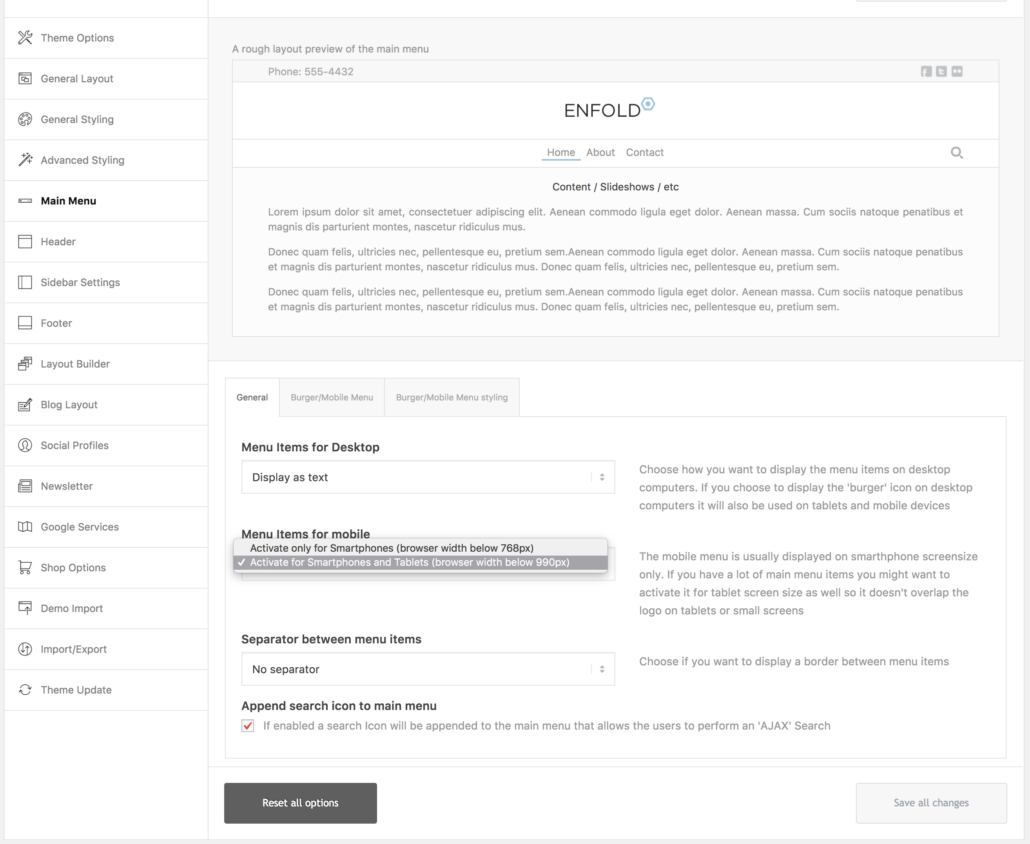
Which would be triggered at 990px and you can use the code provided here – https://kriesi.at/documentation/enfold/switching-to-mobile-menu-on-higher-resolutions/ to switch it to 1045px. Other alternative workaround would be decreasing font size of menu and size of logo but in my humble opinion switching to mobile menu would be a better user experience for your visitors.Regards,
YigitHi,
Please install a child theme – kriesi.at/documentation/enfold/using-a-child-theme/ and copy enfold/includes/helper-post-format.php file to your child theme inside /includes/ folder and find following lines (there will be two instances)
$heading = is_singular() ? "h1" : "h2";and change it to
$heading = is_singular() ? "h2" : "h2";Best regards,
YigitHey!
Have you checked this post – https://kriesi.at/documentation/enfold/switching-to-mobile-menu-on-higher-resolutions/ which is also linked in the link i posted? I believe it would help.
Regards,
YigitHi,
Please refer to this post – https://kriesi.at/documentation/enfold/menu-overlaps-logo-on-tablets/
Cheers!
YigitHallo,
Please go to Enfold theme options > Main Menu and uncheck “Append search icon to main menu” :)
Regards,
YigitHey dedmund,
Could you please post a link of one of your posts where we can see the issue?
Best regards,
YigitJanuary 8, 2018 at 6:14 pm in reply to: Right align last main menu item while other main menu items remain left align #894817Hi,
@davidmartinserrano Thanks for the information! We will reply to you in your own thread :)Best regards,
YigitHi,
You are welcome!
For your information, you can take a look at Enfold documentation here – http://kriesi.at/documentation/enfold/
And if there are features that you wish Enfold had, you can request them and vote the requested ones here – https://kriesi.at/support/enfold-feature-requests/
For any other questions or issues, feel free to start new threads under Enfold sub forum and we will gladly try to help you :)Best regards,
Yigit -
AuthorPosts

