Forum Replies Created
-
AuthorPosts
-
Hey kvanderd,
You can add the child theme and try creating the files and the folders with your custom templates there.
when hosting on a site that provides no ability to add a file remotely
Well, this can make things more difficult.
It will not break any content that you already have.
Best regards,
VictoriaFebruary 11, 2019 at 8:36 pm in reply to: Drop down above the header in the secondary header area #1065649Hi Lucy,
I am looking at what you have in your header now and still don’t understand where you need to add the other menu. The other website is not loading. Did you try making and assigning the menu to the secondary menu?
https://cl.ly/d5d035fe07f1 Here?Best regards,
VictoriaHi Audrey2019,
Can you give us temporary admin access to your website in the private content box below, so that we can have a closer look?
Best regards,
VictoriaFebruary 11, 2019 at 8:26 pm in reply to: smaller columns of text within 1/1 layout element #1065642Hi Srishti,
This is the first time I am hearing this.
Can you please make a screencast of the issue and check the JavaScript console, please.
Best regards,
VictoriaHi Ariane,
Well, you can try to make a separate masonry for each row. It might be more work, trying to use offset or add different category for each 4 team members and assigning them to the masonry. It is not ideal but it might work.
Best regards,
VictoriaHi scotthco,
The mobile header is not transparent and yes, content normally starts after the header so it is offset by the header height.
Yes, the mobile breakpoint is 767px. The tablet starts at 768px.
Do you mean that you want header transparency on the tablet?
Best regards,
VictoriaHi Jürgen,
Yes, the green means tracking activated. I’ll forward this to my colleagues.
Thank you for the input.
Best regards,
VictoriaHi vinayb,
That kind of tab section is not available in Enfold out of the box.
Here are the docs for you and some customizations of the tab section.
And here are the tab section demos
Hope this helps.
Best regards,
VictoriaHey DDSameera,
Here is the code you can put in Enfold > General Styling > Quick Css, if it does not work, put into themes/enfold/css/custom.css
@media only screen and (min-width: 768px) {
  .responsive body, .responsive body #wrap_all  {
    min-height: 100vh !important;
    height: 100%;
  }
}
If you need further assistance please let us know.
Best regards,
VictoriaFebruary 11, 2019 at 7:57 pm in reply to: Enfold Function-Set-Avia-Frontend.php Invalid Argument #1065633Hi d4914cecf96ac0ab962d8b12f3c4b760,
Here is a thread for you to consider
https://kriesi.at/support/topic/trying-to-get-property-of-non-object-in-function-set-avia-frontend-php-line-66/The errors above are notices and warnings, they are not the reason your website is down. Are there any fatal errors in the log file?
Best regards,
VictoriaHey dillionline,
Well, you can set this font for b and strong in the Theme options in Advanced styling if the font was added correctly.

If you need further assistance please let us know.
Best regards,
VictoriaFebruary 11, 2019 at 7:16 pm in reply to: When choose "Edit page (Advanced Layout Builder)" it is opening in a new window #1065617Hi operationeel,
The page that you want to make is made with the Classic editor, it will look different if done with the Advanced Layout Builder. It will not have the blog meta and the related entries and the share buttons. Some of those can be added with the Advanced Layout Builder but not all.
Best regards,
VictoriaHi Todd,
Well, the flex works better for the container with child elements, not 4, that’s why it might not work as good.
Best regards,
VictoriaHi rob,
You can add the tag in the function that you already have. In this function I meant avia_header_scripts_custom.
Best regards,
VictoriaHey tremblayly,
Can you give us temporary admin access to your website in the private content box below, so that we can have a closer look?
Best regards,
VictoriaFebruary 11, 2019 at 7:00 pm in reply to: Remove Theme Options from WP-admin toolbar not just on the front end. #1065611Hi amrod1,
You might want to check the WordPress forums on how to hide the theme link or customize the dashboard menu.
If you need further assistance please let us know.
Best regards,
VictoriaFebruary 11, 2019 at 6:58 pm in reply to: lists posts' title and date under category? Not like excerpt_read_more #1065610Hi robertchen117,
Here is the code you can put in Enfold > General Styling > Quick Css, if it does not work, put into themes/enfold/css/custom.css
.category .post-entry .entry-content p {
    display: none;
}
.category .template-blog .post_delimiter {
    padding: 0;
}
If you need further assistance please let us know.
Best regards,
VictoriaFebruary 11, 2019 at 6:54 pm in reply to: Display and shuffle multiple images by moving cursor #1065608Hey Richard,
Could you please attach some screenshots of the issue?
Could you please give us a link to your website, we need more context to be able to help you.
Best regards,
VictoriaFebruary 11, 2019 at 6:52 pm in reply to: Enfold Theme update – Menu disappears under logo, absent on all Mobile #1065606Hi MarikaZoll,
Best regards,
VictoriaHey onclickdesign,
Best regards,
VictoriaFebruary 11, 2019 at 6:43 pm in reply to: I need child's style.css file set to overrule generated \uploads\*.css output… #1065596Hi scottwgraves,
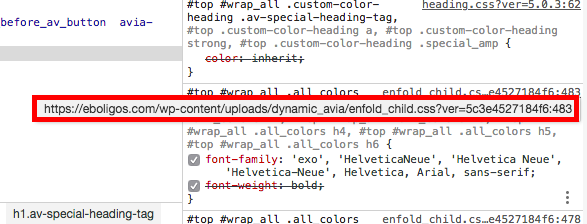
https://eboligos.com/wp-content/uploads/screenshot2.png This is the file with the dynamic styles generated to include the style setting done in the Theme options and Quick css.
When you have the css merging enabled all the css goes into the the
/wp-content/uploads/dynamic_avia/avia-merged-styles-{some hash}.cssIf you need further assistance please let us know.
Best regards,
VictoriaFebruary 11, 2019 at 6:36 pm in reply to: How to add product attribute list into mega menu as sub-menu item #1065589Hey alenbl,
https://cl.ly/a8394d4d109a These are the available options to be added to the menu out of the box, and so the can be used in the submenu.
Please, have a look at this plugin
If you need further assistance please let us know.
Best regards,
VictoriaHi Anton,
Well, you’ll need to modify this file
enfold/config-templatebuilder/avia-shortcodes/mailchimp/mailchimp.phpIf you need further assistance please let us know.
Best regards,
VictoriaHey lemads,
Can you give us temporary admin access to your website in the private content box below, so that we can have a closer look?
Best regards,
VictoriaHey the88project,
You are using id=”latestnews” in the html and in the anchor you use #LatestNews, they have to be the same.
If you need to have all the post data out of the box, you need to use The Classic editor.
Here is the code you can put in Enfold > General Styling > Quick Css, if it does not work, put into themes/enfold/css/custom.css
@media only screen and (min-width:768px) and (max-width: 1200px) {
    .av-masonry-entry .av-inner-masonry-content {
        padding: 10px;
    }
    #top  #wrap_all .av-masonry-entry .av-masonry-entry-title {
        font-size: 20px;
    }
}
If you need further assistance please let us know.
Best regards,
VictoriaHi liliaf,
Here is the code you can put in Enfold > General Styling > Quick Css, if it does not work, put into themes/enfold/css/custom.css
.content {
     padding-top: 0px;
     padding-bottom: 0px;
}
.container {
  padding: 0;
}
If you need further assistance please let us know.
Best regards,
VictoriaHi kellyCraftMedia,
Best regards,
VictoriaFebruary 11, 2019 at 6:04 pm in reply to: Blog Post on Blog Page showing / beside date – how to remove? #1065541Hi tapintoit,
Which issue are you referring to? The logo slider?
Could you please attach some screenshots of the issue?
Best regards,
VictoriaFebruary 11, 2019 at 6:02 pm in reply to: content above header image on product site (woocommerce) #1065540Hey Chris_85,
Category pages are not built with the Advanced Layout Builder, but you can add the banner and the description for the category and all this will be shown.
Best regards,
VictoriaFebruary 11, 2019 at 6:00 pm in reply to: How to show "HTML" data which we are adding into excerpt of post. #1065539Hey almondmike_a,
Could you please clear the cache, check again and get back to us.
Best regards,
Victoria -
AuthorPosts