Forum Replies Created
-
AuthorPosts
-
Hi Paul,
The reason why it’s not working is because you have not set an ID.
For example Rock paper scissors tournament has a link of #1_1, the heading tag (h3) below it should have an ID of 1_1Best regards,
NikkoHi macjeffff,
I believe the plugin you’re looking for is: https://wordpress.org/plugins/better-search-replace/
Hope you’ll find it helpful.Best regards,
NikkoApril 14, 2021 at 9:39 am in reply to: Issue with broken site theme after migrating from hosting #1294294Hi gasto,
We’re happy to hear that :)
Thanks for using Enfold and have a great day!Best regards,
NikkoHi Moescube,
For the dot, please add this CSS Code in Enfold > General Styling > Quick CSS:
#top #wrap_all ins:before {
    display: none;
}
For the new price, please add this CSS code:
#top .price ins .amount {
    font-size: 30px;
}<pre><code>
Just adjust the font size (default is 20px)
As for the position of the currency, please try this CSS code:
#top .price .amount bdi {
    position: relative;
    padding-left: 22px;
}

#top .price .amount .woocommerce-Price-currencySymbol {
    position: absolute;
    left: 0;
}
Best regards, NikkoHi alisandre_lilly,
We’re happy to hear that :)
Thanks for using Enfold and have a great day!Best regards,
NikkoHi kridlot,
Please go to Enfold > Advanced Styling > (Select an element to customize) select Cookie Consent Accept Settings Button click Edit Element button.
A Cookie Consent Accept Settings Button box should show below with options to change Background and Font Color, just change the colors.
Then do the same for Cookie Consent Do Not Accept Cookies Button
Hope this helps.Best regards,
NikkoHi laboiteapixels12,
Thanks for providing both admin and FTP access.
The warning is coming from the pagination and there were improvements and fixes made on Enfold 4.8 and you’re still using Enfold 4.7.6.4.
Please try to update your site first to the latest version (4.8.1) and also don’t forget to make a backup.Best regards,
NikkoHi Beat,
I can’t find any issues that’s similar with the one you mentioned.
Just to verify, is this the plugin you’re referring https://wordpress.org/plugins/simple-membership/ ?Best regards,
NikkoHi eleonorabienno,
I have checked the links on Enfold 4.8.1 and it’s still showing underline on links on hover.
Can you give us a link to the page showing the issue? so we can take a closer look.Best regards,
NikkoHi thinkjarvis,
The default font weight is 400.
Best regards,
NikkoHi lacky1995,
Yes, you’ll just need to login in themeforest using the account you used to purchase Enfold, click on your profile/name on the upper right and click Downloads.
Best regards,
NikkoApril 14, 2021 at 9:02 am in reply to: Padding top between Logo main menu area and color section/media elements #1294279Hi Jorunn68,
Can you give us a link to your site? so we can take a closer look.
Best regards,
NikkoHi zebravision,
Try adding this CSS code in Enfold > General Styling > Quick CSS:
#scroll-top-link {
    right: 60px;
}
Just increase the value to move it to the left (default value is 50px).
Best regards,
NikkoHi Klucas79,
Can you try to change the Header Size to Slim or Custom Pixel Value?
If you choose Custom Pixel Size, change the Header Custom Height to 61px.
Hope it helps.Best regards,
NikkoHi ifuhjasfa,
You can submit a request for refund here: https://themeforest.net/refund_requests/new
Best regards,
NikkoApril 14, 2021 at 8:44 am in reply to: Produkt-Slider "In den Warenkorb" und "Details anzeigen" entfernen #1294274Hi mexxville,
Please try adding this CSS code in Enfold > General Styling > Quick CSS:
#top .avia-content-slider .avia_cart_buttons {
    display: none;
}
Best regards,
NikkoHi sastrysk,
We apologize for the delayed response.
Can you give us temporary admin access and FTP access? so we can inspect on the issue further.
Just post the credentials in private content.Best regards,
NikkoApril 14, 2021 at 8:38 am in reply to: Upgrade old Enfold version via a new purchased license #1294271Hi Björn Almqvist,
I’ve put the Themeforest user name and api key for the new license in Enfold Theme Options page. Will that take care of the update to 4.8?
No, since themeforest/envato has switched from using API to tokens when updating themes/plugin, however, they also have made a plugin that helps make updating easier via a plugin: https://envato.com/market-plugin/ (otherwise you can update via FTP)
Once the site is updated to the latest version, register the theme by following the instructions in https://kriesi.at/documentation/enfold/theme-registration/ then you should be able to use the usual updating of the theme via Theme Options.Can I just drop the new Enfold files via FTP to the server to replace the current files and be up and running without problems?
Theoretically yes, but I would advise against it, to lower the risk on your live site, setup a staging site first then apply the updates to it then review the staging site if there are any issues whether visual or function-wise. If ever there are issues then you can take note of it (and we can try to help fix it) then just document how it is fixed, once it’s all good, it should safe to update the live site.
Here’s a simple tutorial in building a staging site: https://themeisle.com/blog/wordpress-staging-site/Best regards,
NikkoHi lukemyszka,
Are you referring to the h1 in the layerslider?
Best regards,
NikkoHi mrsecommerce,
Please go to Enfold > Advanced Styling > (Select an element to customize) select Cookie Consent Accept Settings Button click Edit Element button.
A Cookie Consent Accept Settings Button box should show below with options to change Background and Font Color, just change the colors.
Then do the same for Cookie Consent Do Not Accept Cookies Button
Hope this helps.Best regards,
NikkoHi arcofbutler,
We apologize for the delayed response.
Your site seems to redirect to https://wordpress.org/ when trying to visit it.
Screenshot: https://kriesi.at/documentation/enfold/wp-content/uploads/sites/22/2017/02/Settings.pngNeed to make the breadcrumb menu not display on the homepage
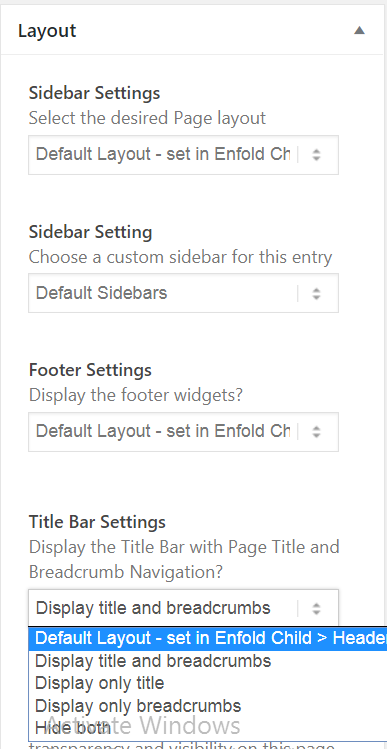
Edit the homepage, In the Sidebar find Layout > Title Bar Settings set to Hide BothThe trail needs to display on the top of the box, the current page should be larger font than the trail and be displayed underneath it
What do you mean by box? is it the container where the breadcrumb is placed?
Also, try to check if our documentation can help with it: https://kriesi.at/documentation/enfold/breadcrumbs/#display-breadcrumbs-under-page-titleOur trail currently always displays (Home / “Current Page”), Home needs to actually update depending on which dropdown they chose and then add a separator and each submenu they click through.
Please use a child theme before adding the code below, you can download and find instructions in our documentation: https://kriesi.at/documentation/enfold/child-theme/
Then add this code on the bottom of functions.php code:function enfold_breadcrumbs_trail( $trail, $args ) { unset($trail[0]); return $trail; } add_filter('avia_breadcrumbs_trail','enfold_breadcrumbs_trail', 10, 2 );Our trail currently uses ‘/’ and we need to it be ‘>’
Add this code on the bottom of functions.php code:function avia_title($args = false, $id = false) { global $avia_config; if(!$id) $id = avia_get_the_id(); $header_settings = avia_header_setting(); if($header_settings['header_title_bar'] == 'hidden_title_bar') return ""; $defaults = array( 'title' => get_the_title($id), 'subtitle' => "", //avia_post_meta($id, 'subtitle'), 'link' => get_permalink($id), 'html' => "<div class='{class} title_container'><div class='container'>{heading_html}{additions}</div></div>", 'heading_html' => "<{heading} class='main-title entry-title {heading_class}'>{title}</{heading}>", 'class' => 'stretch_full container_wrap alternate_color '.avia_is_dark_bg('alternate_color', true), 'breadcrumb' => true, 'additions' => "", 'heading' => 'h1', //headings are set based on this article: http://yoast.com/blog-headings-structure/ 'heading_class' => '' ); if ( is_tax() || is_category() || is_tag() ) { global $wp_query; $term = $wp_query->get_queried_object(); $defaults['link'] = get_term_link( $term ); } else if(is_archive()) { $defaults['link'] = ""; } // Parse incomming $args into an array and merge it with $defaults $args = wp_parse_args( $args, $defaults ); /** * @used_by config-woocommerce\config.php avia_title_args_woopage() 10 * @since < 4.0 * @return array */ $args = apply_filters( 'avf_title_args', $args, $id ); //disable breadcrumb if requested if($header_settings['header_title_bar'] == 'title_bar') $args['breadcrumb'] = false; //disable title if requested if($header_settings['header_title_bar'] == 'breadcrumbs_only') $args['title'] = ''; // OPTIONAL: Declare each item in $args as its own variable i.e. $type, $before. extract( $args, EXTR_SKIP ); if(empty($title)) $class .= " empty_title "; $markup = avia_markup_helper(array('context' => 'avia_title','echo'=>false)); if(!empty($link) && !empty($title)) $title = "<a href='".$link."' rel='bookmark' title='".__('Permanent Link:','avia_framework')." ".esc_attr( $title )."' $markup>".$title."</a>"; if(!empty($subtitle)) $additions .= "<div class='title_meta meta-color'>".wpautop($subtitle)."</div>"; if($breadcrumb) $additions .= avia_breadcrumbs(array('separator' => '>', 'richsnippet' => true)); // changed if(!$title) $heading_html = ""; $html = str_replace('{heading_html}', $heading_html, $html); $html = str_replace( '{class}', $class, $html ); $html = str_replace( '{title}', $title, $html ); $html = str_replace( '{additions}', $additions, $html ); $html = str_replace( '{heading}', $heading, $html ); $html = str_replace( '{heading_class}', $heading_class, $html ); if(!empty($avia_config['slide_output']) && !avia_is_dynamic_template($id) && !avia_is_overview()) { $avia_config['small_title'] = $title; } else { return $html; } }Or you can copy it here: https://pastebin.com/8pvadSGp
Best regards,
NikkoHi Jan,
I see, we’re happy to hear that it’s fixed and thanks for sharing how it was fixed.
Thanks for using Enfold and have a great day!Best regards,
NikkoHi Mainfilmtv,
Can you create a separate thread? and in that thread please put the link on this thread as a reference then post us your login credentials (in the “private data” field):
- Install and activate ” Temporary Login Without Password “.
- Go to ” Users > Temporary Logins ” on the left-side menu.
- Click ” Create New “.
- Add the email address for the account ( you can use (Email address hidden if logged out) ” target=”_blank” rel=”nofollow noopener” data-mce-href=”mailto: (Email address hidden if logged out) “> (Email address hidden if logged out) ), as well as the ” Role ” making that the highest possible and the expiry about four days
( do be sure that we have enough time to debug ). - Click ” Submit “.
- You’ll now have a temporary account. Please provide us here in the private section the URL, so we can login and help you out.
Best regards,
NikkoHi Beat,
Can you give the link of the page mentioned?
You can post it in private content, if you don’t want it to be seen in public.Best regards,
NikkoHi advteksol,
We’re glad that we could help :)
Thanks for using Enfold and have a great day!Best regards,
NikkoHi Telmore,
We’re glad to hear that :)
Thanks for using Enfold and have a great day!Best regards,
NikkoHi rolanddon,
Thanks for giving us admin access.
Actually, you can set the size before inserting the image (you can check the screenshot in private content)
However, the 4th image does not show any image sizes, I just adjusted it with an image editing software and re-uploaded it.
Please review your site.Best regards,
NikkoHi broggen73,
Can you give us the login link as well?
Best regards,
NikkoHi Dave,
Add this CSS code in order to increase the height and width of the image:
.av-tab-section-container .av-tab-section-image {
    height: 120px;
    width: 120px;
}
Best regards,
NikkoApril 12, 2021 at 7:20 am in reply to: Enfold Theme Still Broken After Upgrade – jQuery Migrate #1293860Hi danieljlevin,
You’re welcome :)
Thanks for using Enfold and have a great day!Best regards,
Nikko -
AuthorPosts