

Forum Replies Created
-
AuthorPosts
-
Hi,
Odd, when I login to your site I see it, Please see screenshot in Private Content area.
What browser are you using, and do you have any browser addons?
The screenshot is with Chrome and AdBlock Plus active.Best regards,
MikeHi,
Sorry for the confusion, do you wish to have a image logo in your page header, or a text based logo in your page header?
If you would like to have a image logo, please remove the code from the linked post above, and then add your logo image in these two places, Enfold Theme Options > Logo & Enfold Theme Options > Header > Transparency Options > Transparency LogoBest regards,
MikeHi,
Can you please include a admin login in the private content area so we can take a closer look.Best regards,
MikeHey LaraOcean,
I believe you are referring to this post, yet I don’t see a url to the site to assist, Can you please include a admin login in the private content area so we can take a closer look.Best regards,
MikeHey Animationink,
“span.logo” should move everything together, try using it instead of “.logo, .logo a, .logo img”Best regards,
MikeHi,
Glad Vinay was able to help, we will close this now. Thank you for using Enfold.For your information, you can take a look at Enfold documentation here
and the video tutorials here
And if there are features that you wish Enfold had, you can request them and vote the requested ones here
For any other questions or issues, feel free to start new threads under Enfold sub forum and we will gladly try to help you :)Best regards,
MikeHi,
@SAdesignsUnltd I see you rolled back to v4.2.6, does your webhost offer staging sites? If we could get your site copied to a staging site with v4.3 installed, I’d like to try to isolate the error. I see you still have v4.3 on the site but I don’t want your site to be down while we test.I do note the with v4.2.6 you are getting JetPack “WrappedWebSocket” errors which was reported to:
some of the posts are showing page not found after publishing the article.
source
Can we disable JetPack & perhaps MonsterInsights?I also see the ihomefinder is throwing 18 errors on your sample post link for “non-unique id” for the two contact forms, they should use different ID’s for the two forms, but I don’t think this is causing your error.
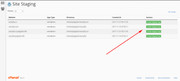
Please see if your host offers staging sites, copies of your current site, typically it’s a option in your cPanel

Best regards,
MikeHi,
Je vois que votre hôte a installé la version 5.4 de PHP, s’il vous plaît demandez-lui de passer à PHP v7——
I see your host has PHP version 5.4 installed, please ask them to upgrade to PHP v7Best regards,
MikeHi,
Glad Vinay was able to help, we will close this now. Thank you for using Enfold.For your information, you can take a look at Enfold documentation here
and the video tutorials here
And if there are features that you wish Enfold had, you can request them and vote the requested ones here
For any other questions or issues, feel free to start new threads under Enfold sub forum and we will gladly try to help you :)Best regards,
MikeHey bvdk,
Si je comprends bien, vous pouvez vous connecter, vous pouvez donc inclure un login administrateur dans la zone de contenu privé afin que nous puissions regarder de plus près.————–
If I understand correctly, you can login, so can you please include a admin login in the private content area so we can take a closer look.Best regards,
MikeHey bobjonesdesigns,
Try this code in the General Styling > Quick CSS field:#top.page-id-6145 div.pricing-table-wrap:nth-child(1) { width: 50% !important; } #top.page-id-6145 div.pricing-table-wrap:nth-child(n+2) { width: 10% !important; }Best regards,
MikeHey SAdesignsUnltd,
You are getting a jQuery error, “TypeError: Cannot read property ‘replace’ of undefined”
have you added a new plugin, custom menu item, or code block lately?
Please first try to disable your plugins, if this doesn’t help, please include a admin login in the private content area so we can take a closer look.Best regards,
MikeApril 28, 2018 at 7:41 pm in reply to: 'previous' and 'next' tabs missing in portfolio entries #948433Hi,
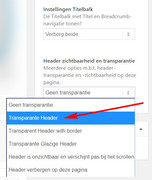
To have the image under your menu, try setting the header to transparent for the page:
Best regards,
MikeHey felixl,
We are planing a smaller release next that adds features that satisfy the upcoming General Data Protection Regulation which will be enforced accross the EU and also affect everyone doing business with someone in the EU.
I don’t have an exact date yet, but it should be soon and will be posted hereBest regards,
MikeHi,
To have a tab section look like a row of buttons, link this:

First start with your tab section where the tabs have no image or icon.
Then add this code in the General Styling > Quick CSS field:.av-tab-section-tab-title-container { text-align: left!important; } .av-tab-section-tab-title-container { background-color: #fff !important; } #top .av-active-tab-title .av-inner-tab-title { color: #000000 !important; background-color: azure !important; } .av-tab-no-icon.av-tab-no-image .av-inner-tab-title { background-color: lightblue !important; color: #fff; padding: 10px 0 !important; } #top .av-section-tab-title { padding: 10px 20px 0px 0px !important; }It would be a good idea to add a page or section ID before each rule, to avoid these rules from affecting other pages, also adjust the colors to suit.
Best regards,
MikeApril 28, 2018 at 6:40 pm in reply to: Hidden redirect causes menu problems on mobile browsers #948425Hi,
Thank you for sharing your solution, we will close this now. Thank you for using Enfold.For your information, you can take a look at Enfold documentation here
and the video tutorials here
And if there are features that you wish Enfold had, you can request them and vote the requested ones here
For any other questions or issues, feel free to start new threads under Enfold sub forum and we will gladly try to help you :)Best regards,
MikeHi,
I uploaded all of the files for the demo, but I had some trouble uploading the database, it could be permission levels.
So the demo is mostly in place, you could start designing now. But if you want to iron out the last couple of images not showing in the demo you could try uploading the database in the Private Content area via PHPmyAdmin. If you do that you’ll also need to upload the wp-config.php in the zip, as your database tables were a different name than the ones in the file.
If you wish to work with it as is, and you want to see the demo images, they are all uploaded so you can download them. The database didn’t update them so they won’t show in the media library.
Hope this helped.Best regards,
MikeApril 28, 2018 at 4:24 pm in reply to: Please read – Regarding Wordfence LayerSlider warning on Enfold 4.0.3 #948405Hi,
Glad it is working for you, but it sounds like you still have a issue to be looked at.
Please open a new thread so we can assist, we will want communicate in the Private Content area, such as your URL & admin login, but as this is not your thread your info will not be private. Thanks for your patience and understanding.
In your new thread please provide admin login info and detail your issue.Best regards,
MikeHi,
This might help: Beginner Concepts: How CSS Selectors Work and this: The 30 CSS Selectors You Must MemorizeGlad we were able to help, we will close this now. Thank you for using Enfold.
For your information, you can take a look at Enfold documentation here
and the video tutorials here
And if there are features that you wish Enfold had, you can request them and vote the requested ones here
For any other questions or issues, feel free to start new threads under Enfold sub forum and we will gladly try to help you :)Best regards,
MikeHi,
The “\” is converted to “u” in the code.
I thought it was explained it the documentation link above, but while shown in the example code, it’s not expressed in the text. Sorry, we are updating the documentation and I’ll check the new version for this.Best regards,
MikeHi,
@trudiligence
I’m sure you have read Enfold 4.3: Performance Update, I believe with the internal compression and optimised CSS and JS files, based on the features you use, many will find third party plugins will not be needed, SG caching may be one such case. Perhaps try running some tests to see the performance difference.Best regards,
MikeHi,
I changed the code to work with your page, please check:function move_postmeta(){ ?> <script> jQuery(window).load(function(){ jQuery( '.page-id-73 .avia-content-slider .slide-entry' ).each(function() { jQuery( this ).find( '.slide-meta' ).insertBefore( jQuery(this).find('.slide-entry-excerpt.entry-content') ); }); }); </script> <?php } add_action('wp_footer', 'move_postmeta');Best regards,
MikeHi,
@katielglover I couldn’t find any other threads started by you, could you please open a new thread so we can assist, we will want communicate in the Private Content area, such as your URL & admin login, but as this is not your thread your info will not be private. Thanks for your patience and understanding.
In your new thread please provide admin login info, FTP access and explain your issue to remind us, thanks.Best regards,
MikeHi,
What you are seeing is a broken image icon, it’s very common in general. I researched this some more and found many reports from other pinterest users, typically once the image is fully in the pinterest system everything works fine, but they say it sometimes takes a little while.
Please try to make a pin and see if it works out.Best regards,
MikeHi,
Thank you for uploading the file, you were very close with your code, try this code and re-select your icon:function avia_add_custom_icon($icons) { $icons['youtube-play'] = array( 'font' =>'coastalicon', 'icon' => 'uf16a'); return $icons; } add_filter('avf_default_icons','avia_add_custom_icon', 10, 1); function avia_add_custom_social_icon($icons) { $icons['YoutubePlay'] = 'youtube-play'; return $icons; } add_filter('avf_social_icons_options','avia_add_custom_social_icon', 10, 1);To add hover background color, please try this code in the General Styling > Quick CSS field:
#top #wrap_all .av-social-link-youtube-play:hover a{
    color:#fff;
    background-color: red;
}
Best regards,
MikeHey limedrop,
I have looked at your site, but I can’t see the issue, please explain.Best regards,
MikeHey steve159159,
It looks as though your webhost upgraded your PHP limit to 65M, please ask them to try 256M
When you say the latest Enfold version, which version is that? I was going to try downgrading your theme to see if that helped, but I was unable to ftp in. Please check.Best regards,
Mike -
AuthorPosts
