Forum Replies Created
-
AuthorPosts
-
Hi,
I’m not sure, I tested on browserling.com and the video played there too.
Please try with the link in the Private Content area.
Note that it loads a little slow with the service and seems to hang if the browser asks if you want to translate the page until you close the prompt.
Are you using Apple devices? I could ask our team to check with Apple if you wish.Best regards,
MikeHi,
I disabled the plugin and enabled the enfold cookie bar, and tested on my Android mobile without and issues.
Were you having this issue with Android or iPhone?Best regards,
MikeHi,
When I look at your theme files via WordPress > Appearance > Editor
I don’t see a footer.php, or a sidebar.php
Please try uploading your theme again via ftp to replace these and any other missing files.Best regards,
MikeHi,
@RandomCreatives I’m not able to see your page as it looks like it is in maintenance mode, but I don’t think we can do that very easily. But if you post a login so we can see the page in question we will take a look.
Please open a new thread so we can assist, as this is not your thread your login info will not be private.Best regards,
MikeHi,
Thank you for the login, I found that the featured image that shows on your “work” page is a resized image that has no animation, while the image in the post is the full size image. Please compare the links in the Private Content area.
I see you have the plugin Simple Image Sizes installed, please try changing the size for the “featured_large size” to 0 (zero) this should keep it from being created and force the original image to be used. Then use the “Thumbnail regeneration” option to rebuild your thumbnails.
If this doesn’t help try doing the same for the “portfolio size” images, as that might be the image used since it is a portfolio item.Best regards,
MikeHi,
Sorry for the late reply, I was able to add images to the main post and the gallery below it without errors. Please see screenshot in Private Content area.
Is this where you were having trouble?
What browser are you using? I used Chrome.Best regards,
MikeHi,
Sorry for the late reply, I see in IE11 the elements don’t show yet in Edge & Edge emulating IE11 the elements do show.
In IE11 there are no errors to try to correct, which makes it a little hard to figure out why the elements are not showing.
I do note that you are using the autoptimize plugin which has been a known to cause similar issues in IE11, please try disabling.
I also see a “rocket-loader.js” from cloudflare, please try disabling this if above doesn’t help.Best regards,
MikeMay 29, 2018 at 2:01 pm in reply to: his element was disabled in your theme settings, Demo Upload #963675Hi,
I have manually installed the demo for you, please clear your browser cache and check.Best regards,
MikeHi,
Thank you for the login, I have looked and it seems the htaccess is not being used. I believe the your webhost has not enabled “AllowOverride” in your Apache server, or the server needs to be restarted to take effect.
Please contact your webhost and explain that the wordpress permalinks rules in the htaccess file are not working, and ask if the “AllowOverride” in enabled.
Or if they can look at the error log to see what is going on.Best regards,
MikeHi,
I added the custom class “part-logo” to the element so this would not effect any other partner elements, you may remove it from the code if you wish.
Try this code in the General Styling > Quick CSS field:#top .part-logo.avia-logo-element-container img:hover { filter: brightness(.7); }feel free the adjust the number to suit.
Best regards,
MikeHi,
Thank you for sharing your solution, we will close this now. Thank you for using Enfold.For your information, you can take a look at Enfold documentation here
And if there are features that you wish Enfold had, you can request them and vote the requested ones here
For any other questions or issues, feel free to start new threads under Enfold sub forum and we will gladly try to help you :)Best regards,
MikeHi,
Sorry that is not what I meant, for me on desktop the video correctly plays, please see video in Private Content area.
and on mobile the fallback image correctly shows, the video is not meant to play on mobile, please see screenshot in Private Content area.Best regards,
MikeHi,
Please try:#top.page-id-9761 #fixed-width-center .flex_cell .flex_cell_inner { max-width: 1024px !important; width: 1024px !important; margin: auto !important; }Best regards,
MikeHi,
Glad we were able to help, we will close this now. Thank you for using Enfold.For your information, you can take a look at Enfold documentation here
And if there are features that you wish Enfold had, you can request them and vote the requested ones here
For any other questions or issues, feel free to start new threads under Enfold sub forum and we will gladly try to help you :)Best regards,
MikeMay 28, 2018 at 7:45 pm in reply to: Google API Key not working but confirms on the Enfold check #963416Hi,
Please open a request – or vote if already requested – on the OpenStreetMap integration using the Enfold feature request form. This is were the Dev team looks for the most requested items to add, I believe it will gain a lot of votes.Best regards,
MikeHi,
Yes for the featured image the input is there:
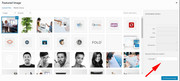
but it seems to be hidden in the grid unless I use this css:small.avia-copyright { display: block; }then it shows in the grid and post page:
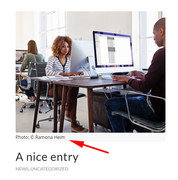
but not in the masonry, seems the code is not there yet.
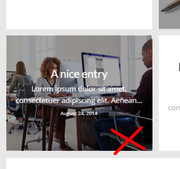
I can add a link, but it will need some more css as it wants to take on the link of the image.
I have the feeling this is really for the next update, but I’m sure we can get it to work correctly.
Since this seems very important to you, I wanted to test it for you.
I hope this helps.Best regards,
MikeHi,
I thought so too, but there seems to be too many people with this issue. Yet on our test sites we can’t reproduce the issue.Best regards,
MikeHi,
Typically the .htaccess is a hidden file when using FTP, sorry I forgot to tell you.
In Filezilla look for this setting
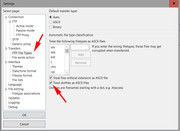
See if this shows you two files now, I can’t imagine you had no .htaccess file, it’s pretty important.
If this doesn’t help please include ftp access in the Private Content area.Best regards,
MikeHi,
Thanks for the login, but in this case please try re-building your merged styles, to do this enter a blank space in the Quick CSS to enable the “Save all changes” button, then save.
I suggested WordPress > Customize > Additional CSS because you are fighting with the built-in p styles. Normally p is a little too general but I have found it will work well in the WordPress field.Best regards,
MikeHi,
Yes it is normal, please add your changes to functions.php, it’s not a big deal, it’s just where you should do it.Best regards,
MikeMay 27, 2018 at 6:55 pm in reply to: Disable All Automatic Uppercase – other solutions not working #962859Hi,
Glad we were able to help, we will close this now. Thank you for using Enfold.For your information, you can take a look at Enfold documentation here
And if there are features that you wish Enfold had, you can request them and vote the requested ones here
For any other questions or issues, feel free to start new threads under Enfold sub forum and we will gladly try to help you :)Best regards,
MikeMay 27, 2018 at 6:10 pm in reply to: his element was disabled in your theme settings, Demo Upload #962848Hey JohannBelo,
Sorry for the late reply and thank you for the login, I was able to login.
I see you are using Strato webhost, which has issues with the demos as they block them.
We can assist with a manual demo import but we will need FTP access to do so.
Please note that with the demo import you will lose all content and settings.
Which demo would you like, 2017 Demo?Best regards,
MikeHey Thomas Flämig,
Danke, dass Sie uns kontaktiert haben. Enfold kann problemlos jede Art von Website erstellen, viele unserer Mitglieder erstellen Affiliate-Programme mit Amazon und anderen. Enfold hat auch viele eingebaute Demos, mit denen Sie Ihre Site einfach und schnell einrichten können.
Bitte sehen Sie sich unsere Demos mit Enfold hier an
Sie können unsere tollen Kritiken hier lesen
Sollten Sie jemals Hilfe benötigen, steht Ihnen unsere Unterstützung immer zur Verfügung, zusammen mit großartigen DokumentationenWir freuen uns darauf, zu sehen, was Sie mit Enfold bauen, und dabei zu helfen, wie wir können.
———
Thank you for contacting us. Enfold can easily create any kind of website, many of our members create affiliate program sites with Amazon and others. Enfold also has many built in demos that you can use to make setting up your site easy and quick.
Please see our demos built with Enfold here
You can read our great reviews here
and should you ever need help, our support is always ready to help, along with great documentationWe look forward to seeing what you build with Enfold, and assisting any way we can.
Best regards,
MikeMay 27, 2018 at 5:36 pm in reply to: Beitrags erscheint nicht / featured post image not displaying #962841Hey bitterlemmer,
Sorry, I’m not sure I understand, as I see your blog post image in both your blog and in your post.
Has this been resolved?Best regards,
MikeHey Pauline ,
Thank you for contacting us, your theme is Coherence Last Update was 18 April 2016
You can read the capabilities at the link above, I don’t know of any bugs.
Is there something you are having a issue with, or are you considering updating to a new theme such as our Enfold theme?Best regards,
MikeHey Jagrav,
Your images are not opening in lightbox, they are opening directly, although your settings seem correct.
You do have extra att set to each image:?fit=450%2C513&ssl=1that is not a part of Enfold, yet I don’t see which plugin or script is adding this.
I believe this is the cause, do you know anything that might be adding this?Best regards,
MikeMay 27, 2018 at 4:47 pm in reply to: Photo Gallery that opens in a Modal Window from a button #962813Hey flordelizamejia,
Please try this solutionBest regards,
MikeHey Kirstie,
Try this code in the General Styling > Quick CSS field:.av-hotspot-fallback-tooltip-inner,.av-hotspot-fallback-tooltip-count,.av-hotspot-fallback-tooltip-count .avia-arrow { background-color: #fff !important; }Best regards,
Mike -
AuthorPosts