

Forum Replies Created
-
AuthorPosts
-
Hi,
Thank you, the theme’s css reset had cleared the tag, so I added it to your Quick CSS:i { font-style: italic !important; }Please clear your browser cache and check.
Best regards,
MikeHi,
Thank you, I had just noticed, looking at your site now, that you are using v3.4.7
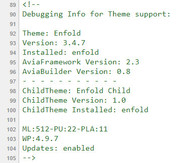
Perhaps it’s a cashing issue with the stylesheet that posts the version number.
Glad to hear this is resolved for you, hope you have a great day.Best regards,
MikeHi,
Thanks, you too.
Glad we were able to help, we will close this now. Thank you for using Enfold.For your information, you can take a look at Enfold documentation here
For any other questions or issues, feel free to start new threads under Enfold sub forum and we will gladly try to help you :)Best regards,
MikeHi,
Thank you for the login, I believe that the issue is that images are too narrow to show the overlay, if I change the attachment size to “gallery” which is more square, the overlay shows.
Please try to re-format the images so there is more white space at the top and bottom, so it is more square, and then try adding the new images.Best regards,
MikeHey hgabay,
Try this code in the General Styling > Quick CSS field:@media only screen and (max-width: 767px) { .responsive #top .logo { width: 70% !important; margin-right: 70px !important; } .menu-item-avia-special a, #menu-item-search a { padding: 0px !important; } .responsive #top #wrap_all .main_menu { right: -20px !important; } }Best regards,
MikeHey smoothbob,
To remove the overlay blue circle, Try this code in the General Styling > Quick CSS field:#top.home .av-layout-tab .inner-entry .image-overlay { display: none !important; }Best regards,
MikeHi,
Thank you for sharing your solution, I believe this is due to you using Enfold Version: 3.4.7, Perhaps try updating to v4.4.1 for the latest features.
Unless there is anything else we can assist with on this issue, shall we close this then?Best regards,
MikeHey jamesedwardcouncill,
Can you please include a admin login in the private content area so we can take a closer look.Best regards,
MikeHey famewebdesign,
The overlay have been set to none, please check the settings for the images. If you want us to look please include a admin login in the private content area.Best regards,
MikeHi,
Glad we were able to help, we will close this now. Thank you for using Enfold.For your information, you can take a look at Enfold documentation here
For any other questions or issues, feel free to start new threads under Enfold sub forum and we will gladly try to help you :)Best regards,
MikeHi,
Please ask your webhost to update your PHP version, it needs to be done at the server level.
You won’t lose your styling, but you should make a backup and/or test separately to ensure you won’t have any plugin conflicts.
One easy solution is to use a staging site, if your webhost offers it in your cPanel, this option makes a clone of your site with just a few clicks

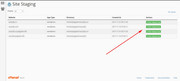
Best regards,
MikeHi,
Try this css:@media only screen and (max-width: 767px) { .responsive #top .av-large-testimonial-slider.avia-testimonial-wrapper .avia-testimonial { padding: 0px 20px !important; } #top .avia-slideshow-arrows a { margin: 30px -30px 0 !important; } }Best regards,
MikeJuly 8, 2018 at 5:07 pm in reply to: Travel Demo – Images did not load. Media Library is empty. #982727Hi,
I have included a link to a zip file with the images for the travel demo in the Private Content area, please ensure to upload them via ftp so they will be in the correct folders in your /wp-content/uploads/ folder.
I have also included another zip file with a custom “travel.xml” & theme setting export file, because you may need to reset your site a re-import the demo for the images to be included in the database.
The “travel.xml” has been adjusted so it will import the images from your /uploads/ folder instead of trying to get them from our url. After the import you can import the theme settings file if you find any css not quiet right, you may need to ensure the correct menu is selected in WordPress > Menus
Let us know if this helps.Best regards,
MikeHi,
I believe that if you add this function to your functions.php it will work to change the login css colors.function my_login_color() { ?> <style type="text/css"> .privacy-policy-link{color:#fff!important;} </style> <?php } add_action( 'login_enqueue_scripts', 'my_login_color' );Best regards,
MikeJuly 8, 2018 at 3:45 pm in reply to: Gallery shows pictures in full size instead of small thumbnails #982708Hi,
Thank you for sharing your solution, we will close this now. Thank you for using Enfold.For your information, you can take a look at Enfold documentation here
For any other questions or issues, feel free to start new threads under Enfold sub forum and we will gladly try to help you :)Best regards,
MikeHey DROR,
Please try this css in your Quick CSS, please adjust opacity to suit.@media only screen and (max-width: 767px) { .responsive #top .avia-slideshow-controls a { display: block !important; } .responsive #top .av-large-testimonial-slider .avia-slideshow-arrows a { opacity: 0.5 !important; } .responsive #top .av-large-testimonial-slider .avia-testimonial-meta-mini { text-align: right !important; } }Best regards,
MikeHi,
I see you are using a old version of Enfold v4.0.7, I don’t remember if that option was available in that version.
Please try updating to v4.4.1
I also see that your PHP Version is 5.3.24, please also update PHP to v5.6 as a minimum, v7 if you can.Best regards,
MikeHi,
I see that you are using a quite old version of Enfold, v4.0.7, Please try updating to v4.4.1
Please make a backup first, or if your webhost offers staging sites in your cPanel, try creating a staging site then update it first to check that all works fine.
Best regards,
MikeHi,
Thanks for the login, after checking, and clearing my cache, I didn’t find a difference between having the merging on or off for mobile.
I do see that your footer has no margin either way. So to fix that please try this code in the General Styling > Quick CSS field:@media only screen and (max-width: 767px) { .responsive #top #wrap_all #footer .container { max-width: 85%!important; width: 85%!important; } }Best regards,
MikeJuly 8, 2018 at 12:55 pm in reply to: After moving website to new domain, contactform still refers to old site #982686Hi,
That’s ok, just glad all is working. We will close this now. Thank you for using Enfold.Best regards,
MikeHey dilge,
Which element is missing the screen options?
Can you please include a admin login in the private content area so we can take a closer look.Best regards,
MikeHey Uroš,
This should not effect the padding or margin, I assume you have tried clearing your browser cache and any caching plugin.
If this doesn’t help, Can you please include a admin login in the private content area so we can take a closer look.
Also include a screenshot of what you see so we can be sure to examine the same.Best regards,
MikeHi,
Thank you.
If we close this, and you find you have more questions on this issue you would need to open a new ticket. We can leave it open if you wish. If you have questions on other issues please open a new ticket for each issue.
If you want to leave this open, then there is no need to reply back, it will stay open.
Thanks for using Enfold.Best regards,
MikeHey clicx,
Thank you for using Enfold.
The image on that page demonstrates the different headers you can have using the options and Enfold Theme Options > Header & the tabs on that page. Here is a screenshot of the options page:
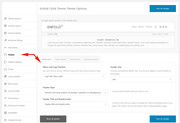
Please see the documentation for the header options which will help explain a lot.Best regards,
MikeHi,
This is happening because the first product on the second line has the class “first” which is making it start a new line.
Can you please include a admin login in the private content area so we can take a closer look.Best regards,
MikeHi,
Glad we were able to help, we will close this now. Thank you for using Enfold.For your information, you can take a look at Enfold documentation here
For any other questions or issues, feel free to start new threads under Enfold sub forum and we will gladly try to help you :)Best regards,
MikeHi,
In your new code above for the homepage slider, you had the class “about” which is only found on your other page “h3.about”
I adjusted your new code so it would work:@media only screen and (max-width: 767px) { .responsive #top.home .slideshow_caption h2 { font-size: 24px !important; } .responsive #top.home .slideshow_caption h2 .red-dot { font-size: 1em; color: #ff0000; vertical-align: 0.2em; margin-left: -0.1em; margin-right: -0.1em; } }you will note that I added “.responsive #top.home .slideshow_caption h2” to your “reddot” so it would not conflict with your other “reddot” now that they are different sizes.
Please clear your browser cache and check that this meets your needs.Best regards,
MikeHi,
I added this css to WordPress > Customize > Additional CSS.variations_form .second_content { display: none; } .variations_form .woocommerce-variation-add-to-cart .second_content { display: block !important; }While I did have to clear your caching plugin several times, for it to finally clear, it is now working.
Please clear your browser cache, maybe more than once, and check.Best regards,
MikeHi,
Glad we were able to help, we will close this now. Thank you for using Enfold.For your information, you can take a look at Enfold documentation here
For any other questions or issues, feel free to start new threads under Enfold sub forum and we will gladly try to help you :)Best regards,
Mike -
AuthorPosts
