

Forum Replies Created
-
AuthorPosts
-
Hi,
Danke, ich bin glücklich zu helfen. Wir werden das jetzt schließen. Danke für die Benutzung von Enfold. Zu Ihrer Information können Sie sich die Dokumentation hier ansehen . Für weitere Fragen oder Probleme, können Sie gerne neue Themen unter starten Enfold Unterforum und wir werden gerne versuchen, Ihnen zu helfen :)— Translated with Google —
Thank you, I’m happy to help.
We will close this now. Thank you for using Enfold.
For your information, you can take a look at Enfold documentation here
For any other questions or issues, feel free to start new threads under Enfold sub forum and we will gladly try to help you :)Best regards,
MikeHi,
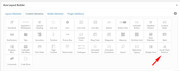
You don’t see it as in this screenshot:
For the back to top, please try this css:#scroll-top-link { background-color: red !important; }please adjust color to suit.
For the timeline please see this post
For the contact form please see this post
To add a sidebar go to Enfold Theme Options > Sidebar & also ensure your sidebar is activate on the page.
When you link to an anchor, please don’t use the last back slash before the tag, like this:
http://www.ideenovation.eu/wordpress#teamBest regards,
MikeHi,
I made some adjustments, please clear your browser cache and check.Best regards,
MikeHi,
Sorry the datepicker is from the jQuery ui library and I couldn’t find a way to increase it’s size because it’s created on the fly in the DOM.Best regards,
MikeHi,
Hopefully restoring from a backup will correct the issue, considering that the first time that we tried to view your site it was not loading, it’s hard to tell what the issue could be.
Please try to ensure that your site is using PHP v5.6 minimum, do you know what version of Enfold you were using?Best regards,
MikeHi,
Glad to hear, I assume we can close this now, but I want to ask anyways :)
Shall we close this?Best regards,
MikeHi,
That’s great news :)
Glad we were able to help, we will close this now. Thank you for using Enfold.For your information, you can take a look at Enfold documentation here
For any other questions or issues, feel free to start new threads under Enfold sub forum and we will gladly try to help you :)Best regards,
MikeHi,
Have you tried the “social share” element in the advanced layout builder?
I assume you are referring to advanced layout builder posts & pages.Best regards,
MikeOctober 18, 2018 at 12:16 am in reply to: Enfold 4.5 Theme Update "Update Failed: Download failed. A valid URL was not pro #1023053Hi,
Please check our trouble shooting postBest regards,
MikeHi,
Glad we could help, unless there is anything else we can help with on this issue, shall we close this then?Best regards,
MikeHi,
Please go to Enfold Theme Options > Header > Extra Elements > Phone Number or small info text to show text in a small bar at the top. Then go to Enfold Theme Options > Header > Extra Elements > Header Social Icons to show social icons at the top.Best regards,
MikeHi,
What I meant was right now you don’t have very many posts, but I understand now that you have a lot of content to add.
As an example, I copied your related post element from one of your pages, you can paste the code in the file that is in the Private Content area, into a “code block” on your advanced layout builder page and it will show 4 related posts. Probably not a long term solution because it’s manual html.Best regards,
MikeHi,
Here is a nice list: 9 Of The Best Related Post Plugins
Another option, I see that you only have a few post on your site, so if every page is going to have the same list of related posts we can copy your element from a default editor page and add it to your advanced layout builder page. This would keep the Enfold style.
Probably not what you had in mind, but I thought I would offer.Best regards,
MikeHi,
If it’s only the login to the front end, then you can include it in the Private Content area.
Please don’t include a login to the back end, as this is not your thread & the thread owner will see the info.
I only need to see the front end for css, if I need to go deeper you will have to start a new thread.Best regards,
MikeHi,
@laptophobo I see you are getting the same error but in a different element, is there a chance that you had a “strong” or other html tag in a title field? I’m asking the team to help out here, can we see your site?Best regards,
MikeHi,
@saucyhotdesign are you using PHP v5.6 minimum? Can we see the test site?
Is there a chance that you had html tags in the title of the hotspot element, such as “strong” ?Best regards,
MikeOctober 17, 2018 at 5:47 am in reply to: Theme update patch of August 17th, 2018 does not work with my installations #1022562Hi,
Great news.
We will close this now. Thank you for using Enfold.Best regards,
MikeHi,
I was able to login and disabled your W3 Total Cache plugin and removed this code, (see link in Private Content area) from your functions.php which removed the error in the head, but you still have a lot of javascript errors, and the page is not loading.
I tried activating the parent theme, which worked, but all of your pages & post went to a 404.
Do you have a backup that you can restore?Best regards,
MikeHi,
Glad we were able to help, we will close this now. Thank you for using Enfold.For your information, you can take a look at Enfold documentation here
For any other questions or issues, feel free to start new threads under Enfold sub forum and we will gladly try to help you :)Best regards,
MikeHi,
I see, perhaps in your situation a sticky header that fades in on scroll would be better?
Please give this a try, and see if you like it:@media only screen and (max-width: 767px) { .responsive #top #wrap_all #header { position: fixed !important; -webkit-animation: fadein 1s; /* Safari, Chrome and Opera */ -moz-animation: fadein 1s; /* Firefox */ -ms-animation: fadein 1s; /* Edge */ -o-animation: fadein 1s; /* Opera */ animation: fadein 1s; } .responsive #top #wrap_all #header.av_header_transparency { display: none !important; } } @keyframes fadein { from { opacity: 0; } to { opacity: 1; } } /* Firefox */ @-moz-keyframes fadein { from { opacity: 0; } to { opacity: 1; } } /* Safari, Chrome and Opera */ @-webkit-keyframes fadein { from { opacity: 0; } to { opacity: 1; } } /* Edge */ @-ms-keyframes fadein { from { opacity: 0; } to { opacity: 1; } } /* Opera */ @-o-keyframes fadein { from { opacity: 0; } to { opacity: 1; } }Best regards,
MikeHi,
I believe the update will be official on Wednesday, that is why it is not listed on the sales page.
Perhaps downloading the file in your downloads page will actually be the v4.5? The way to tell is to open the style.css in the file in a plain text editor such as notepad, and the version number is listed on the forth line from the top.
Other users have found the update in their account downloads, I don’t know why it wouldn’t show in yours also. Perhaps you will need to wait until tomorrow?Best regards,
MikeHi,
Perhaps if you link to your page we can adjust the datepicker with some css.Best regards,
MikeHi,
Glad to hear, unless there is anything else we can help with on this issue, shall we close this then?Best regards,
MikeHi,
That is great news, unless there is anything else we can help with on this issue, shall we close this then?Best regards,
MikeHi,
When loading the demo there is not an option to target a certain page. If you want to copy the same landing page demo you have on one page to another, you can copy and paste the shortcodes as described above. Or let us know which demo page you would like and I can post the shortcodes for you. I have many of the demos installed on my localhost.Best regards,
MikeHi,
@illingco & @lexa_dryke you have entered the token after upgrading to v4.5 to register the theme? And you have tried these Troubleshooting steps?Best regards,
MikeHi,
To have a portrait style image please install Simple Image Sizes plugin and change the dimensions of one of the image presets in the WordPress > Dashboard > Settings > Media > Media Settings:
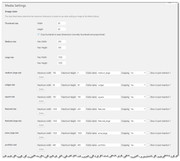
there are about 10 sizes in use, so you can change one to fit your needs. Then use the Thumbnail regeneration option at the bottom of the page.
For the header size, the width of the image should be 1130px, the height is up to you.
For the contact form button, I changed the min height of the color section to move the button up a little, and it seems to work now, please check.Best regards,
MikeHi,
Oh I see now, thanks.
Please add this css:#top .cart-collaterals .woocommerce-Price-amount.amount { float:right !important; }Best regards,
Mike -
AuthorPosts
