

Forum Replies Created
-
AuthorPosts
-
Hi,
The only change I see in v4.5.2 “fixed: an issue with date selection display within the search loop”
I also don’t see any current “search” bugs.
So before your last update, you had different results? Which version was this with? Did you also update WordPress?
If we can roll back to that version and get different search results, then I could create a report for the dev team to examine. But right now my research points to the WordPress search function has trouble searching inside of the shortcode that is used by the builder.Best regards,
MikeMarch 7, 2019 at 6:11 am in reply to: Background image of (some) content blocks aren't visible any more after update #1075773Hi,
Sorry I didn’t see any changes on the pages that I looked at, did your client have modifications in the functions.php of your old version? That would account for such changes when switching themes.
I didn’t change any plugin settings or deactivate any of them, I tried to document what I did and looked at.
I’m sorry that this happened.Best regards,
MikeHi,
There is a second text box below that says “Private Content (link to your website, login credentials, FTP credentials, etc – only visible for moderators)”
Please place your url and admin login info there
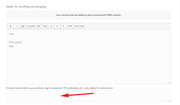
If you don’t see it try turing off your ad blocker.Best regards,
MikeMarch 7, 2019 at 5:47 am in reply to: Unstable website. I suspect is due to CCS code addition #1075755Hi,
Thanks, I added this to your css:html.responsive,.responsive body { overflow-x: visible !important; }and after I cleared your site cache it seems to be gone. Please clear your browser cache and check.
Best regards,
MikeHi,
It looks like a premium plugin: WooCommerce Extra Product Options documentationso I don’t have access to it. Typically we don’t offer support for third party plugins, there are thousands of them and we just can’t make every one of them work with Enfold, it just not practical, or within the scope of our support.
If you have just one item that you don’t want to show on one page, why not just hide it with css like this:.item_class { display: none !important; }Best regards,
MikeHi,
I have not done this myself, but I believe this free plugin will assist: WooCommerce Category Locker
or perhaps these articles:
Restrict Woocommerce Products
How to Create a Private WooCommerce Category The Easy Way
How to Create (& Hide!) WooCommerce Seasonal Products & Pricing
How to Hide Categories in WooCommerce Shop Page
Let us know if any of these help.Best regards,
MikeHey likegluelikecrew,
Thank you for the login and the ftp access, they worked for me. Although I see that you are using a very old version of Enfold v4.0.7
and that your PHP version is 5.3.29 where PHP version 5.6 is the minimum.
This is probably why you couldn’t update, and using Enfold v4.0.7 is probably why your Instagram is not working. The file I have is to patch v4.5.4
First, please ask your webhost to update your PHP to at least v5.6, then I will assist in updating your Enfold.Best regards,
MikeMarch 7, 2019 at 4:21 am in reply to: change background color for drop down questions on contact form #1075731Hi,
Glad we could help, unless there is anything else we can help with on this issue, shall we close this then?Best regards,
MikeMarch 6, 2019 at 7:15 am in reply to: Update Enfold theme to newest version via FTP & maintaining earlier adjustments #1075329Hi,
Glad we were able to help, we will close this now. Thank you for using Enfold.For your information, you can take a look at Enfold documentation here
For any other questions or issues, feel free to start new threads under Enfold sub forum and we will gladly try to help you :)Best regards,
MikeHi,
Thank you :) I see we are working in someone else’s thread, sorry I thought it was yours.
the page was /recensioni-escort/ but I guess you found it, and that is why you know it works?
So when I looked at the other pages they seemed correct and that is why I didn’t add it to your whole site, we can do this but please add some links to pages with the error so I can check.
We should be careful with these scripts so they don’t break any pages.Best regards,
MikeHi,
No that is not going to work. The type of scrolling you want is in the script for the sub-menu, but I see now that you don’t want to use the sub-menu, you want to use two images linked to an anchor.
So I recommend using the plugin “Page scroll to id”
I think I can help you with this, please include admin login in the Private Content area so we can be of more assistance.Best regards,
MikeHi,
I researched this some more and started writing out a new bug report, but I realized that I didn’t test the newest patch on your site that has solved a couple of different issues. So please include FTP access in the Private Content area so I can try uploading this too. If it doesn’t help the dev team will want to know.Best regards,
MikeHi,
Please try this solution or maybe this one for the relevanssi search plugin.Best regards,
MikeMarch 6, 2019 at 5:58 am in reply to: "neuestesn Beiträge" im Footer überschneiden sich + Bilder unterschiedlich groß #1075272Hi,
Sorry for the late reply, and thank for the screenshot. I see you have some very long words in your titles, so let’s try this css to brake them:h3.slide-entry-title.entry-title a { overflow-wrap: break-word; word-wrap: break-word; -ms-word-break: break-all; word-break: break-all; word-break: break-word; -ms-hyphens: auto; -moz-hyphens: auto; -webkit-hyphens: auto; hyphens: auto; }Best regards,
MikeHi,
Sorry for the late reply, I tried to think of a practical way to override the “select2.css”, so try adding this code to the end of your functions.php file in Appearance > Editor:function custom_script(){ ?> <script> (function($){ $(document).ready(function(){ $('link[href="https://yoursite.ru/wp-content/plugins/woocommerce/assets/css/select2.css?ver=3.5.5"]').remove(); }); })(jQuery); </script> <?php } add_action('wp_footer', 'custom_script');be sure to change yoursite.ru in the code with your domain, my test shows this prevents that css from loading.
Best regards,
MikeMarch 6, 2019 at 5:28 am in reply to: change background color for drop down questions on contact form #1075268Hi,
Please try this code in the General Styling > Quick CSS field or in the WordPress > Customize > Additional CSS field:#top.home div .av-light-form select { background-color: #00536c !important; }Best regards,
MikeMarch 6, 2019 at 5:18 am in reply to: Previous and next post navigation – want to add another 2 categories #1075260Hi,
Glad to hear it’s working and that we were able to help, we will close this now. Thank you for using Enfold.For your information, you can take a look at Enfold documentation here
For any other questions or issues, feel free to start new threads under Enfold sub forum and we will gladly try to help you :)Best regards,
MikeHi,
The error messages look like my file upload missed some files, odd that I didn’t see those errors. I re-upped and your update seems to be working now.
Please check your site and clear your server & browser cache.Once you are happy you, (or I) can delete the “enfold-old” via ftp, (not the WP theme page)
Should for some reason you wish to roll-back to the old version, it’s easy to do, simply rename the new “enfold” to “enfold-new” via ftp and then rename “enfold-old” to “enfold” then refresh your page.Best regards,
MikeMarch 6, 2019 at 4:48 am in reply to: Background image of (some) content blocks aren't visible any more after update #1075243Hi,
Thank you for the FTP access, I renamed your current theme to “enfold-old” then I uploaded the new “enfold” and checked that your site is working correctly. Please also check for yourself.
Once you are happy you, (or I) can delete the “enfold-old” via ftp, (not the WP theme page)
Should for some reason you wish to roll-back to the old version, it’s easy to do, simply rename the new “enfold” to “enfold-new” via ftp and then rename “enfold-old” to “enfold” then refresh your page.Ok, so I see you were using v4.5.2 and the page with no image at the top was editing in the default editor, and not in the advanced layout builder, I opened the page in the ALB and tried to choose the top color section background image again but I couldn’t find it in your media library, which was odd because I see that I can access it directly with the link you posted above.
Please see if you can choose the image again and then save, I have seen issues where this was a solution.I also see that you are using the ALB debugger, that allows you to copy and edit the shortcode, but below that you should have the “Enfold Shortcode Parser” that allows you to check for broken shortcode, but you don’t, instead you have “WP Types” options.

Is this page a custom post type that you created, and the page with the image that works is a normal “page”?I also note that you have a javascript error on the page:
Uncaught TypeError: Cannot read property 'value' of undefinedI tried disabling the merged JS and loaded the jQuery in the head to resolve this, but it didn’t. This may not be a part of the image issue, but I wanted to let you know why I did that. If you don’t mind, lets continue with these settings while we try to solve this.
Is this the only page that has this issue?Best regards,
MikeHi,
Glad we were able to help, we will close this now. Thank you for using Enfold.For your information, you can take a look at Enfold documentation here
For any other questions or issues, feel free to start new threads under Enfold sub forum and we will gladly try to help you :)Best regards,
MikeHi,
The color has to go first:.product.product_tag-fun { border: #000 10px solid; }the tag for my product was “fun”
Best regards,
MikeMarch 6, 2019 at 3:18 am in reply to: WooCommerce, Enfold, Shortcodes and after_theme_setup #1075225Hi,
@Robert, Please include a admin login & FTP access in the Private Content area so we can assist, But I recommend starting a new thread as the is not your thread so your login info won’t be private here.
Please post the link here to your new thread so I can find it.Best regards,
MikeHi,
This seems to help, Please try this code in the General Styling > Quick CSS field or in the WordPress > Customize > Additional CSS field:#top #wrap_all #main .article-icon-entry h4.av_icongrid_title,#top #wrap_all #main .article-icon-entry h6.av_icongrid_subtitle { -webkit-font-smoothing: subpixel-antialiased !important; -moz-osx-font-smoothing: grayscale; backface-visibility: hidden !important; transform: translateZ(0); text-shadow: #000 0px 1px 1px; }
Best regards,
MikeHi,
I researched this some more and I think it’s part of a pagination issue that the dev team has solved.
They said to replace /enfold/framework/php/function-set-avia-frontend.php via ftp
with this file
please keep a backup of the original file while you test.
Please let us know if this helps.Best regards,
MikeHi,
I took a look at your magazine element that is showing the text “Link a:” in the title attribute, which shows on thumbnails hover.
So I couldn’t remove the text “Link a: ” but I was able to replace the entire title attribute with the h3 text that goes with the image.
When I checked other pages I didn’t see this text “Link a: ” being added to the magazine titles, so I added the script to the top of the page in a “code block” so that it will only work on this one page. We can make it work on more pages that have the same error, but check this page first.<script> (function($){ $(document).ready(function(){ $(".av-magazine-entry").each(function(){ var captiontext = $(this).find("h3.av-magazine-title").text(); $(this).find("a").attr("title", captiontext); }); }); })(jQuery); </script>Please see the page link in the Private Content area.
Best regards,
MikeMarch 5, 2019 at 5:34 am in reply to: Avia layout builder not working in The Events Calendar #1074653Hi,
I have deleted the “enfold-old”, you can clean out the accounts, thanks for your patience and using Enfold.
We will go ahead and close this then.Best regards,
MikeHi,
First please export your theme settings file, so you will have a backup.
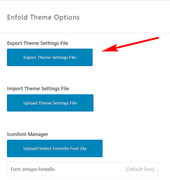
Then install your child theme and activate it.Then when you go to the import/export options page you will find a new option to “Import Settings from your Parent Theme”
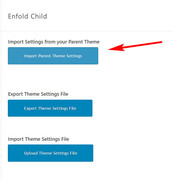
If you have any problems afterward, you can import the parent theme settings file that you saved earlier, via “Import Theme Settings File”
So, yes it’s the same process, just in this specific order.
It will save your customizations from the General Styling > Quick CSS
But your customizations in your parent functions.php, should be moved manually to your child theme functions.phpBest regards,
MikeHi,
Glad we were able to help, we will close this now. Thank you for using Enfold.For your information, you can take a look at Enfold documentation here
For any other questions or issues, feel free to start new threads under Enfold sub forum and we will gladly try to help you :)Best regards,
MikeHi,
Glad we were able to help, we will close this now. Thank you for using Enfold.For your information, you can take a look at Enfold documentation here
For any other questions or issues, feel free to start new threads under Enfold sub forum and we will gladly try to help you :)Best regards,
MikeMarch 5, 2019 at 4:31 am in reply to: Enfold 4.5 Theme Update "Update Failed: Download failed. A valid URL was not pro #1074627Hi,
@likegluelikecrew
I would like to take a look and try to update your site. Please include a admin login & FTP access in the Private Content area of a new thread, as this is not your thread your login info will not be private if posted here.
Please post the link to your new thread here so I can quickly find it.Best regards,
Mike -
AuthorPosts
