

Forum Replies Created
-
AuthorPosts
-
Hi,
Sorry, this doesn’t seem to be going well for mobile, how would you feel about using a different element for mobile? Perhaps we could use a more mobile friendly element and write some css to hide one and show the other only for mobile?
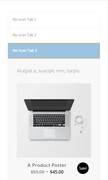
One idea might be to use the “Content Tabs” because they work well for mobile and we can add the product grid to the tabs as shortcode, here is a screenshot of a test I did:
Best regards,
MikeHi,
That is great! I’ll let the dev team know that it is working, I will also leave this thread open because since I modified your theme files updating the theme will break it, and unless this is added to the next update I will need to patch your files again.
We will see if it’s added to the update when it comes out.Best regards,
MikeHi,
Sorry for the late reply, this does seems to be the same issue. Gunter has an open GitHub issue page for the two you linked to, so I added this thread to it also.
Please try the solution that he posted, but keep a copy of the original files, and let us know if this helped.
If it doesn’t help please include an admin login & FTP access in the Private Content area so examine closer.
Thank you for your patience.Best regards,
MikeMarch 30, 2019 at 4:25 am in reply to: Password protected pages not working with Enfold 4.5.4 #1084774Hi,
I tested by adding a password to my “About Us” page that was created using the ALB
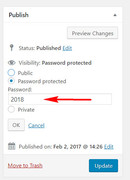
Then I went to the page, logged in, & logged out, in Chrome & Firefox and in all 4 cases I was asked for a password:
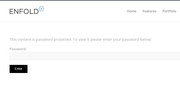
and after I gave the password the page was reloaded to chow the content. This seems to be working correctly.
What happens when you follow these steps? Could your error be from a plugin?Please include an admin login in the Private Content area so I can test your site?
Best regards,
MikeHi,
When you add the css to a code block element, like I did before it must be wrapped in a “style” tag:<style> ... </style>It also won’t work in a text block element.
I don’t know when requests will be more relaxed, but I’ll keep checking yours each time I login.
So to change the logo for black or white like it is right now, I used two logos, one at Enfold Theme Options > Logo
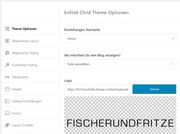
and the other at Enfold Theme Options > Header > Logo-Transparenz
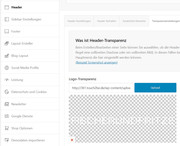
This was your #4 question above.
Best regards,
MikeHi,
Strange, I found your event at 6:03pm, LA time, and since the event was past at that point, I changed the event to 6:30pm and it worked correctly:


I then thought that perhaps by me putting the start & end time of the event as the same it was thoughing it off so I changed the end time to 9:30pm, but it still was correct:
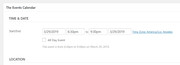
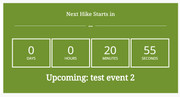
So I read the instructions from the dev team again looking for clues and they said:If you change the timezone on your computer it might be necessary to restart.
Do not forget to clear browser cache.Did you clear your cache? What time is your computer set to?
I will ask the dev team to take a look once I hear back from you because I don’t understand why I can’t recreate your issue on your site.Best regards,
MikeHi,
I assume this solution was successful and we can close this now. Glad we were able to help, Thank you for using Enfold.For your information, you can take a look at Enfold documentation here
For any other questions or issues, feel free to start new threads under Enfold sub forum and we will gladly try to help you :)Best regards,
MikeHi,
Yes the css is very targeted, for your new section also use this css:#top.page-id-337 #after_submenu_2 > .container > .content { padding: 10px 0 !important; }Then please clear your browser cache and check.
Best regards,
MikeHi,
Please see my reply to your other post, it seems to be an issue with your plugin as the shortcode seems to be working correctly.Best regards,
MikeHi,
I tried to investigate your page with the shortcode from your custom plugin, by creating a copy at the url in the Private Content area and removing the according element so that there was only the shortcode according, expecting that the shortcode would work, but with the wrong colors. But the shortcode didn’t work.
Yet if I recreate the shortcode with our shortcode tool it works correctly. I don’t believe that this is a shortcode issue, but an issue with your custom plugin.
When I check your custom plugin I find this error for “title”$toggles .= do_shortcode("[av_toggle title='" . $titel . "' tags='' av_uid='av-ihbnj']" . $details . "[/av_toggle]");which is braking it, please try reviewing your custom plugin for errors.
Best regards,
MikeHi,
I wanted to give you an update, the dev team believes they may have found the issue, but they are still working on the solution.
This is actively marked in our GitHub, Thank you for your patience.Best regards,
MikeHi,
To have the word “moebel” slowly fade in, please try this css:span.moebel { opacity: 1; animation-name: fadeInOpacity!important; animation-timing-function: ease-in !important; animation-duration: 3s!important; } @keyframes fadeInOpacity { 0% { opacity: 0; } 50% { opacity: 0.5; } 100% { opacity: 1; } }Best regards,
MikeHi,
If you use the “final code” on the page above, please ensure you are not adding the first line with the ?php
you would use this:function address_mobile_address_bar() { $color = "#008509"; //this is for Chrome, Firefox OS, Opera and Vivaldi echo '<meta name="theme-color" content="'.$color.'">'; //Windows Phone ** echo '<meta name="msapplication-navbutton-color" content="'.$color.'">'; // iOS Safari echo '<meta name="apple-mobile-web-app-capable" content="yes">'; echo '<meta name="apple-mobile-web-app-status-bar-style" content="black-translucent">'; } add_action( 'wp_head', 'address_mobile_address_bar' );Other than that it looks right and doesn’t cause an error on my localhost, but I’m unable to test beyond that. If this still doesn’t help try Googleing for alternatives.
Sorry that I couldn’t be of more assistance.PS: Have you tried Upwork.com ?
I bet you could hire someone for $5 to do this.Best regards,
MikeHi,
Glad we were able to help, we will close this now. Thank you for using Enfold.For your information, you can take a look at Enfold documentation here
For any other questions or issues, feel free to start new threads under Enfold sub forum and we will gladly try to help you :)Best regards,
MikeHi,
I took a look and the css in the code block had some html brakes in it, braking it :)
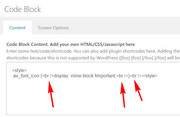
I adjusted it to this:.av_font_icon { display: inline-block !important; }Please clear your browser cache and check.
Best regards,
MikeHi,
Thanks for the screenshot and the explanation.Here is screen shot after your post. I noticed that the tz was set to utc-7 on this event (did you do that?)
I didn’t make any changes because I couldn’t login before, the screenshot was from my computer.
I was able to login today, so I created a test manual event so I could better document the error to explain to the dev team so that they can help.
So at the time of my test your time was 2019-03-28 17:52:05 in Los Angeles accourding to your time and date on your WordPress > Settings > General > Date Format, I also confirmed on Google, so I created an event about one hour in the future (7:00pm) and added a countdown timer to it

Then I published and viewed on the front end and the time on the countdown timer was correct (within the 3 minutes it took me to do this)
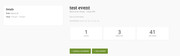
So after this I realized that I didn’t check the countdown timer on your homepage, so I did another one that was about 55 minutes in the future, here is the backend:
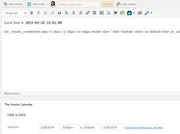
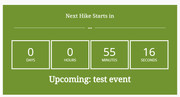
here is the front end:

and here is your homepage countdown timer:
So I’m not sure what I’m doing differently than you were when you tried to create a manual event and had gotten the 7 hour error?*please don’t worry I deleted the test events and they were only live for less than a minute.
While I was looking at the backend of your events I noticed that your event editor was showing the event rows as a column, this typically occurs when there is a plugin conflict. There could be other reasons, but there were no errors in the browser console.
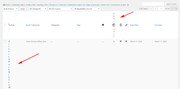
But this didn’t seem to cause an error in the countdown timers that I created.Best regards,
MikeHi,
Both /avia-shortcodes/countdown & /shortcodes/events-countdown were updated.
I see the new timezone option is not showing on events-countdown element, but on the event page there was already a timezone option:

I believe the new events-countdown file is managed in that option, when I test changing this timezone it changes the
events-countdown.
Please try this.Best regards,
MikeHi,
Thanks for the FTP login, but I couldn’t login to WordPress. I went ahead and renamed the files that needed to be replaced with a “-old” on the end and uploaded the new ones. This is so we can roll back if you wish. I also checked your site to ensure it didn’t crash, but it still seemed to be running properly :)
Since I couldn’t login I’m not sure if this is working for you, but I tested on my localhost and it works.
You will now see a “Timezone” option in the Animated Count Down element:

Please select a timezone in the timezone selectbox that you wish to use, it can be different than the timezone WordPress uses in the WordPress > Settings > General > Date Format field and it uses UTC, you’ll just need to make the adjustment to suit.
Please be sure to clear your cache a few times as javascript files were replaced for this modification and they can be a little tricky to clear from the cache, also check any cache plugin and I see your host is using “LiteSpeed” so there is a cache on your server too.
Please let us know if this helps.Best regards,
MikeHi,
I have not seen this before but my research finds that it only works for mobile Android devices The code you posted was broken, try using the code at the link above. But I also see that it is from 2016 so I don’t know if it still works, but I can’t test it on my desktop and it is outside of our support scope since it is not for the theme or website.
Perhaps this plugin would work better: Mobile Address Bar ChangerBest regards,
MikeHi,
If you have created two pages that you don’t want to lose, then yes, please try following the steps I described earlierBest regards,
MikeHi,
@5ivecanons the 403 error you are getting is because Envato has a daily limit on requests, even if you are updating multiple sites. Also their cookie may trigger an error if you are updating multiple sites. Please wait 24 hours and then when you try again try using the incognito mode of your browser.Best regards,
MikeMarch 28, 2019 at 3:40 am in reply to: Button (or text with Link) at header top just to left of Search #1083894Hi,
Thanks for sharing your code updates, and glad this works for you.
Thanks again for the lunch offer :)We will close this now. Thank you for using Enfold.
For your information, you can take a look at Enfold documentation here
For any other questions or issues, feel free to start new threads under Enfold sub forum and we will gladly try to help you :)Best regards,
MikeHi,
Thanks for the login, I took a look at your menu items for “LED light boxes” so on desktop the menu items have a url and work fine, but on mobile the submenu items links are not linking.
This is because in your burger option Menu Icon Submenu items is set to Display submenu items on click > Do not create a clone
For that setting you will see this note:Since you selected to display submenu items on click or on hover, the parent menu item does no longer navigate to the URL it contains, but toggles the visibility of its submenu items. If you want users to be able to open the parent menu URL the theme can create a clone of that item in the submenu
Changing this to: Create a clone for the title menu item or if you change the menu to Always display submenu items will make the links work.
I set it to Always display submenu items to demonstrate.The Envato Market Plugin will help you update easier, it is not in the WordPress plugin directory because it only works for customers. There is no reason to be worried.
Best regards,
MikeMarch 27, 2019 at 6:41 am in reply to: Grid breaks up in Google Chrome Version 72.0.3626.119 (Official Build) (64-bit) #1083435Hi,
Glad to hear, we will close this now. Thank you for using Enfold.For your information, you can take a look at Enfold documentation here
For any other questions or issues, feel free to start new threads under Enfold sub forum and we will gladly try to help you :)Best regards,
MikeMarch 27, 2019 at 6:33 am in reply to: Button (or text with Link) at header top just to left of Search #1083425Hi,
For mobile and tablet devices the page gets the class “avia_mobile” and for desktop the page gets the class “avia_desktop”
so I have changed the script to only show the link when the page has the class “avia_desktop”function event_link(){ ?> <script> (function($){ $(function() { $(document).ready(function(){ if ($("html").hasClass("avia_desktop")) { $('nav.main_menu').prepend('<a class="event-link" href="http://www.google.com">Event Link</a>'); } else { } }); }); })(jQuery); </script> <?php } add_action('wp_footer', 'event_link');Please try this out instead of the other code in the functions.php, but also use the css code as it is still needed.
Thank you for the lunch offer, that is really nice, I’ve been thinking about going there :)Best regards,
MikeHi,
@5ivecanons thank you for the login, I see that you are using Enfold v4.5.3 which had some issues, please update to v4.5.5
I tried creating a test page and saw no errors in the console which is good news. But if updating doesn’t help I would suggest disabling your plugins and re-testing, with all of the changes in WordPress and Enfold there is a possibility that it can cause an issue with a small plugin somehow, isolating it would be our first step.
@eternal626 please also ensure you are using Enfold v4.5.5 & WordPress v5.1.1 and if that doesn’t help please try disabling your plugins also.
Since we now have two similar issues please open a new thread so you can post your admin login info and then post a link to the new thread here so I can find it. Since this is not your thread your login will not be private here.Best regards,
MikeMarch 27, 2019 at 5:44 am in reply to: Clickable elements too close together / Content wider than screen Errors Google #1083394Hi,
Glad to help, I assume we can close this now, but I like to ask. Shall we close this then?Best regards,
MikeHi,
Sorry I didn’t discover what the problem was, it could have been one of the php settings I posted about earlier or how the mod_sec was set up on the server. But nonetheless I have come up with some workarounds for difficult servers. In your case, I uploaded all of the images via ftp and then I edited the import file to import the images from your server instead of ours.
I’m glad it helped unless there is anything else we can help with on this issue, shall we close this then?Best regards,
MikeMarch 27, 2019 at 5:26 am in reply to: Next and previous post arrows missing for The Events Calendar #1083387Hi,
The first page you linked to seems to be a portfolio page. The second page is a events page, on the events page the event plugin uses the elements: tribe-events-nav-previous & tribe-events-nav-next within the tribe-events-footer below the event.<ul class="tribe-events-sub-nav"> <li class="tribe-events-nav-previous"><a href="https://www.naikare.es/taller/enquadernacio-copta-5/"><span>«</span> Enquadernació copta</a></li> <li class="tribe-events-nav-next"></li> </ul>The reason I thought it was hidden with a option was because of this class: tribe-events-visuallyhidden I installed the event calendar on my localhost and created some events and set up the other options so I could assist you.
As you said I could find no option for this and no solution on the event calendar site but I was able to display the prev – next nav with this css:#tribe-events-footer .tribe-events-sub-nav { display: block !important; }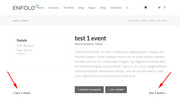
I also tried to find a way to add the avia-post-nav to the event pages but could not.Best regards,
MikeMarch 27, 2019 at 3:51 am in reply to: Enfold 4.5 Theme Update "Update Failed: Download failed. A valid URL was not pro #1083365Hi,
@fchieli if you are using v3.7 there is a good chance that your PHP version is also outdated, that is below v5.6. Please check this and ensure you are using at least v5.6
Another possibility is that when you updated Enfold via FTP you overwrote the theme directory with the new version. This will also crash the site, please ensure the rename the old theme directory (enfold-old) or delete it via ftp and upload the new version in it’s own directory (enfold).Best regards,
Mike -
AuthorPosts
