

Forum Replies Created
-
AuthorPosts
-
Hi,
Thank you for clarifying, but unfortunately I could not login, Please see the screenshot in Private Content area.
Please check the password and also let us know what country you are in, sometimes I need to use a VPN to fake my country so that I can login.
For the steps Mollie & MyParcel, I have not seen these screens before, is this a plugin?
Since this is two issues, one with the builder lockup when “Add all variations in a product” is tried and the other with the “Mollie & MyParcel”, once I can login to investigate, I will first work on “Add all variations in a product” and see what errors are occurring.
Since it’s a live site, perhaps it would be good to see if your webhost has a “1 click staging site” option, this will clone your site so we can check your site without your live site being affected. Most bigger webhosts offer this in the cPanel.Best regards,
MikeHi,
Thank you for the explanation and the images, this helps a lot. I found that on the home page the header transparency was interfering with the background image. This css corrects it:#top.home .av_header_transparency .header_bg { opacity: 1 !important; }For the extra space on the home page, I found that you have an empty color section on the home page that in not on your “cataloghi” page.

Please try removing it.Best regards,
MikeHi,
I have not seen this behavior before, but I would like to investigate by disabling all plugins first, to rule a conflict out, but I’m concerned that this is a live site, will this be ok? Perhaps your webhost offers one-click “staging site” so we can investigate without affecting your live site?Best regards,
MikeHi,
To make this animation work on sub-menu links, first please remove the on hover green background, then try this css:.av-main-nav > li > ul.sub-menu > li > a:active:after, .av-main-nav > li > ul.sub-menu > li > a:focus:after, .av-main-nav > li > ul.sub-menu > li > a:hover:after { background-color: #719430; width: 100%; } #top #header .av-main-nav > li > ul.sub-menu > li > a:hover .avia-menu-text { color: #000 !important; } .av-main-nav > li > ul.sub-menu > li > a:after { display: inline-block; content: ""; text-indent: -99999px; width: 0; height: 40px; -webkit-transition: all .50s ease-in-out; transition: all .50s ease-in-out; position: absolute; bottom: 0; left: 50%; margin-top: 0; -webkit-transform: translateX(-50%); -ms-transform: translateX(-50%); transform: translateX(-50%); z-index: -1 !important; }I think it’s working, but without logging in I can’t check for sure.
As far as getting this to work on mobile, there is no “on hover” for touch screensBest regards,
MikeHi,
I had to edit my response right after I sent it because the theme does allow you to manually set which elements to load in the performance option.
Please try using this option to always load the accordion element.
The issue is that your plugin’s shortcode is getting added after the “tree”
So I’m not sure if you tried this yet
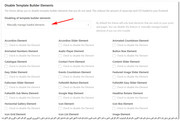
Best regards,
MikeApril 5, 2019 at 2:30 am in reply to: woocommerce shop – sorting by price breaks with simple and variable products #1087266Hi,
Hey good news, the dev team has a solution for this now that they would like you to test, you will need to replace 8 files via FTP.
I have attached a zip file in the Private Content area that I created fo your with the files in the correct folder paths, plus there is a text file listing the paths and dev notes. Please make backups of your files before replacing them should you need to roll back.
Please let us know if this helps.Notes:
Needs WC 3.5.7 !!
extended sorting options for shop page and ALB elements
added select box for ASC/DESC to 2 ALB elements
sorting by price works for variable products now (lowest – highest)
better integration in WC sorting logic
adjusted description where to find default settings for catalog sorting
for backwards comp. config-356.php (new file woo-loader.php)Best regards,
MikeHi,
Sorry for the late reply, when I check your page I get this error just before the tab section shows up:client.js?9d5f84c:16 [WARNING] Crisp found shims of native JavaScript methods. This can alter the chatbox behavior and break things. Make sure not to override listed functions to ensure your chatbox works as expected. You may be looking for other JavaScript libraries in use on this page. You can disable this warning by adding: $crisp.push(["safe", true]) to your page JavaScript. Methods to check: (2) ["document.addEventListener", "document.removeEventListener"]You said that you tried disabling your plugins? Can we also try?
This is the line in the javascript from the error:
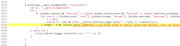
Best regards,
MikeHi,
Sorry for the late reply and thanks for the video, I can’t read the language that your site is in, but I believe that the page gets stuck at the “Add all variations in a product” part, am I correct?
please include an admin login so we can see if the page is getting any errors at this point.
In your post you talk about these two steps:2. From an order send the order to MyParcel (bottom right in the menu if you are in an order)
3. Pay back an order through Mollie.But I don’t know what they are and I don’t think you did these steps in your video, correct?
Do you try disabling your plugins to see if you still got stuck at the same point?Best regards,
MikeHi,
Sorry for the late reply, and thanks for your screenshots, I believed that you wanted your search icon blue along with the topbar for mobile, I sorted this out for you with this css:@media only screen and (max-width: 767px) { .responsive #top #wrap_all .main_menu ul:first-child > li > a { color: rgb(0, 150, 179) !important; } .responsive #top #header_meta { background-color: rgb(0, 150, 179) !important; } } #top #header_meta { background-color: rgb(0, 150, 179) !important; }I checked your menu on all pages but couldn’t find one that was different. If you want to have a hover color for your main menu then please use the advanced styling and add another “Main Menu Links” selection and click the box for hover. This means that you will have it there twice once for not hover, and once for hover

Best regards,
MikeHi,
Sorry for the late reply, I took a look at your menu on hover when your animation is 70px high so it covers the whole menu item.
you need to add a z-index to your css above and you need to have the menu text change colors on hover, this is the added css that worked for me:#top #header .av-main-nav > li > a:hover .avia-menu-text { color: #fff !important; } .av-main-nav > li > a:after { z-index: -1 !important; }here is my results:
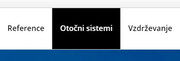
Please clear your browser cache after you add it and check.Best regards,
MikeApril 4, 2019 at 3:45 am in reply to: Disable Mouse Scroll Changing Values on Number Fields. #1086724Hi,
Thanks for the page to test on, but unfortunately I was not able to disable it, at least in Chrome. I tested many javascript snippets but I kept ending up with this warning Chrome views it as an assessability issue to block the mousewheel. I didn’t test other browsers because I didn’t think it would help.
Sorry I wasn’t more help.Best regards,
MikeHi,
Please try this code in the General Styling > Quick CSS field or in the WordPress > Customize > Additional CSS field:#top.page-tribe-attendee-registration .tribe-block__tickets__registration__checkout:nth-child(odd) { display:none !important; }Please check that your form is working correctly, it should, but it’s always better to check.
Best regards,
MikeHi,
I just checked again and that is the right path for v4.5.5,
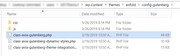
But I see you are using v4.5, so you are going to need to update and then if you are still having problems then try changing the file.
Please note that if you update via FTP, you will need to remove the old theme folder first (via FTP) then upload the new folder.
Please don’t try to overwrite the theme folder, as this will leave old files behind and cause errors.Best regards,
MikeHi,
Please let us know if you were able to manually update via ftp, or if you would like a hand with that.Best regards,
MikeHi,
I believe what is happening is that because your plugin is inserting the shortcodes out of order for the shortcode tree. The “tree” is the list of shortcodes inside the page telling it which elements to get.
In the past the solution was to use the parser in the debugger to rebuild the “tree” but your shortcode is added after so it won’t help.
I didn’t find a filter to always load one element, but you can choose to manually set which elements to load in the performance option.
Please try this.Best regards,
MikeHi,
Glad we were able to help, we will close this now. Thank you for using Enfold.For your information, you can take a look at Enfold documentation here
For any other questions or issues, feel free to start new threads under Enfold sub forum and we will gladly try to help you :)Best regards,
MikeHi,
The slider doesn’t have the option to change the ID it only has the option to change the class, but if you really want to change it, then add the custom class “custom-slider” to it, and then add this code to the end of your functions.php file in Appearance > Editor:function add_custom_id(){ ?> <script> jQuery(window).load(function(){ jQuery('#fullscreen_slider_1.custom-slider').attr('id','experience'); }); </script> <?php } add_action('wp_footer', 'add_custom_id');in the code above change the ID “experience” to what you want the ID to be.
It looks like your shop button is behind the slider because of z-index, and this should help, but as your going to be changing the ID of the slider this will need to be updated:.shopbutton { position: relative !important; z-index: 999 !important; } #fullscreen-slider_1.avia-fullscreen-slider { position: relative !important; z-index: 1 !important; }For backing up your site I recommend using the Full Backup tools that your webhost provides, most plugins fail when you try to restore to a site that has crashed, and that is when you need it the most.
For the logo options, basically there are two logos one before scroll and one after scroll that is basically how it works.
Best regards,
MikeHi,
Please try replacing the file at: /enfold/config-gutenberg/class-avia-gutenberg.php with the one linked in the Private Content area, but please save a backup of your original file.
Then be sure to clear your browser cache.
Please let us know if this helps.Best regards,
MikeHi,
Sorry for the late reply, it looks like you have found a way to make your mobile header sticky, but when you say you wish for your social icons to disappear on scroll, do you want the whole bar that the social icons are in to disappear with the phone number, or just the icons?
This code will make the whole top bar disappear on scroll, Try adding this code to the end of your functions.php file in Appearance > Editor:function custom_script(){ ?> <script> (function ($) { $(window).scroll(function() { var scroll = $(window).scrollTop(); if (scroll >= 100) { $("#header_meta").css({ 'display': 'none'}); } else { $("#header_meta").css({ 'display': 'block'}); } }); })(jQuery); </script> <?php } add_action('wp_footer', 'custom_script');Best regards,
MikeHi,
I assumed that you tried the steps above, in this case try checking your server error log to see what is happening.
If you are still getting:
Download Package URL: Errorcode 403 returned by Envato: Forbidden:
– response_code: 403
– reason: scope-missing
then it sounds like you don’t have the correct permissions for your token set.Best regards,
MikeHi,
Only two for the rules have “#top.page-id-2438” just remove it and it should work for all of the pages.Best regards,
MikeApril 3, 2019 at 4:16 am in reply to: Possible bug; first entry in masonry posts displays 7px padding #1086316Hi,
This should, unless you change the elements on the page.
If you do we will be happy to assist again.Best regards,
MikeHi,
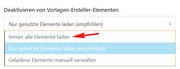
Glad to hear you found the issue. I believe the error you are getting is because in your performance settings your “Disable template creator items” is set to “Load only used elements (recommended)”
Please change to “Always load all elements” and then try again.
Best regards,
MikeHi,
Sorry I didn’t write any css to change the color of the logo, I used two different logo images in the two logo places that I described above.
For an ID to the slider, the slider already has an ID #fullscreen_slider_1 Please try the link in the Private Content area, just use this IDBest regards,
MikeHi,
To also remove the image please try adding this css:#top.page-tribe-attendee-registration div.page-thumb { display: none !important; }Sorry, but I can't test this issue on a clean install because it seems that your plugin is a paid one. But I can say that our dev team has fixed a few issues with the footer as a page, and perhaps this will be cleared up with the next update.
Best regards,
MikeHi,
I believe you are saying that you tried adding it and now it is working.
That’s great. This thread is getting quite long now, perhaps we should close it now and if you have any other issues you can open a new thread?Best regards,
Mike -
AuthorPosts
