

Forum Replies Created
-
AuthorPosts
-
Hi,
Glad we were able to help, we will close this now. Thank you for using Enfold.For your information, you can take a look at Enfold documentation here
For any other questions or issues, feel free to start new threads under Enfold sub forum and we will gladly try to help you :)Best regards,
MikeHi,
I see that you are using the new “Block Editor” WordPress has moved some of the settings around, please try going to your theme settings and under the “Maintenance Mode” setting you will find the “Select Your Editor” setting, select “use WP classic editor”Best regards,
MikeHi,
Good news, the dev team has found the error. Please try replacing this file:
/enfold/framework/js/avia_recaptcha.js
with the version in the Private Content area.
Then clear your browser cache and any cache plugin a couple of times and check.Best regards,
MikeApril 10, 2019 at 6:39 am in reply to: Enfold 4.5 Theme Update "Update Failed: Download failed. A valid URL was not pro #1088976Hi,
@norm4u The error 500 is an Internal Server Error, I tried to work around this by updating your site via FTP, which typically works.
But I found that your child theme has an old header.php that is not supported and I believe it is causing the crash.
But when I examine your header.php it looks as though it contains a custom filter for displaying your shop pages so you will need to either remove the header.php or add your custom code to a up-to-date header.php.
I have uploaded the updated theme as “enfold-new” after you correct the header.php you can rename your current parent theme folder (“enfold”) to “enfold-old” via ftp, and then rename “enfold-new” to “enfold” and then see if your site loads correctly. If it should crash the via FTP switch the names back and your site will load again as before.
I will do this for you if you wish, but you will have to decide how to address the header.phpBest regards,
MikeHi,
I’m sorry I missed that part, I was looking at how the text slid up on hover, not how another element “unfolded” below on click.
So examining the code of the page reveals that this was created with ACF custom post type and uses custom javascript to change the visibility of the unfolded sections.
Unfortunately, I was not able to find a code snippet or tutorial on creating this page or element, but it is quite nice.
My recommendation is to examine the page and try to reverse engineer it as html and add it to a code block, but I can’t assist in creating the ACF custom post type or rewriting our masonry element to perform this.
Sorry I was not more help.Best regards,
MikeHi,
Unfortunately I don’t have access to edit the css, I get this error message:
“Sie sind leider nicht berechtigt, auf diese Seite zuzugreifen.”
Please remove the css I posted earlier, but leave your column css, so I can test again.
I’m surprised that this occurred, because when I was testing yesterday my css didn’t seem to break your columns.Best regards,
MikeHi,
I took a look at your site and see that for some reason the layerslider was deactivated, you will need to activate it:

It is normally activated by default.Best regards,
MikeHi,
Thanks for your feedback, Please try adding this code in the General Styling > Quick CSS field or in the WordPress > Customize > Additional CSS field:.widget_nav_menu ul ul { display: none !important; }Best regards,
MikeApril 10, 2019 at 4:47 am in reply to: Space after caption + Caption under each photo in Gutenberg Image Gallery #1088958Hi,
This is happening because the image is wrapped in a link and adding padding or margin to the image has increased the size of the link. To solve this please remove your css adding the 4em padding, and then add a custom class to the paragraph that the image is in, so your structure is like this:
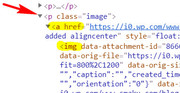
<p class="image"> ... </p>Then add this css to your quick css, which will add the padding for your new paragraph class and remove the padding and margin from your image.
p.image {
    display: flex;
    justify-content: center;
    padding: 4em;
}
p > a > img {
padding: 0px !important;
margin: 0px !important;
}
Best regards,
MikeHi,
Thanks, I have added the code from the post, but I don’t see a change in the bullets and I can’t reproduce on my localhost. But adding the css above to your Quick CSS did work. Please clear your browser cache and check.
Please feel free to adjust to suit.Best regards,
MikeHi,
Thank you for your feedback, I see that each page has a different color for the icons that match the header color. On the first page: /information-security-awareness-training-healthcare all of the icons are the same color, but on the second page: /phishing-awareness-training-for-employees the lower icons are gray like you wrote about.
When I look at the code of the page I see that the color is there but there is an extra “style” which is breaking the code of the page.
I also don’t see the “debugging” code on the page, which is code telling us which version of Enfold you are using and other important info, and your page code looks compressed. So I believe you are using the Autoptimize plugin and you are striping our debugging code from the page.
So please disable all plugins and clear your site cache and server cache and also disable your theme performance css merging, and see if this solves.
If not we will need the admin login so we can try.Best regards,
MikeHi,
Ok thank you, but unfortunately, since I don’t see the warning and you don’t see the warning, I really don’t see how I can help.
If something changes and you believe we can be of assistance, then please let us know.Best regards,
MikeHi,
Since you are getting the error that your token is invalid, please create a new token and ensure that you give it the correct permissions
Please see here How to generate a Envato Personal Token
When I look at your “Token” it looks like the old API with dashes, I don’t believe the new Token has dashes.Best regards,
MikeHi,
Sorry, I was thinking about the hover effect, I see that you want the title to always show, please open your element and under “Element Title and Excerpt display settings” choose “Always display”
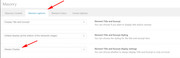
Although there is not a “read more” there is a excerpt you can choose from the options, and then use this css:.av-masonry-entry .avia-arrow { display: none; } .main_color .container .av-inner-masonry-content { background-color: transparent !important; } .av-inner-masonry-content h3 { color: #fff !important; }Best regards,
MikeApril 9, 2019 at 5:10 am in reply to: Enfold 4.5 Theme Update "Update Failed: Download failed. A valid URL was not pro #1088528Hi,
With version 4.4.1 you will need to manually update, please see the instructions within this thread on how to manually update, it is quite easy.Best regards,
MikeHi,
Please download the latest version from your Theme Forest account, please note that sometimes on Theme Forest the version number that is showing in the download section is not correct, sometimes it will show as the version you first downloaded but the link automatically updates so it will actually be our latest version.
If you open the file style.css inside the file the first few lines to tell you what the true version number is, here is an example:/* Theme Name: Enfold Description: <strong>A superflexible and responsive Business Theme by Kriesi</strong> - <br/> Update notifications available on twitter, facebook and via newsletter:<br/> <a href='http://twitter.com/kriesi'>Follow me on twitter</a><br/> - <a href='http://www.facebook.com/pages/Kriesi/333648177216'>Join the Facebook Group</a> - <a href='http://kriesi.at/newsletter'>Subscribe to our Newsletter</a> Version: 4.5.5 Author: Kriesi Author URI: https://kriesi.at License: Themeforest Split Licence License URI: - Theme URI: kriesi.at/themes/enfold/ Envato_ID: 4519990 */Best regards,
MikeHi,
Thank you for your patience, the dev team has suggested the solution here for you.
I see that you referenced it above, but did you try it?Best regards,
MikeApril 9, 2019 at 4:29 am in reply to: woocommerce shop – sorting by price breaks with simple and variable products #1088519Hi,
That is good news in a way, but I will report back that it is not what you are looking for.Best regards,
MikeHi,
To target the next section you will just need to replace #av_section_2 with #av_section_3 and add it to your Quick CSS:@media only screen and (max-width: 767px) { #av_section_3 .flex_column_table .flex_column.av_one_fourth:nth-child(odd) { width: 48% !important; float: right !important; padding: 20px 1px 1px 1px !important; min-height: 268px !important; } #av_section_3 .flex_column_table .flex_column.av_one_fourth:nth-child(even) { width: 48% !important; float: left !important; padding: 20px 1px 1px 1px !important; min-height: 268px !important; } #av_section_3 .flex_column_table .flex_column.av_one_fourth .el_after_av_image { margin-top: 20px !important; } }Best regards,
MikeApril 9, 2019 at 4:09 am in reply to: Wrap products with same subcategory in div WooCommerce #1088514Hi,
That is probably possible, but it would be outside the scope of what we can do here. We have partnered with Codeable to assist in such customizations and understand Enfold very well.Best regards,
MikeHi,
If you take a look at the elements listed in the options you should be able to remember which elements you used when creating your site, or at least which elements you didn’t use such as the “Progress Bars Element”, “Headline Rotator Element”, & “Animated Numbers Element”
You can also look at the backend of your page and the title for each element is visible without having to open it if you are unsure which elements you used.Best regards,
MikeHi,
There we go, that worked :)
Ok so you would like the sub-menu fly out to the left,
Please try this css:.html_header_top #top .av_menu_left .main_menu .menu li ul ul { left: -670px !important; }Please feel free to adjust to suit.
Best regards,
MikeHi,
I see, so you would like the Information graphic to show on mouse click. The layerslider includes buttons that you can use on the layers to link to slides. the reason I think this might work well is that the Information graphic will stay in a relevant location no matter the screen size.Best regards,
MikeHi,
When I took a look Autoptimize was on but so was the loading of the jQuery in the footer, anyways undoing these seemed to help, there was still a lag in the element loading but it seemed more normal.
Please give this a try.Best regards,
MikeHi,
Please give the Shortcoder a try, I tested it and it worked good.Best regards,
MikeApril 8, 2019 at 1:11 am in reply to: woocommerce shop – sorting by price breaks with simple and variable products #1088078Hi,
Thanks for your feedback, so I’m it looks like I made an error, woocommerce-mod-css-dynamic.php was not meant to be in there, but when I went back to get the correct files there were more of them now, so I created a new package, linked below.
You see I have to copy them one at a time manually and I’m placing them in a directory structure to help when you upload them.
Anyways I know that you only care about the woo files, but I don’t know if any of the other files are needed or not so I included them.
So now that I got the config.php and there was an added functions.php, perhaps it will work this time? Hope so :)Best regards,
MikeHey A,
Sorry for the late reply, and thanks for the login but it doesn’t have admin access so I couldn’t really investigate. I see that you are using Enfold v4.5.1, our latest version is v4.5.5, please try updating first and see if that helps.
Now when you say your pages are not under the correct parent pages,
do you mean in the menu or in the backend under all pages?
When you say you can’t create new pages, do you mean that you get an error message or does the site give you a spinning wheel and doesn’t update?Best regards,
MikeHey javcor1104,
That is a pretty cool script, if you download the zip file you’ll see the instructions inside as “ReadMe.md” and the folder to upload to your site is “dist” and there is a “examples” folder for you to see how it works, just open the index.htm in your browser and also in your editor to see how it is set up.
But this is not designed for WordPress so while you can get it to work, it won’t right out of the box and you will have to write some code.
I assume that you don’t know how to code javascript, css, & html, so I recommend hiring a freelancer at Upwork.com to help you, you can probably get someone for $10-$20 but be sure you know what you want it to do before you hire someone and write it all out so they can be clear on what you want.
Sorry but we can’t help you with this because it’s outside of our support.Have you looked in the WordPress plugin directory to see if there is a WordPress version of this? Maybe it’s called something else?
Best regards,
MikeHey Edmund,
Sorry for the late reply, I have taken a look at your site and do not see the error that you described,
Where do you see the error, can you send a screenshot of it?
I believe the error you are talking about is a warning you might see on a full size screen before you see the site, which you would need to click a link on to get to the site, link this one:

In which case this doesn’t have anything to do with the theme, this is with your security certificate, please try these tips for fixing
But I didn’t see this on your site, so I’m just guessing this is what you are seeing.Best regards,
MikeHi,
I have adjusted your css for you so that for mobile your phone number will be green and for desktop it will be white:@media only screen and (max-width:767px) { #top .phone-info span, #top .phone-info span a { color: #76992a !important; } } @media only screen and (min-width: 768px) { .av_header_transparency .phone-info a { color: white !important; } }Please clear your browser cache and check.
Best regards,
Mike -
AuthorPosts
