

Forum Replies Created
-
AuthorPosts
-
Hi,
Thank you, I was able to login to your cPanel and upload the files.
Your theme is updated and you can edit your pages again.
Please check over everything well, and if it’s working well then let me know, there is a folder I should delete so it won’t confuse people in the future.Best regards,
MikeHi,
Please see the link in the Private Content area, is this the correct page? Because the first tab icon “dashboard” is not animating for me.Best regards,
MikeHi,
I tried to edit your functions.php to adjust the code, but the Themes > Editor was not availability. Please enable, the option may be in your security plugin.Best regards,
MikeHi,
Glad we were able to help, we will close this now. Thank you for using Enfold.For your information, you can take a look at Enfold documentation here
For any other questions or issues, feel free to start new threads in the Enfold forum and we will gladly try to help you :)Best regards,
MikeHi,
Glad we were able to help, we will close this now. Thank you for using Enfold.For your information, you can take a look at Enfold documentation here
For any other questions or issues, feel free to start new threads in the Enfold forum and we will gladly try to help you :)Best regards,
MikeHi,
Glad we could help, I assume we can close this now, but I like to ask first.
Is there anything else we can assist with on this issue?Best regards,
MikeHi,
Thank you for the login, but I also need ftp access so I can upload the files, thank you.
Here is a good resource that explains FTP a little more.
Also please note that we will need access to your public_html/ directory, so when creating the ftp user give them “/” access.Best regards,
MikeHi,
Try adding this code to the end of your functions.php file in Appearance > Editor:function change_breadcrumb_home(){ ?> <script> (function($){ $(window).load(function(){ $(".breadcrumb-trail").find("a.trail-begin").attr("href", "https://www.google.com"); }); })(jQuery); </script> <?php } add_action('wp_footer', 'change_breadcrumb_home');Please replace the link in the code with yours.
Best regards,
MikeHey webWahine,
Please try this code in the General Styling > Quick CSS field or in the WordPress > Customize > Additional CSS field:.avia-builder-widget-area li.current_page_item > a { color: #000 !important; }Please clear your browser cache and check.
Best regards,
MikeHey allyson3,
#1: The share like button doesn’t look like it is from Enfold. It looks like a plugin “sharedaddy” please try disabling your plugins.
#2: Please try this code in the General Styling > Quick CSS field or in the WordPress > Customize > Additional CSS field:#top .widget ul.children { padding-left: 20px !important; } #top .widget li.cat-item.cat-item-37 > a, #top .widget li.cat-item.cat-item-42 > a { pointer-events: none !important; }#3: for the recent posts it looks like you are using the Advanced Layout Builder, so please try this shortcode
#4: for square corrners please try this css:.avia-content-slider .slide-image { border-radius: 0px !important; }To have your posts in two columns, please try this css:
#top.blog .slide-entry.av_one_third {
    width: 47% !important;
}
Please ensure you clear your browser cache.
Best regards,
MikeHey Kathy Zech,
Sorry for the late reply, I took a look at your site and I see that you are using Enfold v4.4 with WordPress v5.1.1
You will need to update manually via ftp to Enfold v4.5.5
I can assist with this if you include your ftp access in the Private Content area.Best regards,
MikeHey jsumman,
Thanks for the login, but when I look at your “phone-info” it is centered. Did you already resolve this?
Please see the screenshot in Private Content area.Best regards,
MikeHi,
Please try this:function custom_script(){ ?> <script> (function($){ $(window).load(function(){ $('#top.post-template-default.single #main .breadcrumb-trail > span:nth-child(4) a').each(function() { $(this).on('click',function(){ window.open('http://new.mineslaw.com','_self') return false; }); }); }); })(jQuery); </script> <?php } add_action('wp_footer', 'custom_script');Best regards,
MikeHey gb,
It looks like the feature image of the post is showing.
Please try this code in the General Styling > Quick CSS field or in the WordPress > Customize > Additional CSS field:#top .single-small > .blog-meta { display: none !important; }Best regards,
MikeHi,
Glad we were able to help, we will close this now. Thank you for using Enfold.For your information, you can take a look at Enfold documentation here
For any other questions or issues, feel free to start new threads in the Enfold forum and we will gladly try to help you :)Best regards,
MikeApril 21, 2019 at 8:40 pm in reply to: My header background image in the logo area is not displayed #1093135Hi,
Sorry the image did change, it was stretching the full width.
I changed to:#top #header_main { background-image: url(https://staging.schlossbrauhaus.de/wp-content/uploads/2019/04/kachel-background_01.jpg); background-repeat: repeat; background-size: 143px; }You might find it tricky to align the line with the menu items for all screen widths. Perhaps try making the line a little wider so there are a few pixels of leeway for the top and bottom.
I added the css to WordPress > Customize > Additional CSS I think your Quick CSS has an error in it which I didn’t find.Best regards,
MikeHey webWahine,
I believe there is a new option that is for this, I tried to test the files but they seem dependent on another change.
In the meantime you could try this function. Try adding this code to the end of your functions.php file in Appearance > Editor:function custom_script(){ ?> <script> (function($){ $(window).load(function(){ $('#top.post-template-default.single #main .breadcrumb-trail > span:nth-child(4) a').each(function() { $(this).attr('href','http://new.com/legal-news/'); $(this).on('click',function(){ window.open(this.href); return false; }); }); }); })(jQuery); </script> <?php } add_action('wp_footer', 'custom_script');Please correct your link in the code.
Best regards,
MikeHi,
Sorry for the late reply, when I check your site on mobile the two anchor links I found seem to be working for me on Android & Chrome
Please see links in Private Content area.
When you say it’s not working, is it just landing in the wrong place, or not going there at all?
Can you include one link and a screenshot of the result so we can investigate?Best regards,
MikeApril 21, 2019 at 4:43 pm in reply to: Set enfold theme language independent from wordpress language #1093055Hey olifant551,
Sorry for the late reply, in WordPress you can have two languages, one for the front end, and one for the backend. There is no Enfold language.
So I assume that you want the front end in English, so this is at WordPress > Settings > General > Site Language
and you want the backend in German, so this is at: WordPress > Users > Your Profile > Language
But you can’t have the backend in English except for the Enfold elements which would be in German.
I hope this helps :)Best regards,
MikeHi,
Sorry for the late reply, did you see this css to block all animations at the above link?.avia_transform .avia_start_animation.left-to-right.avia_image, .avia_transform .avia-icon-list .avia_start_animation .iconlist_icon, .avia_transform .avia_start_animation.avia-testimonial .avia-testimonial-image { -webkit-animation: none!important; -moz-animation: none!important; -o-animation: none!important; animation: none!important; opacity: 1!important; -webkit-transform: scale(1)!important; -moz-transform: scale(1)!important; -o-transform: scale(1)1important; transform: scale(1)!important; }But I believe that this will not allow you to use a alternative animation because you will not be able to use these classes, you will have to add new classes to your elements for the animation.
Another point is that each element css file has the animation added, so the cleanest way would be to edit each one of them and delete the animation css, and then add the theme classes to your animate.css file, but this would still be a lot of editing.
Perhaps the easiest way would be to add your new animation to each element with the !important; on the rule and then add it to your WordPress > Customize > Additional CSS which overrides all other css.
This would be easy if your only changing a few of them.
How many different elements do you want to change the animation on?Best regards,
MikeHi,
Thanks for the login, It looks like your spam is from the same bot because they all to have the same backlink.
You could add the link to your “Comment Blacklist” in WordPress > Dashboard > Settings > Discussion
Or try a plugin such as Banhammer
I see that you have not added a free API key for your “Akismet Anti-Spam” so all of your comments are marked “Awaiting spam check” Please try activating your free API key.
I was able to send 20 at a time to the trash and mark as spam, but the site crashed when I tried 999 which is the max
This video will show you how to delete all of them from your cPanel.Best regards,
MikeApril 21, 2019 at 3:38 pm in reply to: Translation issue in social media heading in blog post #1093049Hey guttogjente,
Sorry for the late reply, When your language stopped translating, was this after a update? Is the translation via WordPress or a translation plugin? We would need to see your site to see if it’s an error in the PO language file or something else.
But I’m sure we can change the text with jQuery and we can move it, but we will need to examine the page.Best regards,
MikeHi,
Sorry for the late reply,
1: I need to make the color of each page be blue when you’re on it? Do you mean the background color of the page? Please change this at Enfold Theme Options > General Styling > Main Content > Main Content background color
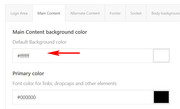
2: Try adding this code to the end of your functions.php file in Appearance > Editor:function custom_script(){ ?> <script> jQuery(window).load(function(){ jQuery( '.hr-custom.avia-builder-el-3' ).insertBefore( '.av-rotator-text.av-rotator-multiline-on.av-rotation-active' ); }); </script> <?php } add_action('wp_footer', 'custom_script');3: To have the team members link to a popup please see this solution.
Last: increase the top-padding of the navigation cell Please try this code in the General Styling > Quick CSS field or in the WordPress > Customize > Additional CSS field:.avia-menu.av-main-nav-wrap { margin-top: 20px !important; }please adjust to suit.
Best regards,
MikeHey heartbit,
Sorry for the late reply, Please try this code in the General Styling > Quick CSS field or in the WordPress > Customize > Additional CSS field:#top #searchform > div { right: 0px !important; }Best regards,
MikeHi,
Glad to help, Happy Easter :)
We will close this now. Thank you for using Enfold.For your information, you can take a look at Enfold documentation here
For any other questions or issues, feel free to start new threads in the Enfold forum and we will gladly try to help you :)Best regards,
MikeHi,
I assume you mean the dashboard colors for agentrising.com?
In each uses profile the colors can be changed for that one user, I don’t believe we are logging in as the same user, so we are not seeing the same thing. Try logging out and then login as the user you gave us, if you still see the issue please include a screenshot of the issue so I can look for it.Best regards,
MikeHi,
Sorry I’m not seeing that on your site, please link directly to the page in your screenshot.Best regards,
MikeHi,
I think we should rewrite it so we are not trying to add individual pages, since you only want the price on “single-product” pages, we should try:#top:not(.single-product) .inner_product_header_cell > .price,#top:not(.single-product) .inner_product_header_cell > .woocommerce-de_price_taxrate,#top:not(.single-product) .inner_product_header_cell > .woocommerce_de_versandkosten { display: none !important; }I added this for you, Please clear your browser cache and check.
Best regards,
MikeHi,
Thank you, so what I’m seeing is at 2051px there is a margin-left on the first footer of 500px:@media screen and (max-width: 2350px) and (min-width: 2051px) #footer .flex_column.first { margin-left: 500px !important;but then at 2350px there is no margin-left:
body div .first, body div .no_margin {
    margin-left: 0;
}
I believe since your rule ends at 2350px the browser looks for the next valid rule which is 0px. I recommend removing the top end of your rule and using a percentage instead of a pixel width, or adding one more open ended rule starting at 2351px using percentages.
From what I can see we don’t have any rules that high and our last one (0px) is open-ended which should go to infinity.
I should point out that I don’t have a screen that large and I don’t recall any questions about screens over 2350px, but this is a good point, thanks.Best regards,
MikeHi,
Thanks for sharing your solution and the screenshot. I’m sure this will help others out.
I assume we can close this now, thanks for using Enfold.For your information, you can take a look at Enfold documentation here
For any other questions or issues, feel free to start new threads in the Enfold forum and we will gladly try to help you :)Best regards,
Mike -
AuthorPosts
