

Forum Replies Created
-
AuthorPosts
-
Hi,
I took a look at your elements and found that you have this css causing the large white space:@media only screen and (max-width: 767px) { #av_section_3 .flex_column_table .flex_column.av_one_fourth:nth-child(odd) { width: 48% !important; float: right !important; padding: 20px 1px 1px 1px !important; min-height: 268px !important; } }Please note your min-height: 268px !important; is forcing a min-height, 160px would be better, as long as it doesn’t effect other elements.
Please try to make this adjustment and clear your browser cache.Best regards,
MikeHi,
OK, I found the correct directory and did the same steps, Please clear your browser cache and check :)Best regards,
MikeHi,
Please note that with css targeting just h3, h2, & h4 will be overwritten by any rule that is also targeting a class, such as “h3.custom_class”
Please give us one example of what you would like to do, and admin access so we can demo for you.Best regards,
MikeHey Erdrol,
Tracking downloads requires changing the code a little, you’ll want to add an “Event” to the code. Here’s the official Google Analytics link to do this, but this link may explain it better.
While these are intended to capture all downloads, another way is to change your download link to trigger the “event”.
You can also add a custom class to your download links and use a script like this to trigger the event:function track_comment(){ ?> <script> $('.form-submit .submit[type="submit"]').on('click', function() { ga('send', 'event', 'button', 'click', 'comment'); }); </script> <?php } add_action('wp_footer', 'track_comment');this example was used to track comment submitions, so please adjust to suit.
Best regards,
MikeHi,
Thanks for the cPanel login, I found that your actual theme folder is in a different directory, Please see the screenshot in Private Content area.
So I uploaded the new theme and renamed them as before, it seems to be working fine, but please check.
If all is fine then please delete the “enfold-old” via the cPanel, or I could do it for you :)Best regards,
MikeHi,
Thank for the login, I see that your css in the Quick CSS, I saved the theme options “save all settings” button one more time, and then checked your element on Firefox, Edge, and Chrome incognito. and the price was not showing.
Please see the screenshot in Private Content area.
I also tested logging out in the same window and then checking and the price was not showing, but it does on the product page as you wanted, (second screenshot).
I assume you are experiencing a cache issue, please try clearing your cache or use incognito.Best regards,
MikeHi,
Thank you, I took a look at your slider and see that the opacity is set to zero, so the images are hidden.
So I added this css to correct:#top .aviaccordion-slide img { opacity: 1 !important; }Please clear your browser cache and check.
As for the cause to this, I see that the images have “jetpack” lazy load on them.
So you could try to disable your lazy load, or jetpack, or you could just use this css to solve.
Lazy load does sometimes cause some small issues, but if this is the only issue you have right now using the css may be good for you.Best regards,
MikeHi,
Glad to hear, I took a look at your site and changed your desktop version from using the “hide on mobile” option to using the “hide under” option and set it to 900px.
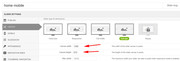
This is because it gives you better control. So this makes your break point 900px which is good, but please look at your mobile version for tablets, your caption is still too large. Please see the screenshot (1) in Private Content area.
Please try setting your “slider canvas” to 890px-625px and then adjust your caption size.
Best regards,
MikeHi,
One way to correct this would be to create a second slider for mobile only, this way you can create a mobile-optimized version.
Then use the screen options to hide one slider and show the other based on screen size.Best regards,
MikeHi,
Sorry for the late reply I couldn’t find the page in you screenshot, and I couldn’t find the exact same separator, but for the ones I did find this should work.
Please try this code in the General Styling > Quick CSS field or in the WordPress > Customize > Additional CSS field:#top #main .av-vertical-delimiter { border-color: #c71456 !important; }Best regards,
MikeHi,
Sorry for the late reply, I was not able to log in, can you please check.
Do you have a geo filter blocking some IP’s?Best regards,
MikeHi,
I took a look and found a misplaced bracket in your css. I have corrected, Please clear your browser cache and check.Best regards,
MikeHi,
Thats odd, where did you place the css? Please try in the WordPress > Customize > Additional CSS field.
Can we have an admin login to see?Best regards,
MikeHi,
I found that both of your sites have “PHP ZipArchive Extension” disabled, this is why when you upload a zip file you get a server error.
Thank you for the FTP access to the second site (kate), I renamed your current theme to “enfold-old” then I uploaded the new “enfold” and checked that your site is working correctly. Please also check for yourself.
Once you are happy you, (or I) can delete the “enfold-old” via ftp, (not the WP theme page)
Should for some reason you wish to roll-back to the old version, it’s easy to do, simply rename the new “enfold” to “enfold-new” via ftp and then rename “enfold-old” to “enfold” then refresh your page.
But when I login via FTP to the first site I get an empty directory, please check the details again and make sure that the directory is “/” and not the user name.Best regards,
MikeHi,
I see, you would like to only not show them on the one page, please try this css:#top.page-id-10428 .inner_product_header_cell > .price,#top.page-id-10428 .inner_product_header_cell > .woocommerce-de_price_taxrate,#top.page-id-10428 .inner_product_header_cell > .woocommerce_de_versandkosten { display: none !important; }Best regards,
MikeHi,
Sorry but I’m not kidding you?
Your question: “Enfold theme by kriesi” is not editable.” True, you add [nolink] to the copyright field and then create your own copyright, very easy? What would you like it to say?For your next question, your screenshot is very clear, you have set the menu item to a page, if you only want it to be a parent item of your sub-menu, then please create it as “custom” menu item with a hash tag as the link so it can contain a sub-menu yet not be a link itself, seems straight forward?
And then for your last question, which is well documented in the link, but perhaps your developer is still having problems with it, I’m happy to help if you share which icons you are trying to use and post admin access.
Best regards,
MikeApril 19, 2019 at 1:04 pm in reply to: Spliting of Column into 50/50 with an image on one side and text on the other. #1092673Hi,
Have you tried the background settings when you add the image, such as scale & cover?
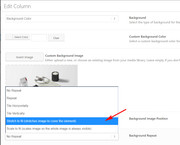
We can also try to use background position css if you include a url to the page.
Another option is using the grid row element instead of the columns.Best regards,
MikeHey bhcdi,
To change the team member name font, Please try this code in the General Styling > Quick CSS field or in the WordPress > Customize > Additional CSS field:h3.team-member-name { font-size: 10px !important; }Please adjust to suit.
Best regards,
MikeHey bauchope,
I believe that the Enfold logo only shows because you have no logo added, it is a default demo feature. But assuming that you don’t want a logo at all please try this css:span.logo.bg-logo {display: none !important;}Best regards,
MikeHey Matt,
To change the background Please try this code in the General Styling > Quick CSS field or in the WordPress > Customize > Additional CSS field:.html_av-overlay-side #top .av-burger-overlay-scroll { background: #fff !important; }Please change the color to suit.
To change the font colors please try this css:.html_av-overlay-side #top #wrap_all .av-burger-overlay-scroll #av-burger-menu-ul a { color: red !important; }Please let us know if there is anything else we can help with.
Best regards,
MikeHey smoke_house,
I took a look at your page and see that the “screen-reader-text” label is what is printing next to your quantity button.
This is for blind visitors to visit and use your site with the help of special browsers. You can read more about this here This css is recommend to hide the text from most visitors but allow the screen readers to still work.
Please try this code in the General Styling > Quick CSS field or in the WordPress > Customize > Additional CSS field:#top #main .screen-reader-text { border:0; clip: rect(1px, 1px, 1px, 1px); clip-path: inset(50%); height: 1px; margin: -1px; width: 1px; overflow: hidden; position: absolute !important; word-wrap:normal !important; }Best regards,
MikeHi,
Oh I see, have you tried this functionadd_theme_support( 'avia_custom_shop_page' );it will enable the Layout Builder for the default Shop page.
Best regards,
MikeHi,
For the gap please try this css instead:@media screen and (max-width: 750px){ main.content { padding-top: 25px !important; } }For the logo issue, please try this css:
@media only screen and (min-width: 989px) {
#top .av_header_transparency.av_alternate_logo_active .logo a > img {
    opacity: 1 !important;
}
}
Best regards,
MikeHi,
Since this error is due to Lazyloading, and we typically advise against it, I don’t believe we will see this often.
But thank you for sharing your solution, I’m sure it will be helpful to some.
We will close this now. Thank you for using Enfold.For your information, you can take a look at Enfold documentation here
For any other questions or issues, feel free to start new threads under Enfold sub forum and we will gladly try to help you :)Best regards,
MikeHi,
As I read your description of your steps it sounds like you tried to upload the themeforest-4519990-enfold-responsive-multipurpose-theme-wordpress-theme.zip that includes the documentation and extra files, which will not work. You need to open that file and find the enfold.zip inside, which is the one you can upload.
I tried to take a look at your site to see if there was anything else that might cause future issues, but I couldn’t login. The login like is probably too old now.
I would be happy to install your update if you wish via ftp, and avoid future frustrations. Please include an admin login & FTP access in the Private Content area.Best regards,
MikeHi,
I examined your page and found that the corrected logo would fit better for mobile devices and the other pages, so I wrote this css to show the margin-top only on the home page at screen sizes above 989px:@media only screen and (min-width: 989px) { #top.home .av_header_transparency .logo { margin-top: 35px !important; } }I have commented out your other css and added this already, Please clear your browser cache and check.
Best regards,
MikeApril 19, 2019 at 3:21 am in reply to: Aligning social icons and privacy policy to the left as hidden on mobile #1092538Hi,
Glad that helped, to align the icons center, please use this css instead:#socket .social_bookmarks { float: none !important; margin: auto !important; position: relative; display: inline-flex; justify-content: center; width: 100% !important; }Best regards,
MikeHi,
Thanks, for your copyright issue, please add [nolink] to the copyright field.
For your menu item, it is conected to a page called “services”, if you only want it to be a parent item of your sub-menu, then please create a “custom” menu item with a hash tag as the link.
To create a custom icon, please see our documentation here.Best regards,
MikeHey Daniel,
With the size of your logo, adding the margin to the to pushes the logo beyond the container. You don’t notice it on the homepage because of the transparency.
It would be recommended to make the logo smaller so that with the margin it fits inside the container, or you could make the container height larger.
We can assist with this, including making these changes activate only on your sub-pages, so that you have the large logo on the home page, and the smaller one on the sub-pages.
Would you like this?Best regards,
Mike -
AuthorPosts
