

Forum Replies Created
-
AuthorPosts
-
Hi,
Sorry for the late reply, I took a look at your “wp-config.php” and it seems to have encrypted lines at the top, I removed them and now your login can be reached, but we don’t seem to have the login, so please try to login.Best regards,
MikeMay 10, 2019 at 11:25 pm in reply to: How to change background color on hover for a submenu element #1099437Hi,
Please try this code in the General Styling > Quick CSS field or in the WordPress > Customize > Additional CSS field:#top #wrap_all .av-main-nav ul > li > a:hover { background-color: #000 !important; }Please see the screenshot in Private Content area.
Best regards,
MikeHi,
Sorry for the late reply, I have looked at your example url above, the reason you are getting an error on the page is that, once you create a page with the Advanced Layout Builder, it is not safe to re-edit with the default editors. The reason you may see demo content when switching between the editors is that the two types of content are stored differently, but this shall not cause any future issues.
If you want to edit the shortcodes, or copy them to a new page please try this post: Enable Avia Layout Builder Debugger
But it is an advanced technique, and not really recommended, perhaps if you can explain what you are trying to achieve we could help.Your issue with the buttons on your localhost sounds like you updated manually by trying to overwrite the theme folder, Please note that if you update manually or via FTP, you will need to remove the old theme folder “enfold” first (via FTP) then upload the new “enfold” folder at /wp-content/themes/enfold/
Please don’t try to overwrite the theme folder, as this will leave old files behind and cause errors.
But I won’t know for sure that this is the issue until I can examine it, please try following the steps above to see if it helps.Best regards,
MikeHi,
Glad to hear the widget titles are working for you.
To get the Google Maps to work you will need to setup a billing account with Google Maps and add your API to the Google Maps field within the theme settings. Please look in the theme settings for the link to create a Google account.
To correct the widegt highlight color, please try this css:.main_color .widget_nav_menu ul:first-child>li.page-item-472.current_page_item { background: #fff !important; box-shadow: 0px 0px 1px 0px rgba(0,0,0,0) !important; } .main_color .widget_nav_menu ul.nested_nav > li.current_page_item > a { background: #f8f8f8 !important; padding-right: 0px !important; margin-right: -62px !important; } .main_color .widget_nav_menu ul.children>li.current_page_item { background: #f8f8f8 !important; padding-right: 52px !important; margin-right: -62px !important; }Best regards,
MikeHi,
Thanks for the feedback, but unfortunately I was not able to reproduce this on my localhost, the search results page doesn’t contain the big-preview class, which the css above targets.
I also checked your search results page which doesn’t contain any image class, but your other pages are hiding the duplicate images.
If you would like to add images to your search results that contain a featured image please try this solution, I tested this and it works.Best regards,
MikeHi,
Sorry for the late reply, and thank you for the more info and login.
Ok, so when I logged into your site I found the “Block Editor” was set as your default editor, so I hope you don’t mind I set the “Classic Editor” as the default editor within the theme settings at Enfold Theme Options > Select Your Editor
Then when I checked your “Classic Editor” “wand” your “Icon Box” option was available:
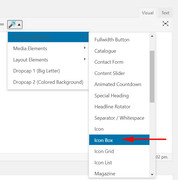
From here I tried to create the effect you are looking for.
First, we can make the “icon box” only use 40% of the width with this css when we add a custom class:.center_icon_box { width: 40% !important; float: left !important; }and we can make the text float to the right with this css:
.float_right {
float: right !important;
width: 55% !important;
}
Please see example in Private Content area.
But unfortunately, it’s still not giving you the wrap you are looking for.Best regards,
MikeMay 9, 2019 at 5:09 pm in reply to: "neuestesn Beiträge" im Footer überschneiden sich + Bilder unterschiedlich groß #1099018Hi,
Glad Victoria could help, we will close this now. Thank you for using Enfold.For your information, you can take a look at Enfold documentation here
For any other questions or issues, feel free to start new threads in the Enfold forum and we will gladly try to help you :)Best regards,
MikeHi,
Glad to hear, we will close this now. Thank you for using Enfold.For your information, you can take a look at Enfold documentation here
For any other questions or issues, feel free to start new threads in the Enfold forum and we will gladly try to help you :)Best regards,
MikeHi,
Sorry for the late reply,
1: Please try this css to fix your “line break” in the menu item:#menu-item-1767 span.avia-menu-text { line-height: 14px !important; display: block !important; margin-top: 60px !important; content: ""; }Please adjust the “line height” & “margin-top” to suit, but this looked good on my screen.
2: I looked at your new page legacytops.com/projects/ and didn’t see the expected see “share buttons” but perhaps we are you mean these, Please see the screenshot in Private Content area.
In such case please try this css:.jetpack-social-widget-list { margin-top: 20px !important; }please adjust to suit.
Best regards,
MikeMay 8, 2019 at 10:29 pm in reply to: How to change background color on hover for a submenu element #1098661Hi,
Thanks, Please try this code in the General Styling > Quick CSS field or in the WordPress > Customize > Additional CSS field:#sub_menu1 li a:hover { background-color: #000 !important; }Best regards,
MikeMay 8, 2019 at 9:58 pm in reply to: How can I change the size of some type-elements in the burger-menu? #1098649Hi,
Sorry for the late reply, could we please have ftp access to try updating your theme to our next version to see if this solves the burger menu?
For your “menu arrows” being “light” I added this css to your Quick CSS.html_av-submenu-hidden .av-submenu-indicator { opacity: 1 !important; }Please clear your browser cache and check.
Best regards,
MikeHi,
Sorry for the late reply, yes I was having trouble reactivating the layerslider, but I found the issue. You had also disabled it in:
wp-content/themes/enfold-child-master/includes/config-enfold/config.php with:// Disable Layerslider if (!defined('EC_DISABLE_LAYERSLIDER')) define('EC_DISABLE_LAYERSLIDER', TRUE);So I got it working again, please check.
Best regards,
MikeHey Raginilk,
If your current theme is before about v4.4 you may need you update via ftp, Theme Forest has changed from an API key to a Token.
Updating via ftp is very easy, basically, upload the new version as “enfold-new” and then change your current theme directory to “enfold-old” via FTP and your new theme to “enfold”
Should something go wrong, just switch back.
If you would like a hand with this, please let us know, and include an admin login and ftp access in the Private Content area so we can be of more assistance.Best regards,
MikeHey hudsoric,
Please try this code in the General Styling > Quick CSS field or in the WordPress > Customize > Additional CSS field:#footer #text-4,#footer #media_image-8,#footer #media_image-9 { margin: 0px !important; } #footer #text-5 { margin-bottom: 0px !important; } #socket .container { padding: 0px !important; } #footer { padding: 0px !important; }Best regards,
MikeHey Ken Schreck,
Thank you for contacting us, please follow this link to Theme ForestBest regards,
MikeHi,
Wenn Sie keinen FTP-Zugang haben, probieren Sie bitte die Option “Dateimanager” für den Webhost aus, beispielsweise in einem cPanel.— Translated with Google —
If you don’t have FTP access, please try your webhost “file manager” option, such as in a cPanel.
Best regards,
MikeHey Christian,
Thank you for contacting us, you can simply begin to use your license/theme install on the new domain.
Nor we or Theme Forest tracks your license to a single domain. Only if your license is called from two or more domains at the same time is an issue created.
I hope this helps, please let us know if we can help further.Best regards,
MikeHi,
Though ftp I see that you are using Enfold v4.5.6, so my first recommendation would be to ensure you are using PHP v5.6 (+)
sometimes you can change this in your cPanel.
I would like to help more, but a “server 500” error really requires an in-depth look at server logs, yet I know you are having issues with this.
To answer your earlier question, WordPress puts out some error logs and your server puts out others. Enfold doesn’t interfere with these.
So, unfortunately, your webhost may be the best resource for this “server 500” error.Best regards,
MikeMay 6, 2019 at 1:14 am in reply to: License – Can I use the theme on more than one customer wesites creations? #1097529Hey Neil Ellis,
This seems to be a duplicate, if so please only respond to one of these requests. Thanks :)
So here’s my answer:
Thanks for asking, our license is for one domain.
Which can be more than one site, if you are using sub-domains. A common instance is if you should have a live site and a staging site on a “dev” sub-domain for testing. Another case would be if you have a dev sub-domain for developing a future site, but once you publish this site to a new domain, please purchase a new license.
Should your friend purchase a new license please direct them to the option to get a full year of support for only a little more, this is a great value!
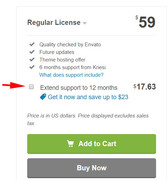
Best regards,
MikeMay 6, 2019 at 1:07 am in reply to: License – Can I use the theme on more than one customer wesites creations? #1097528Hey Neil Ellis,
Thanks for asking, our license is for one domain.
Which can be more than one site, if you are using sub-domains. A common instance is if you should have a live site and a staging site on a “dev” sub-domain for testing. Another case would be if you have a dev sub-domain for developing a future site, but once you publish this site to a new domain, please purchase a new license.
Should your friend purchase a new license please direct them to the option to get a full year of support for only a little more, this is a great value!
Best regards,
MikeHey dockerydesigns,
I tried to take a look, and while I could see the front end, I couldn’t login due to a server “500 error”
When I checked via ftp I didn’t find anything helpful, sorry, but I might be of more help if I could login to your admin account.Best regards,
MikeHey Michael,
Please try this code in the General Styling > Quick CSS field or in the WordPress > Customize > Additional CSS field:p > select > option { background-color: #000 !important; }This will make the background color black, please adjust to suit.
Please clear your browser cache and check.Best regards,
MikeHey Jonas,
We would be happy to help, I see that you are using v4.2
You will need to update your site via ftp because of how Theme Forest changed their key method.
Please login to our support forum for further assistance.Best regards,
MikeHi,
I took a look at your link in both Chrome & Edge,
and I found this css for Edge only should help:@media all and (-ms-high-contrast: none), (-ms-high-contrast: active) { .flex_column.avia-builder-el-5 { margin-top: 140px !important; } }I have added it for you, but I believe your server cache needs to be cleared, please try to clear.
Best regards,
MikeHi,
Glad we were able to help, we will close this now. Thank you for using Enfold.For your information, you can take a look at Enfold documentation here
For any other questions or issues, feel free to start new threads in the Enfold forum and we will gladly try to help you :)Best regards,
MikeMay 5, 2019 at 9:21 pm in reply to: Woocommerce content-product.php template out of date even after latest update #1097504Hi,
Thank you for the reply, it really helps :)
So, Enfold doesn’t override content-product.php we try to do as few mods as possible with WooCommerce and try to work closely with their team. Here what we are doing:
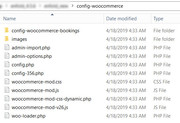
I was able to login and use the info you provided above to investigate and found that your child theme is overriding the content-product.php
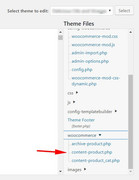
I see that your child theme is overriding quite a few files, and I would recommend a review of these files for their customizations by your developer. With WordPress v5 and all of the updates plugins and themes have had to make, a review of customizations is a good plan.Best regards,
MikeMay 5, 2019 at 8:33 pm in reply to: Malware Scan resulted in over 780 infected files in theme folder – after update #1097489Hi,
Glad we were able to help, thanks for your review :) We will close this now. Thank you for using Enfold.For your information, you can take a look at Enfold documentation here
For any other questions or issues, feel free to start new threads in the Enfold forum and we will gladly try to help you :)Best regards,
MikeHi,
Thanks for the screenshot, please explain how you updated, did you try to overwrite the theme files?
Please include an admin login & FTP access in the Private Content area so we can try to upload a new install.Best regards,
Mike -
AuthorPosts
