

Forum Replies Created
-
AuthorPosts
-
Hi,
Happy to help, unless there is anything else we can help with on this issue, shall we close this then?Best regards,
MikeHi,
Glad we were able to help, we will close this now. Thank you for using Enfold.For your information, you can take a look at Enfold documentation here
For any other questions or issues, feel free to start new threads in the Enfold forum and we will gladly try to help you :)Best regards,
MikeHi,
Thanks for your screenshot, it’s a big help.
Ok, so for the page in your screenshot, and for a few other random pages I tested on your site this css seems to work good:@media only screen and (max-width: 989px) { .container_wrap.empty_title.title_container { height: 20px !important; } .container_wrap.fullsize { margin-bottom: -50px !important; } }So please try adding this css and clearing your browser cache, and then let us know if there are any other pages we should adjust for.
Best regards,
MikeHi,
Thanks for the login, I examined your site and see that some of the demo was imported, to correct the best approach is to reset the site and try to install the demo again.
[1] While trying to reinstall the demo I got this error:/wp-admin/admin-ajax.php:1 Failed to load resource: the server responded with a status of 500 (Internal Server Error)yet all of your PHP settings seem correct, I believe this is due to a “mod-sec” setting with your webhost, but I don’t have access to your error logs or changing any settings, so I will try another approach.
[2] So to correct I installed the demo on my localhost and pushed to your site, this typically overrides the server limitations.
[3] So I got the demo uploaded and all of the files, but I then locked myself out of your admin account, but I was able to create a new user as a backup login, so please clear your browser cache and try to login with one of the two logins below, if you can login with “admin” then delete the other one.
[4] you should be all set now, please check, if you have any issues please let us know and we will help.
Hope you have a great day :)Best regards,
MikeHey Photoart-Huebner,
Meinen Sie zwischen dem Header und dem Inhalt auf der Startseite, dass der Schieberegler zu groß ist?
Falls nicht, weisen Sie bitte auf ein Beispiel, was Sie meinen.— Translated with Google —
Do you mean between the header and the content on the homepage, meaning that the slider is too large?
If not, please point to an example of what you mean.Best regards,
MikeHey tremblayly,
I would recommend the Shop Demo, for the most features or the Travel Demo for just the core features.Best regards,
MikeHey mattsalamon,
I see that you are using Enfold v4.5.4, I’m not sure why the “icon box” shortcode would not be available, but it is in v4.5.6, please try updating.
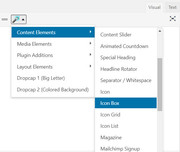
Best regards,
MikeMay 5, 2019 at 3:28 am in reply to: Couldn't add the font because the server didn’t respond. Please reload the page. #1097338Hi,
Thanks for the login, I took a look at your fonts and found one was a zip inside of a zip, which won’t work because the server won’t try to open the file twice.
The other one did install but it was named “MACOSX” which is the name of the Mac folder inside, so I removed it and installed it again, it seems to work correctly now.
Please check.Best regards,
MikeHey Kilian02,
I took a look at your gallery, but I’m not sure that I see any difference
I added links below to two of your images, to me these two and what I see on your site seem to be all the same.
But there are css filters to correct the colors: please read here.Best regards,
MikeMay 5, 2019 at 2:43 am in reply to: How to change background color on hover for a submenu element #1097334Hey DROR,
Sorry for the late reply, I took a look at your site and many pages, but I couldn’t find your sub-menu.
Please link directly to it. Do you want the one menu item in red to change color on hover or all of them?Best regards,
MikeMay 5, 2019 at 1:34 am in reply to: First horizontal gallery Initial Active Image moves after scrolling vertically #1097324Hi,
Well, that sounds positive, first please try changing the first css from 100vh to 85vh, here’s the updated css:@media only screen and (max-width: 767px) { .av-horizontal-gallery-animated .av-horizontal-gallery-wrap { -webkit-transition: none !important; transition: none !important; } .responsive .av-horizontal-gallery-fullwidth .av-horizontal-gallery-wrap { max-width: 85vw !important; } }If this doesn’t help, please remove both css code blocks so I can try again.
Best regards,
MikeHi,
Thanks for the login, but unfortunately it is not working for me. Please check.Best regards,
MikeMay 5, 2019 at 1:20 am in reply to: Woocommerce content-product.php template out of date even after latest update #1097322Hi,
I took a look at your files and I see that you are referring to:
\wp-content\plugins\woocommerce\templates\content-product.php
in the woocommerce plugin directoryThis plugin directory is not updated with the theme, it is only updated when you update the plugin.
Assuming that you did update the plugin, it looks like you had an error, perhaps the notice was too quick or it failed to show, either way please try updating your plugin, should you receive an error or it doesn’t update please try deleting the plugin and then reinstalling it, or you can delete the plugin directory via ftp and then upload the new directory via ftp.Please note, that your settings should stay intact, but it would be a good idea to use your webhost’s backup tool to create a full backup with the database, should something go wrong.
Can I ask how you noticed this, is your site missing a function? I’m just wondering if this is a widespread woocommerce issue that has not been noticed.
Best regards,
MikeMay 5, 2019 at 12:47 am in reply to: Malware Scan resulted in over 780 infected files in theme folder – after update #1097321Hi,
Thanks for the login, I took a look and found that all of the issues were the same:The issue type is: Spam:HTML/mp3Spam.3013 Description: Spam promoting indonesian musicyet when I look at the files they are clean. I found this on the WordFence support from 2 days ago.
Seems they had an issue, and now recommend updating and running the scan again.
Please let us know if this helps.Best regards,
MikeHey journeyofjoy,
Vielen Dank für das Login. Ich sehe, dass Sie Enfold v4.5.2 und WordPress v5.1.1 verwenden
Ich glaube, dass Sie ein Problem mit dieser Version haben. Die Aktualisierung auf Enfold v4.5.6 sollte korrigiert werden.
Bitte probieren Sie es aus.— Translated with Google —
Thank you for the login, I see that you are using Enfold v4.5.2 & WordPress v5.1.1
I believe that you are experiencing an issue we had with that version, updating to Enfold v4.5.6 should correct.
Please give this a try.Best regards,
MikeHey OnVisible,
The related posts element is designed to show on posts created with the Classic Editor, or default editor, but you can show it on posts created with the Advanced Layout Builder.
First, you need to add “tags” to your post, this is what the element pulls other posts from.
Then, add this code to the end of your functions.php file in Appearance > Editor:function related_posts_shortcode( $attr ) { ob_start(); get_template_part( 'includes/related-posts' ); return ob_get_clean(); } add_shortcode( 'rpost', 'related_posts_shortcode' );Then add this shortcode in a “code block” element to display the related posts element:
[rpost]I just tested this with v4.5.6 and it’s still working.
Best regards,
MikeHey Michel Mes,
Please try the password in the Private Content area.Best regards,
MikeHey CreativeExposure,
Thank you for the FTP access, I was able to login, but I will also need to login via your WordPress admin.
I understand that you are looking to install “Enfold Startup Business Demo”

But, did you know that the demos typically overwrite the current settings and content? When I look at your site it seems that you have begun to build your site, are you ok with losing any of this?Best regards,
MikeMay 4, 2019 at 11:12 pm in reply to: Hyperlink in contents are not underlined but we want them to be #1097311Hey Perry,
I took a look at your link and found it is underlined with this css:#main ul li a { text-decoration: underline; }If you don’t see it, please try clearing your browser cache.
Best regards,
MikeHey nicolaj5,
The autoresponder subject line should be translating because it’s in the textdomain “avia_framework”# @ avia_framework #: config-templatebuilder/avia-shortcodes/contact/contact.php msgid "Thank you for your Message!" msgstr "Vielen Dank für Ihre Nachricht!"This is from \enfold\lang\de_DE_formal.po
If you would like to change the text, try editing the config-templatebuilder/avia-shortcodes/contact/contact.php file above at line 460, look for this:"autoresponder_subject" => __('Thank you for your Message!','avia_framework' ),Best regards,
MikeMay 4, 2019 at 10:28 pm in reply to: First horizontal gallery Initial Active Image moves after scrolling vertically #1097308Hi,
Please try this code in the General Styling > Quick CSS field or in the WordPress > Customize > Additional CSS field:@media only screen and (max-width: 767px) { .responsive .av-horizontal-gallery-enlarge-effect .av-horizontal-gallery-wrap.av-active-gal-item { -webkit-transform: scale(1.3) !important; -ms-transform: scale(1.3) !important; transform: scale(1.3) !important; } }Best regards,
MikeHi,
Thank you for your patience, I first tested copying your page to my localhost with the de-bug code, but the error didn’t occur, Please see the video in the Private Content area.
I found that your child theme css was missing two brackets, that I corrected for you, and your Quick CSS also had an error.
In the end I found that this css was causing the issue:.av-tab-section-tab-title-container{ display: none; }I added this to correct
.av-tab-section-tab-title-container{
	display: block !important;
}
This shows the tab section on page load, but your page animation is still “flashing” the page which I believe you want to remove.
So I added this css to remove the animation:.avia_transform .avia_start_delayed_animation.top-to-bottom,.avia_transform .avia-timeline-vertical .avia_start_animation .milestone_icon { -webkit-animation: none !important; animation: none !important; opacity: 1; } .avia_transform .av-tab-arrow-container span { -webkit-transition: none !important; transition: none !important; }but I believe that your chatbox’s “warning” on the page load is still causing a page reload at the end. I won’t be sure until I can disable it. Please clear your browser cache and check, and try disabling your plugins to see if the final reload is removed.
Best regards,
MikeMay 4, 2019 at 7:56 pm in reply to: All new Slider do not work with Woocommerce Version 3.6.2 #1097292Hi,
Thank you for the login, I checked a few of your products and the galleries seem to be working well, I also didn’t find a slider that was not working. I did see that you are using Enfold v4.5.4, and I believe there was an issue with this version that didn’t show the correct url path to images unless they were absolute, this sounds like your issue so I would recommend updating to v4.5.6.
If this doesn’t help, please link to a slider and gallery that is not working so we can investigate further.Best regards,
MikeHi,
Sorry for the late reply, I have looked at your pages and found, as you described, your elements have the style “visibility: hidden;”
directly applied.
This css will show the elements:#wpv-view-layout-1074-TCPID786 { visibility: visible !important; }Please ensure that your PHP is at least v5.6, Enfold v4.0.7 is quite old now so for ToolSet to only work on that version is odd. I have not seen any other issues with ToolSet.
Please try to recreate your “Set” with the newest plugin and theme from scratch.Best regards,
MikeMay 4, 2019 at 5:46 pm in reply to: First horizontal gallery Initial Active Image moves after scrolling vertically #1097268Hi,
Sorry for the late reply, Please try this code in the General Styling > Quick CSS field or in the WordPress > Customize > Additional CSS field:@media only screen and (max-width: 767px) { .av-horizontal-gallery-animated .av-horizontal-gallery-wrap { -webkit-transition: none !important; transition: none !important; } .responsive .av-horizontal-gallery-fullwidth .av-horizontal-gallery-wrap { max-width: 100vw !important; } }Then Please clear your browser cache and check.
Best regards,
MikeMay 4, 2019 at 5:24 pm in reply to: MailChimp Newsletter Subscription Form – Hangs on Submit #1097258Hey Roger,
Sorry for the late reply, I took a look at your page and see that you are getting the error Failed to load resource: the server responded with a status of 404 () avia_forced_reroute=1
and also WebSocket connection to ‘wss://public-api.wordpress.com/pinghub/wpcom/me/newest-note-data’ failed: Error during WebSocket handshake: Unexpected response code: 403
on page load, before the form is used.
I believe this last one is related to the JetPack plugin, please try disabling JetPack and your other plugins to see if that helps.Best regards,
MikeMay 4, 2019 at 4:55 pm in reply to: Problems with Audio player when using Internet Explorer #1097250Hi,
Sorry for the late reply, I see that you are using Enfold v4.5.1, please try updating to v4.5.6 and clear your browser cache, and then checking again.Best regards,
MikeMay 4, 2019 at 4:04 pm in reply to: How can I change the size of some type-elements in the burger-menu? #1097242Hi,
Sorry for the late reply,
Thank you for the video, Please check your mobile menu settings at: Enfold Theme Options > Main Menu > Burger/Mobile Menu > Menu Icon Submenu items > Display submenu items on click
If this doesn’t help, please try disabling your plugins to see if there is a conflict, if this doesn’t help please include an admin login in the private content area so we can be of more assistance.Best regards,
MikeHi,
Glad we were able to help, we will close this now. Thank you for using Enfold.For your information, you can take a look at Enfold documentation here
For any other questions or issues, feel free to start new threads in the Enfold forum and we will gladly try to help you :)Best regards,
Mike -
AuthorPosts
