

Forum Replies Created
-
AuthorPosts
-
Hey bediuzzaman said nursi,
Thank you, but I believe this was sent in error. We will close this now.Best regards,
MikeHey Filipe Santos,
Thanks for contacting us!For technical support please register here kriesi.at/support/register with your item purchase code .
Go to https://kriesi.at/support/ select the theme you purchased bookmark the URL.
Example: https://kriesi.at/support/enfold
Scroll to the bottom of the page to open a new ticket.
Best regards,
MikeHey tixxpff,
As I understand your situation, taking the debugger shortcode and creating new pages by adding the shortcode via the Classic Editor is not the same as debugger to debugger. While this does “work” when opening WordPress will still view it as Classic Editor content.
Opening each page and saving as an “Advanced Layout Builder” page should correct, but for a “bulk” save option, I have not found a solution.
But I have assisted with a function that will automatically open each page / post in the Advanced Layout Builder, but if you have posts that you don’t want to be in the Advanced Layout Builder format, this may cause issues, so I’m not sure this is a “clean” solution. If you wish to try, Try adding this code to the end of your functions.php file in Appearance > Editor:function trigger_alb_on_load(){ ?> <script> (function($){ $(window).load(function() { $("#avia-builder-button").trigger('click'); }); })(jQuery); </script> <?php } add_action('admin_head-post-new.php', 'trigger_alb_on_load');If you are going to select the correct pages and open to save, it may save you some time, but I wouldn’t recommend using this for a client as they may get confused when opening non-Advanced Layout Builder posts.
I hope this helps.Best regards,
MikeHi,
Thanks for the link,
Please try this code in the General Styling > Quick CSS field or in the WordPress > Customize > Additional CSS field:#top.page-id-209 div .av-light-form .input-text, #top.page-id-209 div .av-light-form input[type='text'], #top.page-id-209 div .av-light-form input[type='input'], #top.page-id-209 div .av-light-form input[type='password'], #top.page-id-209 div .av-light-form input[type='email'], #top.page-id-209 div .av-light-form input[type='number'], #top.page-id-209 div .av-light-form input[type='url'], #top.page-id-209 div .av-light-form input[type='tel'], #top.page-id-209 div .av-light-form input[type='search'], #top.page-id-209 div .av-light-form textarea, #top.page-id-209 div .av-light-form select, #top.page-id-209 div div .av-light-form .button { border-color: #3fb19d !important; } #top.page-id-209 .av-custom-form-color * { color: #3fb19d !important; } #top.page-id-209 .av_seperator_big_border .av-main-nav > #menu-item-search > a { border-width: 0px !important; }Please clear your browser cache and check.
Best regards,
MikeHi,
Thank you for the images, I recommend changing your css to this:.entry-content p a:not(.lightbox-added) {...}and then clear your browser cache, and check.
The reason adding a caption doesn’t show the underline is because the classes are no longer .entry-content p a it is then .entry-content a and not inside the paragraph (p).
Please let us know if this helps, if you are still having images showing the underline then a login would help because trying to override the “!important;” in your css is a little hard.Best regards,
MikeHi,
Thank you, Please try this code in the General Styling > Quick CSS field or in the WordPress > Customize > Additional CSS field:#top.single-post .big-preview { display: none !important; }Best regards,
MikeHey Raphael,
Thanks for the link, I took a look and found that you have this css hiding the form:#top form { display: none!important; }Please remove this css, and clear your browser cache.
Best regards,
MikeHi,
To correct the “back to top” button, Please try this code in the General Styling > Quick CSS field or in the WordPress > Customize > Additional CSS field:#scroll-top-link { transform: rotate(-90deg) !important; }As for your css merging, I couldn’t see any difference between it being on or off, Please clear your browser cache and check.
If there is still a difference, please explain one element to look at so we can test.Best regards,
MikeHey oscarluque,
This is because the “textshadow” you gave it is a class and not an ID
Please try this css instead:.textshadow .av-special-heading-tag { text-shadow: 0px 0px 5px black !important; }Best regards,
MikeHey Banshee350,
Unfortunately, the links in the social icons are site-wide and not based on ID’s
I can offer this filter that perhaps could be elaborated, but it would require quite a bit of customization.
Sorry, but I hope this helps.Best regards,
MikeHey bauchope,
I took a look at your site and many of the pages, but I’m not sure which page you are referring to, is it the “News” page?
If so, I would recommend reducing the font size, or using a second element that only shows at this size but with only 3 columns, or 2 columns so it displays better.
I don’t have an iPad but I’m trying to simulate it in landscape as 1024px x 768px.
Can you include a screenshot?Best regards,
MikeHey mwvcaa,
Please try this code in the General Styling > Quick CSS field or in the WordPress > Customize > Additional CSS field:#top.page-id-319 #av-tab-section-1 .avia-builder-el-16 .av-layout-tab-inner { height: 2132px !important; }Best regards,
MikeHey dchcolorado,
Please try this code in the General Styling > Quick CSS field or in the WordPress > Customize > Additional CSS field:.blog-meta > a.small-preview { display: none !important; } .single-small .post_author_timeline { border-right-width: 0px !important; }Best regards,
MikeHey Trasco,
Please take a look at the theme options and recommended plugins at: Enfold Theme Options > Performance > Image Optimization, but I don’t believe these “integrate into the page builder” in the way you are looking for. Our page builder is very unique and I don’t think you will find one that does integrate at this level.Best regards,
MikeMay 18, 2019 at 9:38 pm in reply to: Unable to make or edit posts since WordPress and Enfold updates #1102101Hey SB_Citino,
Please try disabling your plugins. If that resolves the issue, reactivate each one individually until you find the cause.Best regards,
MikeHey Scott,
Please try this code in the General Styling > Quick CSS field or in the WordPress > Customize > Additional CSS field:#footer { z-index: 0 !important; }Best regards,
MikeHey Jürgen,
Sorry for the late reply, WordPress often strips HTML entitys in visual mode, but please try this solutionBest regards,
MikeHi,
Glad to hear you have found the cause, shall we close this then?Best regards,
MikeHey blutcat,
Thanks for the link, I see you have this css causing the issue:#top .av_header_scrolldown.av_header_transparency { opacity: 0; margin-top: -250px !important; }but I will need admin access to examine the root of the css and correct.
Best regards,
MikeHey Jimchil,
I see that you are getting this error:Failed to load resource: the server responded with a status of 404 () /wp-admin/admin-ajax.phpI recommend disabling your plugins and checking your server log for the cause of the 404.
Best regards,
MikeMay 18, 2019 at 5:34 pm in reply to: Default Special Heading missing line in only one section #1102066Hey iedigitaldesign,
I tried to take a look at your site, but I get a “500 error” please check your url.Best regards,
MikeHey move3a,
Please see this post to see if you followed these steps.Best regards,
MikeHey davidjrfoster,
Please see this post to see if you followed these stepsBest regards,
MikeHey havi,
I took a look at your site, but both of your links are the same so I couldn’t see a comparison of what you want and what is happening.
You seem to be talking about your “signature at the end of the article” but the profile image is not a link, so it would not be underlined.
Can you please include a screenshot of what you want to be underlined so we can assist.Best regards,
MikeMay 18, 2019 at 4:47 pm in reply to: Importing Demo after Reinstalling WordPress (GoDaddy WP Hosting) #1102061Hey ghorab,
No there is no “usage log at kriesi.at” but if you are switching to “Godaddy WP managed hosting” their security settings could be blocking the import.
Please check your PHP settings to see if the secure options are activated.
“allow_url_fopen, “allow_url_include” and “register_globals” are “off”
Try turning these “on”.
Otherwise we will need to take a closer look, Please include an admin login in the Private Content area.Best regards,
MikeHey Alwin,
Thank you for asking, first I recommend saving a copy of your “Export Theme Settings File” at Enfold Theme Options > Import/Export > Export Theme Settings File to your computer as a backup:
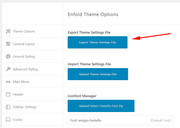
Then disable the Enfold Theme Options > Performance > JS & CSS file merging and compression and any cache plugins.
Then upload the Enfold Child Theme and activate it.
Now you will see a new option at Enfold Theme Options > Import/Export which is: Import Settings from your Parent Theme:
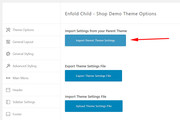
Cliking this will import your theme settings, which should compete the operation, and you will also need to clear your browser cache, but depending on your server cache you may wish to go to Enfold Theme Options > General Styling > Quick CSS field and add a blank space to allow the “Save all Changes” button to be clicked:
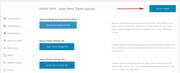
This last step is useally is not needed, but you will need to clear your browser and server cache, sometimes twice.
Please let us know if this helps.Best regards,
MikeHey gharry79,
Yes this is possible with css using:your-class { display: none !important; }but there are a few variables, so it would be easier to see an example post in your post type to suggest a compete css solution.
Please link to your example post in the Private Content area.Best regards,
MikeHey sweetloove,
While many elements have “tooltips” already, I assume that you are looking for a more customized solution which can easily be added with css, please see this tutorial. There are also javascript solutions but this can be much trickier to embed, depending on your experience.
Please let us know if this helps.Best regards,
MikeHey Crisvaltru,
Thanks for the link to your site, but can you please explain what change you can not make and include admin login in the Private Content area so we can be of more assistance.Best regards,
Mike -
AuthorPosts
