

Forum Replies Created
-
AuthorPosts
-
Hi,
I adjusted your css to this:ul.sub-menu { display: block !important; opacity: 0 !important; visibility: hidden !important; }Please clear your browser cache and check.
Best regards,
MikeHi,
2: your name is hidden because strong tags in the footer are set to be white, I added this code in the General Styling > Quick CSS field for you.footer_color#footer strong { color: #000 !important; }1: I’m not sure why your audio player is doing this, I will need to review a little more.
Best regards,
MikeHi,
Sorry, Avada and Enfold are very different and are not meant to merge, I wish I had better news for you.Best regards,
MikeHi,
I have taken a look and found that there was an error in your css, I have corrected. I also found that your menu was set to “mega menu” which this css doesn’t work on so I set the “services” to a regular menu, but I was unsure about the “work” menu items so I left them for you to change if you wish.
Please clear your browser and webhost cache and check.Best regards,
MikeHi,
I have taken a look at your site and see that you are using Enfold v3.8, this is a very old version and you will have to update via ftp, you will not be able to update with the theme option.
Please ensure that you are using at least PHP version 5.6.
I read above that you have uploaded the new theme via ftp, but perhaps you tried to overwrite the theme folder, Please don’t try to overwrite the theme folder, as this will leave old files behind and cause errors.
Please try again with these steps:
The easiest and safest way to do this is to download the newest version from Theme Forest and rename your current theme to “enfold-old” then upload the new “enfold” and check that your site is working correctly.
Once you are happy you can delete the “enfold-old” via ftp, (not the WP theme page)
Should for some reason you wish to roll-back to the old version, it’s easy to do, simply rename the new “enfold” to “enfold-new” via ftp and then rename “enfold-old” to “enfold” then refresh your page.Best regards,
MikeHi,
Thank you, I reset your site to remove the first demo, and then tried again with no errors, Please clear your browser cache and check.Best regards,
MikeMay 29, 2019 at 2:16 pm in reply to: WordPress 5.2 warning about latest Enfold update 4.5.7 #1105164May 29, 2019 at 2:14 pm in reply to: WordPress sends message about technical problem with Enfold #1105162Hi,
Thank you, Please try this code in the General Styling > Quick CSS field or in the WordPress > Customize > Additional CSS field:#top.postid-4574 .av-woo-purchase-button .quantity label.screen-reader-text { margin-left: 30% !important; margin-right: 5% !important; }and add this code to the end of your functions.php file in Appearance > Editor:
function custom_script(){
  ?>
  <script>
(function($){
  $(document).ready(function(){
  $('#top.postid-4574 .av-woo-purchase-button .quantity label.screen-reader-text').each(function() {
    var text = $(this).text();
    $(this).text(text.replace('Candy Box subscription ', ' '));
});
});
})(jQuery);
</script>
<?php
}
add_action('wp_footer', 'custom_script');
Best regards,
MikeHi,
Glad we were able to help, we will close this now. Thank you for using Enfold.For your information, you can take a look at Enfold documentation here
For any other questions or issues, feel free to start new threads in the Enfold forum and we will gladly try to help you :)Best regards,
MikeHi,
Thank you, I believe I understand now. Please try this code in the General Styling > Quick CSS field or in the WordPress > Customize > Additional CSS field:#footer { padding: 0px !important; } #footer .widget { margin: 0px !important; } #footer #media_image-2.widget img { max-width: 40% !important; }This will make the height of your footer smaller, you can adjust the max-width: 40% !important; to make the footer larger or smaller. I know the code says max-width but your middle image is square so this also adjusts the height, and it was so large it made the footer larger.
Please see the screenshot in Private Content area.Best regards,
MikeHi,
Thank you for the ftp access, I was able to login. But the WordPress login below is not working for me.
Please check.Best regards,
MikeHi,
Thanks for the link, yes you can have your images open in a lightbox, when you add the image to your post please ensure that the “ATTACHMENT DISPLAY SETTINGS” are “link to media file”

Please also ensure that in your theme settings: Enfold Theme Options > Lightbox Modal Window is checked

Best regards,
MikeMay 29, 2019 at 5:48 am in reply to: Where can I edit the Enfold version of the WooCommerce Checkout Page Layout #1105050Hi,
Thank you for the screenshots, this is done with css, please try this css:.col2-set .col-2 { float: none !important; } #order_review, #order_review_heading { clear: both !important; width: 40% !important; float: right !important; } #order_review { position: absolute; top: 15%; right: 0; } #order_review_heading { position: absolute; top: 11%; right: 0; } #top .checkout .col-1, #top .checkout .col-2 { clear: both !important; width: 100% !important; } #customer_details { width: 40% !important; float: left !important; clear: both !important; }Best regards,
MikeHi,
Glad we were able to help, we will close this now. Thank you for using Enfold.For your information, you can take a look at Enfold documentation here
For any other questions or issues, feel free to start new threads in the Enfold forum and we will gladly try to help you :)Best regards,
MikeMay 29, 2019 at 5:10 am in reply to: General/Advanced Styling Issue With Animations/Rollovers/Counters #1105036Hi,
Glad we were able to help, we will close this now. Thank you for using Enfold.For your information, you can take a look at Enfold documentation here
For any other questions or issues, feel free to start new threads in the Enfold forum and we will gladly try to help you :)Best regards,
MikeHi,
Sorry for the late reply, I’m not sure I understand this last issue, Please see the first screenshot in Private Content area.
So compared to the page content, please explain how you would like to see the footer width/height, Please see the second screenshot in Private Content area.
Perhaps a mockup or screenshot would help.Best regards,
MikeHi,
Thank you for the login, but I don’t see the site url, please include.Best regards,
MikeHi,
Glad we were able to help, we will close this now. Thank you for using Enfold.For your information, you can take a look at Enfold documentation here
For any other questions or issues, feel free to start new threads in the Enfold forum and we will gladly try to help you :)Best regards,
MikeHi,
Thank you for clarifying, since I do not speak German I will ask the dev team to review.
Thank you for your patience.Best regards,
MikeHi,
Glad we were able to help, we will close this now. Thank you for using Enfold.For your information, you can take a look at Enfold documentation here
For any other questions or issues, feel free to start new threads in the Enfold forum and we will gladly try to help you :)Best regards,
MikeHi,
Ich bin froh, dass wir helfen konnten, wir werden dies jetzt schließen. Vielen Dank, dass Sie Enfold verwenden.Glad we were able to help, we will close this now. Thank you for using Enfold.
For your information, you can take a look at Enfold documentation here
For any other questions or issues, feel free to start new threads in the Enfold forum and we will gladly try to help you :)Best regards,
MikeHi,
Bitte versuchen Sie dieses CSS und passen Sie es an.Please try this code in the General Styling > Quick CSS field or in the WordPress > Customize > Additional CSS field:
#top .av-burger-overlay-inner #av-burger-menu-ul {
    padding-top: 20px !important;
    vertical-align: top !important;
}
Please adjust the “20px” to suit.
Best regards,
MikeHi,
We will close this now. Thank you for using Enfold.For your information, you can take a look at Enfold documentation here
For any other questions or issues, feel free to start new threads in the Enfold forum and we will gladly try to help you :)Best regards,
MikeHi,
Thanks for your feedback, sometimes when you try to download the latest version from Theme Forest the version numbers are not shown correctly. Please try downloading anyways and open the “style.css” in the root folder and look at line 4 to see the version number:
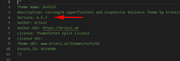
You will need to update this version via ftp.
Please don’t try to overwrite the theme folder, as this will leave old files behind and cause errors.
This is the easiest way to update, first, rename your current theme to “enfold-old” then upload the new “enfold” and checked that your site is working correctly.
Once you are happy you, can delete the “enfold-old” via ftp, (not the WP theme page)
Should for some reason you wish to roll-back to the old version, it’s easy to do, simply rename the new “enfold” to “enfold-new” via ftp and then rename “enfold-old” to “enfold” then refresh your page.
**This assumes that your current theme folder is “enfold”Best regards,
MikeHi,
Glad we were able to help, we will close this now. Thank you for using Enfold.For your information, you can take a look at Enfold documentation here
For any other questions or issues, feel free to start new threads in the Enfold forum and we will gladly try to help you :)Best regards,
MikeHi,
Glad we were able to help, we will close this now. Thank you for using Enfold.For your information, you can take a look at Enfold documentation here
For any other questions or issues, feel free to start new threads in the Enfold forum and we will gladly try to help you :)Best regards,
MikeMay 28, 2019 at 5:22 am in reply to: How to remove the Alt text in the Masonry gallery when hovering over an image #1104652Hi,
I believe I understand, please link to your page so I can test a custom script.Best regards,
MikeMay 28, 2019 at 5:17 am in reply to: Changing Phone Number/Extra Info background only on content pages #1104648Hi,
Glad we were able to help, we will close this now. Thank you for using Enfold.For your information, you can take a look at Enfold documentation here
For any other questions or issues, feel free to start new threads in the Enfold forum and we will gladly try to help you :)Best regards,
MikeHi,
Glad we were able to help, we will close this now. Thank you for using Enfold.For your information, you can take a look at Enfold documentation here
For any other questions or issues, feel free to start new threads in the Enfold forum and we will gladly try to help you :)Best regards,
Mike -
AuthorPosts
