

Forum Replies Created
-
AuthorPosts
-
Hi,
Thanks for the login and ftp access, I don’t think it’s the theme or the .htaccess
I believe it’s your DNS zone settings, please check to see if you have an “A” record for “www” entry of your domain. The “A” record should point to the same IP as your default main Domain.
Please check with your domain name registrar and ask them to assist. They will need to flush the nameservers and it could take a few hours or a day to take effect.Best regards,
MikeHi,
Odd, when I test on my localhost the gallery does work:
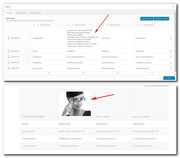
I examined your page closer and found that this custom css at the bottom of your Quick CSS is hiding the image:#top div .avia-gallery img { display: none !important; }I commented it out and now your gallery in your tables are working.
Please clear your browser cache and check.Best regards,
MikeHi,
Please try this code in the General Styling > Quick CSS field or in the WordPress > Customize > Additional CSS field:#top.home #av_section_1 { background-size: cover !important; }The WordPress > Customize > Additional CSS has been given priority over all css in WordPress, so it is a good place to check if some css is working. If you are adding your css to the child theme style.css and you are using the Enfold Theme Options > Performance > JS & CSS file merging and compression you will need to resave the Theme options, the big blue “save all changes” button for the child theme css to be re-built. Sometimes the button is not active so you can’t click it, in this case please add a blank space to the Quick CSS and then save and clear your cache.
You can add your own custom class, in the code above you can replace #av_section_1 with your custom class.
For the width of the background you will need to manually adjust because the with is automatically set to 100%, please try this css:#top #av_section_1 .av-special-heading-tag { width: 90% !important; } #top #av_section_1 .av-subheading { width: 36% !important; }Best regards,
MikeHi,
Glad we were able to help, we will close this now. Thank you for using Enfold.For your information, you can take a look at Enfold documentation here
For any other questions or issues, feel free to start new threads in the Enfold forum and we will gladly try to help you :)Best regards,
MikeJune 1, 2019 at 1:32 pm in reply to: Enfold Masonry images, once expanded (lightbox), don't load full size image. #1106073Hi,
Try adding this code to the end of your functions.php file in Appearance > Editor:add_filter('avf_avia_builder_helper_lightbox_size','avia_change_image_size_lightbox', 10, 1); function avia_change_image_size_lightbox($size){ return 'full'; }Best regards,
MikeJune 1, 2019 at 1:17 pm in reply to: Logos in Footer Widget – Partner Logos element shortcode #1106072Hi,
Thank you, but it seems the login token has expired, please renew.Best regards,
MikeHi,
I took another look at your site and found the css to be working, to demonstrate I changed the top gray bar and phone number to 60px#header_meta { min-height: 60px !important; } #header_meta .phone-info { line-height: 60px !important; font-size: 60px !important; }Please see the screenshot in Private Content area.
Please adjust to suit, and Then clear your browser cache and any cache plugin, and check.
I also adjusted your phone number in Enfold Theme Options > Header > Extra Elements > Phone Number or small info text so it is a link, please check.
You can also add more text there if you wish.Best regards,
MikeHi,
Please try this code in the General Styling > Quick CSS field or in the WordPress > Customize > Additional CSS field:#top #av_section_1 .av-special-heading-tag,#top #av_section_1 .av-subheading, #top .av-image-caption-overlay-center p { filter: alpha(opacity = 80); background: rgba(0, 0, 0, 0.5); padding: 20px !important; }Please clear your browser cache and check.
Best regards,
MikeHi,
Thanks for your feedback, Please include an admin login in the Private Content area so we can examine.Best regards,
MikeHey Banshee350,
Sorry for the late reply, Please try disabling your autoptimize plugin and include admin login and ftp access in the Private Content area so we can investigate further.Best regards,
MikeHi,
Thank you, I have researched this further and understand better now, on my localhost this is working correctly:

Please try disabling your plugins and/or updating to Enfold version 4.5.7
If this doesn’t help Please include an admin login & FTP access in the Private Content area so we can investigate further.Best regards,
MikeHi,
Thank you for sharing your solution, we will close this now. Thank you for using Enfold.For your information, you can take a look at Enfold documentation here
For any other questions or issues, feel free to start new threads in the Enfold forum and we will gladly try to help you :)Best regards,
MikeMay 31, 2019 at 1:32 pm in reply to: Where can I edit the Enfold version of the WooCommerce Checkout Page Layout #1105672Hi,
Glad we were able to help, we will close this now. Thank you for using Enfold.For your information, you can take a look at Enfold documentation here
For any other questions or issues, feel free to start new threads in the Enfold forum and we will gladly try to help you :)Best regards,
MikeMay 31, 2019 at 5:29 am in reply to: php warning(s) spamming errorlog – Enfold 4.5.6 WP 5.1.1 #1105592Hi,
Glad to help, I would say about an hour, you will want them to test your custom functions.php after it is moved to the new theme.Best regards,
MikeHi,
Thank you for the login, which blog search elements – news category and past months is removed by trying this?Best regards,
MikeMay 31, 2019 at 5:09 am in reply to: Logos in Footer Widget – Partner Logos element shortcode #1105587Hi,
Sorry for the late reply and thanks for the login, but I don’t have access to the widgets so I can’t try to adjust.
Please ensure this login has admin access.Best regards,
MikeMay 31, 2019 at 5:05 am in reply to: WordPress 5.2.1 + Enfold 4.5.7 = Error Avia Editor CODES #1105586Hi,
Sorry for the late reply, I tried to watch your video, but it was not available, please upload again.Best regards,
MikeHi,
Sorry for the late reply, I see that in your screenshot where you don’t see the gallery shortcode, you are using a “Text element” I didn’t notice that the option was not available there before, please try using the Classic Editor for a post or page to see this option:
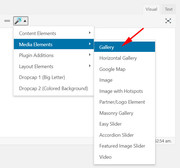
You can set the “Classic Editor” option in the theme settings on the bottom of the first option page:

Best regards,
MikeHi,
Thank you I was able to test the css on your page and it seems to work:
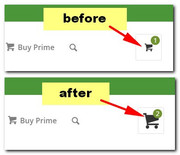
Please try again and clear your browser cache.Best regards,
MikeHi,
Sorry, this was just a matter of setting the menu to show, I have done this for you:
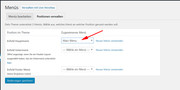
Please clear your browser cache and check.Best regards,
MikeHi,
Yes, but you said the site was built using a really old copy of Avada, before Enfold was added, correct?Best regards,
MikeHi,
To add a background image on your page I added a “color section” element with your columns inside and a background image, please review the page and settings of the color section.
This sample image I used makes reading the text hard so I also added some css to help.#top.page-id-603 .flex_column.av_two_third { background-color:rgba(250,250,250,0.5)!important; padding: 20px !important; }Please add this css and clear your browser cache, and feel free to adjust to suit.
This thread is getting very long with many issues and solutions, typically we try to keep these shorter so they are easy for other users to search and other mods to assist. If this solution is good then let’s close this and open a new thread for other issues.Best regards,
MikeHi,
Danke für die Rückmeldung.— Translated with Google —
Thank you for the feedback.
Best regards,
MikeHi,
Thanks for the feedback, but this is what I’m seeing on my localhost:

Can you upload the site onto a temp server so we can examine?Best regards,
MikeHi,
First you will need to ask your webhost to correct the server settings in the screenshot above to:PHP Post Max Size: 50M
PHP Max Upload Size: 20M
PHP ZipArchive Extension: enable
PHP Multibyte String Extension: enable
PHP Multibyte Regex Functions: enableBut sorry, I meant to tell you that you will need to update your theme via FTP, because of it’s age and version.
The easiest and safest way to do this is to download the newest version from Theme Forest and rename your current theme to “enfold-old” via ftp then upload the new “enfold” and check that your site is working correctly.
Once you are happy you can delete the “enfold-old” via ftp, (not the WP theme page)
Should for some reason you wish to roll-back to the old version, it’s easy to do, simply rename the new “enfold” to “enfold-new” via ftp and then rename “enfold-old” to “enfold” then refresh your page.
Please don’t try to overwrite the theme folder, as this will leave old files behind and cause errors.**Please note that this is based on your current theme folder in /wp-content/themes/ being enfold if it’s a custom name please adjust the instructions accordingly**
Best regards,
MikeHi,
Thank you for the login, I see that your PHP is v5.6.40, so that is good.
But I also see that you have custom code in your parent theme (Enfold) functions.php and are using the “Advanced Custom Fields” plugin, please advise “your guys” of this because they will need to copy this to the updated theme.
I would advise hiring from Codeable and in your request let them know it is a Enfold site.Best regards,
Mike -
AuthorPosts
