

Forum Replies Created
-
AuthorPosts
-
Hi,
Thanks for the login, I couldn’t see the borders in the menu, and the menu text didn’t align center for me. I tested in Chrome, Firefox, Edge & IE11
Please see the screenshot in the Private Content area. Please try clearing your site and browser cache. Are you using Safari?Best regards,
MikeHey design_necca,
Thank you for explaining your swoosh, for your situation, there is not a css swoosh that can be added to take the place of your photoshop swoosh.
You could edit the sections in photoshop to make the sections transparent with the orange swoosh, but your still opening with photoshop.Best regards,
MikeHey KarenOlaf,
Fügen Sie im Bereich Private Inhalte einen Administrator-Login und einen FTP-Zugang ein, damit wir sehen können, warum Sie ihn nicht installieren können.— Translated with Google —
Please include an admin login & FTP access in the Private Content area so we can see why you can’t install it.
Best regards,
MikeHi,
Will all of the featured images going to link to the same site or page or does each need to be a different link?Best regards,
MikeHey Karen Hoffmann,
Please include an admin login & FTP access in the Private Content area so we can take a closer look.Best regards,
MikeHey VM,
Please see this post To disable the parent menu link so it cannot be clicked and show only the submenu items on hover please follow the below steps.Please go to Appearance > Menus > Select a menu to edit > Your menu
Expand the “Custom Links” options.
Create a parent menu item with its URL as “#” so it will not be clickable.
Add the submenu items to the parent menu.
Save your menu.Best regards,
MikeHi,
Please include an admin login in the Private Content area so we can see what is going on with your privacy policy link.Best regards,
MikeHi,
Glad we were able to help, we will close this now. Thank you for using Enfold.For your information, you can take a look at Enfold documentation here
For any other questions or issues, feel free to start new threads in the Enfold forum and we will gladly try to help you :)Best regards,
MikeHi,
Glad to hear it’s solved, unless there is anything else we can help with on this issue, shall we close this then?Best regards,
MikeHi,
Try adding this code to the end of your functions.php file in Appearance > Editor:function custom_script(){ ?> <script> (function($){ $(document).ready(function(){ $('.av-magazine-thumbnail a:not(:has(img))').closest( '.av-magazine-thumbnail' ).css({'opacity':'0'}); }); })(jQuery); </script> <?php } add_action('wp_footer', 'custom_script');it will remove the image frame when no image is included.
Please see the screenshot in Private Content area.Best regards,
MikeHi,
To center the “related products” title and increase the font, Please try this code in the General Styling > Quick CSS field or in the WordPress > Customize > Additional CSS field:.related.products { text-align: center !important; } .related.products > h2 { font-size: 22px !important; }please adjust to suit, Then clear your browser cache and any cache plugin, and check.
To change the related products text, Try adding this code to the end of your functions.php file in Appearance > Editor:
function custom_related_products(){
  ?>
  <script>
(function($){
  $(document).ready(function(){
  $('.related.products h2').each(function() {
    var text = $(this).text();
    $(this).text(text.replace('Related products', 'Awesome Deals'));
});
});
})(jQuery);
</script>
<?php
}
add_action('wp_footer', 'custom_related_products');
Please adjust “Awesome Deals” to suit. Also note that with this text replace, case does matter, see ‘Related products’
Best regards,
MikeHey rasa,
Please try adding your text into the title of your masonry galleryMap to the Unknown<br />2018<br /> Colored and Metallic Pens on Paper <br />8.5″ x 11″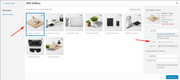
when I tested this it seem to work fine.
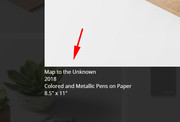
I also note that you are using Enfold v4.5.4, so if this still doesn’t help, please try updating to v4.5.7Best regards,
MikeHey Tobias,
Please try the author_link filter in your functions.php:// redirect author link add_filter( 'author_link', 'modify_author_link', 10, 1 ); function modify_author_link( $link ) { $link = 'http://example.com/'; return $link; }Please adjust the url to suit.
Best regards,
MikeJune 15, 2019 at 3:02 pm in reply to: Force product title to use H1 tag when using Advanced Layout Builder #1110668Hey IdeaZone2550,
For the standard product pages, the product title is in H1 tags, but when you create your own product page you will need to add each element. It sounds like you have added a title or you are referring to the top title bar:
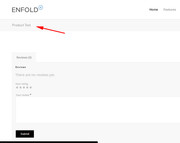
Please link to your product page so we can take a closer look.Best regards,
MikeHi,
Please try this link and in the sidebar navigation go to Main Menu > Main menu linksDisable parent menu link: To disable the parent menu link so it cannot be clicked and show only the submenu items on hover please follow the below steps.
Please go to Appearance > Menus > Select a menu to edit > Your menu
Expand the “Custom Links” options.
Create a parent menu item with its URL as “#” so it will not be clickable.
Add the submenu items to the parent menu.
Save your menu.Best regards,
MikeHey Julie,
If I understand correctly you would like to hide pages 5538 & 5536 from the sidebar navagation. Will this be for all pages or just some?
For example to hide the pages from certain pages, try some css like this:#top.page-id-5536 .widget_nav_menu .page-item-5536,#top.page-id-5536 .widget_nav_menu .page-item-5538 { display: none !important; }To hide them from all pages, please try css like this:
.widget_nav_menu .page-item-5536,.widget_nav_menu .page-item-5538 {
display: none !important;
}
To exclude pages from the screaches you will need to use a function like the one you poasted, have you tested this one?
Please let us know if this helps.Best regards,
MikeHey sky19er,
Thanks for the links and showing your css, but as I look at your homepage with the transparent glassy header I don’t see the logo jumping on scroll.
Please include a screenshot of what you are seeing, you can add screenshots by uploading your images to a service such as postimages.org and pasting the html code given in your post.Best regards,
MikeJune 15, 2019 at 7:59 am in reply to: Updating WordPress version / Enfold Theme / PHP Questions #1110593Hey lanikita,
Thank you for the information on your setup, Please first ensure that you are using PHP version v5.6 as a minimum.
Then download the theme from Theme Forest.
Then open it and extract the “enfold.zip” file and then extract it to your desktop as /enfold/
Then rename to /enfold-new/ and upload the folder to your /wp-content/themes/ folder via FTP or your file manager in your webhost cPanel
Then via FTP or your cPanel file manager, at /wp-content/themes/ rename /enfold/ to /enfold-old/ and rename /enfold-new/ to /enfold/Now your new version is installed, please check your site. If all is well then “Good Job!” If not then reverse the last rename step above and your site will be restored.
Then you should be able to update the WordPress core.
Best regards,
MikeHey birgitthaler,
Der Grund, warum die Schriftart “Nunito” manchmal nicht angezeigt wird, ist, dass ein “Mixed Content” -Fehler angezeigt wird. Das heißt, Ihre Seite wird über “https” geladen, nicht jedoch die Schriftart. In der Regel korrigiert ein Plugin wie Really Simple SSL dies.
Ich bin mir nicht sicher, ob ich Ihre zweite Frage verstehe, bitte erklären Sie.— Translated with Google —
The reason the font “Nunito” sometimes doesn’t show is because you are getting a “Mixed Content” error, that is your page is loaded over “https” but not the font. Typically a plugin such as Really Simple SSL will correct this.
I’m not sure that I understand your second question, please explain.Best regards,
MikeHey Lianne,
Thank you for sharing the above filter, I was able to correct the errors by correcting the quotes.
Try adding this code to the end of your functions.php file in Appearance > Editor:function prefix_woocommerce_sale_flash( $text ) { $text = '<span class="onsale">'. __( 'Action!', 'text_domain' ). '</span>'; return $text; } add_filter( 'woocommerce_sale_flash', 'prefix_woocommerce_sale_flash' );I tested this on my localhost and it seems to work, please check.
Best regards,
MikeHi,
Try adding this code to the end of your functions.php file in Appearance > Editor:function jl_remove_post_dates() { add_filter('the_date', '__return_false'); add_filter('the_time', '__return_false'); add_filter('the_modified_date', '__return_false'); add_filter('get_the_date', '__return_false'); add_filter('get_the_time', '__return_false'); add_filter('get_the_modified_date', '__return_false'); } add_action('loop_start', 'jl_remove_post_dates');Best regards,
MikeHi,
Odd, I can’t recreate this. Please see the screenshot in Private Content area. Do you have an iPad to check if the cart issue is really happening?Best regards,
MikeHi,
Sorry for the late reply, To fix the slideshow image, Please try this code in the General Styling > Quick CSS field or in the WordPress > Customize > Additional CSS field:@media only screen and (min-width: 767px) and (max-width: 1023px) { .avia-slideshow-inner > li > div.avia-slide-wrap { max-height: 220px !important; } } @media only screen and (min-width: 1024px) and (max-width: 1438px) { .avia-slideshow-inner > li > div.avia-slide-wrap { max-height: 293px !important; } } @media only screen and (min-width: 1439px) { .avia-slideshow-inner > li > div.avia-slide-wrap { max-height: 430px !important; } }This address the different screen sizes.
Best regards,
MikeHi,
Sorry for the late reply, and thanks for the example code. I was able to reproduce so I wrote a report for the dev team to review your solution.
Thanks for sharing.
I will post here as I learn more.Best regards,
MikeHi,
Thank you, I understand better now. I see that this is a plugin and it doesn’t seem to load any of it’s own css. I also note that with your page caching and merging off your site still reports getting your css from the merged css.
I believe your server is caching also and we will need to clear this cache or turn it off.
Does your plugin come with any css snippets to style the grid? There are also many options, please see if you find any about styling the grid, I didn’t see one.Best regards,
MikeJune 12, 2019 at 4:35 am in reply to: Single Blog Post, Archive and Category doesn't show my fullwidht submenu #1109327Hi,
Sorry for the late reply, to add the lines above and below of the widget title, Please try this code in the General Styling > Quick CSS field or in the WordPress > Customize > Additional CSS field:h3.widgettitle { border-style: solid; border-width: 1px 0 1px 0; padding: 10px 0 10px 0; }Best regards,
MikeHi,
If you are using Yoast please see this post
One issue that you may find is that Google will post any date it finds on the page and use it as the post date. The link above also has some links to some plugins that may work for you.Best regards,
MikeHi,
Yes, a blank file will mess up your site. Please remove it or copy the header.php in your parent theme to your child theme.
You could deactivate Yoast, instead of uninstalling it.Best regards,
MikeJune 10, 2019 at 12:08 pm in reply to: How to change the font color of an error message (contact form 7) #1108794Hi,
Glad we were able to help, we will close this now. Thank you for using Enfold.For your information, you can take a look at Enfold documentation here
For any other questions or issues, feel free to start new threads in the Enfold forum and we will gladly try to help you :)Best regards,
Mike -
AuthorPosts
