

Forum Replies Created
-
AuthorPosts
-
Hi,
Very good, we will leave this open until we hear back from you.Best regards,
MikeHi,
Thank you, as I inspect your element I find that the “-webkit-text-fill-color” in use is not a standard and not supported in IE browsers. I believe that this css will correct:@supports (-ms-ime-align:auto) { .highlight-gradient { -webkit-text-fill-color:red !important; } } @media all and (-ms-high-contrast: none), (-ms-high-contrast: active) { .highlight-gradient { -webkit-text-fill-color:red !important; } }But I couldn’t login to test it, please check the admin login so I can test and adjust this if needed.
Best regards,
MikeJuly 9, 2019 at 4:57 am in reply to: Change the Contact form "Submit" button text to something else #1116880Hey freshwebsitesla,
You can change the “submit” text from within the editor:
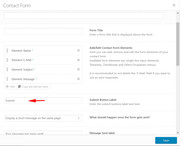
To change the color please try this css in the General Styling > Quick CSS field or in the WordPress > Customize > Additional CSS field:#top.page-id-632 .main_color input[type='submit'] { background-color: red !important; }To change the size please try this css:
#top.page-id-632 .main_color input[type='submit'] {
        width: 200px !important;
    height: 150px !important;
}
}
Best regards,
MikeHey grivers99,
I took a look at your iconbox titles on your homepage, but found they were H3,
Perhaps the H1 error was on a different page?Best regards,
MikeHi,
Thanks for the WordPress login, but the ftp login is not working, please check.Best regards,
MikeJuly 9, 2019 at 4:04 am in reply to: How to change the background color of the contact form? #1116873Hi,
Oh I see now, Please try this code in the General Styling > Quick CSS field or in the WordPress > Customize > Additional CSS field:form select option { color: #000 !important; }Best regards,
MikeHi,
Glad we were able to help, we will close this now. Thank you for using Enfold.For your information, you can take a look at Enfold documentation here
For any other questions or issues, feel free to start new threads in the Enfold forum and we will gladly try to help you :)Best regards,
MikeHi,
Glad we were able to help, we will close this now. Thank you for using Enfold.For your information, you can take a look at Enfold documentation here
For any other questions or issues, feel free to start new threads in the Enfold forum and we will gladly try to help you :)Best regards,
MikeHi,
Glad we were able to help, we will close this now. Thank you for using Enfold.For your information, you can take a look at Enfold documentation here
For any other questions or issues, feel free to start new threads in the Enfold forum and we will gladly try to help you :)Best regards,
MikeHi,
Glad we were able to help, we will close this now. Thank you for using Enfold.For your information, you can take a look at Enfold documentation here
For any other questions or issues, feel free to start new threads in the Enfold forum and we will gladly try to help you :)Best regards,
MikeHi,
Glad to hear, unless there is anything else we can help with on this issue, shall we close this then?Best regards,
MikeJuly 9, 2019 at 3:22 am in reply to: Removing Upper Case on Blog Headers for Modern Business Blog Style #1116849Hi,
Please try this code in the General Styling > Quick CSS field or in the WordPress > Customize > Additional CSS field:.html_elegant-blog #top .post-entry .minor-meta { text-transform: none !important; }Best regards,
MikeHi,
Please try clearing your browser cache and check again.
When I check the white line is gone, Please see the screenshot in Private Content area.Best regards,
MikeHi,
Thanks for the login, I found that no functions were added to the child theme functions.php, so I added the code above.
Now the “recent posts” is changed to “LEGUTÓBBI HOZZÁSZÓLÁSOK” please adjust to suit.
Please clear your browser cache and check.
Please see the screenshot in Private Content area.Best regards,
MikeHi,
I see that your theme version is v4.5.4 please manually update to v4.5.7
The easiest and safest way to do this is to download the newest version from Theme Forest and rename your current theme to “enfold-old” via ftp then upload the new “enfold” and check that your site is working correctly.
Once you are happy you can delete the “enfold-old” via ftp, (not the WP theme page)
Should for some reason you wish to roll-back to the old version, it’s easy to do, simply rename the new “enfold” to “enfold-new” via ftp and then rename “enfold-old” to “enfold” then refresh your page.
Please don’t try to overwrite the theme folder, as this will leave old files behind and cause errors.Best regards,
MikeJuly 9, 2019 at 2:44 am in reply to: Icon list animation not working in tab section when clicking on a link #1116841Hi,
For your version you will need to manually update, please give this a try.Best regards,
MikeHi,
We could try to manually install the demo, Please include FTP access in the Private Content area.Best regards,
MikeHi,
I took a look at your site and saw the message that your “Disabling of template builder elements” setting was “load only used elements” so I set it to “load all elements”
Now it works, Please see the screenshot in Private Content area.
I saw your font was white on white, so I added this css:.avia-testimonial-content p { color: #000 !important; }Please clear your browser cache and check.
Best regards,
MikeHey nickcrouse,
Thanks for the login, I see that you are using Enfold v3.4.6 with WordPress v5.2.2 this will most likely cause issues.
Please try updating to Enfold v4.5.7
The easiest and safest way to do this is to download the newest version from Theme Forest and rename your current theme to “enfold-old” via ftp then upload the new “enfold” and check that your site is working correctly.
Once you are happy you can delete the “enfold-old” via ftp, (not the WP theme page)
Should for some reason you wish to roll-back to the old version, it’s easy to do, simply rename the new “enfold” to “enfold-new” via ftp and then rename “enfold-old” to “enfold” then refresh your page.
Please don’t try to overwrite the theme folder, as this will leave old files behind and cause errors.Best regards,
MikeHi,
If your Quick CSS is empty but the css is still working there is a good chance that it is loading from your
/wp-content/uploads/dynamic_avia/avia-merged-styles-a54e3191159416645362abec3b7bbc1d.css
there may be many files in the directory but this is the one that is loading.Best regards,
MikeJuly 8, 2019 at 12:02 am in reply to: Can you Re-Enable the Social Icons on the Header function please? #1116516Hey Asiertxu,
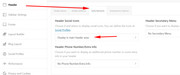
Here are the settings to add the social icons to the header:
To add the social icons to the socket:
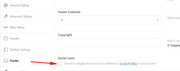
Are these missing from your theme options?
If so Please include an admin login in the Private Content area so we can investigate.Best regards,
MikeHi,
To hide the white box, Please try this code in the General Styling > Quick CSS field or in the WordPress > Customize > Additional CSS field:.added_to_cart_notification { display: none !important; }Best regards,
MikeHey marsh1984,
I’m not sure there is a solution for this, it happens to me on every site that I rotate on. When the screen size changes the placement of the elements also change.
But I did find this solution perhaps it will work.Best regards,
MikeJuly 7, 2019 at 11:22 pm in reply to: Private pages hidden in search but not able to reference in Gravity Forms #1116509Hey Paul,
Sorry for the late reply, to exclude some pages from your search results please see this articleBest regards,
MikeHey Gerhard,
Sorry for the late reply, and thanks for the login, for the first page /partnerbereich/ Please try this code in the General Styling > Quick CSS field or in the WordPress > Customize > Additional CSS field:#top.page-id-4959 .avia-content-slider.avia-builder-el-15 { min-height: 226px !important; } #top.page-id-4959 .avia-content-slider.avia-builder-el-20 { min-height: 256px !important; }and for the second page /e-marke-elektrotechniker-finden/, please add this css:
#top.page-id-1346 .avia-logo-slider.avia-builder-el-1 {
min-height: 126px !important;
}
#top.page-id-1346 .avia-logo-slider.avia-builder-el-15 {
min-height: 149px !important;
}
Best regards,
MikeHey csib,
Thanks for the video, your issue with the text not visible in the editor looks like from an older version.
Please ensure you are using v4.5.7 If this doesn’t help then Please include an admin login in the Private Content area so we can investigate.Best regards,
MikeHi,
Glad to hear you have it sorted out and you were able to update. We will close this now. Thank you for using Enfold.For your information, you can take a look at Enfold documentation here
For any other questions or issues, feel free to start new threads in the Enfold forum and we will gladly try to help you :)Best regards,
MikeHi,
I believe that I have it sorted out now, I placed this function in your child theme functions.php:function custom_not_script(){ ?> <script> (function ($) { $(window).load(function() { if ($("body").hasClass("woocommerce-account") || $("body").hasClass("single-product")) { $('.auction-time-countdown').css({'opacity':'1'}); $('.time-left').css({'opacity':'1'}); } else { $('.auction-time-countdown').css({'opacity':'0'}); $('.time-left').css({'opacity':'0'}); } }); })(jQuery); </script> <?php } add_action('wp_footer', 'custom_not_script');this will hide the countdown and time left unless it’s the account page or the product page
please clear your browser cache and check.Best regards,
Mike -
AuthorPosts
