

Forum Replies Created
-
AuthorPosts
-
Hey i9design,
Thank you for the link to your site, I wrote this css for the image above your to demonstrate, the class for the image is: .orange_hover.orange_hover:hover:before { content:""; display: block; height: 100%; position: absolute; visibility: visible !important; top: 0; left: 0; width: 100%; background: rgba(212, 118, 10, 0.5) !important; }I felt this looks better when the opacity is removed, so try testing with this also:
body .flex_column.avia-link-column.avia-link-column-hover:hover {
    opacity: 1 !important;
}
Best regards,
MikeHey LFK,
Sorry for the late reply, I took a look at the source code of your site and didn’t find the meta robots entry, I did find some other meta entries from your plugin, has this already been resolved?
Please see the screenshots in Private Content area.Best regards,
MikeSeptember 18, 2019 at 7:30 pm in reply to: Polylang Plugin doesn't work anymore after upgrade to 4.6! #1139641Hi,
Sorry I was not able to reproduce, I tested your cart in Chrome and Firefox by adding an item and then going back to the Shop and adding another. As long as I accepted the cookies the cart worked correctly, could your browser be blocking cookies?
Please see the screenshots in Private Content area.Best regards,
MikeSeptember 18, 2019 at 7:08 pm in reply to: Cookie Consent Message Bar – link to page – Enfold 4.6.1 #1139634Hi,
Glad we were able to help, we will close this now. Thank you for using Enfold.For your information, you can take a look at Enfold documentation here
For any other questions or issues, feel free to start new threads in the Enfold forum and we will gladly try to help you :)Best regards,
MikeHi,
Please ensure that you added the filter @Ismael shared to the end of your functions.php file in WordPress > Appearance > Editor also ensure that you copy the code from the support forum and not the email message from the forum because it may change the quotes into curly quotes.
If this still doesn’t work for you, Please include an admin login in the Private Content area so we can take a look.Best regards,
MikeHi,
Glad Victoria could help, we will close this now. Thank you for using Enfold.For your information, you can take a look at Enfold documentation here
For any other questions or issues, feel free to start new threads in the Enfold forum and we will gladly try to help you :)Best regards,
MikeHi,
Please try this css instead:#top #wrap_all .av-social-link-facebook a { color: #fff !important; background-color: #37589b !important; }Then clear your browser cache and check.
Best regards,
MikeHi,
Thank you, from looking at your image I believe you are referring to how the tab section is dropping one tab down when there is not enough screen width for the tabs? Typically the tabs are meant to run off the screen advancing forward as the tabs are click, but this also has a limit. Please see our demo here.
Did I understand this correctly?Best regards,
MikeHi,
Please try this code in the General Styling > Quick CSS field or in the WordPress > Customize > Additional CSS field:.cart_dropdown_link > span:before { font-size: 30px !important; }Then clear your browser cache and check.
Best regards,
MikeSeptember 18, 2019 at 4:38 pm in reply to: Cookie Consent Message Bar – link to page – Enfold 4.6.1 #1139558Hi,
@totoro Sorry for the late reply, and thank you for the login, the reason your privacy link is not working is because you don’t have a privacy page to link to, please try creating one at: WordPress > Dashboard > Settings > Privacy
Please see the screenshot in Private Content area.Best regards,
MikeHey Arne,
Sorry for the late reply, unfortunately, the “portfolio_preview_container” which is the large area at the top that shows the portfolio entries is not dynamically created in between the grid entries. We don’t have a way to assign the close button to return the user back to the same place on the page.Best regards,
MikeHi,
Sorry for the late reply, for the checkbox label on the contact form please try this code in the General Styling > Quick CSS field or in the WordPress > Customize > Additional CSS field:.avia_ajax_form.av-form-labels-hidden .av_form_privacy_check label{ position: initial !important; top: initial !important; left: initial !important; }Best regards,
MikeHi,
Glad we were able to help, we will close this now. Thank you for using Enfold.For your information, you can take a look at Enfold documentation here
For any other questions or issues, feel free to start new threads in the Enfold forum and we will gladly try to help you :)Best regards,
MikeHi,
This looks good and I don’t see a reason for mobile to slow down.Best regards,
MikeSeptember 16, 2019 at 3:15 am in reply to: Tables – how can I change font size, font color, etc. #1138632Hi,
Sorry for the late reply, I will start with your last question for the example site and the vanishing third row, this was done by having two different tables showing only for certain screen widths.
Now for your page, for font size and color but not the heading cell:.pricing-table li:not(.avia-heading-row) { font-size: 10px !important; color: red !important; }for the heading cell:
.pricing-table li.avia-heading-row {
    background-color: blue !important;
    border-color: blue !important;
    font-size: 10px !important;
    color: #ffffff;
}
for the every other cell background color:
.pricing-table>li:nth-child(even) {
	  background-color: yellow !important;
}
.pricing-table>li:nth-child(odd):not(.avia-heading-row) {
	  background-color: orange !important;
}
I believe that should cover everything, please adjust to suit.
Best regards,
MikeHi,
Glad we were able to help, we will close this now. Thank you for using Enfold.For your information, you can take a look at Enfold documentation here
For any other questions or issues, feel free to start new threads in the Enfold forum and we will gladly try to help you :)Best regards,
MikeHi,
Glad we were able to help, we will close this now. Thank you for using Enfold.For your information, you can take a look at Enfold documentation here
For any other questions or issues, feel free to start new threads in the Enfold forum and we will gladly try to help you :)Best regards,
MikeHey Tilman,
Please try this code in the General Styling > Quick CSS field or in the WordPress > Customize > Additional CSS field:#footer > .container > .flex_column.av_one_fourth:nth-child(n+3) { background-color: #fff !important; }please adjust the color to suit.
Best regards,
MikeHey andyux,
Please try this code in the General Styling > Quick CSS field or in the WordPress > Customize > Additional CSS field:@media only screen and (max-width: 767px) { #footer > .container > .flex_column.av_one_half { width: 50% !important; } }Best regards,
MikeHi,
Glad we were able to help, we will close this now. Thank you for using Enfold.For your information, you can take a look at Enfold documentation here
For any other questions or issues, feel free to start new threads in the Enfold forum and we will gladly try to help you :)Best regards,
MikeHi,
Please try this instead:.more-link:hover { text-decoration: none !important; opacity: 0.9 !important; }Best regards,
MikeHi,
Thank you, this was odd but I was able to correct it with this css:.js_active #top.home #av_section_1.av-minimum-height .container { opacity: 1 !important; -webkit-transition: none !important; transition: none !important; }I added this to your Quick CSS and it will only work on the one page, so I don’t believe you will have any conflicts, but please clear your browser cache and check.
Best regards,
MikeHi,
Sorry for the late reply and thanks for the login, it looks like these links are because the form plugin creates a custom post type which is then creating an unexpected url path.
I would recommend using the Redirection plugin and something like ^/form-maker/(.*) which should redirect the path including the /form-maker/
but please read the plugin documentation and test.Best regards,
MikeHi,
Sorry for the late reply, it looks like the section is now hidden on mobile viewpoint, do you no longer need assistance with this?Best regards,
MikeSeptember 16, 2019 at 12:50 am in reply to: custom margin color section button not clickable #1138599Hi,
Sorry for the late reply and thank you for the login. The reason the button in the orange box can’t be clicked is because the color section below is on top of it. But we can adjust this with a z-index rule, I first enabled custom classes for your elements in the theme options and gave them custom classes.
Then I added this css to your Quick CSS:.below-section { z-index: 0; position: relative; } .orange-box { z-index: 50; position: relative; }Now your button is clickable, please clear your browser cache and check.
Best regards,
MikeHey GraphicEyeDK,
Sorry for the late reply, I assume that you are not using a translation plugin and your text is translated by WordPress only.
Enfold has built-in support for the WPML plugin, you can read about it here: How to translate pages built with Enfold using WPML
Many Enfold users find that the Polylang plugin works well also, here is their documentation: Strings translation
But when I look at your page I only see a few words that may need to be changed so you may find the Say what plugin easy to use, here is an example:
Try adding the text you would like to replace, and your new text, and use ‘avia_framework’ as the Text Domain. Or use ‘woocommerce’ as the Text Domain if it’s in your shop. This screenshot shows a example.
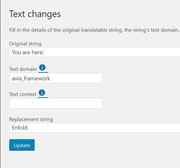
Please let us know if this helps.Best regards,
MikeHi,
Thank you, but the typical login address is not working for me /wp-admin/
do you have a custom login url?Best regards,
MikeHi,
Glad we were able to help, we will close this now. Thank you for using Enfold.For your information, you can take a look at Enfold documentation here
For any other questions or issues, feel free to start new threads in the Enfold forum and we will gladly try to help you :)Best regards,
MikeHi,
Glad Victoria could help, we will close this now. Thank you for using Enfold.For your information, you can take a look at Enfold documentation here
For any other questions or issues, feel free to start new threads in the Enfold forum and we will gladly try to help you :)Best regards,
MikeSeptember 15, 2019 at 11:09 pm in reply to: Change Margins for Standard Separtor – via CSS for mobile #1138586Hey christina,
There are a few different separators so I will try to help with a standard one, and I will assume that you mean smaller than a tablet when you refer to mobile. In this case please try this code in the General Styling > Quick CSS field or in the WordPress > Customize > Additional CSS field:@media only screen and (max-width: 767px) { .hr.hr-default { margin: 10px 0 !important; } }Please adjust the margin to suit and then clear your browser cache and check.
If this doesn’t help please include the url to the page in question so we can take a closer look.Best regards,
Mike -
AuthorPosts
