

Forum Replies Created
-
AuthorPosts
-
Hey Mike teglas,
Sorry to hear you are having this issue, but we do not have the ability to change the license owner, all licenses are issued by Envato (Theme Forest) as an exclusive contract we have with them in order to offer our product on their platform.
You could try asking them, but in my experience, they will not get involved with Developer / Client disagreements.
I can offer an easy solution that will save you time (money), simply purchase a new license (theme), in doing so you will be able to update your theme which I see is v4.2.3 and really needs to be updated, also you will get 6 months of support on our forum which could be very helpful if you are not going to have a future developer.
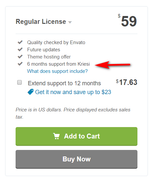
But I recommend checking the box for “Extend support to 12 months” for a little more, this is a one time offer that is available to new customers only and is a great value.
Once you get your new license simply replace your current one with it in the theme.Best regards,
MikeOctober 12, 2019 at 2:23 pm in reply to: I can't run this code in place of the custom css class. What is the reason. #1147356Hi,
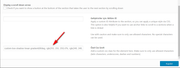
Sorry for the late reply, I took another look at your homepage and see that you have added the full css code into the CSS Classes field “Özel Css Sınıfı” this is not correct, in this field please only enter the class “custom-box-shadow” and the add the full css code into your child theme styles.css, this was already done. I corrected this for you and then cleared your cache plugin, you will still need to clear your browser cache.
Wrong way:
Right way:
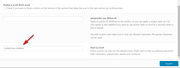
Please see the screenshot in the Private Content area for the correct place to put your cssBest regards,
MikeHi,
The reason there is a different background color around the blue ones is because it is a blue circle on a white background. If you switch to the new images with the transparent background this would be solved, and you would not need theborder-radius: 100%;code because they are already round. Replacing the images should also make the other two pages look better.
Please give this a try removing the css I gave you, and if it still needs adjusting we can help afterward.
Bulk replacing the featured images may turn out to be a little tricky, but this plugin may make it easier: Quick Featured Images please read this article.Best regards,
MikeOctober 11, 2019 at 5:51 am in reply to: Blog Posts Element not showing Date meta on first (top) displayed post #1147015Hi,
Sorry for the late reply and thanks for the login, I found that a custom script in your child theme functions.php is causing the error://------------------------- // JS - Meta after title // ------------------------ function metaAfterTitle(){ ?> <script> jQuery(".template-blog .post-entry").each(function(i) { var postTitle = jQuery(this).find('.blog-categories.minor-meta'); var metaInfo = jQuery(this).find('.post-meta-infos'); jQuery(metaInfo).insertAfter(postTitle); }); </script> <?php } add_action('wp_footer', 'metaAfterTitle');I re-enabled, but please disable and clear your browser cache and check.
Best regards,
MikeHi,
Sorry for the late reply, thank you for creating the demo page. I hid the second slider via the screen options in the element because I thought the first looked best at full screen, your slider link works well and I added this javascript in a code block element to delay the caption from showing for 19 seconds, I was not sure how long you wished to delay it for.<script> jQuery(document).ready(function($) { $('.slideshow_inner_caption').css('display','none'); $('.slideshow_inner_caption').delay(19000).fadeIn("slow"); }); </script>Adding the script to a code block element ensures it only fires on this page, plus I see that you are not using a child theme, so this will keep you from losing it with updates.
Please clear your browser cache and check.Best regards,
MikeHi,
Sorry for the late reply, I took a look via ftp and found you current version in the folder “enfold” was missing many files, so I renamed it “enfold-missing” and renamed “enfold-october” to “enfold” basically rolling the update back, your site is now working. Please try uploading your new version again via ftp.
The easiest and safest way to update is to download the newest version from Theme Forest and rename your current theme to “enfold-old” via ftp then upload the new “enfold” and check that your site is working correctly.
Should you wish to roll-back to the old version, it’s easy to do, simply rename the new “enfold” to “enfold-new” via ftp and then rename “enfold-old” to “enfold” then refresh your page.
Please don’t try to overwrite the theme folder, as this will leave old files behind and cause errors.Best regards,
MikeHi,
Sorry for the late reply, Please try this code in the General Styling > Quick CSS field or in the WordPress > Customize > Additional CSS field:@media only screen and (max-width: 767px){ #top.archive .avia-content-slider .slide-image img { width: 30px !important; height: 30px !important; border-radius: 100% !important; } #top.archive .avia-content-slider a.slide-image { pointer-events: none !important; } }This will only work on mobile archive pages and make the image a 30px round circle plus make it not clickable.
Best regards,
MikeOctober 10, 2019 at 1:31 pm in reply to: Frontend disappears after saving small site changes in Backend. #1146854Hi,
Sorry for the late reply, I tested your Home2 with our a Avia Layout Builder Debugger but found no errors and I was able to copy your pages shortcode to my localhost and also test on a new install.
I removed the “#” from the headline rotator and saved without error, and the backend looks the same as the frontend. Please check to confirm.Best regards,
MikeHi,
@paul_hunt please try again because we will need the admin login to your site, but as this is not your thread your details will not be private here.
I see from your profile you have no threads started, perhaps you didn’t save or submit, or there was a glitch.
Thank you for your patience.Best regards,
MikeHi,
Glad we were able to help, we will close this now. Thank you for using Enfold.For your information, you can take a look at Enfold documentation here
For any other questions or issues, feel free to start new threads in the Enfold forum and we will gladly try to help you :)Best regards,
MikeHi,
Please try this code in the General Styling > Quick CSS field or in the WordPress > Customize > Additional CSS field:@media only screen and (max-width: 988px) { #header { display: none !important; } }Best regards,
MikeOctober 9, 2019 at 5:09 am in reply to: Change a h3 into div in the comments section – in which file? #1146360Hi,
Sorry, I don’t know, it is in the WordPress core, once I found this out I stopped looking for it.
You would not want to change this directly because you would have to make the edit with every WordPress update, this is why WordPress created “filters” like above.
Shall we close this then?Best regards,
MikeHi,
Thank you for the test page, I see that the Enfold defaults are being overridden by a plugin “fancyboxforwp” I tried to change this with some javascript but could not. I found on my fresh install that the image links to a pdf will open in a “new window” if the setting in the image element is used, so the error is with the plugin. Please disable the plugin or ask the plugin author if there is an option to disable on a case-by-case basis.Best regards,
MikeHi,
First I hid your exposed login. Then I found that for the partner element the custom class was not there anymore, which should not be lost via an update.
Then I found that the css still didn’t work because the structure of the element had changed, so I adjusted the css and now it works good.
Please clear your browser cache and check.
You don’t need to worry about updating again because I doubt that we will change the element structure again, but if we do we can help adjust your css again :)Best regards,
MikeHi,
Glad to hear this is working for you, we will close this now. Thank you for using Enfold.For your information, you can take a look at Enfold documentation here
For any other questions or issues, feel free to start new threads in the Enfold forum and we will gladly try to help you :)Best regards,
MikeHi,
Sorry, we don’t other than we are working on this feature. I would recommend setting up a default install on a testing server and have one of the ADA services scan it. Unless there is anything else, shall we close this then?Best regards,
MikeHi,
Glad we were able to help, we will close this now. Thank you for using Enfold.For your information, you can take a look at Enfold documentation here
For any other questions or issues, feel free to start new threads in the Enfold forum and we will gladly try to help you :)Best regards,
MikeOctober 8, 2019 at 5:19 am in reply to: Change a h3 into div in the comments section – in which file? #1145996Hi,
Thanks for the feedback, I have found that this is not from the theme but WordPress core, please use this function to change, just add to the end of your functions.php file in Appearance > Editor:add_filter( 'comment_form_defaults', 'custom_reply_title' ); function custom_reply_title( $defaults ){ $defaults['title_reply_before'] = '<span id="reply-title" class="comment-reply-title">'; $defaults['title_reply_after'] = '</span>'; return $defaults; }Best regards,
MikeOctober 8, 2019 at 4:49 am in reply to: Blog Posts Element not showing Date meta on first (top) displayed post #1145993Hi,
Thanks for the feedback and disabling your wpfc-minified, this has helped as it now shows you are having a jQuery error. Please check the setting Enfold Theme Options > Performance > Load jQuery in footer, if this is checked please uncheck it.
If this doesn’t help, please include an admin login in the private content area so we can be of more assistance.Best regards,
MikeHi,
Glad to hear that worked for you, for your new issue please try this code in the General Styling > Quick CSS field or in the WordPress > Customize > Additional CSS field:.dgwt-wcas-ico-magnifier { display: none !important; }Then clear your browser cache and check.
Best regards,
MikeOctober 8, 2019 at 4:07 am in reply to: Error in structure data (Error: SomeProducts is not a known valid target type) #1145988Hi,
Sorry, I don’t believe that this filter is going to be added to Enfold as it unsets the theme functions. If it is working for you please feel free to use, but note that this thread is 11 months old now and quite a lot has changed in the theme.Best regards,
MikeOctober 8, 2019 at 3:54 am in reply to: Custom CSS class in developer tab on text element has disappeared #1145985Hi,
Sorry for the late reply, please include a screenshot of the element you would like to customize so it is clearer for us, and an admin login so we can see the page since it’s in maintenance mode.
To add a screenshot please try using https://postimages.org/ and pasting the image URL in your post.Best regards,
MikeHi,
Glad we were able to help, we will close this now. Thank you for using Enfold.For your information, you can take a look at Enfold documentation here
For any other questions or issues, feel free to start new threads in the Enfold forum and we will gladly try to help you :)Best regards,
MikeHi, typically third party plugins will not be found within the Advanced Layout Builder element blocks, in this case please use the plugin’s shortcode, such as
[ultimate-faqs]Best regards,
MikeHey bobfurgo,
Sorry for the late reply, we have been working to be better ADA prepared, but it will probably be a few more updates before we are where we want to be.Best regards,
MikeHi,
Sorry for the late reply, thanks for the login, if I understand correctly you should add a custom class to your element such as “gf-icon-box” and then use the css Jordan gave you with the custom class like:.gf-icon-box h3.iconbox_content_title{ font-size:10px!important; }then this would work wherever it was posted. Please note have the custom class for the element is all lowercase letters and there is no preceding dot, but in the css there is a preceding dot.
The page you linked to above returned a 404 so I couldn’t demonstrate. Sorry but I can’t help with your CPTUI questions, I’m not that sure with it.Best regards,
MikeOctober 7, 2019 at 4:15 am in reply to: Frontend disappears after saving small site changes in Backend. #1145604Hi,
Sorry for the late reply, and thanks for the login. I don’t see the hash (#) in your headline rotator, were you able to correct this?
Is “Home” & “Home2” the same? I see in your WordPress > Settings > General > Homepage “Home” is chosen, but in Enfold Theme Options > Homepage “Home2” is chosen. This probably is not a big deal, but we should pick the same just to rule out any conflicts. Which one do you want to use? I would then test on the other page because I don’t want to lose your whole page as you said was happening.Best regards,
MikeOctober 7, 2019 at 3:43 am in reply to: Fontello font not showing after updating to latest theme version #1145600Hi,
Sorry for the late reply, the first time I loaded your site I saw the missing font icons, but after that the icons were working fine.
Perhaps this was just a hiccup from your server? Please try clearing your browser cache and checking again.If you still have issues then please note that your PHP version is 5.4.45-0 is too old now and needs to be updated to v5.6 minimum, but v7.1 would be better. Please ask your webhost to update for you.
Also, I see that your theme is v4.4.1, and had many issues, so please update your theme to the latest version.
I also see that your WordPress is v4.9.11, please update to the latest version.
Please ensure that you create a full backup first.
Perhaps it would be a better idea to test these updates on a stagging site, or test site just to be on the safe side.Best regards,
Mike -
AuthorPosts
