

Forum Replies Created
-
AuthorPosts
-
Hi,
Please try this code in the General Styling > Quick CSS field or in the WordPress > Customize > Additional CSS field:@media only screen and (max-width: 1200px) { #top #header_meta, #top #header_meta nav ul ul li, #top #header_meta nav ul ul a, #top #header_meta nav ul ul { background-color: #14396c !important; } }After applying the css, Please clear your browser cache and check.
Best regards,
MikeHi,
Sorry for the late reply and thanks for the lopgin, Please try this code in the General Styling > Quick CSS field or in the WordPress > Customize > Additional CSS field:#menu-item-64 a span .yz-primary-nav-area { opacity: 1 !important; display: inline-block !important; }this will show the menu item when logged in, when logged out the container is empty.
After applying the css, Please clear your browser cache and check.Best regards,
MikeHi,
Sorry for the late reply, I was able to login, and I see your two icon images in the media library, but I’m not sure which menu item this should be for on the homepage, or if it’s for a different page, please advise.Best regards,
MikeHi,
Thanks for the link to your site, I notice that your Whatsapp icon has a http link like this:http://1-555-555-5555please try using the tel link like this:tel://1-555-555-5555
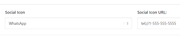
Please note that the number format is important if you want it to work with both IOS & Android, please read this article.
When I test this on my Windows localhost with Chrome, it seems to trigger the correct response:
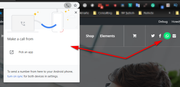
unfortunately, I don’t have an iPhone and I can’t connect my Android to my localhost, but I believe this will help, please try.Best regards,
MikeHey Roger,
Thank you for the link and screenshots, I also noticed that between 480px & 599px the social icons take space without showing pushing the language icons and burger menu over the logo, so I included a fix for this also.
Please try this code in the General Styling > Quick CSS field or in the WordPress > Customize > Additional CSS field:@media only screen and (max-width: 989px) and (min-width: 768px){ #top #header.av_header_glassy.av_header_transparency .social_bookmarks li, #top .av_header_glassy.av_header_transparency .social_bookmarks li a { border-color: rgba(255,255,255,.25); color: #fff; } #top #header.av_header_glassy #header_main .social_bookmarks li a { color: #9c9288 !important; border-color: transparent; background: 0 0; } } @media only screen and (max-width: 767px) and (min-width: 600px){ #top #header.av_header_glassy #header_main .social_bookmarks li a { color: #9c9288 !important; border-color: transparent; background: 0 0; } #top #header #header_main .avia-menu.av_menu_icon_beside { margin-right: 0 !important; } } @media only screen and (max-width: 599px) and (min-width: 480px){ #top #header.av_header_glassy #header_main .social_bookmarks { display: none !important; } }After applying the css, Please clear your browser cache and check.
Best regards,
MikeNovember 17, 2019 at 3:25 pm in reply to: Paragraph text all aligning left regardless of setting & custom CSS. #1157646Hi,
Glad to hear, thanks for using Enfold.
For your information, you can take a look at Enfold documentation here
For any other questions or issues, feel free to start a new thread and we will gladly try to help you :)Best regards,
MikeHi,
Glad to hear, we will close this now. Thank you for using Enfold.For your information, you can take a look at Enfold documentation here
For any other questions or issues, feel free to start new threads in the Enfold forum and we will gladly try to help you :)Best regards,
MikeHey fionayoung,
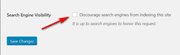
I recommend using a plugin such as Password Protected it is very easy to use. I also recommend checking the box at WordPress > Settings > Reading > Search Engine Visibility to ask Google to not index it.
Best regards,
MikeNovember 17, 2019 at 1:05 pm in reply to: Hide price and hints for shipping costs and tax rate on product detail page #1157623Hey Jörg,
Thanks for the link and screenshot, Please try this code in the General Styling > Quick CSS field or in the WordPress > Customize > Additional CSS field:#top.single-product p.wc-gzd-additional-info,#top.single-product .legal-price-info { display:none !important; }After applying the css, Please clear your browser cache and check.
Best regards,
MikeHi,
Glad to hear we will close this now. Thank you for using Enfold.For your information, you can take a look at Enfold documentation here
For any other questions or issues, feel free to start new threads in the Enfold forum and we will gladly try to help you :)Best regards,
MikeHi,
Ok, I changed the blog post layout to Elegant and changed the script in the functions.php to:function move_breadcrumb_below_title() { ?> <script type="text/javascript"> (function($) { function a() { $('#main .avia-breadcrumbs').detach().insertAfter('h1.post-title.entry-title'); $('#main .post-meta-infos').detach().insertAfter('.big-preview.single-big'); } a(); })(jQuery); </script> <?php } add_action('wp_footer', 'move_breadcrumb_below_title');and added this css to the italian Quick CSS, you may need to add it to your other languages:
.html_elegant-blog #top .post-entry .post-meta-infos {
	margin-top: 0 !important;
}
#top.single span.av-vertical-delimiter {
	border-color: transparent; !important;
}
please clear your browser cache and check the link in the Private Content area.
Best regards,
MikeHi,
you css is working for me
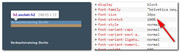
please clear your browser cache and check.
another way to write your css is:#top #main h2.socket-h2 a span { font-size:10px !important; line-height:1.2em !important; }Best regards,
MikeHi,
Thank you for sharing your solution and the link. We will close this now. Thank you for using Enfold.For your information, you can take a look at Enfold documentation here
For any other questions or issues, feel free to start new threads in the Enfold forum and we will gladly try to help you :)Best regards,
MikeHi,
To me it looks like a customized version of the 2017 demo.
But you understand that Enfold can create all of these demos, it’s just a matter of moving the elements around and customizing to suit.Best regards,
MikeHi,
Do you want to continue using the “default business” blog layout? The elegent & modern layouts both will put the post title above the featured image, then if you want I can try to adjust the breadcrumbs script to somewhere else, right now the breadcrumbs are tied to the post title so wherever it goes the breadcrumbs will follow.Best regards,
MikeHey traillight,
Unfortunately, pods is not parsing the shortcode, it’s only printing it as text.
I’m not sure if pods can do this, perhaps if it had a “do_shortcode” option, try asking the plugin developer how pods can do this.
Sorry, but we don’t have experience with this plugin because we don’t support third-party plugins.Best regards,
MikeHi,
I only found 4 instances of [year] on your page, once in “schema”, once in “structured-data” and twice in an image “alt”
I don’t believe that shortcodes can be parsed in these places.Best regards,
MikeHey AngelAsim,
I can try to help, Please include an admin login & FTP access in the Private Content area, as this is a new install I assume that I can reset the install if I feel it is necessary? Sometimes this is necessary after a failed attempt.Best regards,
MikeHey Jak73,
Thanks for the link, when I compare the H3 widget titles in your footer to the H2 heading on your homepage, they both use the same font, and the same font-weight, so we can reduce the font size to 10px, but that is the only difference I see, is this correct?Best regards,
MikeHi,
Unfortunately, trying to match this layout:

is going to be a much bigger customization than what we can do here, I recommend hiring a freelancer on upwork.com and have them create a custom “single.php” file for you.
I also recommend creating a “staging site” for the freelancer to work on, most web hosts have a one click staging site option in the cPanel which creates a staging clone of your site so they can test and edit on it and your site will stay up and running untouched. You can always ask your webhost if you have this option.Here are some screenshots of what it would look like:
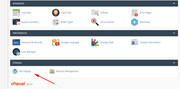
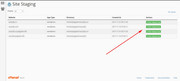
Best regards,
MikeHi,
Sorry for the late reply and thanks for the screenshot and login, I took a look at your table and found that bold html tags had been added to your table around words and at one point an error had been made causing a “snowball” effect.
The error looks like this:
<b>7:00PM Thursday<b></b>as you can see there is a opening bold tag then text and another opening tag and then a closing tag, so two opening and one closing causes an error and the Advanced Layout Builder tries to correct but it didn’t know were to put the next tag so you ended up with 8 errors and a table element that was not working correctly.
This is my guess, there is a chance that someone made the same error 8 times?
Anyways I Enabled the Avia Layout Builder Debugger and corrected the code for you.
Now the tables are correct, but they are still missing any data that was there at one point, but you can now add it in.
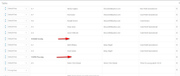
Please keep in mind that html errors in title fields and tables can brake the Advanced Layout Builder 🙂
Please check and let us know if this solved 👍Best regards,
MikeHi,
1: try disabling the featured image from showing on the single post and add your image to the top of your post, it will then show under the title.
2 & 4: is there more than one author and is the social icons for the author or the site? You may need to edit the single.php file to achieve this, as it’s not quite as easy as it sounds.
3: to make the H1 bolder, try this css:#top #wrap_all h1.post-title.entry-title a { font-weight: 900 !important; font-size: 40px !important; }900 is the boldest, but not all fonts have this, increasing the font size may also help it to stand out, just remove if you wish.
Best regards,
MikeHey annameis,
Sorry for the late reply, here is the result I was able to achieve on my localhost:

this is the functions.php code:function avia_add_custom_social_icon($icons) { $icons['discord'] = 'discord'; return $icons; } add_filter('avf_social_icons_options','avia_add_custom_social_icon', 10, 1);this is the css:
#top #wrap_all .av-social-link-discord a:before{
content: "";
width: 30px;
height: 30px;
display: inline-block;
vertical-align: middle;
background: url([your-domain]/wp-content/uploads/2019/11/iu.png) no-repeat center center;
background-size: contain;
}
then I choose “discord” in the social profiles
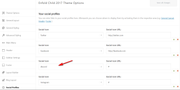
If you sill have any issues then you may have curly quotes in your code, otherwise include an admin login and I’ll take a look.Best regards,
MikeNovember 16, 2019 at 10:44 pm in reply to: When using Event Tickets, tickets and form are not visible. #1157553Hey ariane1001,
Sorry for the late reply, this appears to only show in the mobile view, but you can force it to show with this css:.av-single-event-meta-bar.av-single-event-meta-bar-mobile { display: block !important; }Best regards,
MikeHi,
When you updated the theme via ftp do you try to overwrite the theme files?
This will cause errors, the easiest and safest way to update via ftp is to download the newest version from Theme Forest and rename your current theme folder to “enfold-old” via ftp then upload the new “enfold” folder and check that your site is working correctly.
Once you are happy you can delete the “enfold-old” folder via ftp, (not the WP theme page)
Should for some reason you wish to roll-back to the old version, it’s easy to do, simply rename the new “enfold” folder to “enfold-new” via ftp and then rename “enfold-old” to “enfold” then refresh your page.
Please don’t try to overwrite the theme folder, as this will leave old files behind and cause errors.Best regards,
MikeHey Juli,
You can do this but you will need to copy the database and then adjust it for the new domain, I recommend using the I recommend the Duplicator plugin to easily do this.Best regards,
MikeHey kensingtoncyprus,
Thank you for the link and the screenshots, when I look at your footer on a small mobile screen the only text that I see that is not wrapping is the two email address that contain no space between them, please add a space before and after the slash “/” then the text will break there.
Please see the screenshot in Private Content area.Best regards,
MikeHey Lutz Bachmann,
This is not correct, I recommend contacting the racists and explain how you feel, perhaps with integrity you can open their hearts.Best regards,
MikeHi,
Glad Victoria could help, we will close this now. Thank you for using Enfold.For your information, you can take a look at Enfold documentation here
For any other questions or issues, feel free to start new threads in the Enfold forum and we will gladly try to help you :)Best regards,
MikeHey marcoabis81,
Sorry for the late reply and thanks for the login, I see that you are using the “Elegant” blog style, if you switch to the “default business” blog layout it will show your meta below the title instead of at the end of your post.
To move the breadcrumbs to above the title, Try adding this code to the end of your functions.php file in Appearance > Editor://move breadcrumbs above post title function move_breadcrumb_below_title() { ?> <script type="text/javascript"> (function($) { function a() { $('#main .avia-breadcrumbs').detach().insertBefore('h1.post-title.entry-title'); $('#main .avia-breadcrumbs').append('<br/>'); } a(); })(jQuery); </script> <?php } add_action('wp_footer', 'move_breadcrumb_below_title');result:
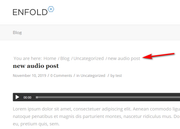
Best regards,
Mike -
AuthorPosts
