

Forum Replies Created
-
AuthorPosts
-
Hi,
Thanks for the feedback and the login. I see your sliders with the text layers at 200px, 225px, and 250px.
In my tests on Chrome on Windows, mobile, tablet, and desktop all look good. I assume you cleared your browser cache, so please include screenshots of what you are seeing in the Private Content area to point out what I must be missing.
Thank you.Best regards,
MikeHey Mike1050,
Sorry for the late reply, and thank you for the login. When I logged in your homepage showed the “Block Editor” with the Enfold shortcode within a “shortcode” block, is this how you work on your pages?
Please see the screenshot in the Private Content area. I only ask because typically the last used editor state is the one shown.
I see that you have 2 empty grid rows and 2 empty color sections, I assume that this is where your missing content was?I’m not sure why the WordPress Revisions didn’t work properly, unfortunately, I don’t believe your content is going to be recoverable. Typically when the Advanced Layout Builder elements break or content disappears, this is due to unclosed html tags used in the title fields, for example, often people wish to make the titles bold but they use
<strong>Title<strong>instead of<strong>Title</strong>but since you now have missing content I’m not sure if this was the case.But the new WordPress “Block Editor” is the cause for your messages:
There is an automatic backup of this Post, which is more recent
This page is asking you to confirm that you want to leave – data you have entered may not be savedThis is because the new WordPress “Block Editor” is trying to automatically save every few moments whether you have made changes or not. This can be annoying unless you keep this in mind, you can use the Classic Editor option within the theme panel:

Otherwise, if you made no changes please don’t save when prompted on exit.
Sorry I couldn’t be more help and restore your page.Best regards,
MikeHey John,
Sorry for the late reply, I have taken a look at your homepage backend after disabling your Classic Editor plugin and found the Text Block element worked correctly. Please see the screenshot in Private Content area.But I did notice that the text element “Element Preview” didn’t show the text, is this what you are referring to?
I don’t believe it is as the WordPress “Default Editor” doesn’t have an “Element Preview”, yet this is working correctly on my localhost site with no plugins, so if it is, please try disabling you plugins to see if that helps.I would like to point out that you don’t need the plugin to use the Classic Editor, because the theme includes this option in the theme panel at the bottom of the theme options page:
Best regards,
MikeNovember 30, 2019 at 11:53 am in reply to: two elements with id="avia-menu" (accessibility issue) #1161446Hi,
Thanks @Guenni007, @codemonkeynorth, I can not reproduce the error, if you still find the error please include a link to your site.
Perhaps you are using an older version or you updated by overwriting the theme via FTP?Best regards,
MikeHi,
Sorry for the late reply, I believe you can target these individual team pages with this css,
Please try this code in the General Styling > Quick CSS field or in the WordPress > Customize > Additional CSS field:#top.parent-pageid-4155 #wrap_all #main .main_color.container_wrap { background-color: orange !important; }Since all of these team pages are child pages to “4155” you can use the class
.parent-pageid-4155instead of the page id of each page.
After applying the css, Please clear your browser cache and any cache plugin and check.
Also try disabling Enfold Theme Options > Performance > JS & CSS file merging and compression temporarily to clear the built-in file merging and compression.Best regards,
MikeNovember 29, 2019 at 1:32 pm in reply to: Horizontal gallery one click to scroll horizontally #1161222Hey Bruno,
Sorry for the late reply, so as I’m looking at your pages on desktop, and as I understand your issue, the galleries are not scrolling horizontally with one click, they seem to require two clicks, and then they work correctly with a single click.
Investigating your page without an admin login, I don’t see any plugins used, but I see a script called that contains “ignore right click”
So assuming you have tried disabling all plugins, or that you have no plugins, I would like admin access to investigate this further because I have not been able to recreate this issue on my local site.
Please include an admin login in the private content area so we can take a closer look.
Also, is this a test site or a live site?Best regards,
MikeNovember 29, 2019 at 12:17 pm in reply to: Looking for some assistance with menu indicators #1161208Hi,
Glad to hear, and it looks nice.
We will close this now. Thank you for using Enfold.For your information, you can take a look at Enfold documentation here
For any other questions or issues, feel free to start new threads in the Enfold forum and we will gladly try to help you :)Best regards,
MikeHi,
Is the css that @Guenni007 not working in some languages, or do you want it to work only in some languages?Best regards,
MikeHi,
Sorry, I do not see the space at the bottom of your slider on your homepage, on mobile or desktop. Please see the screenshots in Private Content area. What browser and OS are you using?
To hide the slider on mobile, Please try this code in the General Styling > Quick CSS field or in the WordPress > Customize > Additional CSS field:@media only screen and (max-width: 767px) { #revolutionslider_1 { display:none !important; } }After applying the css, Please clear your browser cache and check.
Best regards,
MikeHi,
Glad Ismael could help, we will close this now. Thank you for using Enfold.For your information, you can take a look at Enfold documentation here
For any other questions or issues, feel free to start new threads in the Enfold forum and we will gladly try to help you :)Best regards,
MikeHi,
I see what you mean now, I believe you are going to need to create two sliders, one for mobile and one for desktop, and then show / hide with visibility option or css. We don’t work with the Revolution Slider or have a connection with them, but in the Layerslider this is the recommended tactic. In the Layerslider you have the option to create the slider at certain screen sizes so you and adjust the layers for that screen size, or show different layers.
Perhaps the Revolution Slider has a better way to achieve this within the slider you are using, but we don’t know how to do this with the Revolution Slider, you could ask them in their support forum.With the Revolution Slider adding
min-height: 100vh;only creates the empty space instead of making it full height.Best regards,
MikeHi,
Thank you for the feedback, when I check your page seems correct for me, but it also seems that your page elements have changed, is this correct? Please include a screenshot of what you are seeing so we can ensure we are seeing the same result.
You can add screenshots by uploading your images to a service such as postimages.org and pasting the html code, or link given in your post or Private Content area.Best regards,
MikeHi,
@acscreativenew, yes I don’t recommend the css solution for you but since your original issue was related to css this was the direction I started with until I realized your page didn’t have the same structure as your live site.
Please try copying the live page shortcode to your dev site, even if only in a test page to see if this corrects, if not please create a plain text file with the live page shortcode, and link in the Private Content area, so we can compare the two pages and debug.
@mmsdev, Please open a new thread so we can assist, as this is not your thread you will not see our comments in the Private Content area and your info in the Private Content area is not private. Thank you for your understanding.Best regards,
MikeHi,
Thank you for the feedback, I see your rev slider on the homepage is working without the space at the bottom, and I see the css is active, please try clearing your browser cache if it still looks broken to you.Please open a new thread for each issue, this helps other users find solutions based on the opening subject line quicker and helps keep the thread length manageable and on topic for multiple mods to assist. Thank you for your understanding.
Best regards,
MikeHi,
Sorry for the late reply, I see that you using the “sticky header” option, so in this case the header classes do not change on scroll.
Try adding this code to the end of your functions.php file in Appearance > Editor:function custom_scroll_script(){ ?> <script> (function ($) { $(window).load(function(){ $('.logo').hide(); $(window).scroll(function() { var scroll = $(window).scrollTop(); if (scroll >= 10) { $('.logo').show(); } else { $('.logo').hide(); } }); }); })(jQuery); </script> <?php } add_action('wp_footer', 'custom_scroll_script');Best regards,
MikeHi,
Sorry for the late reply, I have looked at your draft homepage with the slider, to remove the white space under the slider Please try this code in the General Styling > Quick CSS field or in the WordPress > Customize > Additional CSS field:#revolutionslider_1 { min-height: 0 !important; }After applying the css, Please clear your browser cache and check.
Typically I recommend using more targeted css, but I know you will be moving this to your homepage, so when you do please use this css instead:#top.home #revolutionslider_1 { min-height: 0 !important; }Best regards,
MikeHi,
Glad Ismael could help, we will close this now. Thank you for using Enfold.For your information, you can take a look at Enfold documentation here
For any other questions or issues, feel free to start new threads in the Enfold forum and we will gladly try to help you :)Best regards,
MikeHi,
Thank you for the feedback, I have compared the section of the two sites and I found the structure is not the same, on the dev site you have “Autoclose” twice and the “av-flex-placeholder” is is the second column instead of between the columns:
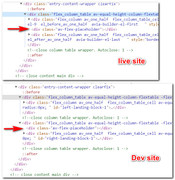
typically this occurs when a html closing tag is not placed correctly, such as a strong tag in a title field, and the builder tries to correct automatically.
Since I assume you want the two pages exactly the same for testing, I recommend Enabling the Avia Layout Builder Debugger and copy the page shortcode from the live site and replace the shortcode in the dev site to correct.
Otherwise you could use the css to correct the dev site, please note I added a custom ID to target this section before I realized the root of the error:#top.postid-180 #landing-block-1 #left-landing-block-1,#top.postid-180 #landing-block-1 #right-landing-block-1 { width: 46% !important; } #top.postid-180 #landing-block-1 #left-landing-block-1 { float:left !important; } #top.postid-180 #landing-block-1 #right-landing-block-1 { float: right !important; } #top.postid-180 #landing-block-1 .flex_column_table.-flextable { display: block !important; }After applying the css, Please clear your browser cache and check, but I recommend replacing the page shortcode.
Best regards,
MikeNovember 27, 2019 at 12:09 pm in reply to: Columns centered vetically without being equal height? #1160601Hi,
Thank you for the feedback, I believe I understand now, please try this css:#top.page-id-62 #av_section_4 .flex_column_div.first.avia-builder-el-15 { z-index: 2 !important; }Best regards,
MikeNovember 27, 2019 at 11:47 am in reply to: Some pages of the main menu are displayed as categories #1160597Hi,
Glad to hear this solved and you will make this change to your other site because errors like this often behave unexpectedly and could suddenly start occurring.
We will close this now. Thank you for using Enfold.For your information, you can take a look at Enfold documentation here
For any other questions or issues, feel free to start new threads in the Enfold forum and we will gladly try to help you :)Best regards,
MikeNovember 27, 2019 at 11:35 am in reply to: Burger menu not working for blog post pages on mobile? #1160592Hi,
I’m not sure how that could have happened, I found that you have 2 different menus in your functions.php, and I added the “av-switch-768” class to the second on to make it work correctly, now they both have this class, perhaps you had added your new link to only one of them? I’m glad you were able to add the link back.Best regards,
MikeNovember 26, 2019 at 1:59 pm in reply to: Burger menu not working for blog post pages on mobile? #1160328Hi,
Glad to hear, shall we close this then?
This thread is getting very large.Best regards,
MikeNovember 26, 2019 at 1:55 pm in reply to: Contact Form Element Not Being Sent To Email when filled out on phone #1160326Hi,
Perhaps a better solution would be to use a plugin that would save your intake form to the WordPress backend instead of emailing it, it would probably be easier to read also, I tried searching for you but there are many results so it’s hard to tell which one would be best for you.
Please try search terms like:
wordpress intake form plugin
wordpress question form plugin
wordpress interview plugin
etcBest regards,
MikeHi,
Glad we were able to help, we will close this now. Thank you for using Enfold.For your information, you can take a look at Enfold documentation here
For any other questions or issues, feel free to start new threads in the Enfold forum and we will gladly try to help you :)Best regards,
MikeHi,
To get the shortcode for a 1/2 column and a video element try opening a new post using the Classic Editor and choose your element with the shortcode wand:
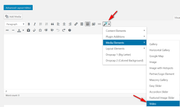
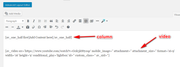
then place your video shortcode inside your column shortcode:
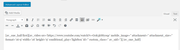
Another way to recreate complex shortcodes is to Enable the Avia Layout Builder Debugger and create your shortcodes in the Advanced Layout Builder and below you will see the debugger field:
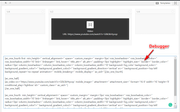
then copy the code and add to your Classic Editor “text” tab.

Best regards,
MikeHi,
Glad we were able to help, we will close this now. Thank you for using Enfold.For your information, you can take a look at Enfold documentation here
For any other questions or issues, feel free to start new threads in the Enfold forum and we will gladly try to help you :)Best regards,
MikeNovember 26, 2019 at 12:01 pm in reply to: Burger menu not working for blog post pages on mobile? #1160272Hi,
Ok, thanks for the feedback and screenshots, I took a look at your sub-menu code in your functions.php and found it was missing the “av-switch-768” class, I have now added.
To correct your course button I added this css:.learndash-wrapper .ld-course-status.ld-course-status-not-enrolled .ld-course-status-action .learndash_checkout_buttons { margin: -1.5em .5em !important; } .learndash-wrapper .ld-course-status.ld-course-status-not-enrolled .ld-course-status-action .learndash_checkout_buttons > div > div > form { margin-top: 1em !important; }Please clear your browser cache and check.
Best regards,
MikeNovember 25, 2019 at 1:35 pm in reply to: Burger menu not working for blog post pages on mobile? #1159857Hi,
Thank you, the reason the burger menu is not showing is this code:#top .av-burger-menu-main { /*to not display magnifying glass on desktop*/ display: none !important; }So I disabled this and now the burger shows and I checked your homepage and I still don’t see the magnifying glass on desktop.
Perhaps this was an error? Please clear your browser cache and check.
If you find a magnifying glass on desktop that you want to be removed we can help.Best regards,
Mike -
AuthorPosts
