

Forum Replies Created
-
AuthorPosts
-
Hi,
Sorry for the late reply, I have seen all 3 of your messages, lets work from this one so we can all work together. Please don’t reply to this message.Best regards,
MikeHi,
Sorry for the late reply, I have seen all 3 of your messages, lets work from this one so we can all work together. Please don’t reply to this message.Best regards,
MikeHi,
Sorry for the late reply, I have found your 3 messages on this issue, I have been able to login to your WordPress site but I couldn’t FTP in to help. I tried “FTP & SFTP”, although you are not clear on your FTP password, I had to try the two passwords at the bottom of your private message. It looks like your webhost is in the Philippines and I don’t have a VPN for the Philippines, is your webhost blocking the USA from FTP access to your ftp access? This is common for FTP access. I have included my IP address in the private content area, if you can ask your webhost to “white list” me I will try to help. Otherwise, we have team members in the Philippines that can help, but it may take a day, depending on the time zone.
I will mark your other posts to this one, let’s work from this one so we are all on the same page / topic / post.
Thank you for your patience and using Enfold.Best regards,
MikeHi,
Glad we were able to help, we will close this now. Thank you for using Enfold.For your information, you can take a look at Enfold documentation here
For any other questions or issues, feel free to start new threads in the Enfold forum and we will gladly try to help you :)Best regards,
MikeHey Flow9999,
Yes, this is possible. Here is an example for a 1/3 column, but please note this is very general and will affect all 1/3 columns on your site, I recommend adding a custom class to your columns and adjusting the css to suit. If you would like a hand with this please apply the custom class and add a link to the page, or include an admin login in the Private Content area so we can demonstrate.
The demo css is:.flex_column.av_one_third:hover { animation: grow 2s; animation-fill-mode: forwards; position: relative; z-index: 50; } @keyframes grow { to { transform: scale(1.2) } }So the “keyframes” is how much the column will “grow”, please note that the word “grow” here means nothing, as long as it matches the rest of your css it can be any word.
The animation is set to 2s to compete, adjust to suit.
Theanimation-fill-mode: forwards;is the trick to “hold” the animation while “hover” is activated, otherwise it will go back to the regular size after 2s.
The “z-index” is needed otherwise, some columns will be under the others.
Here is a screenshot of the expected results:

Best regards,
MikeHi,
Glad we were able to help, we will close this now. Thank you for using Enfold.For your information, you can take a look at Enfold documentation here
For any other questions or issues, feel free to start new threads in the Enfold forum and we will gladly try to help you :)Best regards,
MikeHi,
Glad Rikard could help, we will close this now. Thank you for using Enfold.For your information, you can take a look at Enfold documentation here
For any other questions or issues, feel free to start new threads in the Enfold forum and we will gladly try to help you :)Best regards,
MikeHey marcoabis81,
Thanks for the login, to set a link in a image element, first change the “no link” to “manually set”
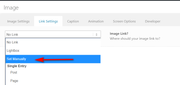
then you will see the link field
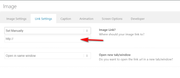
Best regards,
MikeHi,
Sorry, the login didn’t work for me, please check.
I assume your script is the remove img titles?
please adjust to this:(function($){ $(document).ready(function(){ $("img").removeAttr("title"); }); })(jQuery);Best regards,
MikeHi,
Thank you for the login, please include a DropBox link in the Private Content area to your copy of Enfold so we can try.
If you also include ftp access we will be able upload that way too.Best regards,
MikeHi,
Glad to hear you have sorted this out. Thank you for using Enfold.Best regards,
MikeHey adamghart,
Glad to hear, thanks for using Enfold.
For your information, you can take a look at Enfold documentation here
For any other questions or issues, feel free to start a new thread and we will gladly try to help you :)Best regards,
MikeHey kikosanchezestudio,
Sorry for the late reply, typically the Simple Image Sizes plugin works well, did you regenerate the images after you made the change?
Also note that the image you want to change may not be the “featured image”, for example when I change my posts to have no sidebars the featured image is using the “entry_without_sidebar size” in Simple Image Sizes options. Your image is very large so perhaps it’s the “extra_large size” in the options.Best regards,
MikeHey Real-3D,
Sorry for the late reply, I assume that your mouse wheel button is programmed to do that, as mine is not.
But I believe this solution will work for you, or perhaps one of these.Best regards,
MikeHey dorisb123,
Sorry for the late reply, for mobile the scroll to top button is hidden but adding this css will show it:@media only screen and (max-width: 767px){ .responsive #scroll-top-link { display: block !important; } }On your example site the mobile menu is always at the bottom, so do you want your menu fixed to the bottom and always showing, or only show when you reach the bottom?
I believe you can add a sub-menu and use this css:#top .av-submenu-container { position: fixed !important; bottom: 0 !important; height: auto; }Best regards,
MikeDecember 1, 2019 at 2:14 am in reply to: Portfolio grid – only select certain entries to show #1161527Hey bauchope,
Sorry for the late reply and thanks for the login, but I’m not sure where your element is or which portfolios you want to choose, but to achieve this:
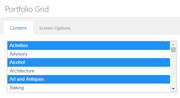
you should hold down the control key while clicking the portfolios you want to choose, that is on a Windows OS at least.Best regards,
MikeHey psipi,
Sorry for the late reply, so as I was not sure which button you are working on I choose the “Anything Is Possible™” button as an example.
Right now you have an inline background-color, this will need to be removed because inline styles win over stylesheets, and the button has a transition and hover opacity.
Otherwise, this css should work for you:#top #wrap_all #main .button-blacksuperpsi a,#top #wrap_all #main .button-blacksuperpsi a:hover { background-color: transparent !important; border-radius: 30px !important; text-decoration: none !important; color: #fff; } #top #wrap_all #main .button-blacksuperpsi a:hover { border: 3px solid green !important; }Are you using the Advanced Layout Builder to create your buttons, or the builder shortcode?
I don’t recommend using csshero, it can make debugging your css harder, but some people like it.Best regards,
MikeHi,
Sorry for the late reply, I have carefully read your messages and followed your links, but I was not able to recreate your error, I was able to put an item into the cart and checked the item links back to the item, I was also able to edit the item which sent me back to the item, I also created an account to purchase and then on the payment page the item was correct.
In all cases the item was correct, please see the screenshots in the Private Content area.
So perhaps I am not following correctly, please try creating a video so I can follow along and recreate your error.Best regards,
MikeHi,
Sorry for the late reply, your logo seemed correct to me on the first load but on the second load it changed to 198px wide giving the squashed look. I found that a javascript (data-pagespeed-no-defer) is loaded in the logo link, which could be part of the issue.
Did you mean to put a script there? I recommend moving it to your header.Best regards,
MikeHey Blue_Bear,
Sorry for the late reply, it looks like your slider is not showing because it is trying to load an insecure script fromhttp://sa.kewego.com/swf/p3/epix.swfif this is correct try changing the link to a https
For the header please try disabling Autoptimize and your caching plugin and the Enfold Theme Options > Performance > JS & CSS file merging and compression and clear your browser cache, If this doesn’t help, please include an admin login in the private content area so we can be of more assistance.Best regards,
MikeHey Aniona,
Sorry for the late reply, and thanks for the screenshots, please try entering the number 2 because the number should be the place in the order, not it’s ID.Best regards,
MikeHi,
Sorry for the late reply, Please try this code in the General Styling > Quick CSS field or in the WordPress > Customize > Additional CSS field:#top #main .avia-video .av-click-to-play-overlay { z-index: 100 !important; }After applying the css, Please clear your browser cache and check.
Best regards,
MikeHi,
Sorry for the late reply, it looks like this page is using a different menu with the Zen Menu Logic plugin, have you tried not using the Zen Menu Logic on this page, like the other page?
I didn’t want to try because I received a warning that the WPML plugin was translating and it could be lost if changes were made.Best regards,
MikeHey Jaispirit,
Sorry for the late reply, do you want to add menu items to the mobile menu, or do you want the mobile menu to show up to 1024px?Best regards,
MikeNovember 30, 2019 at 10:56 pm in reply to: Latest update broken the Styling and will not save any changes #1161500Hi,
Sorry for the late reply and thanks for the links, you don’t need to update the child theme, only the parent theme, which I see you have done.
I compared your live site and demo site and found no difference, so I assume you were able to restore your css?Best regards,
MikeHi,
Sorry for the late reply, and thanks for the login. I see on this page you have the “Header visibility and transparency” set to hide header.
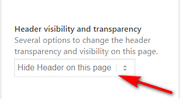
Please try a different option so the header will show, then the breadcrumbs will show.Best regards,
MikeHey r2chh,
Sorry for the late reply, I was not able to login so please try this code in the General Styling > Quick CSS field or in the WordPress > Customize > Additional CSS field:#top.home #av-extra-columns > div > div > div > div { flex-wrap: nowrap !important; }After applying the css, Please clear your browser cache and check.
Best regards,
MikeNovember 30, 2019 at 10:03 pm in reply to: class-grecaptcha.php on line 490 Error After Activating Enfold #1161494Hey SlmnB,
Sorry for the late reply, the error is referring to the recaptcha keys, so either your site key or your secret is wrong or empty.Best regards,
MikeHey Bruno,
Sorry for the late reply, Please try this code in the General Styling > Quick CSS field or in the WordPress > Customize > Additional CSS field:#av-burger-menu-ul > li.menu-item-30 > a { pointer-events: none !important; }After applying the css, Please clear your browser cache and check.
Best regards,
Mike -
AuthorPosts
