

Forum Replies Created
-
AuthorPosts
-
Hi,
Sorry for the late reply, I see that you have quite a lot of custom functions in your child theme functions.php, so when you tested with the 2020 theme and your site was fast, these functions were not used?
So perhaps one or some of these are the issue, have you tried removing these from your child theme and clearing your browser cache to see if you have improved performance?
You also have a dashboard notice: “Important plugins are missing, are outdated or are not supported” for the “Germanized for WooCommerce” plugin and another notice “Your theme (Enfold Child) contains outdated copies of some WooCommerce template files.”
Perhaps try updating this plugin and template files.Best regards,
MikeHi,
Sorry for the late reply, for me it looks like the theme is not loading, is Enfold activate?
Please include an admin login in the Private Content area so we can take a closer look.
I have had success using the Duplicator plugin to migrate sites, perhaps giving this a try will solve this for you.Best regards,
MikeHey Thomas,
Sorry for the late reply, there is not a setting to control this, but we can adjust with some css.
Please link to your page and explain how you would like it to look.
I assume that in mobile, the table should be full-width and centered, and the first column should be 25% and the second column should be 75% so the text is on one line?Best regards,
MikeHi,
Glad we were able to help, we will close this now. Thank you for using Enfold.For your information, you can take a look at Enfold documentation here
For any other questions or issues, feel free to start new threads in the Enfold forum and we will gladly try to help you :)Best regards,
MikeHi,
Thanks for the login, I tried testing your site in maintenance mode, but I was not able to reproduce your issue, I know you said it occurs randomly, but are there any steps we can take to see the error? I also didn’t lose the admin bar.
Both of these items are controlled with cookies, so it seems to be a cookie issue with your browser.
What browser are you using? Do you use an ad-blocker?
I see a facebook customer chat script added to your header.php, perhaps opening this in maintenance mode is resetting the maintenance & admin cookie somehow?
We have a cookie consent patch, but you are not using the cookie consent bar so I don’t think this is the issue, unless you had it on when the error occurred?
If you want to try the patch you would replace the /enfold/js/avia-snippet-cookieconsent.js file with – https://github.com/KriesiMedia/enfold-library/blob/master/temp_fixes/Enfold_4_6_3/avia-snippet-cookieconsent.js
Please save a copy of your original file as a fallback.Best regards,
MikeDecember 21, 2019 at 1:39 pm in reply to: Tabular Data Table (scrollable) inside of a tab section on mobile #1168420Hey navindesigns,
I see that the table is not switching to the mobile view it’s cells are going to 100% width, did you add any custom css that might have change this?
Please include an admin login in the Private Content area so we can examine this closer.Best regards,
MikeHi,
Thanks for the login, as I understand your fontello icon is meant to be a feather but when I look at your uploaded fontello-5e0f7125.zip, which is the imported “ast” font it doesn’t contain a feather

I didn’t find another fontello file in your media library, please try uploading this file and importing into your icon manager, and include a link to the file in the Private Content area so I can check the font code.Best regards,
MikeHey marcoabis81,
Please try changing your css to this instead:#top.page-id-8197 .avia-image-container:hover .avia_image { box-shadow: 3px 6px 16px #000!important; }Best regards,
MikeHi,
This error is due to a file change in WordPress v5.3.1, the dev team has released this fix for the missing icons, please upload the following file via FTP to
\enfold\framework\php\function-set-avia-frontend.php
https://www.dropbox.com/s/gmbg5202rjz1vou/function-set-avia-frontend.php?dl=0
Please save a copy of your old file should you encounter an upload error.
Then clear your browser cache and any cache plugin, and check.
This has been added to the upcoming Enfold update.Best regards,
MikeHi,
@niklas thank you for sharing. @ginnywills did this resolve your issue?Best regards,
MikeHey neotronics,
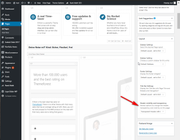
Please go to the backend of your page, to the right sidebar item “Layout” > “Header visibility and transparency” and choose one of the transparency options.
Best regards,
MikeHi,
Please try adding your css in the General Styling > Quick CSS field or in the WordPress > Customize > Additional CSS field.
Also try publishing your page instead of viewing a “preview” of it.
I see from your screenshot you have a caching plugin, please try disabling your caching plugin and your Enfold Theme Options > Performance > JS & CSS file merging and compression setting while you are creating your site, once you are done you can enable these to make your site faster.
Sometimes you may find your css is not specific enough to override the theme css, so you can try adding!important;at the end of your css rules like this:.page-id-3503 .main_color { background-color: red !important; }and add the
#topID to your page ID class, like this:#top.page-id-3503 .main_color { background-color: red !important; }Best regards,
MikeHi,
@Guenni007 thank you for the great explanation with screenshots. @algkent did this help you resolve your question?Best regards,
MikeDecember 21, 2019 at 10:55 am in reply to: white lines between social icons in transparent menu #1168401Hey beachcitiescryo,
Please try this code in the General Styling > Quick CSS field or in the WordPress > Customize > Additional CSS field:#top #header_meta .social_bookmarks li { border-right-style: none !important; border-right-width: 0 !important; }Then clear your browser cache and any cache plugin, and check.
Best regards,
MikeHey bobfurgo,
Thanks for the login and ftp access, I renamed your current parent theme to “enfold-old” via ftp then I uploaded the new “enfold” via ftp and checked that your site is working correctly. Please also check for yourself carefully.
Once you are happy, you (or I) can delete the “enfold-old” via ftp, (not the WP theme page)
Should for some reason you wish to roll-back to the old version, it’s easy to do, simply rename the new “enfold” to “enfold-new” via ftp and then rename “enfold-old” to “enfold” via ftp and then refresh your page.Best regards,
MikeHey algkent,
Here is the effect your css is giving me (bottom one)
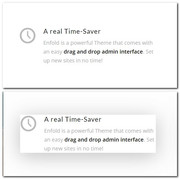
So if you are adding this into your Quick CSS then perhaps you are not targeting the element correctly, if you are adding it into your stylesheet directly, then you need to save your theme settings to update the compresed css file that was built with the Enfold Theme Options > Performance > JS & CSS file merging and compression setting, if you have it turned on.
Otherwise please post the full css code and link to the element page so we can check.Best regards,
MikeHey RezNation,
This is due to a file change in WordPress v5.3.1, the dev team has released this fix for the missing icons, please upload the following file via FTP to
\enfold\framework\php\function-set-avia-frontend.php
https://www.dropbox.com/s/gmbg5202rjz1vou/function-set-avia-frontend.php?dl=0
Please save a copy of your old file should you encounter an upload error.
Then clear your browser cache and any cache plugin, and check.Best regards,
MikeDecember 21, 2019 at 12:53 am in reply to: How do I show portfolio categories on a portfolio item? #1168360Hi,
Thanks for testing, and sorry, I don’t know what I was thinking 🤦♂️
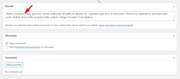
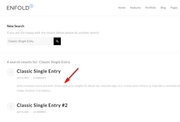
Anyways the portfolio item is built with the Advanced Layout Builder so you have to add the excerpt manually in the excerpt field at the bottom of the page for it to show in the search results.
Sorry for that, please give this a try.Best regards,
MikeDecember 21, 2019 at 12:40 am in reply to: Change name of Avia layout builder on page builder #1168359Hi,
I just tested it on my localhost and it is working, perhaps I confused you by using the text “Enfold Builder”, I changed it to “Bob’s Builder”, please use this script and then clear your browser cache and check again.function custom_rename_script(){ ?> <script> jQuery(window).load(function(){ jQuery("#avia_builder h2.hndle.ui-sortable-handle span").text("Bob's Builder"); }); </script> <?php } add_action('admin_head', 'custom_rename_script');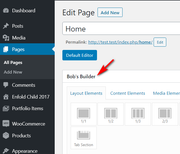
Best regards,
MikeDecember 21, 2019 at 12:27 am in reply to: Remove Enfold logo in General Styling – Main Menu #1168358Hi,
I couldn’t login because I don’t have the .htaccess password but I was able to download your “logo” via ftp, I assume it was not working for you due to caching? Anyways I wrote this script for your child theme to replace the theme panel demo logo, the script only fires in the WordPress admin panel. You will need to upload your image somewhere safe like the media library and change the url in the script, then add the script to your child theme functions.php file in Appearance > Editor:function custom_pr_logo(){ ?> <script> (function($){ $(document).ready(function(){ $("#wpbody-content #pr-logo").attr("src","http://test.test/wp-content/uploads/2019/12/logo_modern.png"); }); })(jQuery); </script> <?php } add_action('admin_head', 'custom_pr_logo');Then clear your browser cache and any cache plugin, and check.
Best regards,
MikeHi,
Sorry for the late reply, to addrel='nofollow'to the social icons at the top of your page you will need to edit line 167 of\enfold\includes\helper-social-media.php
look for:$html .= "<a {$blank} {$aria_label} href='" . esc_url( $icon['social_icon_link'] ) . "' " . av_icon_string( $icon['social_icon'] ) . " title='{$display_name}'>";change to:
$html .= "<a {$blank} rel='nofollow' {$aria_label} href='" . esc_url( $icon['social_icon_link'] ) . "' " . av_icon_string( $icon['social_icon'] ) . " title='{$display_name}'>";To add the
rel='nofollow'to the “Share this entry” at the bottom of your post edit line 436, look for:$this->html .= "<a {$blank} {$aria_label} href='" . esc_url( $share['url'] ) . "' " . av_icon_string( $icon ) . " title='' data-avia-related-tooltip='{$name}'>";change to:
$this->html .= "<a {$blank} rel='nofollow' {$aria_label} href='" . esc_url( $share['url'] ) . "' " . av_icon_string( $icon ) . " title='' data-avia-related-tooltip='{$name}'>";But you can’t override a helper function inside a child theme. The override will only work for template files such as the header.php, loops, templates etc. So please make these changes to the parent theme.
Please save a copy of your original file as a fallback.Best regards,
MikeDecember 20, 2019 at 10:20 pm in reply to: fullscreen slider fallback image flashes before video #1168341Hey darrenheld2,
Sorry for the late reply, it looks like your video is hosted on YouTube, is this correct? The image is showing while the video is being loaded, typically this is not seen. Have you tried hosting the video on your site so it will load quicker?Best regards,
MikeDecember 20, 2019 at 9:49 pm in reply to: Only show page numbers on the left / change text in masonry gallery #1168338Hey operaghostit,
Sorry for the late reply, for your first question, please try this code in the General Styling > Quick CSS field or in the WordPress > Customize > Additional CSS field:.av-masonry span.pagination-meta { display: none !important; }For your second question, I tested replacing the words “load more” with an image of a rocket, which worked well, so you can use this css in your Quick CSS field and replace my url with one to your image:
a.av-masonry-pagination.av-masonry-load-more,a.av-masonry-pagination.av-masonry-load-more:hover {
  background-image: url(https://test.test/wp-content/uploads/2019/12/rocket.png);
  height: 40px;
  background-size: contain;
  background-repeat: no-repeat;
  background-position: 50% 50%;
  color: transparent;
  }
If you would like help adjusting the css please link to your page and the image you would like to use.Best regards,
MikeHi,
Please try this code in the General Styling > Quick CSS field or in the WordPress > Customize > Additional CSS field:.av-subheading.av_custom_color { opacity: 1 !important; }this rule is general in case you had other sub-headings that you needed to be corrected, but if you find it is effecting sub-headings that you don’t want, then add a custom class to the element and we will help adjust the css.
Best regards,
MikeDecember 20, 2019 at 1:02 pm in reply to: How do I show portfolio categories on a portfolio item? #1168108Hi,
Yes, I understand, if it is the above function causing the error then perhaps we can rewrite it, but please test without the function so we can isolate the error.Best regards,
MikeHi,
Thank you for the login,
1) I see that you are missing the icons in the icon box, this is due to a file change in WordPress v5.3.1, the dev team has released this fix for the missing icons, please upload the following file via FTP to
\enfold\framework\php\function-set-avia-frontend.php
https://www.dropbox.com/s/gmbg5202rjz1vou/function-set-avia-frontend.php?dl=0
Please save a copy of your old file should you encounter an upload error.
Then clear your browser cache and any cache plugin, and check.
2) I was able to change two of the headings, please check.
3) the layout of both pages are stretched for me, did you already correct this?Best regards,
MikeHi,
Ok, shall we keep this open until you can update the php, or close it and open a new one if needed?Best regards,
MikeHi,
Glad we were able to help, we will close this now. Thank you for using Enfold.For your information, you can take a look at Enfold documentation here
For any other questions or issues, feel free to start new threads in the Enfold forum and we will gladly try to help you :)Best regards,
MikeDecember 19, 2019 at 2:10 pm in reply to: Problem with slider menu overlaying video and preview image under slide on mobil #1167735Hi,
Sorry this is/was the intended behavior all along, Safari and Chrome announced last year that they are not supporting auto playing video on mobile, thus the need for a fallback image. It was the error that seemed to show the video on mobile on your site.
Please try using the layerslider as your slider.Best regards,
MikeDecember 19, 2019 at 1:38 pm in reply to: How do I show portfolio categories on a portfolio item? #1167725 -
AuthorPosts
