Forum Replies Created
-
AuthorPosts
-
Hey talltini,
Thanks for the link to your site, In your css “font-color” is not valid, please use “color” like this:.avia-cookiemessage-bottom { background: #a1c2a2 !important; color: #f5f5dc !important;} .avia-cookie-consent-button { background-color: #f5f5dc !important;}Did you add this css to the Enfold Theme Options > General Styling > Quick CSS field:
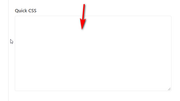
or did you fill in the fields in the Enfold Theme Options > Advanced Styling > Cookie Consent Message Bar:

If you used the Enfold Theme Options > Advanced Styling > Cookie Consent Message Bar and included the!important;please remove this. If you used Enfold Theme Options > General Styling > Quick CSS then perhaps there is a missing bracket earlier in your css braking your code, please try copying all of your css and add it to WordPress > Customize > Additional CSS as it will check your code for errors and give you hints to repair.
If this doesn’t help, please include an admin login in the private content area so we can be of more assistance.To change the font color of the message below the contact form, Please try this code in the General Styling > Quick CSS field:
p.av_form_privacy_check.av_contact_privacy_check {
	color: red !important;
}
Please adjust the color to suit.
I see that you have html code showing on your page:

is this something you are working on?
I also note that you are using Enfold v4.4.1 with WordPress v5.3.2, you can expect errors with these as Enfold v4.4.1 was not WordPress v5 ready. Please update Enfold, but unfortunately, due to a change at Theme Forest around that version you will need to update via FTP.The easiest and safest way to update is to download the newest version from Theme Forest and rename your current theme folder to “enfold-old” via ftp then upload the new “enfold” folder and check that your site is working correctly.
Once you are happy you can delete the “enfold-old” folder via ftp, (not the WP theme page)
Should for some reason you wish to roll-back to the old version, it’s easy to do, simply rename the new “enfold” folder to “enfold-new” via ftp and then rename “enfold-old” to “enfold” then refresh your page.
Please don’t try to overwrite the theme folder, as this will leave old files behind and cause errors.
If you are not comfortable with this then also include ftp access in the Private Content area and we can assist.Best regards,
MikeHi,
Happy New Year!
Glad to hear you have somewhat found the issue. Unfortunately, it looks like you will need to remove functions one at a time to find the error, but since this seems to only occur with logged-in users I would start with functions that include “is_user_logged_in”, “admin_head”, “admin_enqueue_scripts”, “is_admin”, “current_user”
I would also investigate the custom scripts.Best regards,
MikeJanuary 4, 2020 at 3:10 pm in reply to: Grid Layout is showing all the same post in all categories #1170287Hi,
Thanks for the ftp access, but I was having some trouble uploading, I believe it’s because of my VPN.
Please see Private Content area.Best regards,
MikeHi,
Sorry, I was not able to login to test again to see if I can now recreate your issue, please check the login.Best regards,
MikeJanuary 4, 2020 at 2:25 pm in reply to: Tabular Data Table (scrollable) inside of a tab section on mobile #1170281Hi,
I believejustify-content: space-evenly;works better thanjustify-content: space-around;in this case.
I changed your css to this to demonstrate, pleas check:.js_active .av-tab-section-tab-title-container { display: flex!important; justify-content: space-evenly; padding-top: 0px; padding-bottom: 0px; }You can also try these options
Best regards,
MikeHi,
Thanks for the login, I took a look at your homepage and opened it in the Advanced Layout Builder and it looks correctly, I didn’t save as you said it looked “screwed up” without saving.
Please include a screenshot of what you are seeing “screwed up” so we can better understand. Or perhaps include a screencast so we can see the steps you are taking.
you can add screenshots by uploading your images to a service such as postimages.org and pasting the html code, or link given in your post or Private Content area. you can upload a video to DropBox and post the link in the Private Content area.Best regards,
MikeHi,
Thank you for the feedback, in this video (#post-1169104): https://www.screencast.com/t/dQblKzer where you use the template to create the page and it shows broken shortcode error:
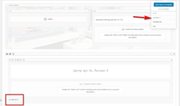
this means that the template contains the error and can not be used without spreading the error to every new page.
Then later in the video you used an English template that didn’t seem to contain the error, but you dragged elements from the broken template into the working area:

I recommend trying to create a new Ukrainian translation page from the English page with the duplication functionIn this video (#post-1169110): https://www.screencast.com/t/4OIW3M7VWxa were the page has a shortcode error and you add a new block and remove the old block that “looks” like it contains the error, this typically doesn’t work because were you “see” an error is usually after where an error really occurs. Sometimes the auto-repair function in the parser can repair a page if the error is not too bad, but when it can’t, such as in your case, you will need to delete the page and create a new one, without templates and copied shortcode.
In this post (#post-1169101) you provided some new information, you said all pages and languages were working correctly before you moved your site to a new host, then this error started showing.
So this is a very good info, do you still have a backup from the old server before the move? How did you move the site? Can you create a testing sub-domain and try using your backup to recreate your site?Best regards,
MikeHi,
Glad we were able to help, we will close this now. Thank you for using Enfold.For your information, you can take a look at Enfold documentation here
For any other questions or issues, feel free to start new threads in the Enfold forum and we will gladly try to help you :)Best regards,
MikeHi,
Thanks for the login but I didn’t find any helpful info in your server logs and your settings look fine. As you pointed out this seems to only occur in the Ukrainian language.
The shortcode structure is broken as shown in your screenshots:
https://drive.google.com/file/d/16uuczPSgmjnJvA2YIsU6ZuNT_q0N15JS/view?usp=drivesdk
https://drive.google.com/file/d/1pRPdUkzbrgZ_pzrc5k3JDKoMVPtKSHAl/view?usp=drivesdk
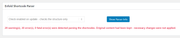
and the auto repair function in the parser is not correcting.
Typically this kind of shortcode error is due to incorrect html code in element fields, but in your case it seems to have occurred during the translation. For example you can see this error:

where thee=''][/av_heading]was duplicated. Have you asked WPML if they have seen similar issues with the Ukrainian language?
Have you tried deleting the Ukrainian pages and re-translating with your other plugins disabled?Best regards,
MikeHi,
Sorry for the late reply, I tested your Bookings plugin with Enfold for the product in the Private Content area and it seems to work for me, please see the screenshot in Private Content area.
I used the calendar to find dates that were available to book, the next available date was March 7 2020
then I choose a time, the next available time was 13:00
then I clicked the “Book Now” button and was taken to the order page to pay.I couldn’t see the screenshots you posted above so I’m not sure what they are pointing out.
Please try these steps and confirm that this also worked for you.Best regards,
MikeDecember 30, 2019 at 1:35 pm in reply to: Dataprotection with Enfold? How to set header-tags? #1169086Hi,
So are we to understand that you have followed the recommendation and this issue has now been corrected and we should close this thread?Best regards,
MikeHey zwachm,
Sorry for the late reply, I have reviewed your post at WPML and see they have ran a compatibility test in their sandbox and was not able to reproduce your error, they have also asked for you to post what changes in the settings you have made so they can continue testing. Perhaps you didn’t see this request so I’m just trying to point this out so they can continue with the test.Best regards,
MikeHi,
Sorry for the late reply, to show the slideshow arrows on mobile, Please try this code in the General Styling > Quick CSS field or in the WordPress > Customize > Additional CSS field:@media only screen and (max-width: 767px){ .responsive #top .avia-slideshow-arrows.avia-slideshow-controls a { display: block !important; opacity: 1 !important; } }Best regards,
MikeHi,
Sorry I’m not sure why your hosting provider asks the server name and port, as this is your server and port. There is no part of the theme running on our server?
For your cURL error I see that you are using the Really Simple SSL plugin and they have this post explaining how to solve the cURL error cURL is a part of the PHP install and it is suggested to update the PHP version and change the “timeout” or check your mod_security module and firewall which may be blocking the cURL request. This must be done by your hosting provider.Best regards,
MikeDecember 30, 2019 at 12:37 pm in reply to: Grid Layout is showing all the same post in all categories #1169082Hi,
Sorry for the late reply, please try updating WordPress and include ftp access to your staging site so we can try installing the latest Enfold beta to see if this corrects your category pagination.Best regards,
MikeDecember 30, 2019 at 11:57 am in reply to: Add caption in lightbox under image in masonry gallery #1169081Hi,
Sorry for the late reply, and thanks for the login. I tested @Guenni007 script on your page by adding only the script part to a code block element between script tags and found it to be adding the caption below the image’s lightbox popup. Here is a screenshot:

This is what you wanted correct?
I left the script and code block on your page so you can test, you can remove by deleting the code block element that is under your full-width easy slider.
If you find this is what you wanted you can remove the code block and add the full code snippet from @Guenni007 above to your child theme functions.php file in WordPress > Appearance > Editor , you only need to change the second line toif(is_page(3178)){as this is your page ID.
Best regards,
MikeHi,
Unfortunately for some of your sliders the amount of text is too much for the small visible area of mobile devices, please consider reducing the amount of text to fit in the area.Best regards,
MikeHi,
Sorry for the late reply, I took a look at your /special-report-research/ page and found in your technical data of your report the “less-than” signs broke the page shortcodes, so to correct I replaced all of the less-than signs with this html:<span class="lthan"></span>and added this css to your Enfold Theme Options > General Styling > Quick CSS field:
span.gthan:before {
  content: ">";
}
span.lthan:before {
  content: "<";
}
and now the page is showing correctly. Please try this for any other pages that might have the error.
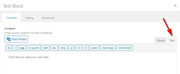
Please note that when you add this html to your text element, please add it through the “text” tab and not the “visual” tab:
If you are using the “greater-than” sign on any pages please use this html instead:<span class="gthan"></span>Best regards,
MikeHi,
Sorry for the late reply, when I look at your homepage tab section, everything seems to be on one line, is this the right section?

Best regards,
MikeHi,
Sorry for the late reply, I added this css to your Quick CSS:.av-social-link-whatsapp a::before { font-family: 'entypo-fontello'; content: ''; }The WhatsApp icon is now showing, please clear your browser cache and check.
Best regards,
MikeHi,
Thank you for the shortcode, I tested on my localhost and the slider at the top of the page auto starts and pauses and plays on click correctly in both Chrome & Firefox.
The same page on your site auto starts and pauses and plays on click correctly in both Chrome & Firefox, but once the video plays for a few minutes it doesn’t respond to clicks in Firefox, it just keeps playing.
While I found no errors in the Firefox console it seems to only have this behavior on your site, perhaps there is a conflict with one of your plugins or a script.
Please try disabling your plugins and scripts and clearing your browser cache to see if this solves.Best regards,
MikeDecember 29, 2019 at 3:08 pm in reply to: Changing Highlighted Buttons In Menus With Enfold Update #1169072Hi,
Sorry for the late reply, I Enabled the Avia Layout Builder Debugger and found the image in the shortcode and removed it. I’m not sure how this occurred but if you find it again we will be happy to assist. I see that you have many saved templates in the Advanced Layout Builder, so if this section was from a template then there is a chance the template contains the error.Best regards,
MikeHi,
Did you try disabling the plugin “WooCommerce Blocks” to see if this is causing the error as @Yigit thought?
If this works then you could also try updating it to the latest version.Best regards,
MikeHi,
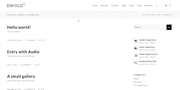
Sorry for the late reply, Try adding this code to the end of your functions.php file in Appearance > Editor:function remove_excerpt_from_archive(){ ?> <script> (function($){ $(document).ready(function(){ $('.archive').each(function() { $(this).find( '.entry-content' ).remove(); $(this).find( '.big-preview' ).remove(); }); }); })(jQuery); </script> <?php } add_action('wp_footer', 'remove_excerpt_from_archive');It will remove the excerpt and featured image from the archive pages and leave the title and meta, I was not sure if you wanted the meta or not, here is a screenshot:
Best regards,
MikeHey TerabyteTechnology,
The bundled version of LayerSlider will be updated with theme updates, which we do depending on our own release cycle and depending on critical updates. The users cant update the bundled version of the layerslider, even if actived.
However, if a user wishes to update before the next theme update, they can simply purchase a copy of the layerslider, upload it as a plugin and activate it. It will then overwrite the bundled version, and then the user is in full control of LayerSlider updates.
You can read more about this in our documentationBest regards,
MikeHi,
Sorry for the late reply, I didn’t find the menu item ‘discover, wireless sensors’ in your mega menu and I’m not sure if you want to add an icon next to your mega menu text or replace the text with an icon, so I will show you both solutions.
To add an icon before the mega menu text we will use the following css, note that each menu item has a different ID, so adjust to target each item along with the icon code and color.#menu-item-3487 > .mega_menu_title > a:before { content: "\e894"; font-family: entypo-fontello; color: #3ec607; position: relative; padding-right: 5px; }To replace the menu text with an icon use this css:
#menu-item-3488 > .mega_menu_title > a {
	color: transparent !important;
}
#menu-item-3488 > .mega_menu_title > a:before {
  content: "\e8a7";
  font-family: entypo-fontello;
  color: #3ec607;
  position: relative;
  padding-right: 5px;
}
Here is what these would look like:

you can add the above css to your Enfold Theme Options > General Styling > Quick CSS field to test, please be sure to clear your browser cache after adding.Best regards,
MikeHi,
For the css solution to the facebook social, Please try this code in the General Styling > Quick CSS field or in the WordPress > Customize > Additional CSS field:.social_bookmarks_facebook a::before, .av-social-link-facebook a::before { font-family: 'entypo-fontello'; content: ''; }If you are unsure with correcting the error with the patch file, then we can assist with this if you include an admin and ftp login.
Best regards,
MikeHi,
Sorry for the late reply, when I test the Accordeon Slider on a clean install with no demos installed the default setting for the Caption Title Header for the Accordeon Slider is a dark overlay with white text.
The same is true for the Enfold Default Demo
and for the Enfold 2017 Demo
So I’m not sure why you are getting a different result, but we are more than happy to help you adjust the colors to suit your needs.Best regards,
Mike -
AuthorPosts