

Forum Replies Created
-
AuthorPosts
-
January 23, 2020 at 2:25 pm in reply to: set the same font for different languages frontpage #1177609
Hi,
Thank you for the video, so the reason the page has a slight scroll is because the layerslider is set to 100% visual height and then you have a small footer at the bottom of the page.
So to correct we will make the layerslider 92% percent high so the footer will also show without scroll.
Please try this code in the General Styling > Quick CSS field or in the WordPress > Customize > Additional CSS field:@media only screen and (min-width: 767px) { #top.home #layer_slider_1 { height: 92vh !important; } }please feel free to adjust to suit.
I didn’t understand your second question about the logo, do you want the logo on the right of the site name? When I look on a desktop screen I don’t see this, I see that the site name and the logo together is one image. Perhaps you had a different image you were using at one time?Best regards,
MikeHi,
Glad to hear this works, I had added the post ID (#top.postid-41520) to the code for it to work on the one post to test, and I was not sure if each post was going to be the same or not. You can remove the “#top.postid-41520” part of the code.So I investigated this further and created a test post on your site and found that this css in the theme was causing the issue:
.avia_mobile .avia-full-stretch {
    background-attachment: scroll !important;
}
So even though you had set the image to “fixed” it was actually getting set to “scroll” and moved the image up and was clipped, I corrected by adding this css in your Quick CSS:
.avia_mobile #top #main .avia-bg-style-fixed .avia-full-stretch {
    background-attachment: fixed !important;
}
Please clear your browser cache and check the test post on mobile. Then please check your other pages on mobile to see if is working for them and if so you can remove the first css I gave you, or use both, it’s up to you.
You may find the first css handy to fine tune some background positions with a pixel value rather than a basic “top” or “center”
For your other question, you can define this custom css with a class and add the class in the color section, please let us know if you still want to do this, I’m not sure if the new info changes your thought about this.Best regards,
MikeHi,
For the table to have a max width of 270px (70px+200px) please try this css:@media only screen and (min-width: 768px) { #top.single-product .avia-data-table th.avia-desc-col { text-align: right !important; width: 70px !important; padding: 0px !important; } #top.single-product .avia-data-table .avia-highlight-col { width: 200px !important; } #top.single-product div .avia-table { width: 270px !important; } }but I find that the first column text is larger than 70px, you can change the values in the code to suit, perhaps to 100px for the first column, 300px for the second, and 400px for the total table width.
@media only screen and (min-width: 768px) {
#top.single-product .avia-data-table th.avia-desc-col {
    text-align: right !important;
    width: 100px !important;
    padding: 0px !important;
}
#top.single-product .avia-data-table .avia-highlight-col {
    width: 300px !important;
}
#top.single-product div .avia-table {
    width: 400px !important;
}
}
also if you want the rows in the second column to have the same background colors, the change the second column to default from highlight:
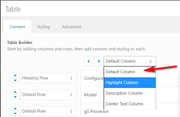
Best regards,
MikeHi,
Thank you for the screenshot mockup, first add this css to remove the blue circles and gray line, Please try this code in the General Styling > Quick CSS field or in the WordPress > Customize > Additional CSS field:.avia-toc-style-elegant { padding-left: 0px !important; } .main_color .avia-toc-style-elegant a:first-child:after, .main_color .avia-toc-style-elegant a.avia-toc-level-0:after { border-color: #fff !important; } .main_color .avia-toc-style-elegant a:before { border-color: #fff !important; }Then to add a number before each TOC link Try adding this code to the end of your functions.php file in Appearance > Editor:
function custom_toc_script(){
  ?>
  <script>
(function($){
  $(document).ready(function(){
var i = 0;
$('a.avia-toc-link').each(function(index, element){
    i++;
    $(element).text(i + '. ' + $(element).text());
});
});
})(jQuery);
</script>
<?php
}
add_action('wp_footer', 'custom_toc_script');
unfortunately, since the number is added to the link we can not change the color to red as in your mockup, I also only tested this on a TOC with no childern, as in your mockup.
This is the expected results:
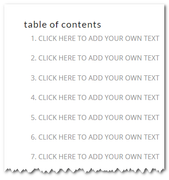
Please clear your browser cache and check.
If this doesn’t help please include the url to the page in question so we can take a closer look.Best regards,
MikeHi,
Thank you for the feedback, to adjust the space between these rows please try this css in the General Styling > Quick CSS field or in the WordPress > Customize > Additional CSS field, I assigned percentages so the values would be somewhat flexible, and targeted the main screen sizes, 425px and under for mobile, 768px, 1024px, 1440px, and above for desktop, and included a little extra around these sizes. This should cover all real devices.@media only screen and (min-width: 1299px) { #top.home #av_section_1 > div > div.container > main > div > div > div:nth-child(4) { margin-top: -10% !important; } } @media only screen and (min-width: 999px) and (max-width: 1050px) { #top.home #av_section_1 > div > div.container > main > div > div > div:nth-child(4) { margin-top: -25% !important; } } @media only screen and (min-width: 768px) and (max-width: 800px) { #top.home #av_section_1 > div > div.container > main > div > div > div:nth-child(4) { margin-top: -40% !important; } } @media only screen and (max-width: 767px) { #top.home #av_section_1 > div > div.container > main > div > div > div.flex_column_table > div.flex_column:nth-child(n+2),#top.home #av_section_1 > div.av-section-color-overlay-wrap > div.container > main > div > div > div:nth-child(4) { margin-top: -30% !important; } }After applying the css, Please clear your browser cache and check.
Best regards,
MikeHi,
Thanks for the link, I tested your site in Chrome, Firefox, Edge & IE11 but couldn’t find any errors please include a screenshot of the error that you are seeing.
You can add screenshots by uploading your images to a service such as postimages.org and pasting the html code, or link given in your post or Private Content area.Best regards,
MikeJanuary 22, 2020 at 12:14 pm in reply to: Headline Rotator centre alignment not working for Prepended static text line #1177146Hi,
Sorry I was not able to see your page because it is in maintenance mode. I recommend opening a new thread with your admin login in the Private Content area, Since this is not your thread posting your login here will not be private. You can post a link to your new thread here so it will be easier to find.Best regards,
MikeJanuary 22, 2020 at 12:00 pm in reply to: Purchased theme and have 404 errors – installed on a staging area #1177136Hi,
For the full-screen video try using the layerslider with a video background, for the header to show while scrolling up try this solution.Best regards,
MikeJanuary 22, 2020 at 3:51 am in reply to: set the same font for different languages frontpage #1176998Hi,
Thanks for the video, I took a look and cleared my cache and the 3 pages look correct, when you clear your cache in Chrome try hitting “F-12” to bring up the developers tools and then right click on your reload button and choose “empty cache and hard reload”
you can only get this menu option when the developers tools are showing, it looks like this:
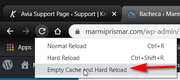
Best regards,
MikeHi,
Thanks for the FTP access, I tried to upload the new theme but about halfway though I got the error:
550 Can't create directory: Disk quota exceeded
Please check with your webhost to remove the Disk quotaBest regards,
MikeJanuary 21, 2020 at 2:49 pm in reply to: set the same font for different languages frontpage #1176751Hi,
I took a look at your slider on your 3 home pages and it seems to be working, Please see the screenshots in Private Content area.
But I made a video of the steps I took last time, I first deleted the current layerslider translations, and went back to the screen to show it was gone, then I opened and saved the layerslider so it would be in the translations again, to my surprise they were already translated, so I added the number “1” to the translations to show editing them would work, then I went to all 3 homepages to see if the number “1” was there, and it was.Best regards,
MikeHi,
Yes, you can add the page IDs into the code like this:@media only screen and (max-width: 767px) { #top.page-id-10767 .header_color .header_bg,#header_meta { background-color: transparent !important; } #top.page-id-10767 .logo img { opacity: 0; } #top.page-id-10767 .logo a { background-image: url(https://scalpinnovation.dk/wp-content/uploads/2018/01/scalpinnovation-header-logo-neg-1.png); background-repeat: no-repeat; background-size: contain; } #top.page-id-10767 .header_color:not(.av_header_transparency) div .av-hamburger-inner,#top.page-id-10767 .header_color:not(.av_header_transparency) div .av-hamburger-inner:before,#top.page-id-10767 .header_color:not(.av_header_transparency) div .av-hamburger-inner:after,.html_av-overlay-side-classic #top.page-id-10767 .av-burger-overlay li li .avia-bullet { background-color: #fff !important; } #top.page-id-10767 .header_color:not(.av_header_transparency) .social_bookmarks a { color: #fff !important; } #top.page-id-10767 .avia-menu.av_menu_icon_beside { border-right-width: 0 !important; } }just adjust the page IDs to suit, this is the page ID to the page we have been testing on.
Best regards,
MikeHi,
You will have to change your cookie settings “Default Cookie Behaviour” to “All cookies and services are accepted on first page load, user can opt out”Best regards,
MikeHi,
Glad we were able to help, we will close this now. Thank you for using Enfold.For your information, you can take a look at Enfold documentation here
For any other questions or issues, feel free to start new threads in the Enfold forum and we will gladly try to help you :)Best regards,
MikeHi,
I did a quick search & test for a popup plugin and found WP Popups it says it works with CF7 and in my test it worked fine with Enfold and the Enfold shortcode and was able to link to a button using a custom class trigger in the popup options, you’ll see the option under triggers when you build your popup.As for the next & previous, we don’t have an easy way to add these into a custom location or assign them to different buttons like you are asking, but I was able to write this function to get the current next & previous links and replace the links in your custom buttons. This will work now but if your buttons change when you add the popup we may need to adjust the script, but after that it should work for every product.
Try adding this code to the end of your functions.php file in Appearance > Editor:
function custom_next_prev(){
	?>
  <script>
(function($){
  $(document).ready(function(){
    var getprev = $("a.avia-post-nav.avia-post-prev").attr("href");
    var getnext = $("a.avia-post-nav.avia-post-next").attr("href");
    $(".woocommerce-product-details__short-description .avia-buttonrow-wrap a.avia-button:nth-child(2)").attr("href", getprev);
    $(".woocommerce-product-details__short-description .avia-buttonrow-wrap a.avia-button:nth-child(3)").attr("href", getnext);
});
})(jQuery);
</script>
<?php
}
add_action('wp_footer', 'custom_next_prev');
Best regards,
Mike-
This reply was modified 6 years, 2 months ago by
Mike. Reason: correct an error
January 21, 2020 at 3:57 am in reply to: set the same font for different languages frontpage #1176537Hi,
I think that polylang & layerslider was difficult to work with as the polylang support threads pointed out but I was glad that it finally worked. Perhaps you would not need to change the layerslider translations again once your final edit is sorted out so maybe it worth giving it one more try? But if you think you are going to make many changes to the layerslider then perhaps WPML would be better.Best regards,
MikeHi,
Thank you for the feedback, I assume that you would like the white header before scroll and transparent after scroll with a white burger menu and social icons, in this case please try this css:@media only screen and (max-width: 767px) { .header_color .header_bg,#header_meta { background-color: transparent !important; } .logo img { opacity: 0; } .logo a { background-image: url(https://scalpinnovation.dk/wp-content/uploads/2018/01/scalpinnovation-header-logo-neg-1.png); background-repeat: no-repeat; background-size: contain; } .header_color:not(.av_header_transparency) div .av-hamburger-inner,.header_color:not(.av_header_transparency) div .av-hamburger-inner:before,.header_color:not(.av_header_transparency) div .av-hamburger-inner:after,.html_av-overlay-side-classic #top .av-burger-overlay li li .avia-bullet { background-color: #fff !important; } .header_color:not(.av_header_transparency) .social_bookmarks a { color: #fff !important; } .avia-menu.av_menu_icon_beside { border-right-width: 0 !important; } }Please see the screenshot in Private Content area.
I see that when your site is at tablet width, which is above 768px your header is not sticky and so doesn’t become transparent, so I assume what you meant was when it is below 767px while the header is still sticky?
After applying the css, Please clear your browser cache and check.Best regards,
MikeHey Wagner Henrique,
Thanks for your question, since v4.0.7 Enfold has grown a lot, to upgrade from this version you will have to do so via FTP, please ensure your PHP version is 7.x and follow these steps:
The easiest and safest way to update is to download the newest version from Theme Forest and rename your current theme folder to “enfold-old” via ftp then upload the new “enfold” folder and check that your site is working correctly.
Should for some reason you wish to roll-back to the old version, it’s easy to do, simply rename the new “enfold” folder to “enfold-new” via ftp and then rename “enfold-old” to “enfold” then refresh your page.
Once you are happy you can delete the “enfold-old” folder via ftp, (not the WP theme page)
Please don’t try to overwrite the theme folder, as this will leave old files behind and cause errors.As for your questions I will try to answer them below:
1 – Do I need to configure the whole site again after an upgrade?
no
2 – Do I need to create the website pages again?
no
3 – Did you have speed gains from version 4.0.7 to version 4.7.1?
yes, please see this post and this one.
4 – Does the new theme support an E–commerce?
yes – woocommerce is well supported
5 – Does the new theme have SEO?
yes it supports basic seo, but many people choose to use a plugin such as yoast for advanced seo.
6 – My products have several .pdf, does the new theme support working with .pdf in the cloud?
yes – we had an issue with pdf links but our latest update solved this, woocommerce also supports pdf.
7 – Am I at risk of losing my current pages?
no, but if you have customize any theme files directly you will want to back them up and add them to a child theme, so your changes will not be lost with future theme updates Read about it & Get it here
8 – Do You have an efficient SEO optimization?
same as #5I recommend checking with your webhost to see if you have the one click staging site option, this is a option in most cPanels to create a staging clone of your site so you can test an update on it and your live site will stay up and running untouched while you test the new features.
Here are some screenshots of what it would look like:

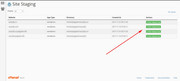
Best regards,
MikeHey Carsten,
Thanks for the link, for a transparent header before scroll, Please try this code in the General Styling > Quick CSS field or in the WordPress > Customize > Additional CSS field:@media only screen and (max-width: 766px) { .responsive #top #main {margin-top: -80px!important;} #top #wrap_all .av_header_transparency {background-color: transparent!important;} div#header_main > .container {display: block !important;} }but this is a little hard to see your logo, perhaps you could change your logo to white for before scroll.
For a transparent header after scroll, try this css:@media only screen and (max-width: 766px) { .header_color .header_bg,#header_meta { background-color: transparent !important; } }For always transparent, try this css:
@media only screen and (max-width: 766px) {
  .header_color .header_bg,#header_meta {
  background-color: transparent !important;}
  .responsive #top #main {margin-top: -80px!important;}
  #top #wrap_all .av_header_transparency {background-color: transparent!important;}
  div#header_main > .container {display: block !important;}
  #top .av_header_transparency #header_meta {
    border-bottom: 0 none transparent;}
}
Best regards,
MikeJanuary 20, 2020 at 1:28 pm in reply to: Hide §19 (1) UStG small business notice in product list #1176284Hi,
Thanks for the login, I removed your Quick CSS code and changed your child theme stylesheet css to this:.product .inner_product p.wc-gzd-additional-info.small-business-info { display: none !important; }It is now working, please clear your browser cache and check.
Best regards,
MikeHi,
Thanks @Guenni007 for the update and for sharing.Best regards,
MikeHi,
Oh, I see, so you want your “next” & “previous” buttons to link the same way as the “next” & “previous” fly-outs on the page?
Please see the screenshot in Private Content area.
To make a popup please read this article that has the script to use and if you follow the link in the post you will see the HTML & CSS.
If you are going to use the CF7 (Contact Form 7) it will give you the shortcode to create the form which you can add to the popup html. In CF7 you can use placeholders or Set the Default Value in the field. (advanced technique)Best regards,
MikeHi,
Glad we were able to help, we will close this now. Thank you for using Enfold.For your information, you can take a look at Enfold documentation here
For any other questions or issues, feel free to start new threads in the Enfold forum and we will gladly try to help you :)Best regards,
MikeHi,
Glad we were able to help, we will close this now. Thank you for using Enfold.For your information, you can take a look at Enfold documentation here
For any other questions or issues, feel free to start new threads in the Enfold forum and we will gladly try to help you :)Best regards,
MikeJanuary 20, 2020 at 12:42 pm in reply to: Purchased theme and have 404 errors – installed on a staging area #1176265Hi,
Glad to see that you live site is working, so reading your steps above seems that you tried to overwrite the theme files with the new version, this left old files behind from version 3.5.4 and caused the crash, also moving your staging site “.htaccess” file to your live site caused your other errors, each “.htaccess” & “wp-config.php” is unique to each site.
To update your theme please follow these steps:The easiest and safest way to update is to download the newest version from Theme Forest and rename your current theme folder to “enfold-old” via ftp or your cPanel file manager then upload the new “enfold” folder and check that your site is working correctly.
Should for some reason you wish to roll-back to the old version, it’s easy to do, simply rename the new “enfold” folder to “enfold-new” via ftp or your cPanel file manager and then rename “enfold-old” to “enfold” then refresh your page.
Once you are happy you can delete the “enfold-old” folder via ftp or your cPanel file manager, (not the WP theme page)
Please don’t try to overwrite the theme folder, as this will leave old files behind and cause errors.Perhaps removing the “index.php” from your links caused them to point to your live site, but this will be the correct step to take for your live site. For your staging site replacing the “index.php” in your links with “/staging586/” would have solved.
Best regards,
MikeJanuary 20, 2020 at 12:17 pm in reply to: set the same font for different languages frontpage #1176252Hi,
Thank you, as I research further I find that polylang & layerslider don’t seem to play together:
polylang support
polylang support
enfold support
So I tried setting all of the homepages to use the same IT slider and used the “cleanup database with unused text strings” option in polylang to clear out all of the old translions.
Then I opened each of the IT slides in layerslider and saved, then I went to the “translation strings” in polylang and manually set each language to the correct translation using Google Translate:
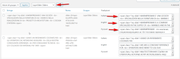
and then saved the “translation strings” at the bottom of the page.
Now each language homepage shows the slider with the correct language, please clear your browser cache and check.Best regards,
MikeHi,
Well done on your buttons, I see that your “call us” and “enquere” buttons are opening popups. I also see that your “enquere” has a CF7 form. So I guess your last question is the redirect on submit?
For that please try the Redirection for Contact Form 7 plugin.
While this can be done with javascript, since you are using CF7 I would recommend using this plugin to keep everything working well.
Please let us know if there is anything else we can assist with.Best regards,
MikeHi,
I have seen another advanced thread on this topic that was reported as working. I have not tried it but @Guenni007 typically posts very good code, perhaps give this a try.Best regards,
MikeJanuary 19, 2020 at 9:58 pm in reply to: Hide §19 (1) UStG small business notice in product list #1176125Hey DivaNails,
Please try adding the css to the Enfold Theme Options > General Styling > Quick CSS field.
After applying the css, Please clear your browser cache and check.
If this works then you have the css & js file merging enabled, while making your css edits directly into the child theme style.css.
The merged files only update then the theme settings are updated, such as clicking the big blue button “save all changes”, saving the style.css file doesn’t update the merged files.
So you could save the theme settings to force re-building the merged file, if the button is not clickable, try adding a blank space into the Quick CSS field to activate the button.For best results, try disabling the merged css & js, and disable any caching plugin, and enter your css into the “Quick CSS” field while you are creating your site. Once you are done you can move all of your css to the style.css and enable your caching & merging.
I hope this helps explain what is happening.If this doesn’t help, please include an admin login in the private content area so we can be of more assistance.
Best regards,
Mike -
This reply was modified 6 years, 2 months ago by
-
AuthorPosts
