

Forum Replies Created
-
AuthorPosts
-
Hi,
Thanks for the link to your page, this script will replace the link and add the popup class in every “show_details_button” on your site to your popup, I tried to be very specific with the classes so it should not affect other buttons.
Try adding this code to the end of your functions.php file in Appearance > Editor:function custom_button_script(){ ?> <script> (function($){ $(document).ready(function(){ $(".product .avia_cart_buttons a.button.show_details_button").attr("href", "#").addClass('spu-open-6686'); }); })(jQuery); </script> <?php } add_action('wp_footer', 'custom_button_script');You will note that the button’s design will change a little because of your css for that button class, I assume that is ok?
Best regards,
MikeFebruary 7, 2020 at 2:44 pm in reply to: Hide featured image on single portfolio… recursively #1182317Hey Julien,
Try adding this code to the end of your functions.php file in Appearance > Editor://disable featured image function disable_featured_image( $html, $post_id, $post_image_id ) { if(is_single()) { return ''; } else return $html; } add_filter( 'post_thumbnail_html', 'disable_featured_image', 10, 3 );Best regards,
MikeHey MAKSIMS,
Sorry for the late reply, do you mean that all of the buttons will trigger the same CF7 pop-up?
If it is the button I’m thinking of there is not a built-in way to change the link of the button, but we may be able to add a function to do this. Please link to your page with the button and include the link to the pop-up so we can investigate.Best regards,
MikeHi,
Please try this code in the General Styling > Quick CSS field or in the WordPress > Customize > Additional CSS field:#top.page-id-800 #av-layout-grid-1 .flex_cell.av_one_third { padding: 360px 0px 0px 0px !important; } #top.page-id-800 #av-layout-grid-1 .flex_cell.av_one_third:hover { padding: 180px 0px 180px 0px !important; }After applying the css, Please clear your browser cache and check the test page.
Best regards,
MikeFebruary 7, 2020 at 12:41 pm in reply to: Enfold seems to overwrite different even and odd rows styling #1182291Hi,
I believe it could be because you have regular WordPress users who are also in the WPUsers plugin, so each user has two avatars. So you could try disabling the plugin or you can try this css in your Quick CSS:.topic-author > .bbp-reply-author > img.avatar.photo:nth-child(2),.reply.type-reply > .bbp-reply-author > img.avatar.photo:nth-child(2) { display: none !important; }After applying the css, Please clear your browser cache and check.
Best regards,
MikeHi,
Odd, the update had not been applied, not sure what happened back then but the FTP access still worked so I applied the update and it seems to be working fine on the frontend. The WordPress login didn’t work so I can’t check the backend, please login and check.Best regards,
MikeFebruary 7, 2020 at 11:35 am in reply to: Enfold seems to overwrite different even and odd rows styling #1182275Hi,
I checked the css again and adjusted it to this which I put at the top of your Quick CSS:#top #bbpress-forums li.bbp-body ul.even { background-color: #e1e1e1 !important; }Please clear your browser cache and check the screenshot and link in Private Content area.
Best regards,
MikeHi,
Sorry for the late reply and thanks for the login, the way the lightbox works is it gets all of the images, so in this case is it is getting the thumbnail and the featured image from the post, if you uncheck the “Display Thumbnails” option in the element then the lightbox only shows the image once, which id from the link, but the magazine element then doesn’t show the thumbnail on the front end.
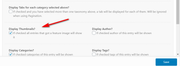
but I’m sure you want to show the image in the magazine element.
I tried removing the second image or classes or links with javascript but that just produced a blank slide where the second image would have been, so you still had to click twice. I also tried to simulate a double click when the arrows were clicked but that didn’t work either. So I’m not sure we can change this but I will try to research some more.
Please try unchecking the “Display Thumbnails” option in the element to see how the front end looks and behaves, and try removing the featured image from the posts to see if that corrects the behavior of the magazine element.Best regards,
MikeHey lifefitnessnz,
Sorry for the late reply, as I understand your question you would like 3 custom social media icons in a row in your footer widget.
For this I recommend using the “Custom HTML” widget and add the Icon element shortcode to it, to get the shortcode open a new post using the Classic Editor and choose Icon from the shortcode wand tool:
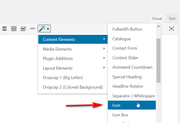
Then create each of your icons and design to suit adding your links and in the developer section add a custom class such as “footer-icons”
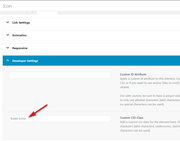
then add the shortcode to your widget:
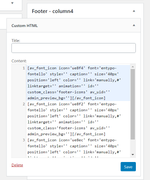
This is the shortcode I used in this example:[av_font_icon icon='ue8f4' font='entypo-fontello' style='' caption='' size='40px' position='left' color='' link='manually,#' linktarget='' animation='' id='' custom_class='footer-icons' av_uid='' admin_preview_bg=''][/av_font_icon] [av_font_icon icon='ue8f2' font='entypo-fontello' style='' caption='' size='40px' position='left' color='' link='manually,#' linktarget='' animation='' id='' custom_class='footer-icons' av_uid='' admin_preview_bg=''][/av_font_icon] [av_font_icon icon='ue8ec' font='entypo-fontello' style='' caption='' size='40px' position='left' color='' link='manually,#' linktarget='' animation='' id='' custom_class='footer-icons' av_uid='' admin_preview_bg=''][/av_font_icon]This is the result:

They should show in a row.
If you wish to use the image element instead, follow the same steps with the image shortcode and be sure to add the custom class and if your images show as a column like this:

then add this css to your Enfold Theme Options > General Styling > Quick CSS field#footer .widget_text .custom-html-widget .footer-icons { display: inline !important; }which should correct to a row:

If this doesn’t help then please create an example and link to it so we can help adjust your css.Best regards,
MikeHi,
Sorry for the late reply, I couldn’t login because there is also a htaccess login prompt before the WordPress prompt, please include login details for this also.
Do you mean that you are tring to use the new “Block editor’s” FAQ structured data content block like in this image?
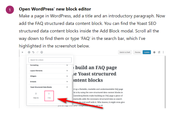
Your page looks like it was created with the Enfold “Advanced Layout Builder” so I assume that you are opening a Advanced Layout Builder page with the WordPress Block editor and tring to add this? If so you will have errors because the two editors can not be used on the same page.Best regards,
MikeHi,
Glad we were able to help, we will close this now. Thank you for using Enfold.For your information, you can take a look at Enfold documentation here
For any other questions or issues, feel free to start new threads in the Enfold forum and we will gladly try to help you :)Best regards,
MikeHi,
I don’t think this is the slider either, Please see the screenshots in Private Content area.
This is what I see in the Chrome dev tools console when I emulate your site as mobile, 425px, these errors do not show when emulation is not used, so at full size your homepage loads fine but when loaded as mobile size all of the errors abouthttp://sswim.rushow up? I was hoping that cleaning up those files would remove the errors.
Do you have a server-side cache that can be emptied?Best regards,
MikeHi,
I tested your css above and it produced the G+ icon for me. I copied the correct whatsapp icon to this css:.social_bookmarks_whatsapp a::before, .av-social-link-whatsapp a::before { font-family: 'entypo-fontello'; content: ''; }Best regards,
MikeHi,
@toner728, Sorry I did not see that you added more to your message, I checked your page and tried to recreate the 1/3 columns with video elements and your YouTube links, but found no errors on my localhost:
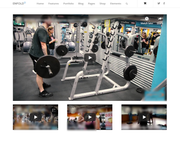
It does look like you are using the Autoptimize plugin, I recommend testing with it disabled.
If this doesn’t solve, please open a new thread and include a link to your site with admin login. Since this is not your thread posting your login here will not be private and you will not see anything we write in the Private Content area.Best regards,
MikeHi,
Thanks for the login, the screenshot was from the “portfolio grid” suggestion above, I didn’t have success with the grid row when there was anything in the grid row, which is why I said it was not very useful, but now I can’t reproduce it.
But I took another approach, I took your color #5356bc and used a RGBA to feColorMatrix converter to create a SVG filter which gives an overlay, the only drawback is the special heading is also under the overlay.
This is the css I added to your site:.grid-hover:hover { filter: url("data:image/svg+xml;utf8,<svg xmlns=\'http://www.w3.org/2000/svg\'><filter id=\'colorChange\'><feColorMatrix type=\'matrix\' values=\'0.33 0 0 0 0 0 0.34 0 0 0 0 0 0.74 0 0 0 0 0 1 0'/></filter></svg>#colorChange"); opacity: 1 !important; }Please clear your browser cache and check.
Best regards,
MikeHi,
Please try this code in the General Styling > Quick CSS field or in the WordPress > Customize > Additional CSS field:a.av-masonry-entry.isotope-item h3.av-masonry-entry-title.entry-title { min-height: 39px !important; }Best regards,
MikeFebruary 5, 2020 at 12:19 pm in reply to: Move Date below blog Title – using Blog Posts content element #1181727Hi,
Very good, please check again and let us know. We should close this thread as it is very long now and goes back to 2016.Best regards,
MikeHi,
I’m not sure, I have not seen this before. Did you once have the WordFence plugin? It has code in your htaccess file and in your root you have “wordfence-waf.php” From this article it seems these things have to be manually removed, there is also a Wordfence Assistant plugin that will remove the Wordfence firewall & Wordfence data in your database and advanced locks.
I have not used WordFence myself or tried removing it so I’m not sure if this is normal. But the console errors to'http://sswim.ruandnet::ERR_HTTP2_PROTOCOL_ERRORerror concerns me.You also have these files in your home directory that are not normal and I can’t find any info on them from Google:
wp-real-leaf.php
ass.php
wp-ultimate.php
wp-success.phpYou said there was another developer, how long have you worked on this site with no issues and when did these issues begin?
Do you have a backup that is from before the issues?Best regards,
MikeFebruary 4, 2020 at 2:50 pm in reply to: Page Titles and H1 tags displaying as duplicate on the Category listing page? #1181284Hi,
The theme lists posts on the archive pages as H2 with the category under it and then the excerpt of the post.
On your page you are hiding the title field and manually adding an H1 in the content section which shows on the archive page as part of the excerpt and the original title from the page is included.
So if you used the main title on your page and didn’t manually add an H1 in your content you would not have the duplicate titles.
To me it looks like you are using the default editor for your page and you probably wanted the title to be under your featured image instead of in the gray title bar.
So if I have this correct try this, remove your manually added H1 title on your page and set your title to show on the page next to the breadcrumbs, this is a H1 title created by the theme.

then add this code to the end of your functions.php file in Appearance > Editor:function custom_title_script(){ ?> <script> (function($) { $(document).ready(function(){ $('.page .main-title.entry-title').detach().insertBefore('.entry-content'); }); })(jQuery); </script> <?php } add_action('wp_footer', 'custom_title_script');then your H1 title will show below your featured image:
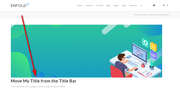
and then on your archive page you will not have duplicate titles. But all of the titles will be H2 because SEO recommends that there should only be one H1 on any page.Best regards,
MikeHi,
I see, that is a good idea. I researched this a little and found this article that seemed similar to what you want to do.We knew that we can keep one thing the same on all of these pages which were page-slugs, so we decided to add page slugs in body class which allowed us to do all the customizations we wanted without any complications.
They posted this function:
//Page Slug Body Class
function add_slug_body_class( $classes ) {
global $post;
if ( isset( $post ) ) {
$classes[] = $post->post_type . '-' . $post->post_name;
}
return $classes;
}
add_filter( 'body_class', 'add_slug_body_class' );
I tested on my localhost and found this works for pages and posts, for example:
the post “hello world” = post-hello-world
the page “meet the team” = page-meet-the-team
and the slugs should be the same across different installs regradless of the page-idsBest regards,
MikeFebruary 4, 2020 at 12:13 pm in reply to: Enfold seems to overwrite different even and odd rows styling #1181237Hi,
Thanks for the login, but I still don’t see a css file loading for this plugin. Perhaps it’s because Enfold has some modified BB Press files in the theme folder to enable BB Press to work correctly with Enfold.
How much styling did you want to do? Perhaps we can assist like the css above, did you find that working?Best regards,
MikeHi,
Thank you for the feedback, the extra space above occurs because the footer page also contains the classavia-builder-el-0for the first section on the page, and when the transparent header is used it adds 116px top padding so the header looks transparent.
The top color section on your footer page has a min-height of 100px, yet the container doesn’t have the height. That is why in the css above we gave the container the matching height and centered it vertically.So on your footer page I give the first section a custom ID and then edited your css to this:
#custom_footer > .container {
  min-height: 100px;
  padding-top: 0px !important;
  display: flex !important;
  align-items: center !important;
  justify-content: center !important;
}
I checked pages that had both transparent headers and not, and the footer seems to be the same now, please clear your browser cache and check.
Best regards,
MikeHi,
Have you seen our Shop Demo, you can freely import this from your “Demo Import” option. There is also a shop demo within the 2017 Demo.
But I don’t know of any outside demos available. A good place to get inspiration is in our Showcase threadBest regards,
MikeHi,
I’m finding a strange error only when I load your site at a mobile size,Mixed Content: The page at 'https://asobiny.com/demo/' was loaded over HTTPS, but requested an insecure script 'http://sswim.ru/?ver=4.7.2'. This request has been blocked; the content must be served over HTTPS.this error occurs more than 60 times in the browser console
But I can find how this is getting added to your site. Do you also see this?Best regards,
MikeHi,
Glad we were able to help, we will close this now. Thank you for using Enfold.For your information, you can take a look at Enfold documentation here
For any other questions or issues, feel free to start new threads in the Enfold forum and we will gladly try to help you :)Best regards,
MikeFebruary 3, 2020 at 2:29 pm in reply to: Page Titles and H1 tags displaying as duplicate on the Category listing page? #1180931Hi,
Sorry for the late reply, what is the name of the plugin. I assume that if you deactivate the plugin the page will work correctly?
I suppose you can use some css to hide one of the headings, or you can see if this has been reported by the plugin before and check for a solution for this. Some plugins have a troubleshooting panel in the plugin that address known issues.Best regards,
MikeHey groovymarci,
Please try downloading the font from Google:
https://fonts.google.com/specimen/Montserrat?selection.family=Montserrat
Then import it at Enfold Theme Options > Import/Export > Custom Font Manager
Then when you choose the font for your element in the Enfold Theme Options > Advanced Styling be sure to use the one at the bottom of the list:

If the browsers are supporting “font-stretch” and the font you are using, then you can probably use it by adding support for it
in your custom csss, please see this link example.Best regards,
MikeHi,
I tried to look at your page but it doesn’t seem to be loading right now.
Did you say that you are using Enfold v3.6.1 ?
Please try updating your site to the Enfold v4.7.2You will have to update manually via FTP.
The easiest and safest way to do this is to download the newest version from Theme Forest and rename your current theme folder to “enfold-old” via ftp then upload the new “enfold” folder and check that your site is working correctly.
Should for some reason you wish to roll-back to the old version, it’s easy to do, simply rename the new “enfold” folder to “enfold-new” via ftp and then rename “enfold-old” to “enfold” then refresh your page.
Once you are happy you can delete the “enfold-old” folder via ftp, (not the WP theme page)
Please don’t try to overwrite the theme folder, as this will leave old files behind and cause errors.Best regards,
MikeHey CommunityHousing,
Thanks for using Enfold. We will close this now.
Best regards,
MikeHey pattyNE,
Please try this code in the General Styling > Quick CSS field or in the WordPress > Customize > Additional CSS field:#top .avia-content-slider .slide-meta-time { display: none !important; }After applying the css, Please clear your browser cache and check.
Best regards,
Mike -
AuthorPosts
