

Forum Replies Created
-
AuthorPosts
-
Hi,
The dev team has returned a fix for the full-width button in the Ajax Portfolio Preview text section: “The full-width element full-width button shortcode broke the layout because called outside shortcode tree and creating an extra section.” Full-width elements try to full-width for the screen not just the element, so typically placing a full-width element inside a page element will cause an issue. In this case, the dev team edited the full-width button and the portfolio element so this will work correctly.
This will be included in the next release. In the zip file in the Private Content area, you will find two files:
buttons_fullwidth.php & portfolio.php
via ftp, please save a fallback copy of your current files and replace these at these locations:
\wp-content\themes\enfold\config-templatebuilder\avia-shortcodes\buttons_fullwidth\buttons_fullwidth.php
\wp-content\themes\enfold\config-templatebuilder\avia-shortcodes\portfolio\portfolio.php
Then clear your browser cache and any cache plugin, and check.Best regards,
MikeAugust 17, 2020 at 12:37 pm in reply to: Portfolio Grid Feed Pagination does not seem to work #1238467Hey Ivana,
Sorry for the late reply, I didn’t see the video, but I did see that your pagination links seem to have the trailing page number stripped from the url.
Please include an admin login in the private content area so we can take a closer look. Can we temporarily disable your plugins for testing?Best regards,
MikeHi,
The patch should already be in this version, please include an admin login in the Private Content area so we can investigate.Best regards,
MikeHi,
Glad we were able to help, we will close this now. Thank you for using Enfold.For your information, you can take a look at Enfold documentation here
For any other questions or issues, feel free to start new threads in the Enfold forum and we will gladly try to help you :)Best regards,
MikeHi,
Thank you for the login, I see that the button “Edit Audio Player (Classic Editor)” is always pointing to the “post=1766” which is one of your Audio Players, it doesn’t seem to matter if it is a post or a page, and there are no errors in the browser console.
If I disable your plugin “Disable Gutenberg” and change the default editor at Enfold Theme Options > Select Your Editor the button changes text but not the wrong link.
So I don’t know why this plugin & Enfold are clashing, but unfortunately, there is not a lot we can for third-party plugins within the scope of our support.
But since the link never changes, I think we can replace the link with the correct edit link for pages and posts with this script and hopefully improve your workflow.
Try adding this code to the end of your functions.php file in Appearance > Editor:function custom_script(){ ?> <script> (function($){ $(window).load(function(){ function get_current_page_id() { var page_body = $('body'); var id = 0; if(page_body) { var classList = page_body.attr('class').split(/\s+/); $.each(classList, function(index, item) { if (item.indexOf('page-id') >= 0 || item.indexOf('postid-') >= 0) { var item_arr = item.split('-'); id = item_arr[item_arr.length -1]; return false; } }); } return id; } var id = get_current_page_id(); var theURL = '/wp-admin/post.php?post='+id+'&action=edit&classic-editor=1'; $('#wp-admin-bar-edit a').mouseover(function() { $(this).attr("href", theURL); }); }); })(jQuery); </script> <?php } add_action('wp_footer', 'custom_script');this will not change the text of the button, but it does change the link.
Please clear your browser cache and check.Best regards,
MikeHi,
Sorry for the late reply, and thanks for the login, I first disabled your custom code to see the pagination working the default way, but as soon as your page loads the/page/2/part of the URL is stripped so the pagination doesn’t advance to the next page.
It looks like your gform plugin might be doing this.
Please try disabling your plugins and enable one at a time clearing your cache in between each one.
Once we can get the pagination working again we can take another look at the scrolling to the top issue.Best regards,
MikeHi,
Sorry for the late reply, to load your edited /avia.js file via the child theme, first ensure that your file is at: /enfold-child/js/avia.js by creating a folder called “js” in your child theme directory.
Then add this code to the end of your child theme functions.php file in Appearance > Editor://Load child theme avia.js function wp_change_aviajs() { wp_dequeue_script( 'avia-default', get_template_directory().'/js/avia.js', array('jquery')); wp_deregister_script( 'avia-default', get_template_directory().'/js/avia.js', array('jquery')); wp_enqueue_script( 'avia-default', get_stylesheet_directory_uri().'/js/avia.js', array('jquery')); } add_action( 'wp_enqueue_scripts', 'wp_change_aviajs', 100 );Then clear your browser cache and any cache plugin, a couple of times and check.
Best regards,
MikeHey myroska,
Sorry for the late reply and thanks for the link and screenshot, I also checked your page and see the duplicate code. I see that you included ftp access, but can you also include an admin login to your site so we and examine further?Best regards,
MikeHi,
Sorry for the late reply and thanks for the login, I checked your test event and found the event had already expired, so I changed the start and end dates so it will show. I couldn’t find the setting with the block editor set so I enabled the Classic Editor.
Then I found your site giving this error:(failed)net::ERR_CONNECTION_RESETsometimes for your enfold stylesheet, and sometimes for your javascript files.
Please check your server error log to see why your site seems to rest the connection on most page reloads, this seems like a server misconfiguration.Best regards,
MikeHi,
Very good then and thanks for your feedback, we will close this now. Thank you for using Enfold.For your information, you can take a look at Enfold documentation here
For any other questions or issues, feel free to start new threads in the Enfold forum and we will gladly try to help you :)Best regards,
MikeHey Blaise,
Sorry for the late reply, and thanks for the screenshots. So when the button in your toolbar says “Edit Audio Player (Classic Editor)” it links to the plugin settings, and this occurs if you “preview” a page?
Yet if you publish the page the button will say “Edit Page (Advanced Layout Builder)”, correct?
Can we login to your site to examine? Please include an admin login in the private content area so we can take a closer look.Best regards,
MikeHi,
Sorry for the late reply and thanks for the login to your test site, so on the homepage & “the book” page I added custom ID’s to the image column and the text column, the ID’s used is copy & cover.
Then I added this code to the end of your functions.php file in Appearance > Editor:function custom_script(){ ?> <script> (function($){ $(document).ready(function () { if ($(window).width() <= 766) { $( '#main' ).each(function() { $( this ).find( '#cover' ).insertAfter( $(this).find('#copy') ); }); } else { $( this ).find( '#copy' ).insertAfter( $(this).find('#cover') ); } }); })(jQuery); </script> <?php } add_action('wp_footer', 'custom_script');now for mobile the text will show first.
Please clear your browser cache and check.
Please note that if you check with a resized desktop browser you will need to reload the page at the new size for the script to work. This will not be an issue for and actual mobile device.Best regards,
MikeHi,
Sorry for the late reply, and thanks for the login, I checked your main menu sub-menus and found on hover the font size was much larger, but the sub-menus are not showing in a big box for me. Please see the screenshot in Private Content area.
If you would like to adjust the font size, please try this code in the General Styling > Quick CSS field or in the WordPress > Customize > Additional CSS field:a:hover span.avia-menu-text { font-size: 12px !important; }Best regards,
MikeHi,
Thank you for your feedback, I’m not sure that the demo import would behave differently for you logging into your site and clicking the button or your webhost logging into your site and clicking the button, I certainly see that the import worked now and that is good. I will pass your feedback to the dev team.
Unless there is anything else we can assist with on this issue, shall we close this then?Best regards,
MikeHi,
I would say that this should resolve the issue because the “aviaAsset_avia-head-scripts” row in the database is created when the file merging and compression is enabled, and it is removed when file merging and compression is disabled.
But in your Private Content area above the code that you pasted is much more than the one line that should be there, like this:

so I wonder if your field is being appended and not cleared. Can you search for “aviaAsset_avia-head-scripts” in your “phpMyAdmin” database tool while your file merging and compression is disabled and again when it is enabled to see if it is removed and then shows with just one line when it is enabled.Best regards,
MikeHi,
Thank you for the login and for the feedback, I tried disabling your “Dynamic Caching” in your “SG Optimizer” plugin and then retested the two links you posted above and both passed, please see the screenshots and links in Private Content area.
I then reenabled the setting so you can decide if you want this setting on or off.
I believe you will find with this setting off the issues with the menu and other builder elements in the “Mobile-Friendly Test” will be resolved.
If you try disabling your “Dynamic Caching” in your “SG Optimizer” plugin, please also click the “Purge SG Cache” button at the top of your admin page to clear the server cache.Best regards,
MikeHi,
Sorry for the late reply and glad to hear your host was able to import the demo. Typically this error seems to occur with “Managed WordPress” hosting accounts that have certain security settings. It doesn’t seem to be every “Managed WordPress” host, but typically these types of accounts are limited to the user for making changes to the server settings and many hosts will not change settings or advise which settings are used.
One solution that sometimes helps is checking the PHP settings on the server to see if the secure options are activated.
If “allow_url_fopen, “allow_url_include” and “register_globals” are “off”, try turning these “on”.
I suspect that your webhost temporarily made a change to your server settings before they imported the demo.
The dev team is working on a new importer, but right now we are unsure when this will be ready.
Since your demo is now imported shall we close this thread?Best regards,
MikeHi,
Sorry for the late reply and thank you for your patience. I have found that adding a full-width button in the Ajax Portfolio Preview text field causes theFailed to execute 'getComputedStyle'error. I have reported this to the dev team.
I suggest changing your full-width buttons to X-Large buttons in the Ajax Portfolio Preview text section as a temporary solution.
Since your buttons are added as shortcode you can change the buttons by simply removing_bigfromav_button_big

Hopefully, this will save you from recreating every button.
I will post an update when the dev team returns a patch for this issue.Best regards,
MikeHi,
Thank you for the feedback, this is a strange issue, so yes, I believe the two errors are due to the test not loading the CSS. I also believe that if you check your Google Webmaster account you will not be getting any errors for the same files from Google Bot, meaning that your site is indexing correctly, and as we know actual devices are loading the files.
I’m not sure why the test is not loading some of your css files, but I do see that you have a “mixed content” error which is not related to your css, but perhaps correcting it will help.
So this code tells the Browser or Google Bot, to try to get all files via HTTPS thus solving any “mixed content” errors.
Try adding this code to the end of your functions.php file in Appearance > Editor:function add_custom_meta(){ ?> <meta http-equiv="Content-Security-Policy" content="upgrade-insecure-requests"> <?php } add_action('wp_head', 'add_custom_meta', 1);If you prefer, we can add this for you if you include an admin login to your site in the Private Content area.
Best regards,
MikeHi,
Sorry for the late reply, I see that I misunderstood your first request, and thanks for your screenshot because the gray is hard to see. :)
So, to remove the gray from the background but leave it for the form, try this css:#top.woocommerce-account .main_color .col-1, #top.woocommerce-account .main_color .col-2 { background-color: #FFF !important; }Best regards,
MikeHi,
@Justin thanks for sharing your solution, unfortunately, I was unable to reproduce an error in the console on my localhost, but I’m glad to hear that this helped with your issue.Best regards,
MikeHi,
Thank you, I checked your “news” category and found only one “link” type post, except for the two test posts.
So for the author page we will target post-entry-6313 and change the URL only on the author page with this script.
Please adjust the URL in the script to the one in the Private Content area.
Try adding this code to the end of your functions.php file in Appearance > Editor:function custom_author_link_type_link(){ ?> <script> (function($){ $(window).load(function(){ $("#top.archive.author .post-entry-6313 h2.post-title.entry-title ").find("a[rel='bookmark']").attr("href", "https://www.google.com"); }); })(jQuery); </script> <?php } add_action('wp_footer', 'custom_author_link_type_link');This can be extended in the future if you add more link type posts.
Best regards,
MikeHi,
@Justin sorry for the late reply, I installed Yoast on my localhost and checked/avia_framework_post-sitemap.xmlbut I’m not seeing any errors in the browser console, but the sitemap also has zero entries. Perhaps after there are some entries the error will show for me? I also checked the homepage for the error but didn’t see it.
What version are you using 4.7.6.2 ?As for indexing the builder, I would leave this option enabled so that Yoast doesn’t add
noindexto the robots meta.
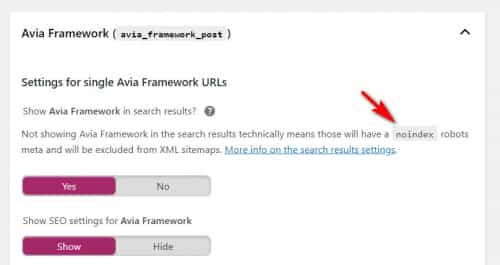
Best regards,
MikeHi,
Ok, I did see that you tried enabling the parent theme and disabling the plugins without success, but I was hoping that if I tried the same that I may see a clue in the browser console. Unfortunately, the only time I could reproduce your issue on my localhost was when I added the base64 code. So since you removed the code but the error is still occurring so I wonder if your server is using object caching which would still output the deleted code.
So if you can’t create a staging site to test with can I test on your live site perhaps Sunday before noon? When do you have the least traffic?Best regards,
MikeHi,
Sorry for the skype link I was trying to highlight the format of the link, so you would actually enter this:
skype:live:emailnamewithoutdomain?callin your screenshot this partemailnamewithoutdomaindoesn’t look like an email. Please see this thread for more info.
For your page with little content please link to it so we can adjust the css, typically the best solution is to add more content or to add more height to your content. For example, your page has two buttons, try putting the two buttons in a color section with the min-height set to “At least 100% of Browser Window height” or “At least 75% of Browser Window height” this will give you more control over which pages are affected.Best regards,
MikeHi,
Sorry for the late reply, and thanks for the screenshots. For the first issue please try this css:#top.woocommerce-account .main_color .col-1, #top.woocommerce-account .main_color .col-2, #top.woocommerce-account .main_color form.login, #top.woocommerce-account .main_color form.register { background-color: #B29DB6 !important; }for the second one, thanks for sharing the logic & css behind the effect, so please try this css:
#top.woocommerce-cart div td.actions .coupon .input-text,
#top.woocommerce-checkout div form .form-row input.input-text,
#top.woocommerce-checkout .main_color .input-text {
	font-size: 16px !important;
}
After applying the css, please clear your browser cache and check.
Best regards,
MikeHi,
Thank you for checking, yes the error is still occurring. Is your server using object caching? Please check if you can clear your server cache if any. Since your site is live, please check your webhost to see if you have the one click staging site option, this is a option in most cPanels to create a staging clone of your site so we can test on it and your live site will stay up and running, untouched. You can always ask your webhost to help you with setting this up if you want.Here are some screenshots of what it would look like:


Otherwise, I would like to enable your parent theme and disable your plugins to test further.
Best regards,
MikeHi,
1: for your footer you can try this css in the General Styling > Quick CSS field or in the WordPress > Customize > Additional CSS field:#main > div.container_wrap { min-height: 80vh !important; }otherwise please link to an example page for us to examine.
2: Please see this thread the second answer says try this:href="skype:live:emailnamewithoutdomain?call">Best regards,
MikeHi,
Unfortunately, the dev team says this is not a bug, but an expected result of how “get_the_excerpt()” removes links from the content, and changing this breaks other functions. Please see below for full notes.
How many “link” type posts do you plan on showing on your author page? I’m thinking if there is only a couple I may be able to write a script that will add the links, otherwise, this may require an author.php rewrite to achieve your goal.Best regards,
Mike -
AuthorPosts
