

Forum Replies Created
-
AuthorPosts
-
Hi,
Sorry for the very late reply, please try this solution, a further explanation of this example is here.
If you would like more help with this please create a test page on your site and include an admin login s in the Private Content area so I assist.Best regards,
MikeHi,
Sorry for the very late reply, the mobile menu is created from the regular menu that is created in the WordPress menu option, it is not really another menu, so you should create a footer menu and a secondary menu, which is the menu used above the header and not shown on mobile, and then your two main menus for each language which will also be used for mobile menus.Best regards,
MikeHi,
I see that your posts are created with the Advanced Layout Builder, and your “related entires” are at the bottom of the posts, have you tried using the blog post element to show the posts based on the taxonomies?Best regards,
MikeHi,
I believe that the title tag of the link that wraps the image is the title of the image in the media library correct?
I tried to point out above that adding the same title to the link and the image will cause accessibility issues with screen readers.
In elements where the image is not wrapped in a link the title tag is applied to the image, but when the image is wrapped in a link the title tag is applied to the link. Do you plan on having your site compliant with users that have accessibility issues such as low sight?Best regards,
MikeMarch 27, 2021 at 3:22 pm in reply to: fullwith dropdown unter hamburger menü mit social media icons #1290743Hi,
I see, this script was customized for a specific site, please note above it was based on this one, so you could try that one instead. Today when I check your site it is not loading well, I assume you are working on it. If the original solution linked doesn’t help with all caching and minification disabled, then please remove the script and open a new thread with admin login details in the Private Content area, and post a link to the new thread here and I will assist in the new thread.
Please include details of where you would like the social icons in the mobile menu and perhaps a mockup. Please also note that since this is not your thread posting your login here will not be private and you will not see anything we write in the Private Content area.Best regards,
MikeHi,
Your image is not showing so I’m not quite sure what you wanted to show, but I don’t see an author tag in the link of the image.
What I was trying to point out is that the link has a title tag that wraps the image, please see the screenshot in the Private Content area.Best regards,
MikeMarch 26, 2021 at 2:31 pm in reply to: fullwith dropdown unter hamburger menü mit social media icons #1290572Hi,
Sorry, I don’t understand what you mean by the “Social Media Icons are doubled” I don’t see this on your site?Best regards,
MikeMarch 26, 2021 at 2:04 pm in reply to: Mega Menu – description text on the left and navigation on the right of text #1290569Hi,
Glad we were able to help, we will close this now. Thank you for using Enfold.For your information, you can take a look at Enfold documentation here
For any other questions or issues, feel free to start new threads in the Enfold forum and we will gladly try to help you :)Best regards,
MikeHi,
@2SINN glad to hear, @Guenni007 thank you for your input 🙂Best regards,
MikeHi,
I disabled the “Enfold Related Posts Element” plugin and disabled “lazy loading” in the Enfold Theme Options > Performance > Lazy Loading cleared your cache and the images are loading better now.
Please don’t use this plugin, I wrote it almost 4 years ago, poorly 🙂 it was never official and I have removed it from GitHub today.
Anyways, please clear your browser cache and check.Best regards,
MikeMarch 25, 2021 at 12:23 pm in reply to: Fullscreen Slider – Continue Automatic Rotation After Click #1290360Hi,
Glad we were able to help, we will close this now. Thank you for using Enfold.For your information, you can take a look at Enfold documentation here
For any other questions or issues, feel free to start new threads in the Enfold forum and we will gladly try to help you :)Best regards,
MikeHi,
Glad this helped, it is not “better” to include the code only on the landing page like I did, I only do this to test, but sometimes I like to do this with a script it might only be used on one page, because I’m a minimalist 🙂
Unless there is anything else we can assist with on this issue, shall we close this then?Best regards,
MikeMarch 24, 2021 at 2:08 pm in reply to: Fullscreen Slider – Continue Automatic Rotation After Click #1290121Hi,
Thank you for your patience, I made the adjustment for you and created a test page with a similar slider linked below, and cleared your Autoptimize and FVM cache, and it seems to work well, please clear your browser cache, a few times and check.
Please note that clearing javascript files from your browser cache may take a couple of tries, and the reason I created the test page was because your slider rotation was slow for me to test the solution, this one is set to two seconds.Best regards,
MikeMarch 24, 2021 at 12:10 pm in reply to: fullwith dropdown unter hamburger menü mit social media icons #1290075Hi,
The Error “Uncaught ReferenceError: jQuery is not defined” in the Console, typically means that you are loading jQuery in the footer, so the script is running before jQuery is loaded.
This is an option in the theme settings at Enfold Theme Options > Performance > Load jQuery in your footer, but many caching & minifying plugins also do this, so please check and disable.
If you don’t see the Enfold Theme Options > Performance > Load jQuery in your footer option, then this means that your webhost has modified the WordPress install.Best regards,
MikeHi,
I believe that you had created a custom template, earlier and it is this template that is causing your problems. I can not recreate your issue with a new install.Best regards,
MikeHi,
Testing it on Screenshot Guru, I can see the YouTube icon, but that doesn’t really tell me anything
What it says is that a completely different computer on a different network is showing your page loading correctly, this would be the same as if somebody wanted to know if your website was down or not, they would use downforeveryoneorjustme.com
I hear your frustration and I wish I had more to offer but Nikko and I both can not reproduce this, and a third-party test can not either. I will ask the rest of the team to take a look, perhaps I missed something.Best regards,
MikeHi,
Ok, I will ask the team for suggestions on loading entypo-fontello with a cdn.Best regards,
MikeHey bts-de,
Sorry for the very late reply and thank you for your patience, so your image in this case is a background image of the link which does have the title tag:title="Individuelle Sonderanfertigung von MonLines, Soundbar Lift"typically background images do not have titles for accessibility compliance. In this case, I believe it interferes with screenreaders when the link has a title tag that is wrapping a background image with another title tag.
I believe in your case the link title tag is retrieved from the image title field in the media library, and so if the image title tag was included then you would have two titles wrapped that are the same, which would cause accessibility issues.Best regards,
MikeHi,
I don’t believe that the dev team will be interested in replacing fontello with fontawesome in the avia editor, it would be a major job to recode the ALB and elements and I don’t believe that the backend icons affect the frontend view. Perhaps this post will help you: Scoring 100/100 In Google Pagespeed Insights, Gtmetrix Pagespeed And YslowBest regards,
MikeHi,
@mgyura thanks for your feedback, I was not able to reproduce the error on your site, and I was only able to reproduce the error on @Gianluigi’s site when I used a VPN, as you can see from the screenshots and DevTools error link. So I’m assuming that you are experiencing the same issue, but this could be incorrect to assume because other factors could be browser-based “Ad-Blockers” or extensions, etc, but from your post that you tested on a friend’s Windows machine I doubt both machines are using the same extensions. Thus a slow network from your side, such as a wifi hotspot, phone signal or on your webhost side, CDN, etc makes sense to me.
All of the icons are shown with the fontentypo-fontello.woff2as shown in the screenshot above, not just the YouTube one, the reason the YouTube one is not showing is because the browser did this:[Intervention] Slow network is detectedin the DOM waterfall.
But please note that the error and screenshots are from @Gianluigi’s site when I used a VPN, I was not able to reproduce the error on your site. Maybe it is a stretch to say that you are both experiencing the same error, but I wanted to try my best to find some sort of reason why this is occurring and this was the only this I could see the error on Windows 10 & Mac Big Sur
Please try testing your site like this: Go to Screenshot Guru and enter your url and view the results which show your YouTube icon:

Best regards,
MikeHi,
Sorry for the very late reply and thanks for your patience and login, to test this in a controlled invirment environment I copied your page shortcode and added to my localhost with a clean install of WordPress 5.7 & Enfold 4.8.1

and created a main menu with the links to the tab sections:
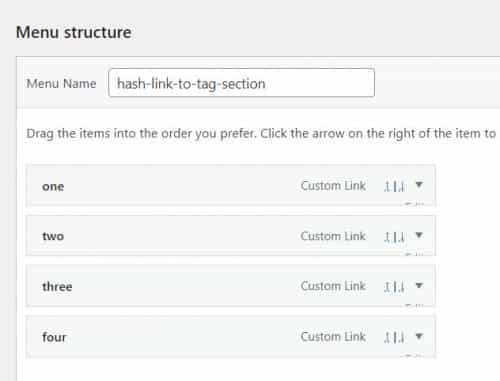
and I added this script to a code block element on the page:<script> (function($) { function scrollToTab(s, e,) { $(s).on(e, function(event) { var anchor, loc, cur, hash, tab, parent, pos; if( e == 'load' ) { loc = window.location.hash; hash = loc; } else { loc = $(this).attr('href'); hash = loc.substring(loc.indexOf('#')); } tab = $('.av-section-tab-title[href='+ hash +']'); parent = tab.parents('.av-tab-section-outer-container'); pos = parent.offset(); tab.trigger('click'); if(hash) { setTimeout( function() { $(window).scrollTop( pos.top - 100 ) }, 1000 ); } }); } scrollToTab( '.menu-item a', 'click' ); scrollToTab( window, 'load' ); })(jQuery); </script>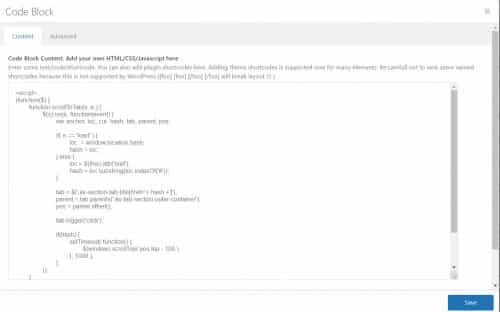
and clicking the menu item scrolled down the page and opened the correct tab, here is the page load:

here is the menu click on menu iten “three” and the scroll down and tab open:

So this does work, as for why it is not on your site, I see that you have disabled the jQuery from loading in your header:
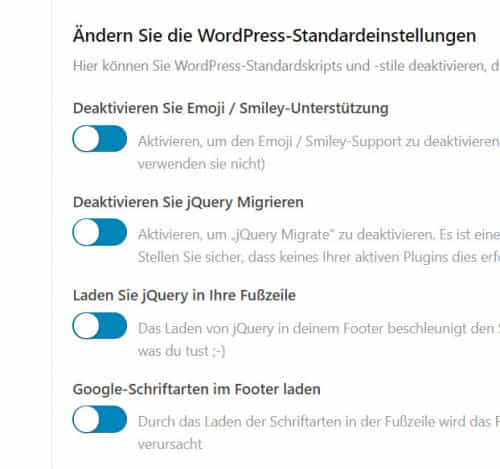
and you are using “WP Super Cache” with the Enfold Theme Options > Performance > JS & CSS file merging and compression so you could be minifying on top of minifying, both of this can cause issues, so I would recommend disabling your plugins and clear your server cache and check. You can also try testing on a clean install on your staging site and then test your customizations until it breaks the script to find what you need to change on your site.
I hope this helps to know the script does work.Best regards,
MikeHi,
Sorry for the very late reply and thanks for your patience, I have two ways to load font awesome with functions.php snippets, the first one enqueues it and the second loads the css in the wp_head, you can try both (one at a time) to see which will give you a better load time, but there really should not be too much difference between them. Also note that the first one was loading v4.7.0 when I saved the code and the second was loading v5.3.1, but you can adjust to suit, I left the original links to demonstrate the link format.add_action( 'wp_enqueue_scripts', 'enqueue_font_awesome' ); function enqueue_font_awesome() {wp_enqueue_style( 'font-awesome', 'https://maxcdn.bootstrapcdn.com/font-awesome/4.7.0/css/font-awesome.min.css' ); }function Font_Awesome_5(){ ?> <link rel="stylesheet" href="https://use.fontawesome.com/releases/v5.3.1/css/all.css" integrity="sha384-mzrmE5qonljUremFsqc01SB46JvROS7bZs3IO2EmfFsd15uHvIt+Y8vEf7N7fWAU" crossorigin="anonymous"> <?php } add_action('wp_head', 'Font_Awesome_5');Best regards,
MikeMarch 21, 2021 at 11:28 pm in reply to: WooCommerce single item display with direct link to cart? #1289531Hey Jason,
Sorry for the very late reply, in my experience the variable straight to cart product links that I have seen on sites seem to have been created with premium plugins, but there are other options, for example, this article offers code snippets for regular straight to cart product links. For variable products which I believe you are asking for this article offers a direct linking for Variable Product to Cart which could be applied to a button or image on your homepage, still not exactly what you are looking for, but it an option.
For plugins, this one seems to offer the option, but I have not tested, the key point to this plugin is: it adds the First variation of the variable product in the cart, so it could work for you.
Direct Checkout for WooCommerce seems to be the most popular in the WordPress library.
I tried to find the premium plugin that as I recalled, had a variable option on load and then linked directly to the cart, but I didn’t find it, it might be on CodeCanyon.net.Best regards,
MikeHey 2SINN,
Sorry for the very late reply and thanks for your patience and the login to your site, I didn’t login though instead I copied your full-size image to my localhost and tried a few different “solutions” from the past to try to find one that would work for this.
So for your image please add the custom classopenfullsize

Then add this code to the end of your functions.php file in Appearance > Editor:function custom_script() { ?> <script> (function ($) { $(document).ready(function(){ $('.openfullsize .avia-image-overlay-wrap .avia_image.lightbox-added').click(function(){ var fullsize = $(this).find('img').attr('src'); $('img.mfp-img').attr("src", fullsize); }); }); })(jQuery); </script> <?php } add_action('wp_footer', 'custom_script');This will work and should not cause any conflicts because of the custom class, please note that it is still important that the “full-sized” image is explicitly selected in the image element.
Best regards,
MikeHi,
@Gianluigi and @Mgyura thanks for your patience and links, so I first tested both of your sites on Windows 10 & Mac Big Sur with Chrome & Safari & Brave, etc.. and the YouTube icon showed just fine from the USA, but when I tested with a VPN in Italy @Gianluigi’s icon did not show with this error:
[Intervention] Slow network is detected. Fallback font will be used while loading:

So the error links to: Feature: Intervention: WebFonts use adaptive timeouts to take fallback fonts and at the bottom of the article the solution is:
Web site owners can opt-out from the intervention by setting CSS font-display to other than ‘auto’.
but I don’t believe we have set the display to “auto” specifically, I believe the browser is assuming this based on our css:#top .avia-font-entypo-fontello, body .avia-font-entypo-fontello, html body [data-av_iconfont='entypo-fontello']:before{ font-family: 'entypo-fontello'; }So I believe the slow network is the cause and the browser is looking for shortcuts, and is doing this, it’s not so much the YouTube icon than the waterfall of the DOM is just happening to pick the last loading one or such. So we could try setting the display to “block” so the browser will load the font:
#top .avia-font-entypo-fontello, body .avia-font-entypo-fontello, html body [data-av_iconfont='entypo-fontello']:before{ font-family: 'entypo-fontello'; display: block;}which may work, but the site may also still have other issues due to the slow network.
I do note that @Mgyura is also in the USA, so I’m not sure how to recreate a test for you since we are both in the USA, but I do believe that the issue is also a slow network, so I believe the same css would work.
Please note that while this may help, I would recommend a webhost on a better network, sort of like that saying: Speed Matters 🙂 but then again we had to jump through a lot of hoops to see the error, so maybe very few people are getting the error, and even fewer are looking for that icon? Just a thought.Best regards,
MikeMarch 20, 2021 at 10:05 pm in reply to: Change "You may like" in French since the new update #1289368Hey edechauvigny92,
Sorry for the very late reply and thanks for your patience, I assume that you followed these steps because you said that it doesn’t more “anymore” implying that it did work once for you. So to test on my localhost I followed these steps and changed my FR language file “Vous aimerez peut-être aussi” to “Tu pourrais aussi aimer” and this worked correctly for me using a child theme with Enfold v4.8.1 & WordPress 5.7
So perhaps your Poedit edit didn’t save correctly, or your functions.php code in not correct, or you have a plugin or cache that is overwriting the change? Please review these and try again.Best regards,
MikeMarch 20, 2021 at 9:17 pm in reply to: Mega Menu – description text on the left and navigation on the right of text #1289367Hi,
Thank you for your feedback, so I tried to recreate your mega menu on my localhost so I could try so different solutions to achieve your layout and on my first attempt, pure luck, I believe I did achieve this:

this is the backend view:

So I believe the difference is that you are adding the “This is the Ministry About Text” text as the discription and not the menu title, but I’m not sure as I haven’t logged in to your menu.
Please give this tweak a try and let us know if this helps.Best regards,
MikeHi,
@ecomstore sorry but this thread is about adding ‘playsinline’ to the background video tag for a section from 2019, if you are having issues with Safari and videos then please open a new thread but note that Safari 12.1 had a known issue that seems to have been corrected with Safari 13.1+
The current version of Safari is 14.0.2 and the videos seem to work fine?Best regards,
MikeMarch 20, 2021 at 2:40 pm in reply to: Icon Box icon not displaying if Open in new window AND link applied to icon #1289342Hi,
@Mischa thanks for the screenshot but I can not reproduce the issue with v4.8, please do not use patch files from older threads, I have removed this source file. This issue and solution is from an older version. Please test again with a completely new theme upload of v4.8 – if you find you still have an issue and you have disabled all of your plugins, then please open a new thread so we can assist.Best regards,
MikeHey Lissasan,
Sorry for the very late reply and thanks for your patience. To change the post slider img link to the same link in the post slider excerpt, try adding this code to the end of your functions.php file in Appearance > Editor:function custom_script() { ?> <script> (function($){ $(document).ready(function(){ $("article.slide-entry").each(function(){ var callinkurl = $(this).find(".slide-entry-excerpt.entry-content a.callink").attr("href"); $(this).find("a.slide-image").attr("href", callinkurl); }); }); })(jQuery); </script> <?php } add_action('wp_footer', 'custom_script');I tested this on your test page by injecting the javascript via the browser and it worked correctly, but a key point is that your post slider excerpt link has the custom class “callin”, so please ensure you continue to add this custom class.
Please give this a try and let me know if this helps.Best regards,
Mike -
AuthorPosts
