

Forum Replies Created
-
AuthorPosts
-
Hey StuWeTueHo,
Thank you for your question, I’m not sure if there is a nesting issue with adding the code block element to the “Text Block” shortcode wand options, as in your screenshot, but I have asked the team for feedback and will reply when I hear back. Thank you for your patienceBest regards,
MikeHi,
Thank you for the screencast, I would describe this as your page loading rather than a “flicker”, to reduce this I would recommend using a caching plugin, WP Fastest Cache typically works well.
Another option would be to activate the Enfold Theme Options > Page Preloading option.Best regards,
MikeHey interfacemedia,
Thank you for the link to your site and video, but I looks like the page in question was built with the page builder Elementor, Enfold has it’s own built-in page builder, the Advanced Layout Builder which can not be removed from the theme or replaced by another page builder, we do not support Elementor and do not expect all of it’s features to work correctly.
We recommend that you remove Elementor and use the Advanced Layout Builder.Best regards,
MikeHi,
Thank you for your patience, I found this only occurred when your CSS file merging and compression was enabled, which lead me to look at your Quick CSS and I found that you were missing a bracket, I corrected, please clear your browser cache and check.

Best regards,
MikeHey Magdalena,
Thank you for your patience and the link to your site, I see that you have the masonry options set to show 10 items at a time with pagination and showing 3 categories, when I check page 3 I see 2021 items, page 5 shows 2020 items, and page 75 shows 2011 items. So this seems to be working correctly.
I also tested with only one category and it showed many different dates also.
Am I understanding correctly? Please check again.Best regards,
MikeMay 14, 2022 at 9:15 pm in reply to: Woocommerce webhooks stopped by Enfold – still not resolved #1351804Hey Silvio,
We see this is a duplicate thread, I have replied to your original thread, please check.Best regards,
MikeHi,
Thank you for your patience, to move the price and add to cart button below the tabs on a single product page I tested this function on my demo site:add_action('woocommerce_before_single_product', 'avia_woocommerce_new_hooks_mod'); function avia_woocommerce_new_hooks_mod() { remove_action( 'woocommerce_single_product_summary', 'woocommerce_template_single_price', 10); add_action( 'woocommerce_after_single_product_summary', 'woocommerce_template_single_price', 2); remove_action( 'woocommerce_single_product_summary', 'woocommerce_template_single_add_to_cart', 30); add_action( 'woocommerce_after_single_product_summary', 'woocommerce_template_single_add_to_cart', 3); }this was the result:

I believe this is what you were asking for, I also tested this on your single product page with similar results, please see the screenshot in the Private Content area.
I didn’t leave this function in your child theme functions.php, so please add it and check.Best regards,
MikeHi,
Thanks for the link to your page, but the menu has changed to a burger style, if you would still like some help with the other menu please change back so we can be of more assistance.Best regards,
MikeHey sebzh22,
Thank you for your patience, I tried to find the page in question but couldn’t, please link to it so we can examine and try to assist.Best regards,
MikeHey Jens-abroad,
Thank you for your patience and for the login to your site, for the grid layout on your archive page and tag page I added this code to the end of your functions.php file in Appearance ▸ Editor:add_filter('avf_blog_style','avia_change_archive_blog_layout', 10, 2); function avia_change_archive_blog_layout($layout, $context){ if($context == 'archive') $layout = 'blog-grid'; return $layout; } add_filter('avf_blog_style','avia_change_tag_blog_layout', 10, 2); function avia_change_tag_blog_layout($layout, $context){ if($context == 'tag') $layout = 'blog-grid'; return $layout; }so now the layout is grid with the images showing, but the css doesn’t match because the blog grid on your landing page is created by the plugin Gutenberg Blocks by Kadence Blocks
To have all of the grid styles match try building your landing page with the theme’s Advanced Layout Builder and use the blog element to show the posts.
Also, I recommend using a Child Theme and moving the functions.php code to the child theme so it will not be lost on your next theme update.Best regards,
MikeHi,
Thanks for your patience, the slider on the site that you are copying is the REVOLUTION SLIDER with a Contact Form 7 form, so you will need these for exactly the same design, as you posted above, but if you wish you could probably get very close to this with the built-in Layerslider. This is the css for the form, you will need to adjust the element classes for the contact form that you use on the new site as these are not default classes:.banner form { background: rgba(0,0,0,0.5); padding: 50px; border-radius: 0 } #top input[type="text"]-webkit-appearance:none;border:1px solid #e1e1e1;padding:8px 6px;outline:none;font:1em "HelveticaNeue","Helvetica Neue",Helvetica,Arial,sans-serif;color:#777;margin:0;width:100%;display:block;margin-bottom:20px;background:#fff;border-radius:0px} .banner input { padding: 6px 12px !important; font-size: 14px !important; font-family: arial !important; border-color: rgb(225,225,225) !important; border-radius: 5px !important; margin-bottom: 0px !important } .banner form { background: rgba(0,0,0,0.5); padding: 50px; border-radius: 0 } .banner form { margin-bottom: 0px !important } .new-form p:last-child { margin: 0 !important } .banner textarea,.banner select,.banner input { padding: 6px 12px !important; font-size: 14px !important; font-family: arial !important; border-color: rgb(225,225,225) !important; border-radius: 5px !important; margin-bottom: 0px !important } .banner label { color: #000 !important; font-size: 16px !important } .banner textarea { height: 70px !important } @media only screen and (max-width: 425px) { .banner_slid .flex_column_table { margin:50px 0 !important } } @media only screen and (min-width: 1025px) { .banner_slid .ban_imag { display:none !important } } @media only screen and (max-width: 1100px) { .banner_slid { background-position:right center !important } }Best regards,
MikeHey ashkiradarman,
Please check that the setting WordPress ▸ Settings ▸ Reading ▸ Search engine visibility is not enabled

If this is not the case please include admin login in the Private Content area so we can be of more assistance.Best regards,
MikeHi,
Thanks for the link to your page showing the error, I believe this is related to your plugin a3-lazy-load, please disable this plugin and clear your browser cache and check again.Best regards,
MikeHi,
Thank you for your patience, I tested your function above but couldn’t reproduce the error on a single product page:

I also checked shop pages, regular pages, posts, and portfolio pages.
I do note that your code above is adding page specific classes which could cause conflicts, such as:
av-67b3u7-b76b4296f6d03b9bb4a425ab60d3cd36
avia-builder-el-0
post-entry-2559
av-3aftcf-0defea7f6cd2898ac4c585f671f6abd0
avia-builder-el-1
these didn’t cause and issues on my test site, but it’s the only thing that I can see as a possible issue.Best regards,
MikeHi,
The search function is the basic built-in WordPress search, to exclude pages and posts you can use a plugin like Search Exclude, but you are asking to exclude a specific div from the search results and the only way I found to do this is with the Relevanssi search plugin and using the [noindex] shortcode
I tested your search for Küche & Bad & Wohnen and all of the results were pages that had these terms as H1 heading, none of the results that I saw were because of your code block submenu, are you sure that you are getting submenu results?Best regards,
MikeHey Manuela,
Thank you for your patience, to use an image instead of an icon in the icon box element, add a custom class to the icon box you wish to change, for this example we will use custom-image-icon note there is no dot before the class.

then add this code in the General Styling ▸ Quick CSS field or in the WordPress ▸ Customize ▸ Additional CSS field:.custom-image-icon .iconbox_icon { background-image: url(https://kriesi.at/wp-content/themes/kriesi/images/logo.png); height: 23px; background-size: contain; background-repeat: no-repeat; background-position: 50% 50%; } .custom-image-icon .iconbox_icon:before { display: none; }the expected results:

To use multiple images use a different class for each image.
After applying the css, please clear your browser cache and check.Best regards,
MikeHey spygames,
Thank you for your patience, I believe the Header Phone Number changed from a “span” tag to a “div”, so try this script:function add_custom_script(){ ?> <script> (function($){ function change_topinfo() { $('.page-id-12131 .phone-info div').text('CALL NOW: 01604 946 543'); $('.page-id-28924 .phone-info div').text('CALL NOW: 01604 267 522'); } change_topinfo(); })(jQuery); </script> <?php } add_action('wp_footer', 'add_custom_script');Best regards,
MikeMay 14, 2022 at 12:53 pm in reply to: menu non collant sur une page particulière ou sur tous mes produits #1351766Hey sebzh22,
Merci de votre patience, pour supprimer l’en-tête collant d’une page Essayez d’ajouter ce code à la fin de votre fichier functions.php dans Apparence ▸ Éditeur et ajustez l’ID de page en conséquence— Translated with Google —
Thank you for your patience, to remove the sticky header for one page Try adding this code to the end of your functions.php file in Appearance ▸ Editor and adjust the page ID (9516) to suit
function add_custom_script(){
if(is_page(9516)){
?>
<script>
jQuery(window).load(function(){
	 jQuery('html').removeClass('html_header_sticky');
});
</script>
<?php
}
}
add_action('wp_footer', 'add_custom_script');
Best regards,
MikeHi,
Glad Ismael could help, if you have any further questions please create a new thread and we will gladly try to help you. Thank you for using Enfold.Best regards,
MikeMay 14, 2022 at 12:03 am in reply to: Enfols multilanguage site using child and parents sub-directories on WP basis #1351724Hi,
I’m not sure that I follow what you mean, when you say that you have copied the parent directory 5 times, do you mean that you copied the\wp-content\themes\enfold\directory 5 times,
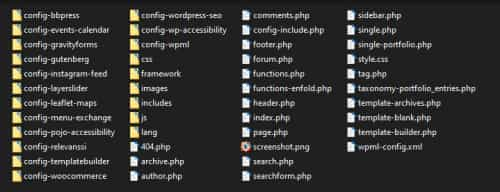
or that you copied the WordPress directory 5 times?
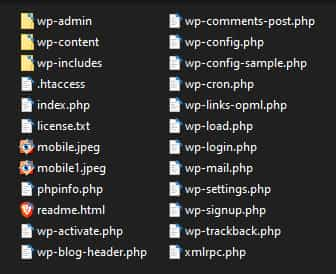
1: you can build your primary site first, but you won’t be “copying” it to the other sites, you will be using the WordPress ▸ Tools ▸ Export from that site and then WordPress ▸ Tools ▸ Import on the other sites.
2: you will not be able to “delete” the theme directories and “copy” the other directories to it, in WordPress the changes you make are stored in the database, not in the actual files.
Best regards,
MikeHi,
Thanks for the feedback, above you had linked to your homepage and the sidebars had the custom classes sidebar-left & sidebar-right please check the css on that page.
The new page doesn’t have these classes, if you add these classes to the first and last 1/5 columns then it should work.Best regards,
MikeHi,
Thank you for your patience, to hide the sidebars on mobile landscape and increase the main content to 100% width, try this css:@media only screen and (max-width: 895px) and (orientation: landscape) { #top .entry-content-wrapper > .sidebar-left, #top .entry-content-wrapper > .sidebar-right { display: none; } #top .entry-content-wrapper > .sidebar-left + .av_three_fifth { margin-left: 0; width: 100%; } }I believe the max-width: 895px is correct, but feel free to adjust to suit your needs.
After applying the css, please clear your browser cache and sg-cache check.Best regards,
MikeHi,
Thank you for your patience, I see that you are using OVH hosting which has the set_time_limit() disabled by default on the server, please ask OVH hosting to enable this setting, otherwise you will continue to get the cURL error.Best regards,
MikeHi,
Glad to hear that you have this sorted out, and thanks for sharing your solution, if you have any further questions please create a new thread and we will gladly try to help you. Thank you for using Enfold.Best regards,
MikeHi,
Glad Rikard could help, if you have any further questions please create a new thread and we will gladly try to help you. Thank you for using Enfold.Best regards,
MikeHey Manuela,
Did you already find the solution to this? I checked your page and the text is below the icon, please see the screenshot in the Private Content area.Best regards,
MikeHi,
Glad we were able to help, and thanks again to Guenni007, we will leave this thread open for Guenni007 to reply. If you have any further questions please create a new thread and we will gladly try to help you. Thank you for using Enfold.Best regards,
MikeHi,
Thank you for your patience, I tested this function in my functions.php:add_filter('avf_logo_subtext', 'kriesi_logo_addition'); function kriesi_logo_addition($sub) { $sub .= '<span class="bloginfo name">' .get_bloginfo( 'name', 'display' ).'</span>'; $sub .= '<span class="bloginfo description">' .get_bloginfo( 'description', 'display' ).'</span>'; return $sub; }it gets the site title and description from the WordPress settings, and I uploaded a small 80px red logo as the regular logo and small 80px white logo as the transparent logo in the theme options:

Then I added this css:#top .logo, #top .logo a { overflow: visible; display:flex; max-height: 80px; color:red; text-decoration: none; } @media only screen and (min-width: 990px) { #top #header.av_header_transparency .logo a { color:#fff; } } .logo .subtext { font-size: 20px; padding-left: 20px; font-weight: 600; display: flex; flex-direction: column; align-items: flex-start; justify-content: center; } .bloginfo { line-height:22px } @media only screen and (max-width: 820px) { .logo .subtext { font-size: 12px; } .bloginfo { line-height:14px } } @media only screen and (max-width: 610px) { .responsive #top #wrap_all #header_main .main_menu { display: flex; position: relative; width: 100%; justify-content: center; } .responsive #top #header_main .logo { display: flex; width: 100%; justify-content: center; } #header_main .inner-container { display: flex; flex-direction: column; align-items: flex-start; } }my header size is the default “Slim”, with a “Sticky Header”

Desktop before and after scroll:

Laptop:

For mobile (425px) I stacked the logo & text over the mobile menu and centered them, this seems to work better than making the text so small that I couldn’t really read it:

This is how the smallest mobile (375px) looks:

Please give this a try, I linked to my test site below.Best regards,
MikeMay 12, 2022 at 1:02 pm in reply to: timeline on mobile does'nt show correctly unless you turn the phone to landscape #1351554Hi,
Thank you for your patience, I see that you are using Enfold 4.7.6.4, please Enter a valid Envato private token and update your theme to Enfold 4.9.2.3
Then clear your cache and check again.Best regards,
MikeHi,
Thank you for your patience, below I have linked to your logo image, please note that it is in the lower half of the image height, try resizing the image so the logo text is the same height as the image, this will make the logo larger and center it in the container as you have requested.Best regards,
Mike -
AuthorPosts
