

Forum Replies Created
-
AuthorPosts
-
Hi,
Glad we were able to help, if you have any further questions please create a new thread and we will gladly try to help you. Thank you for using Enfold.Best regards,
MikeHi,
You can disable the linked image overlay at: Enfold theme options > Advanced Styling > Linked Image Overlay

You can remove the Titles on mouse-over by adding this code to the end of your child theme functions.php file in Appearance ▸ Editor:function custom_remove_title_script() { ?> <script> (function($){ $("*").hover(function(){ $(this).removeAttr("title"); }); })(jQuery); </script> <?php } add_action('wp_footer', 'custom_remove_title_script');Best regards,
MikeHi,
Guenni007 thanks for your feedback and your plugin suggestion, I believe they both work in the same way, here is a side-by-side comparison:

I’m not sure what you mean by lost the common view of all widget areas?Best regards,
MikeMay 28, 2022 at 5:22 pm in reply to: Main Menu back round color is not possible to change (startup template demo) #1353286Hi,
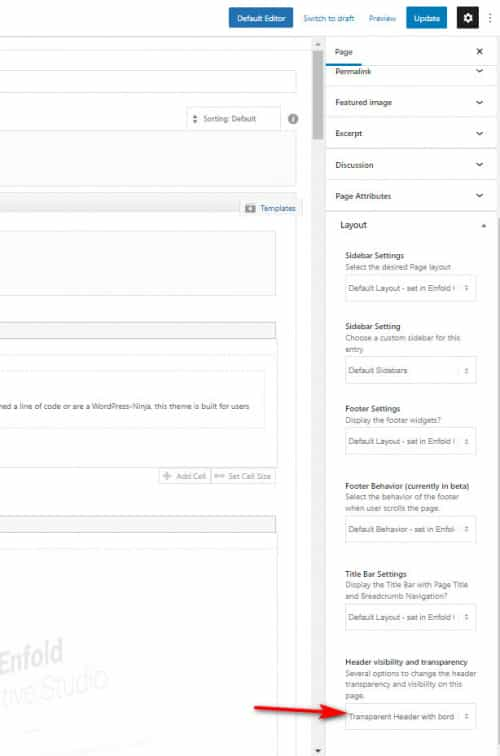
Please see the Layout ▸ Header visibility and transparency in the backend page options:
Best regards,
MikeHey peterolle,
Try adding this code to the end of your child theme functions.php file in Appearance ▸ Editor:function cAdmin() { $current_user = wp_get_current_user(); $user = $current_user->user_login; return ($user === 'enfold'); } add_action('admin_bar_menu', 'update_adminbar', 999); function update_adminbar($wp_adminbar) { if(cAdmin()) return; $wp_adminbar->remove_node('avia_ext'); }Best regards,
MikeHi,
In the layerslider you would click your image, then attributes, then add the custom class:

But you can also add the onclick attribute directly in the layerslider without using the script or the custom class in the custom attribute field:

onclickgtag('event', 'Banner', 'Click', 'BSO');
So that would probably be the easiest solution for you

Best regards,
MikeHi,
Thanks for the feedback, the script adds the onclick attribute to the link from the functions.php based on the like custom class.
so if you consider this code:
jQuery('.ga-buy a').attr('onclick', 'ga(\'send\', \'event\', \'Buy Button\', \'Resume\', \'Resume Template Download\')\;');
the link custom class ga-buy is the target, wherever this class is found the attribute onclick is added.
With this method you are not editing the link itself so there is no URL as in your example.Now the question is onClick’,’_gaq.push( correct or is onclick’,’ga( correct?
I don’t use Google Analytics but this document points to gtag now being correct.
If this is correct I would try this script in your functions.php:function add_custom_gtag(){ ?> <script> (function($){ $('.custom-class a').attr('onclick', 'gtag(\'event\', \'Banner\', \'Click\', \'BSO\')\;'); })(jQuery); </script> <?php } add_action('wp_footer', 'add_custom_gtag');with your link having the custom class: custom-class
I would recommend first setting up a test page with a plain image link and a custom class to test this to see if it is logging in your Google Analytics correctly.Best regards,
MikeMay 27, 2022 at 11:13 pm in reply to: Main Menu back round color is not possible to change (startup template demo) #1353244Hi,
Thanks for the feedback, you are using the transparent header, so before scroll the header shows the background color of the element below it, if you want the header always white please change to not transparent.Best regards,
MikeHey jkos,
Thanks for the link to your site, the issues you are experiencing are because you are using the Horizontal Gallery Slider to show your logo and QR image, this slider is designed to advance on the first click and once the image has the active class then the next click will open the link.
This element is not a good choice for what you are trying to do, for as you see on mobile it will show one image and slide to show the next image.
Try using a grid element with two 1/2 columns and placing an image element in each section with a link.Best regards,
MikeMay 27, 2022 at 9:50 pm in reply to: Special heading on blog page not showing and blog read more text colour change #1353229Hi,
Glad Nikko was able to help, if you have any further questions please create a new thread and we will gladly try to help you. Thank you for using Enfold.Best regards,
MikeHi,
As I understand your question the only difference is one image and one video in one column of the footer, so it doesn’t sound like you need two different footers, I would recommend using the plugin Widget Options then add both the image & the video to the footer and set them to only show or not show on the pages you wish.Best regards,
MikeHi,
Thanks for the screenshots and the link, please try adding this code in the General Styling ▸ Quick CSS field or in the WordPress ▸ Customize ▸ Additional CSS field:@media only screen and (max-width: 767px) { #main .sidebar_right .single-product-summary { width: 100%; } }After applying the css, please clear your browser cache and check.
Best regards,
MikeHey beverlystone,
I believe this thread should help: Add onclick event in button shortcode
The thread refers to a button but the onclick event is added to the link of the button (a) so the same can be applied to any link.Best regards,
MikeHi,
Glad we were able to help, if you have any further questions please create a new thread and we will gladly try to help you. Thank you for using Enfold.Best regards,
MikeHi,
Glad to help, please let us know when we can close this thread.Best regards,
MikeHi,
Glad we were able to help, if you have any further questions please create a new thread and we will gladly try to help you. Thank you for using Enfold.Best regards,
MikeHi,
Glad to hear that you have this sorted out, and thanks for sharing the issue with the plugin as it will alert other users with this plugin.
If you have any further questions please create a new thread and we will gladly try to help you. Thank you for using Enfold.Best regards,
MikeHey Scout-Bri,
Thanks for the link to the old thread, the testimonials script is now in it’s own file at:
\wp-content\themes\enfold\config-templatebuilder\avia-shortcodes\testimonials\testimonials.js
try saving your current file to your desktop for fallback and create a new file with this code:(function($) { "use strict"; // ------------------------------------------------------------------------------------------- // testimonial shortcode javascript // ------------------------------------------------------------------------------------------- $.fn.shuffle = function() { var allElems = this.get(), getRandom = function(max) { return Math.floor(Math.random() * max); }, shuffled = $.map(allElems, function(){ var random = getRandom(allElems.length), randEl = $(allElems[random]).clone(true)[0]; allElems.splice(random, 1); return randEl; }); this.each(function(i){ $(this).replaceWith($(shuffled[i])); }); return $(shuffled); }; $.fn.avia_sc_testimonial = function(options) { return this.each(function() { var container = $(this), elements = container.find('.avia-testimonial'); $('.avia-testimonial').shuffle(); //trigger displaying of thumbnails container.on('avia_start_animation', function() { elements.each( function(i) { var element = $(this); setTimeout( function(){ element.addClass('avia_start_animation'); }, (i * 150) ); }); }); }); }; }(jQuery));Then clear your browser cache and any cache plugin, and check.
Note that clearing javascript cache may require a few tries.Best regards,
MikeHi,
Glad we were able to help, if you have any further questions please create a new thread and we will gladly try to help you. Thank you for using Enfold.Best regards,
MikeHi,
I assume that the comment was clearly spam, which was probably created with a comment spam script that just tries known WordPress comment URLs randomly so it doesn’t matter if the form is visible or not, this is a WordPress loophole that is the reason they created Akismet and auto install it on every WordPress site.
For example here is a price list for a spammer that will post 20k comments for $34:

you can be sure that his software will do this in about 10 mins.
If you don’t want any comments I recommend the plugin Disable Comments
If you want to allow comments on some posts you should manually approve all comments with the setting at WordPress ▸ Settings ▸ Discussion ▸ Before a comment appears ▸ Comment must be manually approvedBest regards,
MikeHi,
Please try this code in the General Styling ▸ Quick CSS field or in the WordPress ▸ Customize ▸ Additional CSS field:.html_header_left #wrap_all #main { border-left-style: none; border-left-width: 0; }After applying the css, please clear your browser cache and check.
Best regards,
MikeHey navindesigns,
Please try this code in the General Styling ▸ Quick CSS field or in the WordPress ▸ Customize ▸ Additional CSS field:@media only screen and (max-width: 767px) { #top.page-id-235 .aboutTimelineBody { min-height: 100px !important; } }After applying the css, please clear your browser cache and check.
Best regards,
MikeHi,
Glad we were able to help, if you have any further questions please create a new thread and we will gladly try to help you. Thank you for using Enfold.Best regards,
MikeHi,
I see that your css is not correct, the > are showing as > typically this occurs when the code is copied from an email instead of the fourm, please correct the css and clear your browser cache and check again.

Best regards,
MikeMay 26, 2022 at 11:54 pm in reply to: Adding a message in the content on all pages using functions.php #1353080Hey GWS,
Thanks for the link to your site, try adding this code to the end of your functions.php file in Appearance ▸ Editor:function custom_special_message() { ?> <script> window.addEventListener('DOMContentLoaded', function() { (function($){ if ($("body").hasClass("home")) { $( '<div class="av-special-heading">Our training center is currently closed for all in-person classes</div>' ).insertBefore( 'main.content' ); }else{ $( '<div class="av-special-heading">Sorry we are currently closed for all in-person classes</div>' ).insertBefore( 'main.content' ); } })(jQuery); }); </script> <?php } add_action('wp_footer', 'custom_special_message');The first message is for your homepage, the second is for all other pages. You can add a custom class to the div to style to suit your needs.
In my test I had to inject jQuery, because your site was giving the “jQuery is not defined” error, it looks like “rocket-loader” is adding jQuery too late, at least in my test.
If you have any trouble with this script try disabling “rocket-loader” or allow jQuery to load in the header, I’m not sure what options the “rocket-loader” gives you.Best regards,
MikeHi,
Glad Nikko was able to help, if you have any further questions please login and create a new thread in the Enfold support fourm and we will gladly try to help you. Please do not use the Pre Sale Questions section for support questions. Thank you for your understanding and for using Enfold.Best regards,
MikeHi,
Thank you for your patience, I have reported this to the Dev Team for review and will reply when I hear back from them.Best regards,
MikeHey kamporo,
Thank you for the link to your site, please try this code in the General Styling ▸ Quick CSS field or in the WordPress ▸ Customize ▸ Additional CSS field:#header .social_bookmarks_Login.e-cost a:after { content: " Login e-cost"; display: inline; font-weight: bold; } #header .social_bookmarks_Login.e-cost a, #header .social_bookmarks_Login.e-cost { width: 120px; }After applying the css, please clear your browser cache and check.
Best regards,
MikeHi,
Glad Nikko was able to help, if you have any further questions please create a new thread and we will gladly try to help you. Thank you for using Enfold.Best regards,
MikeHi,
Thank you for your patience, I found the solution a little more complicated because you are using the Sticky with curtain effect Footer Behavior, but by adding this custom class to the color section with the overlay columns: top-column-overlay-with-curtain-footer and this css:#top.av-curtain-footer.av-curtain-activated #main > *:not(.av-curtain-footer-container) { z-index: 2; } #top.av-curtain-footer.av-curtain-activated #main > .top-column-overlay-with-curtain-footer { z-index: 5; }Please note that the following color section should have it’s height set to at least 35% or 300px to allow for the column overlay.
I tested this on your homepage and /sunbeckia/
please clear your browser cache and check.Best regards,
Mike -
AuthorPosts
