

Forum Replies Created
-
AuthorPosts
-
Hi,
Is the front end correct? Which font in the preview is not correct? Do you want to use Open Sans for all of your fonts? Earlier I thought that the font Monaco was a custom installed font, is this true, try going to Enfold Theme Options ▸ Import/Export ▸ Custom Font Manager and removing this font.
If one of your plugins is adding this font and everything else is correct I would not think that the back end preview would be that important?
If it is then I would recommend disabling your plugins to see if that corrects, if it does then enable each plugin one at a time until the error occurs again.
If this doesn’t help then try disabling your customizations to see if that helps.
If not then leave your plugins disabled and include an admin login in the Private Content area so we can examine.Best regards,
MikeHi,
Glad to hear that you have this sorted out, if you have any further questions please create a new thread and we will gladly try to help you. Thank you for using Enfold.Best regards,
MikeHi,
I believe the issue is when you use the CDN images they take longer to load and while the PageSpeed report is checking the page for CLS the images load and change the height of the elements causing the low score.
I tested this css to set the minimum height of the elements that were failing on the CLS report and added it to my WordPress ▸ Customize ▸ Additional CSS because the WordPress CSS field has the highest priority.
I tested this on the original shortcode that you sent me using your image from the CDN that gave the CLS score of 0.269 above (today it gave a score over 0.3xx)@media only screen and (min-width: 768px) { #av-layout-grid-1 .avia-image-container { min-height: 684px; } #av-layout-grid-2 { min-height: 490.75px; } #av-layout-grid-3 { min-height: 189.56px; } #av-layout-grid-4 .flex_cell.av-gridrow-cell.av_one_third { min-height: 490.75px; } }with this css I got a score of 0.001

I tried to write the css thinking it might be used for all of your pages with the same layout, please try this on your page.
Try to regen your site cache so the css is included before testing, I don’t use any caching on the test site.Best regards,
MikeSeptember 27, 2022 at 12:57 pm in reply to: Enfold_Child Theme can't find parent Enfold Theme after manual update to 5.x #1366535Hi,
Thanks for the logins, I found that your parent theme was in an extra directory /enfold/enfold/ so the child theme couldn’t find the files of the parent theme, I corrected and activated your child theme.
I noticed in WordPress ▸ Dashboard ▸ Tools ▸ Site Health your PHP version is 7.3.33 and the minimum recommended version for WordPress is v7.4, please ask your webhost to update this for you.

Best regards,
MikeHi,
Thanks for the feedback, I tested the font zip on my test site and it works, when I try it on your site I see that you get a 403 error:
/wp-admin/admin-ajax.php 403 this the Forbidden error from your server, try disabling try these steps to solveBest regards,
MikeSeptember 27, 2022 at 3:36 am in reply to: Change the colour of screen background on scroll #1366478Hey engage24,
I achieved this by adding 5 color sections each with a custom class of: white, blue, red, yellow, and purple and each with a height of 100% with a special heading for reference:

then I added this css:.turn-white { background-color: #fafaf8; } .turn-blue { background-color: #3860be; } .turn-red { background-color: #c7102a; transition: background-color .5s ease; } .turn-yellow { background-color: #ffa100; } .turn-purple { background-color: #2b1378; }and added this script to the end of your child theme functions.php file in Appearance ▸ Editor:
function waypoint_change_background_color_scroll() { ?>
  <script>
window.addEventListener('DOMContentLoaded', function() {
  (function($){
    var $sections = $('.avia-section');
    var $white = $(".white");
    var $blue = $(".blue");
    var $red = $(".red");
    var $yellow = $(".yellow");
    var $purple = $(".purple");


    $white.waypoint(function(direction) {
      if (direction === 'down') {
         $sections.addClass('turn-white');
         $sections.removeClass('turn-purple');
      }
      if (direction === 'up') {
      	$sections.removeClass('turn-white');
      	$sections.addClass('turn-purple');
      }
    }, {
      offset: '50%'
    });
    $blue.waypoint(function(direction) {
      if (direction === 'down') {
         $sections.addClass('turn-blue');
         $sections.removeClass('turn-white');
      }
      if (direction === 'up') {
      	$sections.removeClass('turn-blue');
      	$sections.addClass('turn-white');
      }
    }, {
      offset: '50%'
    });
    $red.waypoint(function(direction) {
      if (direction === 'down') {
         $sections.addClass('turn-red');
         $sections.removeClass('turn-blue');
      }
      if (direction === 'up') {
      	$sections.removeClass('turn-red');
      	$sections.addClass('turn-blue');
      }
    }, {
      offset: '50%'
    });

    $yellow.waypoint(function(direction) {
      if (direction === 'down') {
         $sections.addClass('turn-yellow');
         $sections.removeClass('turn-red');
      }
      if (direction === 'up') {
      	$sections.removeClass('turn-yellow');
      	$sections.addClass('turn-red');
      }
    }, {
      offset: '50%'
    });

    $purple.waypoint(function(direction) {
      if (direction === 'down') {
         $sections.addClass('turn-purple');
         $sections.removeClass('turn-yellow');
      }
      if (direction === 'up') {
      	$sections.removeClass('turn-purple');
      	$sections.addClass('turn-yellow');
      }
    }, {
      offset: '50%'
    });

  })(jQuery);
});
 </script>
  <?php
}
add_action('wp_footer', 'waypoint_change_background_color_scroll');
See my demo page here.
Best regards,
MikeHi,
Glad Rikard could help, if you have any further questions please create a new thread and we will gladly try to help you. Thank you for using Enfold.Best regards,
MikeSeptember 27, 2022 at 1:06 am in reply to: In footer, the 4th column is dropping under the 3rd column #1366467Hey Christy,
Thanks for the link to your site, I see that you are using v4.7.6.4, you may wish to update to v5.1.2.
The issue with your footer columns is that the 1/4 columns have a width of 24.5% where they should have a with of 20.5%
Please check your custom css for this, or try this css in Enfold Theme Options ▸ General Styling ▸ Quick CSS field#footer .av_one_fourth { margin-left: 6%; width: 20.5%; } #footer .first.av_one_fourth { margin-left: 0%; }After applying the css, please clear your browser cache and check.
Best regards,
MikeSeptember 27, 2022 at 12:52 am in reply to: Enfold_Child Theme can't find parent Enfold Theme after manual update to 5.x #1366466Hey C41A,
Please include an admin login & FTP access in the Private Content area so we can check.Best regards,
MikeHi,
Please try this css:@media only screen and (max-width: 767px) { .subtext.avia-standard-logo-sub span { display: none; } }After applying the css, please clear your browser cache and check.
Best regards,
MikeHi,
Thanks for the feedback, yes, using a separate WordPress and Enfold theme there will allow you to have a holding page there.Best regards,
MikeHi,
Thanks for the link to your page, is this the search field that disappears on input or hover?

I tested on Windows in Chrome, Firefox, & Edge and found no issue.
Which browser did they see the error on?Best regards,
MikeHi,
Glad we were able to help, if you have any further questions please create a new thread and we will gladly try to help you. Thank you for using Enfold.Best regards,
MikeHi,
As I understand your question, your activate domain should remain visible, and you have wordpress with a theme installed there “test.com”
your development site should show the “comimg soon” page while you are working on it, and a separate wordpress with Enfold is installed there “test.com/new”
in this case the “comimg soon” page will not interfere with your activate domain.Best regards,
MikeHi,
Thank you for the shortcode, I first tested it exactly as you sent it and while the images don’t show for me in the backend the url for the images were in the code and were pulled from your domain on page load and they showed on the frontend, in the first test the CLS was 0.269:

so I was basically able to reproduce the issue, so as a first modification test I changed all of the images to local images to verify the results and rule this out as a cause, I left all settings the same and tried to use the same size images, but the result was a CLS 0.012, a huge difference just by changing the images:

To find a cause for this difference I notice that your images seem to be served by a CDN, please try making a copy of this test page and change the images so they don’t use the CDN or any plugins, and see if you also get a lower score.Best regards,
MikeHi,
Glad we were able to help, if you have any further questions please create a new thread and we will gladly try to help you. Thank you for using Enfold.Best regards,
MikeHi,
Glad we were able to help, if you have any further questions please create a new thread and we will gladly try to help you. Thank you for using Enfold.Best regards,
MikeHi,
Glad to hear that you have this sorted out, if you have any further questions please create a new thread and we will gladly try to help you. Thank you for using Enfold.Best regards,
MikeHi,
Glad we were able to help, your css had a space in between the overlay and the entry classes, but since the two classes belong to the same div it was unnecessary.
If you have any further questions please create a new thread and we will gladly try to help you. Thank you for using Enfold.Best regards,
MikeHi,
Thanks for the link to your site, I see that the “second logo” and “Owner info” is added by a custom function in your child theme functions.php:// Add options to the customize menu function register_theme_customizer( $wp_customize ) { $wp_customize->add_section('secondry_logo_section', array( 'title' => __('Secondry Logo', 'enfold'), 'description' => '', 'priority' => 30, )); $wp_customize->add_setting('secondry_logo', array( 'default' => '', 'capability' => 'edit_theme_options', 'type' => 'option', )); $wp_customize->add_control(new WP_Customize_Image_Control( $wp_customize, 'secondry_logo', array( 'label' => __('Secondry Logo', 'enfold'), 'section' => 'secondry_logo_section', 'settings' => 'secondry_logo', ))); $wp_customize->add_section('header_client_info', array( 'title' => __('Owner Info', 'enfold'), 'description' => '', 'priority' => 60, )); $wp_customize->add_setting('owner_info', array( 'default' => '', 'capability' => 'edit_theme_options', 'type' => 'option', )); $wp_customize->add_control('owner_info', array( 'label' => __('Owner Name', 'enfold'), 'section' => 'header_client_info', 'settings' => 'owner_info', )); $wp_customize->add_setting('owner_contact', array( 'default' => '', 'capability' => 'edit_theme_options', 'type' => 'option', )); $wp_customize->add_control('owner_contact', array( 'label' => __('Owner Contact Number', 'enfold'), 'section' => 'header_client_info', 'settings' => 'owner_contact', )); $wp_customize->add_section('banner_section', array( 'title' => __('Banner Section', 'enfold'), 'description' => '', 'priority' => 40, )); $wp_customize->add_setting('home_banner_image', array( 'default' => '', 'capability' => 'edit_theme_options', 'type' => 'option', )); $wp_customize->add_control(new WP_Customize_Image_Control( $wp_customize, 'home_banner_image', array( 'label' => __('Banner Image', 'enfold'), 'section' => 'banner_section', 'settings' => 'home_banner_image', ))); $wp_customize->add_setting('banenr_text', array( 'default' => '', 'capability' => 'edit_theme_options', 'type' => 'option', )); $wp_customize->add_control('banenr_text', array( 'label' => __('Banner Text', 'enfold'), 'section' => 'banner_section', 'settings' => 'banenr_text', )); } add_action( 'customize_register', 'register_theme_customizer' );that addS to the WordPress customizer:

Your second logo image is there, but the html div is not added to the page source code.
Unfortunately I don’t have any experience with this kind of customization, I assume that it would need to hook into the Enfold header.php but I don’t know how.
I recommend asking the person that set this up for you to help you.Best regards,
MikeSeptember 25, 2022 at 9:47 pm in reply to: Customizing Search Results, Particularly in WooCommerce Products #1366282Hi,
The sidebar for the search result page is set to the Enfold Theme Options ▸ Sidebar Settings ▸ Sidebar On Pages but I assume that you don’t want to disable the sidebar on all of your pages, so try this css:#top.search-results #main .sidebar { display: none; } #top.search-results #main .container .av-content-small.units { width: 100%; } #top.search-results #main .author-extra-border { right: auto; left: -100%; } #top.search-results #main .container .content.template-search { border: none; }After applying the css, please clear your browser cache and check.
Best regards,
MikeHi,
Thank you for your feedback, and thanks for pointing out the CLS score lower on the page that I missed, and I do see that on /neon-canyon/ when tested on PageSpeed you have a score of 0.375, but when I test our grid row demo page for desktop the score is only 0.003:

I also tested our Shop demo page that used grid rows and it had a higher score of 0.022, but still quite lower than yours:

So I compared your /stella-nubis/ page to your /neon-canyon/ page thinking perhaps a different element was causing your high score and I noticed that you didn’t have a video on your “fixed” page so I tested our demo video page, but it’s score was only 0.005:

So while I do see that for your pages, removing the grid row lowers your score, I’m not able to reproduce this with our demo site, or my personnel testing demo site that has no caching or optimization.
Please don’t misunderstand me, I’m not arguing, but in order for me to write an issue report for the Dev Team I need to demonstrate how to reproduce the issue on a clean install with no plugins so they can also reproduce it and investigate.
Perhaps you could enable the Avia Layout Builder Debugger and copy the page shortcode to a plain text file (.txt) and post a DropBox link to it for me to test on my site, that way I could reproduce the issue and investigate further.Thank you for your patience,
MikeHi,
Please try this css to add the background color to them on hover#top #header .mega_menu_title a:hover { background: #ebebeb; }After applying the css, please clear your browser cache and check.
Best regards,
MikeHi,
Please try this css:#mec_cart_transactions_table * { font-family: 'open-sans' !important; }After applying the css, please clear your browser cache and check.
Best regards,
MikeHey Susanne,
Thanks for your question, do you mean the font used in your mailpoet form:

this seems to be the font Monaco, is this a custom font that you have installed?
What font do you want to use, Open Sans?
Typically you would select the default site wide font at Enfold Theme Options ▸ General Layout ▸ Fonts

If this doesn’t help please include an admin login in the Private Content area so we can examine, is there other places that you want to change the font?Best regards,
MikeHi,
Thank you for the link to your site, I see that the css was probably added from an email instead of from the forum, typically this will cause the greater than symbols to paste as code:

I corrected for you:
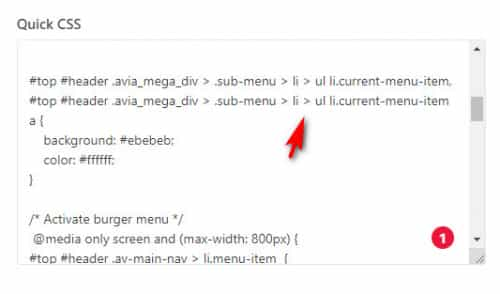
and now it is working:

please clear your browser cache and check.Best regards,
MikeSeptember 24, 2022 at 11:39 pm in reply to: WooCommerce product img cropped on default shop page, after Enfold Update #1366234Hi,
Glad Ismael could help, if you have any further questions please create a new thread and we will gladly try to help you. Thank you for using Enfold.Best regards,
MikeHi,
Thanks for your patience, is this the text:Ihr Experte für Akquise,
erfolgreiche Vertriebsstrategien
und effektiven B2B-Vertriebfor the font Finger Paint
Please reset the login token link so we can examine.Best regards,
Mike -
AuthorPosts
