

Forum Replies Created
-
AuthorPosts
-
Hi,
Glad to hear, the error above pointed towards the block editor, if you try to edit the same page with both the Advanced Layout Builder & the WordPress Block Editor, this may cause errors, your version of Enfold doesn’t need the plugin Classic Widgets so I disabled it, it was needed for only one version.
I switched your default WordPress editor to the Classic Editor in the theme settings at Enfold Theme Options ▸ Select Your Editor ▸ Use WP Classic Editor I see Elementor classes in the shortcode of the page but I don’t see the Elementor plugin, please don’t mix Elementor & Enfold and I would not recommend using any Block Editor “Blocks” in a ALB page. The Elementor classes are not an issue so don’t worry about them, I saying if there was Elementor functions or javascript that may be an issue, I didn’t see any on your page, but seeing anything Elementor makes me want to point it out.
You site still seems to load the backend of the page slower than mine and I see in WordPress ▸ Dashboard ▸ Tools ▸ Site Health ▸ Info ▸ Server that your PHP memory limit is 1G, so that looks good, but in WordPress ▸ Dashboard ▸ Tools ▸ Site Health ▸ Info ▸ WordPress Constants the WP_MEMORY_LIMIT is 40M, where mine is 64M, the page you are building is quite large so perhaps this is an issue? I don’t know for sure.
I did find some stray brackets in your css on the page:

I removed them, please try to avoid this.Best regards,
MikeHi,
I enabled the Avia Layout Builder Debugger that shows the Enfold Shortcode Parser and it shows 3 errors on the page:


but unfortunately the parser won’t automatically repair and when I try to manually repair the changes are not saved.
The copy of the page on my site shows no errors so I created a new page on your site and the backend opened with no errors:

please try this page linked below.Best regards,
MikeHi,
Thanks for the feedback, I found that you had set your homepage as the 404 error page so these tools thought your site was a 404 error, “page not found”

I disabled this and now the tool sees your site, please check.Best regards,
MikeHi,
Glad we were able to help, if you have any further questions please create a new thread and we will gladly try to help you. Thank you for using Enfold.Best regards,
MikeHey macjeffff,
Thanks for the link to your site, according to One Click Accessibility support this is issue can be solved with this css:#pojo-a11y-toolbar.pojo-a11y-toolbar-right .pojo-a11y-toolbar-toggle { right: 180px !important; width: 40px !important; }The support link above was for the left side menu, but I adjusted it for your right side menu.
After applying the css, please clear your browser cache and check.

Best regards,
MikeMarch 6, 2023 at 1:11 pm in reply to: Extra CSS data-created_by=”avia_inline_auto” on posts and pages #1400241Hi,
Glad Guenni007 could help, thank you Guenni007, if you have any further questions please create a new thread and we will gladly try to help you. Thank you for using Enfold.Best regards,
MikeHey jb84,
Glad to hear that you have this sorted out, if you have any further questions please create a new thread and we will gladly try to help you. Thank you for using Enfold.Best regards,
MikeHi,
Glad Guenni007 could point you in the right direction, thank you Guenni007, if you have any further questions please create a new thread and we will gladly try to help you. Thank you for using Enfold.Best regards,
MikeHi,
To change the secondary menu item font size in the mobile menu please try this css:.html_av-overlay-full #top #wrap_all #av-burger-menu-ul li a { font-size: 23px; }After applying the css, please clear your browser cache and check.
Best regards,
MikeHi,
Glad we were able to help, if you have any further questions please create a new thread and we will gladly try to help you. Thank you for using Enfold.Best regards,
MikeHi,
Sorry, I didn’t see in your previous reply that the issue was resolved, glad Yigit was able to help, if you have any further questions please create a new thread and we will gladly try to help you. Thank you for using Enfold.Best regards,
MikeHi,
Thanks for the feedback, when I test Ismael‘s code above the three columns “Commercial Cleaning”, “Specialist Domestic Cleaning” and “Why Choose Us”
all become full-width at 1024px this should be correct for an iPad in portrait, perhaps yours is different please check your iPad screen resolution here
Try Ismael‘s code again:@media only screen and (max-width: 1024px) { .responsive #top #wrap_all .flex_column.av-break-at-tablet, .responsive #top #wrap_all .av-break-at-tablet .flex_cell { margin: 0; margin-bottom: 20px; width: 100%; display: block; } .responsive #top #wrap_all .av-break-at-tablet-flextable, .responsive .av-layout-grid-container.av-break-at-tablet { display: block; } }Please ensure to copy the code from the forum and not an email notification so the symbols are not converted.
After applying the css, please clear your browser cache and check.
Please note that iPads & iPhones can be hard to clear the cache, often you need to also clear the history to fully purge the cache, following these steps for Safari and note Step 4 where you will Clear the History.
If this doesn’t help please include an admin login in the Private Content area so we can be of more assistance and check if you have an error in your css.
Also please upload a new screenshot of the error as the original one has expired.Best regards,
MikeHi,
Glad we were able to help, if you have any further questions please create a new thread and we will gladly try to help you. Thank you for using Enfold.Best regards,
MikeHi,
Thank you for the link to your site, to reverse the color for the social icons with the hover state and make them larger please try this css:#top #wrap_all #header_main .social_bookmarks li a { width: 40px; line-height: 40px; } #top #wrap_all #header_main .social_bookmarks { height: 40px; } #top #wrap_all #header_main .social_bookmarks li { width: 40px; font-size: 30px; } #top #wrap_all #header_main .av-social-link-facebook a { color: #fff; background-color: #37589b; } #top #wrap_all #header_main .av-social-link-facebook:hover a, #top #wrap_all #header_main .av-social-link-facebook a:focus { color: #808080; background-color: transparent; } #top #wrap_all #header_main .av-social-link-twitter a { color: #fff; background-color: #46d4fe; } #top #wrap_all #header_main .av-social-link-twitter:hover a, #top #wrap_all #header_main .av-social-link-twitter a:focus { color: #808080; background-color: transparent; } #top #wrap_all #header_main .av-social-link-instagram a { color: #fff; background-color: #a67658; } #top #wrap_all #header_main .av-social-link-instagram:hover a, #top #wrap_all #header_main .av-social-link-instagram a:focus { color: #808080; background-color: transparent; } #top #wrap_all #header_main .av-social-link-youtube a { color: #fff; background-color: #a72b1d; } #top #wrap_all #header_main .av-social-link-youtube:hover a, #top #wrap_all #header_main .av-social-link-youtube a:focus { color: #808080; background-color: transparent; } #top #wrap_all #header_main .av-social-link-linkedin a { color: #fff; background-color: #419cca; } #top #wrap_all #header_main .av-social-link-linkedin:hover a, #top #wrap_all #header_main .av-social-link-linkedin a:focus { color: #808080; background-color: transparent; }After applying the css, please clear your browser cache and check.
This is the expected results:

Best regards,
MikeMarch 5, 2023 at 10:12 pm in reply to: Issues displaying fontello icons that I have imported #1400205Hi,
Glad to hear that you have this sorted out, if you have any further questions please create a new thread and we will gladly try to help you. Thank you for using Enfold.Best regards,
MikeHi,
You will need to update the parent theme file with each update, file in the /framework/php/ directory can not be added you your child theme.Best regards,
MikeHi,
Glad to hear that you have this sorted out, thanks for sharing Guenni007Best regards,
MikeMarch 5, 2023 at 10:01 pm in reply to: Issues with Product Gallery image size and Product images size #1400202Hi,
Please also disable the script, we will not use it, and then try going to WordPress ▸ Customizing ▸ WooCommerce ▸ Product Images and choosing Uncropped
and then go to WooCommerce > Status > Tools > Regenerate shop thumbnails, and click the Regenerate button next to it.
If this doesn’t help try adding this code to the end of your child theme functions.php file in Appearance ▸ Editor:add_filter( 'avf_wc_before_shop_loop_item_title_img_size', 'avf_wc_before_shop_loop_item_title_img_size_mod', 10, 1 ); function avf_wc_before_shop_loop_item_title_img_size_mod( $thumbnail_size ) { return 'woocommerce_thumbnail'; }If you use the Woocommerce Gallery instead of the Enfold Gallery do you have the same issue?
Best regards,
MikeHi,
For single posts in that situation you could use this css adding the border to the left of the content:#top.single-post .av_default_container_wrap.container_wrap.sidebar_right, #top.single-post #footer-page .container, #top.single-post #wrap_all #main #section-post-title.avia-no-border-styling { border-left: 10px #e0e0e0 solid; }And disable your header border for these situations, but this won’t work on all of your pages so you may need to adjust this differently for those.
Best regards,
MikeHi,
Thanks Guenni007, you wanted to add page content before the content of a category page?
I don’t have a solution for that, try using the shortcode of the page element instead, as above.Best regards,
MikeMarch 5, 2023 at 8:35 pm in reply to: Critical error, website down. Caused by Events Calendar and Events Tickets #1400195Hi,
Glad to hear that you have this sorted out, if you have any further questions please create a new thread and we will gladly try to help you. Thank you for using Enfold.Best regards,
MikeHi,
Thanks for your patience and the link to your site, I checked the three page that you identified with the error and on each page you had added this: <3 and this was what caused the error, here you can see the text element with the error message warning about it:

after removing the code the text element previews the correct text and the frontend works correctly:

So try not to add this code and please remove it from any other pages.Best regards,
MikeMarch 5, 2023 at 8:14 pm in reply to: Critical error, website down. Caused by Events Calendar and Events Tickets #1400188Hi,
Glad to hear, I’ve not heard of the Shield plugin, so hopefully this will help someone in the future.
Unless there is anything else we can assist with on this issue, shall we close this then?Best regards,
MikeHi,
I see that you are getting this error:
Failed to load resource: the server responded with a status of 400 () /wp-admin/admin-ajax.php
Try disabling your plugins and checking the page again, if this doesn’t help check your webhost error logs, the status of 400 is a server error.
I was able to copy the page to my test site and it works and edits fine, so I don’t think it’s an error on the page.Best regards,
MikeHi,
Thanks for the feedback, when I check the page in your screenshot /test/portfolio/ it does have a 1px right border that the entire sidebar header has even into the footer:

Perhaps you don’t see it well since it is a light color and 1px, here I make it 10px so you can see it better:

The same is true on your other page, this is the css if you want to adjust it:.html_header_sidebar #top #header { border-right: 10px #e0e0e0 solid; }After applying the css, please clear your browser cache and check.
Best regards,
MikeMarch 5, 2023 at 7:13 pm in reply to: Issues displaying fontello icons that I have imported #1400181Hey woogie07,
Thank you for your patience, please include an admin login in the Private Content area so we can be of more assistance.Best regards,
MikeHi,
Try this free plugin: Full Screen Background, this is their demo that looks like what you are asking for.Best regards,
MikeHey conlcoa,
Please include an admin login in the Private Content area and link directly to the page so we can be of more assistance.
Did you add any javascript to the page or did you add any HTML tags to the titles such as <strong> these are typical things that can break a page.Best regards,
MikeMarch 5, 2023 at 6:59 pm in reply to: Incorrect Font Displaying Following Theme Update from 3.6 to 5.4 #1400178Hi,
Glad Rikard could help, if you have any further questions please create a new thread and we will gladly try to help you. Thank you for using Enfold.Best regards,
MikeMarch 5, 2023 at 6:58 pm in reply to: Issues with Product Gallery image size and Product images size #1400177Hi,
Thanks for the feedback, if you are going to use the short pixel plugin, then please don’t use the script, it looks like the plugin is trying to change the images.
I would recommend disabling this plugin and any other “optimizer” plugins until the core issue is solved.
Then try going to WordPress ▸ Customizing ▸ WooCommerce ▸ Product Images and choosing Uncropped
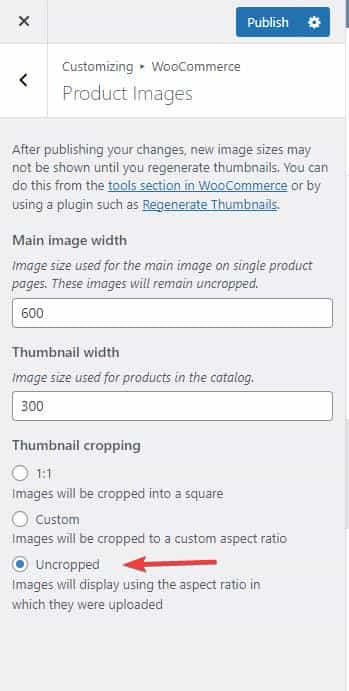
and then go to WooCommerce > Status > Tools > Regenerate shop thumbnails, and click the Regenerate button next to it.
If this doesn’t help try adding this code to the end of your child theme functions.php file in Appearance ▸ Editor:add_filter( 'avf_wc_before_shop_loop_item_title_img_size', 'avf_wc_before_shop_loop_item_title_img_size_mod', 10, 1 ); function avf_wc_before_shop_loop_item_title_img_size_mod( $thumbnail_size ) { return 'woocommerce_thumbnail'; }Then clear any cache plugins and any server cache and your browser cache.
Best regards,
Mike -
AuthorPosts
